
Description :
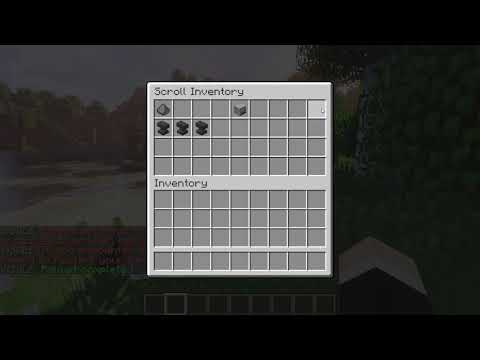
guiAPI is an API which was created to simplify the creation of GUIs. For the moment, you can create only two types of inventories : the normal one and the "scroll" one (which is an gui with multiple pages).
Preview :
Here is a preview of how does the scroll Inventory is working :
Documentation :
InventorySizes :
InventorySizes description
This api also integrates a simplified to manage the size of the GUI. The values are :
InventorySizes.  LOW   (   9  slots  )
InventorySizes.  MEDIUM   (   18  slots  )
InventorySizes.  HIGH   (   27  slots  )
InventorySizes.  LARGE   (   36  slots  )
InventorySizes.  VERYLARGE   (   45  slots  )
InventorySizes.  EXTREME   (   54  slots  )
GuiItem :
GuiItem description
Used to create ItemStack in a easy way. It's also an extension of the ItemStack class so you can put this instead of a "normal" ItemStack object.
Constructors :
GuiItem  (   int  slot,   String   name,   String   desc, Material mat  )

GuiItem  (   int  slot,   String   name,  int  count,   String   desc, Material mat  )
slot : The slot place in the inventory.
name : The name of the item.
desc : The description of the item. Use \n to change the line (The class transforms automatically the String into an Array of strings).
count : The amount of item you want (1 by default).
mat : The material of the item
InventoryGUI :
InventoryGUI description
Create a normal GUI.
Constructor :
InventoryGUI(String title, InventorySizes size) Methods :
addItem(GuiItem item)

isInventoryOpened(Player p)

build(Player p)
addItem : Adds an item into the GUI.
isInventoryOpened : Returns true if this gui is the current GUI showed to the player.
build : Shows the inventory to the player.
scrollInventoryGUI :
scrollInventoryGUI description
Create a scroll GUI.
Constructor :
scrollInventoryGUI(String title, InventorySizes size, Plugin plugin) Methods :
addItem(GuiItem item)

isInventoryOpened(Player p)

build(Player p)

setPageLabel(String pageLabel)
addItem : Adds an item into the GUI. The items are going to be showed in the order they were added. So the specified slot won't be considered for the GuiItem object.
isInventoryOpened : Returns true if this gui is the current GUI showed to the player.
build : Shows the inventory to the player.
setPageLabel : Changes the label before the pages numbers. ("Page" by default)
Code examples :
InventoryGUI example
for   (  Player p  :  Bukkit.  getOnlinePlayers   (   )   )   {
    InventoryGUI gui  =   new  InventoryGUI  (   "Test"  , InventorySizes.  LARGE   )   ;
    gui.  addItem   (   new  GuiItem  (   0  ,  "Anvil"  ,  "Description"  , Material.  ANVIL   )   )   ;

    gui.  build   (  p  )   ;
 }
scrollInventoryGUI example
for   (  Player p  :  Bukkit.  getOnlinePlayers   (   )   )   {
    scrollInventoryGUI scrollGUI  =   new  scrollInventoryGUI  (   "Scroll Inventory"  , InventorySizes.  LARGE  ,  this   )   ;

     for   (   int  i  =   0   ;  i  <   30   ;  i  ++   )   {
        scrollGUI.  addItem   (   new  GuiItem  (  i  +   1  ,  "Anvil n°"   +  i,  "A simple description"  , Material.  ANVIL   )   )   ;
     }

    scrollGUI.  build   (  p  )   ;
}Similar projects
Plugin →Let Me Despawn
Improves performance by tweaking mob despawn rules. Say bye to pesky unintentional persistent mobs.
25MSueta
JourneyMap
Real-time map used for mapping in-game or your browser as you explore.
14.7MSueta
Emotecraft
Create your own emotes in Minecraft.
7.5MSueta
Simple Tpa
A simple tpa plugin which sends requests
5.4MSueta
Common Network
Forge and Fabric Unified Networking Solution
3.9MSueta
Set Home
A lightweight plugin for players to set their homes.
3.8MSueta