

✅ Chat Manager A clean, GUI-based chat management system for moderating, formatting, logging, and reviewing your server chat from one convenient plugin.
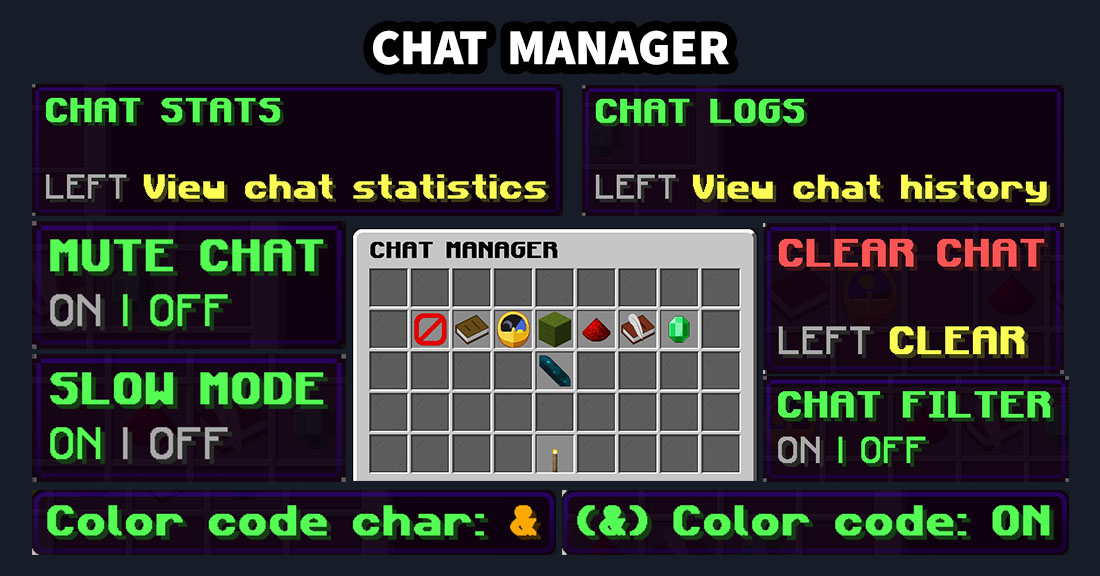
- Chat Manager GUI – Open one clean management panel containing the available chat tools, feature statuses, logs, statistics, Anti-Caps Lock, and chat-format settings.
- Instant Chat Clearing – Clear the previous chat for all online players with one click.
- Global Chat Mute – Temporarily disable public chat for regular players while staff members with the bypass permission can continue chatting.
- Configurable Chat Filter – Detect and replace configured blocked words with asterisks before the message is sent.
- Custom Filtered Words – Edit the blocked-word list directly in
Config.yml. Filtering is case-insensitive and supports Unicode text. - Slow Mode – Add a configurable delay between player messages to reduce spam and chat flooding.
- Anti-Caps Lock – Detect excessive uppercase text and convert uppercase words into a more readable form. The minimum letter count and maximum uppercase percentage are configurable. URLs and Minecraft formatting codes are preserved.
- Staff Bypass Permissions – Allow selected players to ignore chat mute, chat filter, slow mode, or Anti-Caps Lock.
- Chat Color Codes – Enable or disable color-code processing for player messages from the GUI or command.
- Configurable Color Character – Choose the character used for chat colors, such as
&, inConfig.yml. - Custom Chat Formatting – Apply one shared chat template to normal player messages and configure it directly through the dedicated GUI.
- Built-in Format Placeholders – Use
%message%together with%player_name%,%player_displayname%,%player_uuid%, and%world%. The%message%placeholder is required. - PlaceholderAPI Support – Optionally expand installed PlaceholderAPI placeholders in the chat template, such as
%vault_rank%or%player_ping%. PlaceholderAPI is not required for the plugin to work. - In-Game Format Editor and Preview – Edit the chat template directly in chat, validate the required message placeholder, cancel changes safely, and send yourself a live preview.
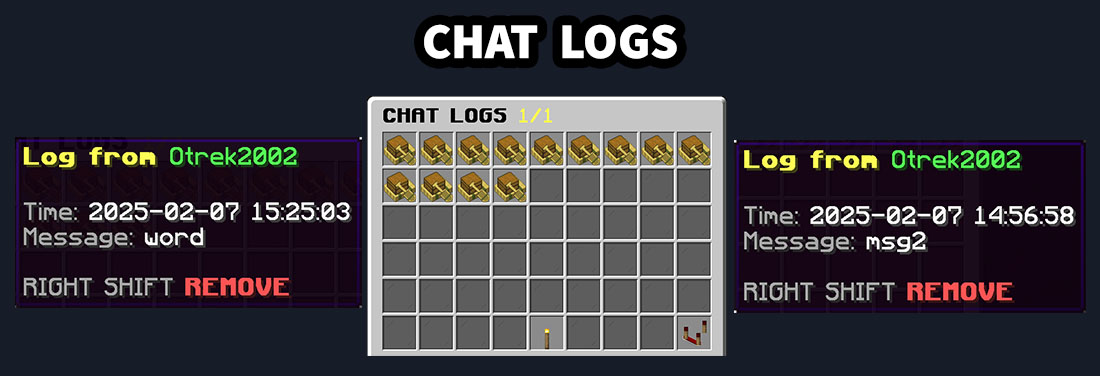
- Automatic Chat Logs – Save player messages together with the sender name and exact date and time.
- Paged Log Browser – Browse saved chat messages through a clean paged GUI without opening configuration files manually.
- Log Sorting – Switch between newest-first and oldest-first sorting directly inside the chat logs menu.
- Individual Log Removal – Remove a selected log entry directly from the GUI using Shift + Right Click.
- Automatic Log Cleanup – Remove messages older than the configured number of hours to prevent the log file from growing indefinitely.
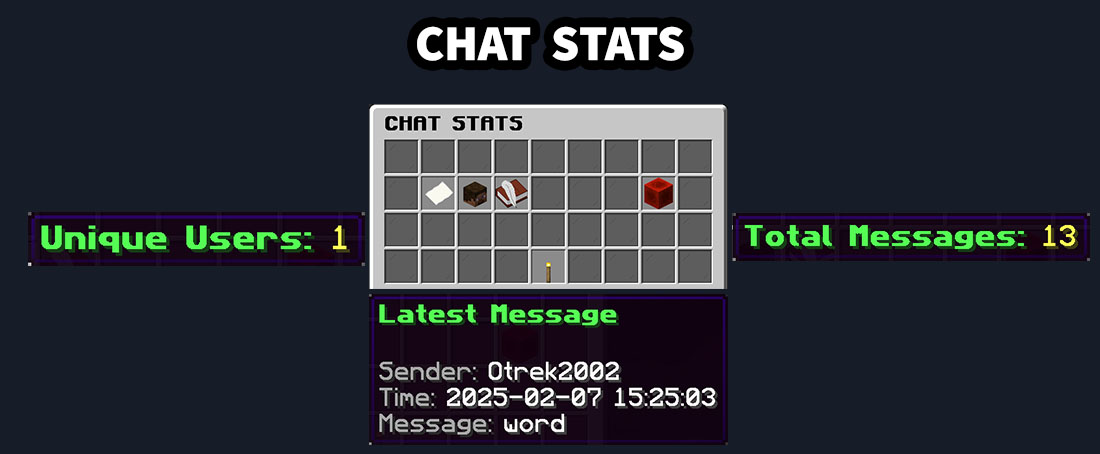
- Chat Statistics – Open a dedicated statistics panel showing total saved messages, unique chat users, the latest message, its sender, and the exact date and time.
- Live Statistics Refresh – Refresh the chat statistics directly from the GUI to display the newest available data.
- Configurable Settings – Configure filter words, slow-mode delay, log retention, color-code character, Anti-Caps thresholds, and the chat-format template in
Config.yml. - Separate Tool and Command Permissions – Control GUI buttons and command actions independently, allowing detailed permission setups for different staff ranks.
- Direct Command Access – Use
/chatmanagerto open the main GUI or run one of the available actions. - Spigot, Paper and Folia Support – Designed for modern Spigot-based servers with Folia-compatible task handling. Supports API 26.1+ and Java 25.
Permissions
| Permission | What it allows |
| chatmanagergui.* | Grants access to every ChatManagerGUI permission, including all tools, commands, menus, and bypass permissions. |
| chatmanagergui.all | Grants access to all Chat Manager features, tools, commands, menus, and bypass permissions. |
| chatmanagergui.maingui | Grants complete access to the main Chat Manager GUI. Includes chatmanagergui.maingui.tool and chatmanagergui.maingui.command. |
| chatmanagergui.maingui.tool | Allows opening the main Chat Manager GUI from another plugin GUI or internal ChatManagerGUI menu. Also allows returning to the main menu from the logs and statistics menus. |
| chatmanagergui.maingui.command | Allows opening the main Chat Manager GUI using /chatmanager. |
| chatmanagergui.clearchat | Grants complete access to chat clearing. Includes chatmanagergui.clearchat.tool and chatmanagergui.clearchat.command. |
| chatmanagergui.clearchat.tool | Allows clearing the server chat through the main GUI. The previous chat is removed from view for all online players. |
| chatmanagergui.clearchat.command | Allows clearing the server chat using /chatmanager clear. |
| chatmanagergui.chatfilter | Grants complete access to chat-filter management. Includes chatmanagergui.chatfilter.tool and chatmanagergui.chatfilter.command. |
| chatmanagergui.chatfilter.tool | Allows enabling or disabling the global chat filter through the main GUI. Filtered words are configured in Config.yml. |
| chatmanagergui.chatfilter.command | Allows enabling or disabling the global chat filter using /chatmanager filter. |
| chatmanagergui.chatfilter.bypass | Allows the player to bypass the chat filter. Configured blocked words will not be replaced in messages sent by the player. |
| chatmanagergui.slowmode | Grants complete access to slow-mode management. Includes chatmanagergui.slowmode.tool and chatmanagergui.slowmode.command. |
| chatmanagergui.slowmode.tool | Allows enabling or disabling slow mode through the main GUI. The delay between messages is configured in Config.yml. |
| chatmanagergui.slowmode.command | Allows enabling or disabling slow mode using /chatmanager slowmode. |
| chatmanagergui.slowmode.bypass | Allows the player to bypass slow mode and send messages without waiting for the configured delay. |
| chatmanagergui.anticaps | Grants complete access to Anti-Caps Lock management. Includes chatmanagergui.anticaps.tool and chatmanagergui.anticaps.command. |
| chatmanagergui.anticaps.tool | Allows enabling or disabling Anti-Caps Lock through the main Chat Manager GUI. Its thresholds are configured in Config.yml. |
| chatmanagergui.anticaps.command | Allows enabling or disabling Anti-Caps Lock using /chatmanager anticaps. |
| chatmanagergui.anticaps.bypass | Allows the player to bypass Anti-Caps Lock processing. |
| chatmanagergui.mutechat | Grants complete access to global chat-mute management. Includes chatmanagergui.mutechat.tool and chatmanagergui.mutechat.command. |
| chatmanagergui.mutechat.tool | Allows enabling or disabling global chat mute through the main Chat Manager GUI. |
| chatmanagergui.mutechat.command | Allows enabling or disabling global chat mute using /chatmanager mute. |
| chatmanagergui.mutechat.bypass | Allows the player to continue sending messages while global chat mute is enabled. |
| chatmanagergui.chatlogs | Grants complete access to the chat logs menu. Includes chatmanagergui.chatlogs.tool and chatmanagergui.chatlogs.command. |
| chatmanagergui.chatlogs.tool | Allows opening the paged chat logs browser through the main GUI. The menu allows administrators to browse, sort, and remove saved messages. |
| chatmanagergui.chatlogs.command | Allows opening the chat logs browser using /chatmanager logs. |
| chatmanagergui.chatstats | Grants complete access to chat statistics. Includes chatmanagergui.chatstats.tool and chatmanagergui.chatstats.command. |
| chatmanagergui.chatstats.tool | Allows opening the chat statistics panel through the main Chat Manager GUI. |
| chatmanagergui.chatstats.command | Allows opening the chat statistics panel using /chatmanager stats. |
| chatmanagergui.colorcode | Grants complete access to chat color-code management. Includes chatmanagergui.colorcode.tool and chatmanagergui.colorcode.command. |
| chatmanagergui.colorcode.tool | Allows enabling or disabling chat color-code processing through the main Chat Manager GUI. The color-code character is configured in Config.yml. |
| chatmanagergui.colorcode.command | Allows enabling or disabling chat color-code processing using /chatmanager colorcode. |
| chatmanagergui.chatformat | Grants complete access to custom chat formatting. Includes chatmanagergui.chatformat.tool and chatmanagergui.chatformat.command. |
| chatmanagergui.chatformat.tool | Allows opening and using the Chat Format Settings GUI, including the format toggle, PlaceholderAPI toggle, template editor, and preview. |
| chatmanagergui.chatformat.command | Allows opening the Chat Format Settings GUI using /chatmanager format. |
Commands
| Command | Description |
| /chatmanager | Opens the main Chat Manager GUI. Requires chatmanagergui.maingui.command. |
| /chatmanager clear | Clears the previous chat from view for all online players. Requires chatmanagergui.clearchat.command. |
| /chatmanager filter | Enables or disables the global chat filter. Requires chatmanagergui.chatfilter.command. |
| /chatmanager slowmode | Enables or disables global slow mode. Requires chatmanagergui.slowmode.command. |
| /chatmanager anticaps | Enables or disables Anti-Caps Lock. Requires chatmanagergui.anticaps.command. |
| /chatmanager mute | Enables or disables global chat mute. Requires chatmanagergui.mutechat.command. |
| /chatmanager logs | Opens the paged chat logs browser. Requires chatmanagergui.chatlogs.command. |
| /chatmanager stats | Opens the chat statistics panel. Requires chatmanagergui.chatstats.command. |
| /chatmanager colorcode | Enables or disables color-code processing in player chat messages. Requires chatmanagergui.colorcode.command. |
| /chatmanager format | Opens the Chat Format Settings GUI. Requires chatmanagergui.chatformat.command. |
INSTALLATION
Requires: Java 25
Supported platforms: Spigot, Paper and Folia (API 26.1+)
Optional integration: PlaceholderAPI
Place the .jar file in ../server/plugins
Enjoy!
Similar projects
Plugin →Let Me Despawn
Improves performance by tweaking mob despawn rules. Say bye to pesky unintentional persistent mobs.
25MSueta
JourneyMap
Real-time map used for mapping in-game or your browser as you explore.
14.7MSueta
Emotecraft
Create your own emotes in Minecraft.
7.5MSueta
Simple Tpa
A simple tpa plugin which sends requests
5.4MSueta
Common Network
Forge and Fabric Unified Networking Solution
3.9MSueta
Set Home
A lightweight plugin for players to set their homes.
3.8MSueta