
✅ JoinLeaveManager v6.8
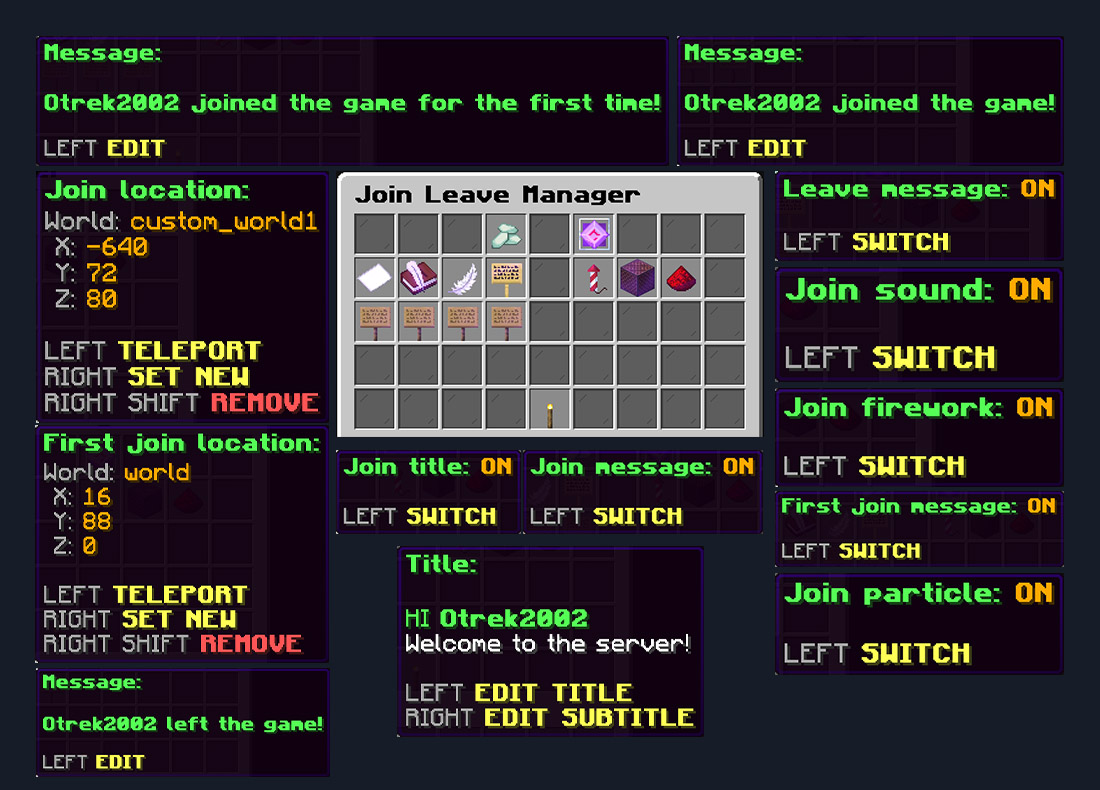
A simple GUI-based system for managing player join and leave events, welcome messages, player profiles, locations, titles, sounds, particles, and fireworks — without manually editing the main configuration.
- Custom Join Messages – Replace the default Minecraft join message with your own messages.
- Random Join Messages – Create multiple join messages. One message is randomly selected every time a player joins.
- Join Message Manager – Add, edit, and remove join messages directly from the GUI using the built-in anvil editor.
- First Join Message – Display a separate server-wide message when a player joins for the first time.
- Custom Leave Messages – Replace the default Minecraft leave message with your own messages.
- Random Leave Messages – Create multiple leave messages and automatically select a random one when a player disconnects.
- Leave Message Manager – Add, edit, and remove leave messages directly from the GUI.
- Smart Return Messages – Send a personal message directly to the player after joining:
- Separate message for the player's first visit
- Separate welcome-back message for returning players
- Messages can use player activity and server information
-
- Smart Return Placeholders – Personal welcome messages support:
-
%NICK%– Player name -
%ONLINE%– Current online players -
%MAX_ONLINE%– Maximum server player count -
%JOINS%– Total player joins -
%PLAYTIME%– Total tracked playtime -
%LAST_SEEN%– Time since the player's previous visit -
%WORLD%– Current world
-
- Player Profiles – Players can view their own activity profile directly in-game.
- Player Statistics – Profiles display:
- First join date
- Last join date
- Last seen
- Total joins
- Total playtime
- Online / offline status
- Current session time for online players
-
- Admin Player Profiles – Administrators can view tracked profiles of other players, including offline players.
- Player Data Storage – Join history and activity statistics are automatically stored separately in
PlayerData.yml. - In-Game Message Editor – Edit first join messages, titles, subtitles, and Smart Return messages using an anvil-based text editor.
- Player Name Placeholder – Use
%NICK%inside standard messages, titles, and subtitles to automatically display the player's name. - Join Title & Subtitle – Show a customizable title and subtitle when a player enters the server.
- Custom Title Duration – Control how long the join title remains visible on the player's screen.
- Join Location – Automatically teleport returning players to a selected location when they join.
- First Join Location – Send new players to a separate location during their first connection.
- First Join Priority – The First Join Location automatically has priority over the regular Join Location for new players.
- Location Management – Manage join locations directly from the GUI:
- Left Click: teleport to the saved location
- Right Click: save your current position
- Shift + Right Click: remove the saved location
-
- Join Firework Effect – Launch a configurable firework when a player joins the server.
- Join Sound – Play a selected Minecraft sound with configurable volume and pitch.
- Join Particles – Spawn configurable particles around the player after joining.
- Simple Toggle Controls – Enable or disable messages, Smart Return messages, titles, fireworks, sounds, and particles with a single click.
- Clean Management GUI – Configure the plugin through an organized inventory menu with clear status indicators and controls.
- Permission-Based Features – Control administrative options and individual player features using separate permissions.
- Color & HEX Support – Customize messages and titles using standard Minecraft color codes and HEX colors in the
&#RRGGBBformat. - Update Notifications – Administrators can receive an in-game notification when a new plugin version is available.
- Direct Command Access – Use
/joinleavemanageror aliases/jlm,/joinleave, and/jlmanager. - Profile Commands – Use
/jlm profileor/jlm statsto quickly open player statistics. - Spigot, Paper & Folia Support – One plugin build supports all three platforms with platform-aware scheduler and teleport handling.
Permissions
| Permission | What it allows |
| joinleavemanager.all.all | Grants access to every JoinLeaveManager permission. Includes all administrative permissions and all player features. |
| joinleavemanager.admin.all | Grants access to all administrative options. Includes the management GUI, message editing, toggles, locations, player profiles, Smart Return settings, and update notifications. |
| joinleavemanager.user.all | Enables all JoinLeaveManager features for the player. Includes messages, titles, locations, fireworks, sounds, particles, player profiles, and personal welcome messages. |
| joinleavemanager.admin.mainmenu | Allows opening the main JoinLeaveManager management GUI. Required for using /joinleavemanager without additional arguments. |
| joinleavemanager.admin.updateinfo | Allows receiving an in-game notification when a new plugin version is available. |
| joinleavemanager.admin.firstjoinmessage.edit | Allows editing the first join message through the GUI. |
| joinleavemanager.admin.firstjoinmessage.toggle | Allows enabling or disabling the first join message through the GUI. |
| joinleavemanager.admin.joinmessage.edit | Allows managing join messages through the GUI. Messages can be added, edited, and removed from the join message list. |
| joinleavemanager.admin.joinmessage.toggle | Allows enabling or disabling join messages through the GUI. |
| joinleavemanager.admin.leavemessage.edit | Allows managing leave messages through the GUI. Messages can be added, edited, and removed from the leave message list. |
| joinleavemanager.admin.leavemessage.toggle | Allows enabling or disabling leave messages through the GUI. |
| joinleavemanager.admin.title.edit | Allows editing the join title and subtitle through the GUI. Left Click edits the title. Right Click edits the subtitle. |
| joinleavemanager.admin.title.toggle | Allows enabling or disabling the join title through the GUI. |
| joinleavemanager.admin.firework | Allows enabling or disabling the join firework effect through the GUI. |
| joinleavemanager.admin.sound | Allows enabling or disabling the join sound through the GUI. |
| joinleavemanager.admin.particle | Allows enabling or disabling the join particle effect through the GUI. |
| joinleavemanager.admin.joinlocation | Allows managing the regular join location through the GUI. Left Click teleports to the saved location. Right Click saves the current location. Shift + Right Click removes the location. |
| joinleavemanager.admin.firstjoinlocation | Allows managing the first join location through the GUI. Left Click teleports to the saved location. Right Click saves the current location. Shift + Right Click removes the location. |
| joinleavemanager.admin.profile | Allows viewing other players' profiles and accessing profile-related administrative settings. Also allows enabling or disabling personal welcome messages through the GUI. |
| joinleavemanager.admin.profile.edit | Allows editing the first join welcome message and returning player welcome message through the GUI. |
| joinleavemanager.user.firstjoinmessage | Allows the player's first join message to be displayed when they connect for the first time. |
| joinleavemanager.user.joinmessage | Allows the player's configured join message to be displayed when they connect. |
| joinleavemanager.user.leavemessage | Allows the player's configured leave message to be displayed when they disconnect. |
| joinleavemanager.user.title | Allows the player to receive the configured join title and subtitle. |
| joinleavemanager.user.firework | Allows the configured firework effect to appear when the player joins. |
| joinleavemanager.user.sound | Allows the configured sound to be played when the player joins. |
| joinleavemanager.user.particle | Allows the configured particle effect to appear when the player joins. |
| joinleavemanager.user.joinspawnlocation | Allows the player to be teleported to the regular join location when connecting. |
| joinleavemanager.user.firstjoinspawnlocation | Allows a new player to be teleported to the separate first join location. The first join location has priority over the regular join location. |
| joinleavemanager.user.profile | Allows the player to view their own player profile and activity statistics. |
| joinleavemanager.user.welcomemessage | Allows the player to receive personal first-join and welcome-back messages. |
⌨ Commands
| Command | Description |
| /joinleavemanager /jlm /joinleave /jlmanager | Opens the JoinLeaveManager management GUI. The GUI allows administrators to manage messages, Smart Return settings, titles, effects, locations, and player profiles. Requires: joinleavemanager.admin.mainmenu |
| /jlm profile /jlm stats | Opens your own player profile. Displays first join, last join, last seen, total joins, total playtime, current status, and current session time. Requires: joinleavemanager.user.profile Administrators with joinleavemanager.admin.profile can also access their own profile. |
| /jlm profile <player> /jlm stats <player> | Opens the profile of another tracked player. Works with online and previously tracked offline players. Requires: joinleavemanager.admin.profile |
Smart Return Placeholders
| Placeholder | Description |
| %NICK% | Player name |
| %ONLINE% | Current number of online players |
| %MAX_ONLINE% | Maximum server player count |
| %JOINS% | Total number of recorded joins |
| %PLAYTIME% | Total tracked player playtime |
| %LAST_SEEN% | Time since the player's previous visit |
| %WORLD% | Player's current world |
INSTALLATION
Requires: Java 25
Paste the .jar file into:
../server/plugins
Restart your server and enjoy!
Similar projects
Config →Let Me Despawn
Improves performance by tweaking mob despawn rules. Say bye to pesky unintentional persistent mobs.
25MSueta
JourneyMap
Real-time map used for mapping in-game or your browser as you explore.
14.7MSueta
Emotecraft
Create your own emotes in Minecraft.
7.5MSueta
Simple Tpa
A simple tpa plugin which sends requests
5.4MSueta
Common Network
Forge and Fabric Unified Networking Solution
3.9MSueta
Set Home
A lightweight plugin for players to set their homes.
3.8MSueta