
AdvancedArmor [1.8-1.19]
2.0.9|| FREE Custom Currency Boosting Armor Plugin Supporting 15+ Economy Plugins ||
AdvancedArmor - An OP Armor plugin for your Minecraft server. Allow players to earn more from currencies by wearing custom armor.
Features:
- Fully Config configurable armor sets:
- Configurable Item Flags (Set Unbreakable with versions 1.12+)
- Configurable Lore and Item Name
- Configurable per-piece Boost
- Configurable with Vanilla Enchants
- Configurable materials and skull textures
- Configurable and custom RGB and HEX colors.
- Configurable Messages.
- Placeholder support.
- External currency support.
- API Support included.
- 5 Pre-made armor sets.
- Money, EXP, Gem, Token, Essence and Coin boost types provided, many more for API usage.
- Compatible with over 9 economy/sell plugins.
- Fully translatable to other languages.
- Extensive API for custom boosts and custom sets.
Soft Dependencies: (Not Required)
- PlaceholderAPI (Optional placeholder dependency)
- Essentials (Optional dependency for money armor)
- ShopGUI+ (Optional dependency for money armor)
- InfiniteChestPro (Optional sell dependency for money armor)
- UltraPrisonCore (Optional sell dependency for money and token armor)
- SuperMobCoins (Optional coin dependency for coin armor)
- QuadrexCoins (Optional coin dependency for coin armor)
- Clip AutoSell (Optional dependency for money armor)
- KrakenMobCoins (Optional coin dependency for coin armor)
- TheOnly-MobCoins (Optional coin dependency for coin armor)
- UltraBackpacks (Optional dependency for money armor)
- DeluxeSellwands (Optional dependency for money and token armor)
- TMMobCoins (Optional dependency for coin armor)
- [NEW] AquaCoins (Recommended optional dependency for coin armor)
- Scyther (Optional dependency for money armor)
- RevEnchants (Optional dependency for money and token armor)
- WildTools (Optional dependency for money armor with sell wands)
- Tokens by GC (Optional dependency for token armor)
- RivalHarvesterHoes (Optional dependency for money and essence)
- RivalFishingRods (Optional dependency for essence armor)
- RivalMobSwords (Optional dependency for essence armor)
How do the boosts work?
- Money
- Money boost relies on an economy plugin. If you are not using a supported economy sell plugin then the boost will not work. The armor boost works by multiplies money earned with a /sell command and other functions to earning money. The supported plugins for money armor are ShopGUI+ and Essentials as well as InfiniteChestPro, Clip's AutoSell, Scyther, RevEnchants, WildTools and UltraPrisonCore for add on sell plugins.
- EXP
- When wearing Experience boost armor, it will multiply how much experience you get when you earn experience.
- Coins
- When wearing Coin boost armor, it will multiply how many coins you get when you receive coins. Make sure you're using the required SuperMobCoins, KrakenMobCoins, TheOnly-MobCoins, QuadrexCoins or the recommended AquaCoins [NEW] dependency.
- Tokens
- When wearing Token boost armor, it will multiply how many Tokens you get when you receive tokens from lucky blocks, player charity or from mining tokens. Make sure you're using the required UltraPrisonCore, RevEnchants, Tokens by GC or DeluxeSellwands dependency.
- Gems
- When wearing Gem boost armor, it will multiply how many Gems you earn. Make sure you're using the required UltraPrisonCore dependency.
- Essence
- When wearing Essence boost armor, it will multiply how much essence you earn. Make sure you're using the required RivalHarvesterHoes, RivalMobSwords or RivalFishingRods dependency.
Commands:
- /armor - The main and only command.
- /armor reload - Reloads the config.
- /armor types - Lists all the armor types hooked.
- /armor give - Give someone an armor piece.
- Usage: /armor give <name> <armor_type> <piece>
Permissions:
- /armor - advancedarmor.command
- /armor reload - advancedarmor.command.reload
- /armor types - advancedarmor.command.types
- /armor give - advancedarmor.command.give
Placeholders:
You don't need to type any command to make them work. They come auto-installed.
- %advancedarmor_helmet_type%
- Returns the player's helmet armor set name.
- %advancedarmor_chestplate_type%
- Returns the player's chestplate armor set name.
- %advancedarmor_leggings_type%
- Returns the player's leggings armor set name.
- %advancedarmor_boots_type%
- Returns the player's boots armor set name.
- %advancedarmor_helmet_boost%
- The helmet boost %.
- %advancedarmor_chestplate_boost%
- The chestplate boost %.
- The leggings boost %.
- %advancedarmor_leggings_boost%
- The boots boost %.
- %advancedarmor_boost_{BOOST-TYPE}%
- The total boost of a specific boost type.
- Example: %advancedarmor_boost_MONEY%


Tutorials:
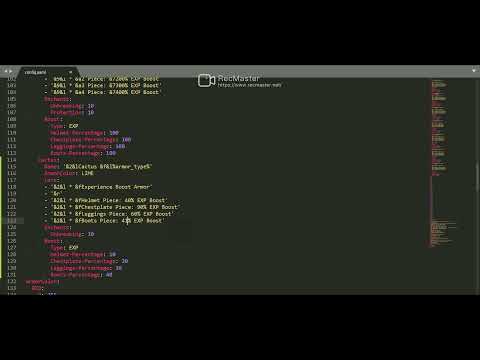
How to use Hex colors and gradients for Armor lore and names.
To add a gradient simply use:
<GRADIENT: hexcode>Your text here</GRADIENT: hexcode>
To use the rainbow simply use:
<RAINBOW 1>Your text here</RAINBOW>
- The number in <RAINBOW1> refers to the saturation. The higher the number the more saturated it will be (lighter the colors). 100 Is the highest saturation.
Here is a rainbow with low saturation (number 1):
Here is a rainbow with high saturation (number 100):
Here is how you can add a single Hex gradient:
<SOLID: hexcode>Your text here
- You do not need to close off a solid color with </SOLID>
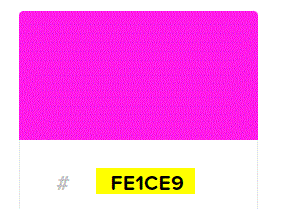
An example of a hexcode would be:
If you need any additional support/help/information please join the following discord server. You can also utilize the discussion function on this resource. I am extremely active on the support discord server and I have not and will not fail to make myself available to any bugs/issues/help requests.
Please do not report any bugs in the review section, report them in the discussion function or the discord server. Thanks.
Discord: https://discord.gg/GquPc7h
Wiki: https://github.com/iLucaH/AdvancedArmor/wiki
Tested Versions: 1.8.8, 1.9.0, 1.12.0, 1.12.2, 1.16.0, 1.16.5, 1.17, 1.17.1, 1.18.0, 1.18.1
Similar projects
Plugin →Let Me Despawn
Improves performance by tweaking mob despawn rules. Say bye to pesky unintentional persistent mobs.
26.2MSueta
JourneyMap
Real-time map used for mapping in-game or your browser as you explore.
14.7MSueta
Emotecraft
Create your own emotes in Minecraft.
7.9MSueta
Simple Tpa
A simple tpa plugin which sends requests
5.4MSueta
Common Network
Forge and Fabric Unified Networking Solution
4.7MSueta
Set Home
A lightweight plugin for players to set their homes.
3.8MSueta