
THIS IS FOR THE PLUGIN: https://www.spigotmc.org/resources/airbar.16649/

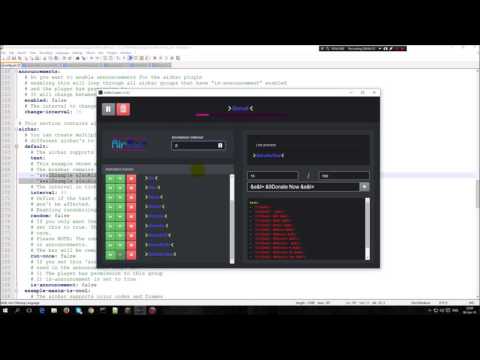
AirBarCreator allows you to visualize your creative mind while creating animations for MVdW Software animation plugins. The application that is available for both Windows, Mac and Linux allows you to create and visualize the animation frame by frame and shows a live preview on how your animation will look like in-game.
1. Requirements
- Linux:
- x-server
- 32/64bit
- Windows
- 2000/XP or higher
- 32/64bit
- Mac
2. Installation
2.1. Windows
2.1.1. Step 1 - Download the correct version
Determine if you are running a 32 or 64 bit version of Windows.
2.1.2. Step 2 - Unzip the file to a location on your computer
To prevent installation programs it is required to unzip the program somewhere on your computer (Don't be one of those persons who put everything on their desktop).
2.1.3. Step 3 - Run the application
Start AirBarCreator.exe , make sure to check for updates on this page in the future.
2.2. Mac OSX
2.2.1. Step 1 - Download the correct version
Determine if you are running a 32 or 64 bit version of Macintosh.
2.2.2. Step 2 - Unzip the file to a location on your computer
To prevent installation programs it is required to unzip the program somewhere on your computer (Don't be one of those persons who put everything on their desktop).
2.2.3. Step 3 - Run the application
Start AirBarCreator.app,
If you see a message that your security settings only allow applications downloaded from the AppStore you need to grant permission to AnimationCreator. To do this: https://www.my-private-network.co.uk/knowledge-base/apple-related-questions/osx-unsigned-apps.html
2.3. Linux
2.2.1. Step 1 - Download the correct version
Determine if you are running a 32 or 64 bit version of Linux.

Fig1: This is an example animation

Fig2: This is an example animation and also its implementation ingame

Fig 3: Right clicking in the input field allows you to easy add colors or effects. (instead of remembering the codes)

Fig 4: You get a live preview of the colors

Fig 5: The bossbar on the top updates automatically depending on the animation interval speed.
Every frame you add will be added to the yaml that you can just copy paste in your configuration.

Fig 6: Buttons allow you to pause or delete the animations

Fig 7: You can move frames up and down or remove them

Fig 8: Color picker in the 1.1.0 update (ONLY FOR 1.9 servers)
Similar projects
Plugin →Let Me Despawn
Improves performance by tweaking mob despawn rules. Say bye to pesky unintentional persistent mobs.
25MSueta
JourneyMap
Real-time map used for mapping in-game or your browser as you explore.
14.7MSueta
Emotecraft
Create your own emotes in Minecraft.
7.5MSueta
Simple Tpa
A simple tpa plugin which sends requests
5.4MSueta
Common Network
Forge and Fabric Unified Networking Solution
3.9MSueta
Set Home
A lightweight plugin for players to set their homes.
3.8MSueta