
✅ AlonsoDiscordChat [1.8-1.16] • Fully customizable! Unlimit
1.1-BETALink chats from Bungeecord network with you Discord server!
THIS PLUGIN REQUIRES JDA
THIS IS THE FINAL VERSION
PLUGIN WORKING FINE, WON'T BE UPDATED AGAIN.
THIS IS A BUNGEECORD PLUGIN
AND
REQUIRES A PERMISSION PLUGIN
READ FAQ BEFORE ASKING FOR SUPPORT





AlonsoDiscordChat is a simple plugin that allow server owners/developers link chats from different servers to their respective discord channels.
What it does?
In short, this plugin allows you to create custom commands to be used to chat between specific discord channels in specific minecraft servers, allowing you to customize almost everything, including permissions, commands, no permission messages, color permissions, message formats, and more!
It does NOT synchronize ranks and roles.

I provide support through discord for all my plugins, if you have any question, problem, suggestion, or bug of any kind related to one of them I will be happy to help you as much as i can. Join discord now by clicking the image above!
Many of you may know how to code plugins, but there are people who don't.
This is made for those people.
Review section is not place for bug reports.

- Multiversion support [Bungeecord - Hexacord]
- Multilanguage support [English by default]
Add you own language in config.yml. - Lightweight plugin.
- Easy setup.
- Custom commands. CREATE YOUR OWN COMMANDS!
- Custom channels.
- Custom permissions to use the command of each chat.
- Custom permissions to use color in each chat.
- Custom disabled servers per command. (For offline networks with auth servers)
- Custom enabled servers per command. (For networks with many gamemodes like survival, creative, etc)
- Custom no-permission message per command.
- Configurable messages.
- Connection logs to track activity. NEW!
- Auto-enable chats when you connect to a server. NEW!
- 3 configurable formats per chat/command:
- Discord > minecraft: Format for messages sent from discord
- Minecraft > minecraft: Format for messages sent and read in game
- Minecraft > Discord: Format for messages sent from minecraft
Watch video in "Screenshots" section to see them.

This plugin is fully configurable, other plugins don't have some features or are not fully customizable.
Many of the plugins are for bukkit/spigot so you need to install them in all your servers. This is a bungeecord plugin, so you need to install it only in your proxy.
This plugin will always be updated if a bug or error is found. Also new features can be added if they are required and makes sense.
Unlimited commands can be created to link minecraft and different Discord channels. Plugin supports disabled and enabled servers so you can block the command in login servers in case you have an offline server. Example, you can create a command like /discordbuilder for builders to chat between minecraft and discord channel called "builderchat", you can disable command in auth-servers so they can chat all across the network except auth-servers.
Same for staff members, youtubers, donators, for players in survival server, creative server, etc! Possibilities are unlimited!
In short
This is a bungeecord plugin, you just need to install it once in your bungeecord and configure it and it will work in your whole network. You don't need to install it in every server like other plugins. It's one bot for your whole network!

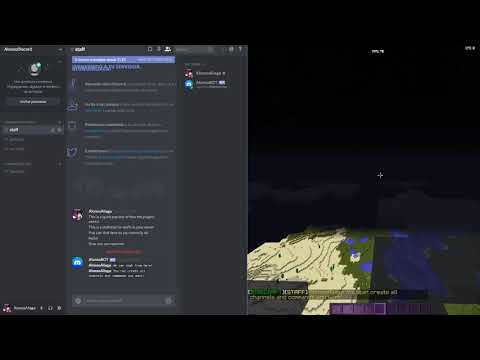
It would be a bit hard to show how plugin works in screenshots so here you have a short preview of the plugin.
In the video you can see two commands /discordstaff and /discordgeneral which i use to link staff chat and general chat of my discord server respectively.
Short plugin review/preview by me
Sorry if there are grammar mistakes, i speak spanish
Here are some screenshots of the features added in updates.
Custom presence 1.0-BETA

Connection logs 1.0.1-BETA


IMPORTANT
You need to install JDA to make the plugin work.
JDA contains all needed to run the Discord Bot in this plugin.
It will also be needed to make future plugins work.
You can download it from here:


Installing plugin in your server:
- Download the plugin from SpigotMC.org
- Copy the jar file into you plugins folder and the dependence.
- Restart the proxy.
- Follow Bot creation Guide and Configuration Guide.
- Save changes made in config.yml.
- Restart the proxy.
BOT CREATION GUIDE
1) Go to https://discordapp.com/developers/applications/ and login.
2) Click on "Create an application"

3) Upload an image, choose a name and write a description for your new Bot and save changes.

4) Click "Bot" on the left side, click "Add Bot" and "Confirm"

5) Uncheck "Public Bot" option. Click "Reveal my token" and copy it (it is private, do not share it with others)

6) Copy this link and replace "YOUR_CLIENT_ID" with your Client ID (Found in step 3)
Link: https://discordapp.com/oauth2/authorize?&client_id=YOUR_CLIENT_ID&scope=bot&permissions=0
7) Select your Discord server, complete the captcha and "Authorize"

8) Your Bot is now authorized and should appear as offline in your Discord server, continue to "Configuration Guide"

CONFIGURATION GUIDE
1) Copy your Token (Found in step 5 - BOT CREATION GUIDE) and paste it in Bot.Token in config.yml
2) Go to your "Server settings", select "Widgets", copy "Server ID" and paste it in Bot.Guild-ID in config.yml
3) Edit your bot status in config. Example: Playing MyNetwork
4) Read comments in config.yml all is explained there in detail.
Quick note: To get your Channel ID type in your chat \#YourChannelName and send it, it will appear a message like <@254789525321321>, the number is the ID for that channel (Use it in Discord-channel-id in config.yml when creating new channels/commands)

All commands are configurable in config.yml
Default commands:
/discordstaff - Toggles staff chat / send message in staff channel
Permission: alonsodiscordchat.discordstaff
Color-permission: alonsodiscordchat.discordstaff.color
/discordgeneral - Toggles general chat / send message in general channel
Permission: alonsodiscordchat.discordgeneral
Color-permission: alonsodiscordchat.discordgeneral.color
/discordsurvival - Toggles survival chat / send message in survival channel
Permission: alonsodiscordchat.discordsurvival
Color-permission: alonsodiscordchat.discordsurvival.color
You can create your own commands for each channel.
These commands are just examples!

✪ config.yml
################################################################################
#      _   _                  ___  _                   _  ___ _         _      #
#     /_\ | |___ _ _  ___ ___|   \(_)___ __ ___ _ _ __| |/ __| |_  __ _| |_    #
#    / _ \| / _ \ ' \(_-</ _ \ |) | (_-</ _/ _ \ '_/ _` | (__| ' \/ _` |  _|   #
#   /_/ \_\_\___/_||_/__/\___/___/|_/__/\__\___/_| \__,_|\___|_||_\__,_|\__|   #
#                                                                              #
#                            Created by AlonsoAliaga                           #
#                    https://www.spigotmc.org/members/281176/                  #
#                                                                              #
################################################################################

#IMPORTANT: Keep in mind that each channel id and command MUST be different!
#You can create as many as channels/commands as you want. Follow the format below.

Bot:
  #You bot token, check setup instructions in spigot page!
  Token: ''
  #You can find this in your server configuration, in Widget tab called "Server ID"
  Guild-ID: ''
  #Set the activity for your bot!
  #PLAYING, WATCHING or LISTENING
  Activity: PLAYING
  #Game that will be after the activity.
  #Example: Playing to Spigotmc.org
  Game: 'Spigotmc.org'

#This is a request, it will send a message to the specific channel when a player changes servers.
#It doesn't have any specific purpose or use. It's just a request.
Connection-log:
  Options:
    Enabled: false
    Discord-channel-id: '77777777777777777'
  Messages:
    Connect: "**{PLAYER}** has connected to the network!"
    Switch: "**{PLAYER}** has switch server to **{SERVER}**!"
    Disconnect: "**{PLAYER}** has disconnected from the network!"

Channels:
  #Name of the channel, just to recognize it.
  discord-staffchat:
    #Command used to toggle chat and to send messages.
    Command: 'discordstaff'
    #Permission to read and send messages.
    Permission: 'alonsodiscordchat.discordstaff'
    #Permission to allow them use color nodes in messages chat (IT DOES NOT AFFECT DISCORD)
    Color-permission: 'alonsodiscordchat.discordstaff.color'
    #Message to send when player don't have the permission or the command is not enabled in the server
    No-permission: '&cYou do not have permissions to use this command!'
    #Auto enable, if set to true. All players will join the discord chat by default, no need to use the command to toggle the chat.
    #However, the command is still needed to send messages.
    Auto-enable: false
    #Text channel id, this is the ID of the text channel in your discord server.
    #To get this enable Developer mode on discord and right click your text channel, copy ID.
    #You can also write '\#Yourchannelname' (without ')and it will send <@YOURTEXTCHANNELID>
    #Then copy it and write it down.
    Discord-channel-id: '77777777777777777'
    Messages:
      Enabled: '&aStaff chat has been enabled!'
      Disabled: '&cStaff chat has been disabled!'
      Chat-not-enabled: '&cError! To send messages in this channel you need to enable it first. Use /{COMMAND} to toggle it.'
    Formats:
      #Format of the message send from discord to minecraft
      Discord-minecraft: '&f&l[&9&lDISCORD&f&l]&f&l[&e&lSTAFF&f&l] &e{MEMBER}&f: &e{MESSAGE}'
      #Format of the message when a player sends a message in game
      Minecraft-minecraft: '&f&l[&2&lMINECRAFT&f&l]&f&l[&e&lSTAFF&f&l] &e{PLAYER}&f: &e{MESSAGE}'
      #Format of the message send from minecraft to discord
      Minecraft-discord: '**{PLAYER}**: ``{MESSAGE}``'
    #IMPORTANT: ONLY ONE OF THE TWO OPTIONS BELOW CAN BE ENABLED, IF BOTH ARE ENABLED THE DISABLED SERVERS WILL BE CONSIDERED ONLY.
    #Servers in which the command is disabled and cannot be used!
    Disabled-servers:
      Enabled: true
      Servers:
      - 'Authlobby-1'
      - 'Authlobby-2'
      - 'Authlobby-3'
    #Servers in which the command is enabled only and can be used!
    Enabled-servers:
      Enabled: false
      Servers: []
  #Create more channels and commands here!
  discord-playerchat:
    Command: 'discordgeneral'
    Permission: 'alonsodiscordchat.discordgeneral'
    Color-permission: 'alonsodiscordchat.discordgeneral.color'
    No-permission: '&cYou do not have permissions to use this command!'
    Auto-enable: false
    Discord-channel-id: '77777777777777777'
    Messages:
      Enabled: '&aGeneral chat has been enabled!'
      Disabled: '&cGeneral chat has been disabled!'
      Chat-not-enabled: '&cError! To send messages in this channel you need to enable it first. Use /{COMMAND} to toggle it.'
    Formats:
      Discord-minecraft: '&f&l[&9&lDISCORD&f&l]&f&l[&7&lGENERAL&f&l] &7{MEMBER}&f: &7{MESSAGE}'
      Minecraft-minecraft: '&f&l[&2&lMINECRAFT&f&l]&f&l[&7&lGENERAL&f&l] &7{PLAYER}&f: &7{MESSAGE}'
      Minecraft-discord: '**{PLAYER}**: ``{MESSAGE}``'
    Disabled-servers:
      Enabled: true
      Servers:
      - 'Authlobby-1'
      - 'Authlobby-2'
      - 'Authlobby-3'
    Enabled-servers:
      Enabled: false
      Servers: []
  discord-survivalchat:
    Command: 'discordsurvival'
    Permission: 'alonsodiscordchat.discordsurvival'
    Color-permission: 'alonsodiscordchat.discordsurvival.color'
    No-permission: '&cYou do not have permissions to use this command!'
    Auto-enable: false
    Discord-channel-id: '77777777777777777'
    Messages:
      Enabled: '&aSurvival chat has been enabled!'
      Disabled: '&cSurvival chat has been disabled!'
      Chat-not-enabled: '&cError! To send messages in this channel you need to enable it first. Use /{COMMAND} to toggle it.'
    Formats:
      Discord-minecraft: '&f&l[&9&lDISCORD&f&l]&f&l[&d&lSURVIVAL&f&l] &d{MEMBER}&f: &d{MESSAGE}'
      Minecraft-minecraft: '&f&l[&2&lMINECRAFT&f&l]&f&l[&d&lSURVIVAL&f&l] &d{PLAYER}&f: &d{MESSAGE}'
      Minecraft-discord: '**{PLAYER}**: ``{MESSAGE}``'
    Disabled-servers:
      Enabled: false
      Servers: []
    Enabled-servers:
      Enabled: true
      Servers:
      - 'Survival-1'
      - 'Survival-2'
      - 'Survival-3'
None yet. You can send me your tutorials :D
Similar projects
Plugin →Let Me Despawn
Improves performance by tweaking mob despawn rules. Say bye to pesky unintentional persistent mobs.
25MSueta
JourneyMap
Real-time map used for mapping in-game or your browser as you explore.
14.7MSueta
Emotecraft
Create your own emotes in Minecraft.
7.5MSueta
Simple Tpa
A simple tpa plugin which sends requests
5.4MSueta
Common Network
Forge and Fabric Unified Networking Solution
3.9MSueta
Set Home
A lightweight plugin for players to set their homes.
3.8MSueta