
AutoMessage [1.21]
3.0.0⚡ AutoMessage is a high-performance plugin for fully customizable automatic server-wide broadcasts.
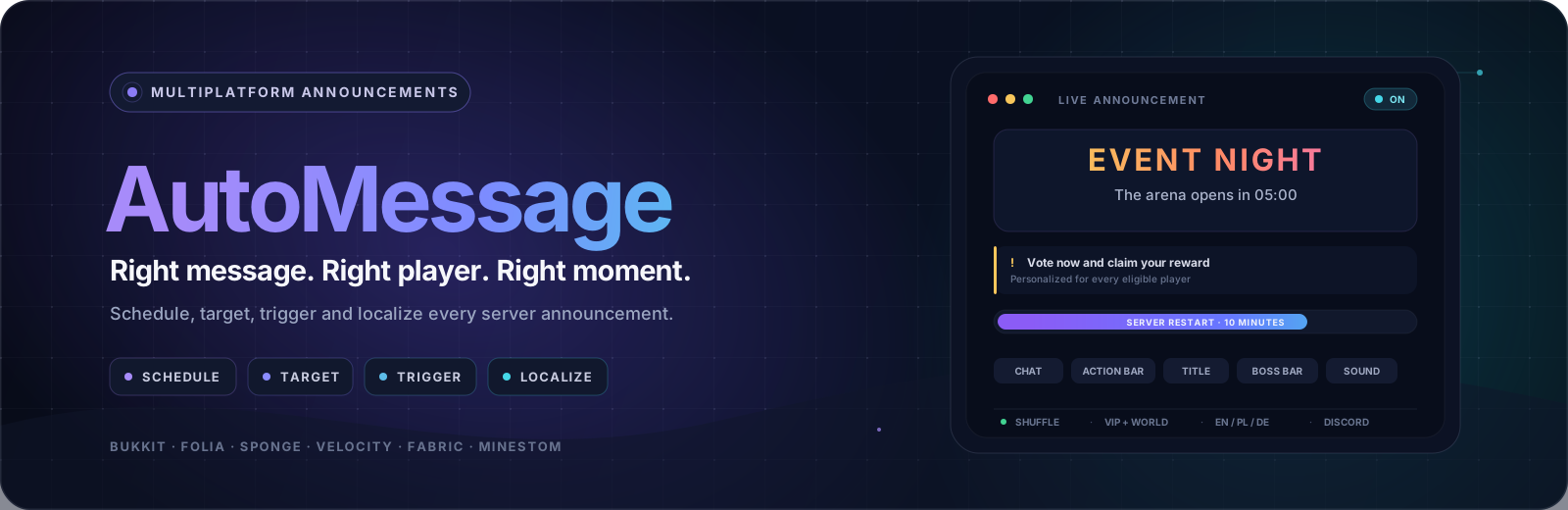








Not another chat rotator. A complete announcement engine.
Targeted, localized and event-aware broadcasts for modern Minecraft servers and networks.
6 runtimes · 8 notice surfaces · 8 audience rules · 3 event triggers · 3 languages shipped · one render per language · no database
|
🧭 Why AutoMessage |
⚙️ Install and configure |
📣 Broadcasts should earn attention
Players learn to ignore announcements when every message reaches everyone. AutoMessage makes server
communication deliberate: every stream keeps its own schedule, every message chooses its own
audience, and the text arrives in the language each player actually plays in - from one shared core
running on Bukkit, Folia, Sponge, Velocity, Fabric and Minestom.
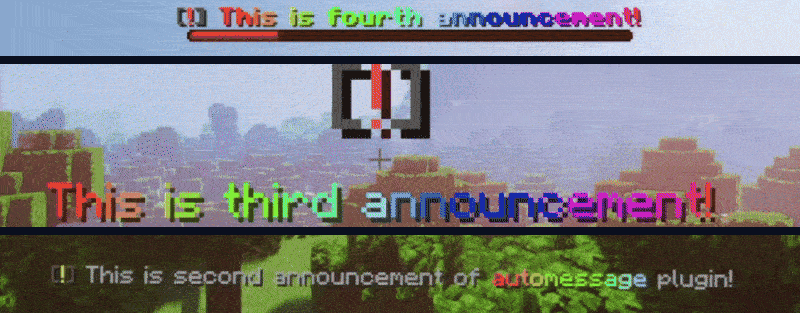
One announcement set, in game, on one server: a boss bar countdown, a full-screen title and a chat line.
A complete announcement, start to finish
Greet returning veterans three seconds after they join - never on a timer, never the newcomers, and
in their own language. Two files say all of it:
# scheduledMessages.yml - who gets it, and when
messages:
  - name: welcome-back
    trigger:
      type: JOIN
      delay: 3s
    rules:
      - type: PLAYTIME
        min: 10h
# lang/en.yml - what it says
announcements:
  welcome-back:
    - chat: "<gray>Welcome back, <aqua>{PLAYER}<gray>."
      sound: "entity.player.levelup MASTER 1.0 1.2"
And this is what the server does with them:
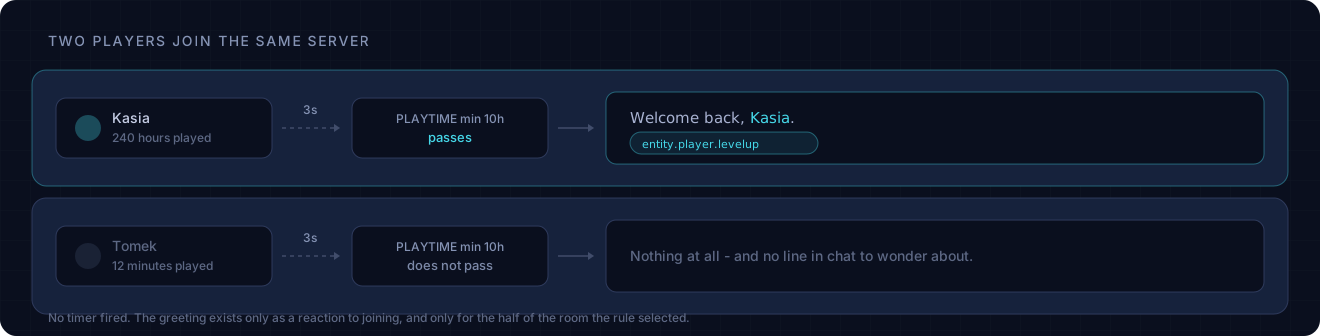
That is the whole feature set in miniature: an event instead of a clock, an audience instead of
everyone, and text that lives beside every other translation.
⚖️ More than a rotating list
The tagline is not marketing. A rotator answers one question - what do I say next? - and sends
the answer to everyone, in one language, on one clock.
| A plain rotator | AutoMessage | |
|---|---|---|
| Who receives it | Everyone online | Permission, group, world, online count, playtime - composed with ANY_OF, NONE_OF, NOT |
| When it fires | One global interval | A schedule per channel, plus JOIN, FIRST_JOIN and re-arming PLAYER_COUNT triggers |
| What it looks like | A line of chat | Chat, action bar, title, subtitle, boss bar and sound, combined in one announcement |
| What it says | One text for everybody | The player's own language, with a per-message fallback |
| Where it runs | One server type | Bukkit, Folia, Sponge, Velocity, Fabric and Minestom, each a native artifact |
The details underneath
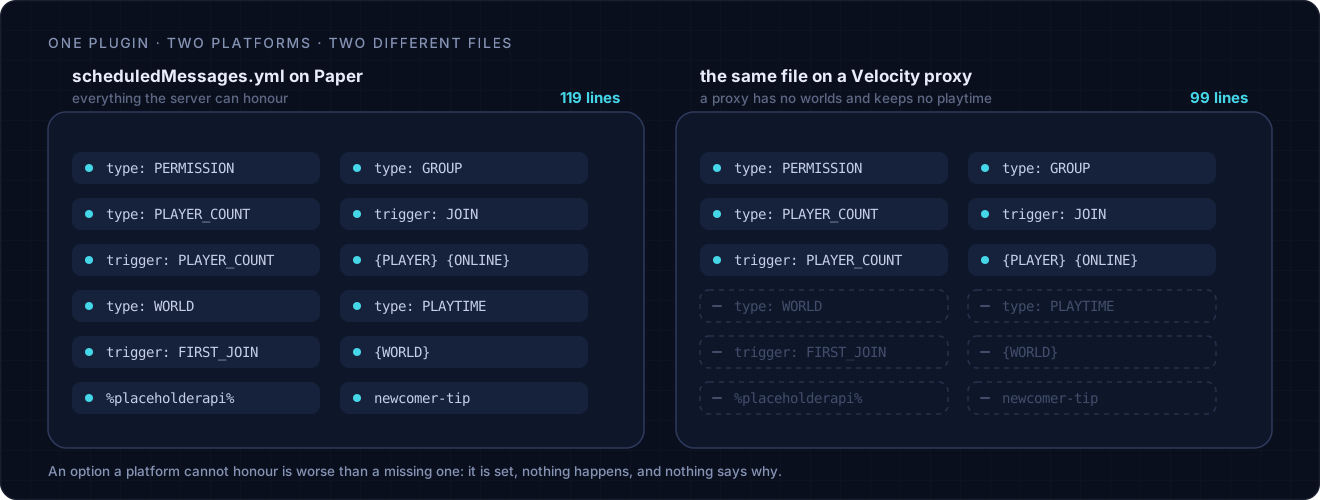
🔀 Four rotation strategiesSHUFFLE, SEQUENTIAL, RANDOM or weighted, chosen per channel. Shuffle deals a whole deck before anything repeats. | 🧩 Configuration that fits the runtime A proxy never sees a world rule or a first-join trigger. Options the platform cannot honor are left out of the file, not written and ignored. | 👁 Preview before publishing/automessage view <name> renders the real localized message to you alone, ignoring its audience rules. |
| ↗ Beyond the server Mirror chat content to a Discord webhook, with player-only placeholders stripped and automatic mentions disabled. | ♻ Reload, do not restart/automessage reload applies schedules, messages and languages in place - including a translation file added while the server was running. | 🪶 Lean dispatch path No database. An empty server short-circuits, placeholders are scanned once per message rather than once per announcement, and everyone reading the same text in the same language is served from a single render. |
🎯 Reach exactly who should hear it
Rules compose. Every top-level rule must pass, and ANY_OF, NONE_OF and NOT nest inside them
when the audience needs more than an AND.
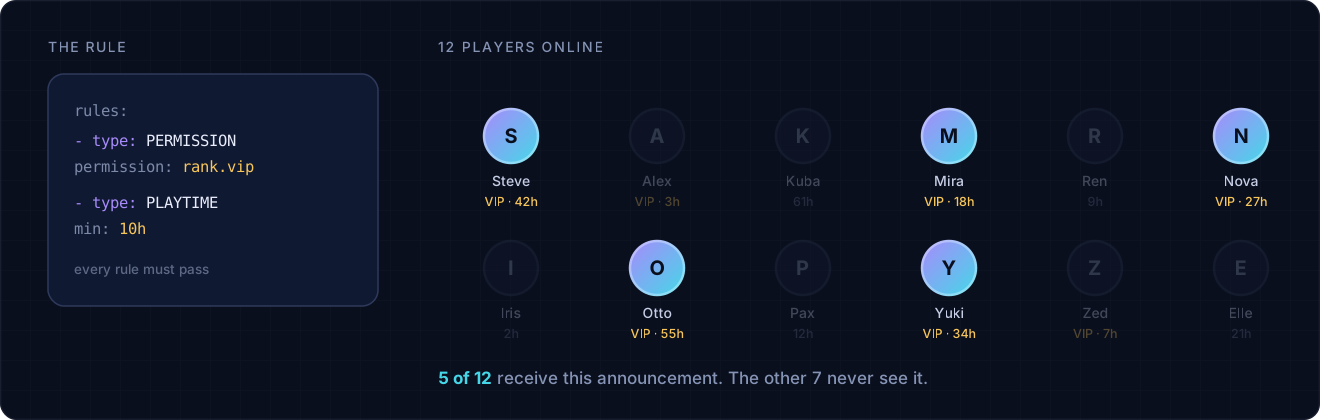
The same rules apply to a message sent by an event, so a join greeting restricted to a permission
never reaches somebody who lacks it just because they walked through the door.
⚡ Fire on an event, not a clock
A message with a trigger leaves its channel rotation entirely and waits for something to happen.
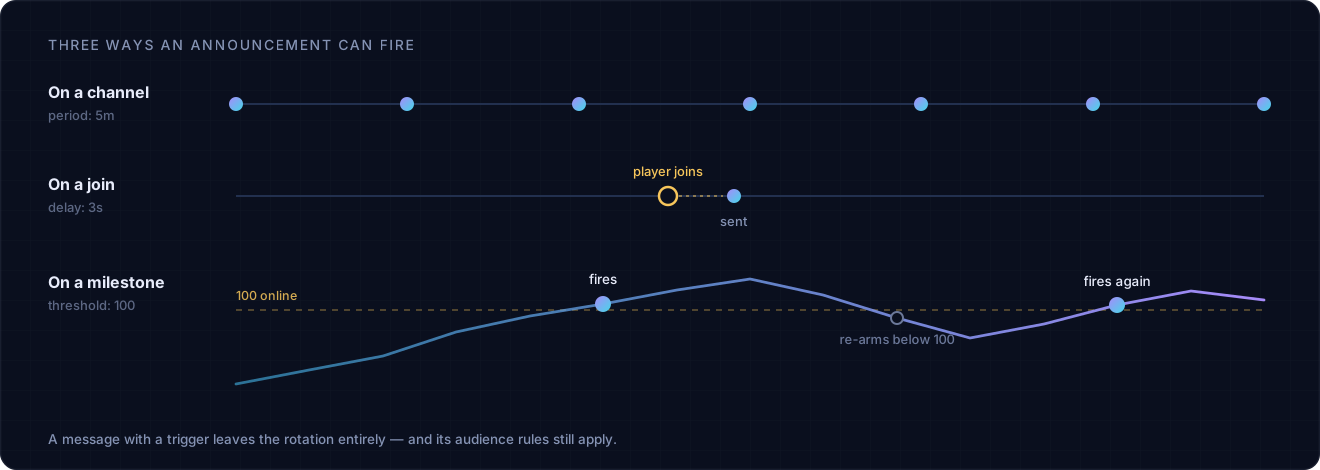
PLAYER_COUNT is the one worth reading twice: it fires once on the way up and re-arms only
after the server drops back below the threshold, so a population hovering on the boundary does not
announce the same milestone every time somebody logs in.
🪶 Costs your server almost nothing
Formatting is the expensive part of an announcement. Colors, gradients, hover text and placeholders
all have to be parsed before a single character reaches anybody - and the obvious way to do that is
once for each player who receives it. Five hundred players online means the same sentence built five
hundred times to say one thing, on the main thread, while the rest of the tick waits its turn.
AutoMessage builds it once per language and hands the finished result to everyone reading it.
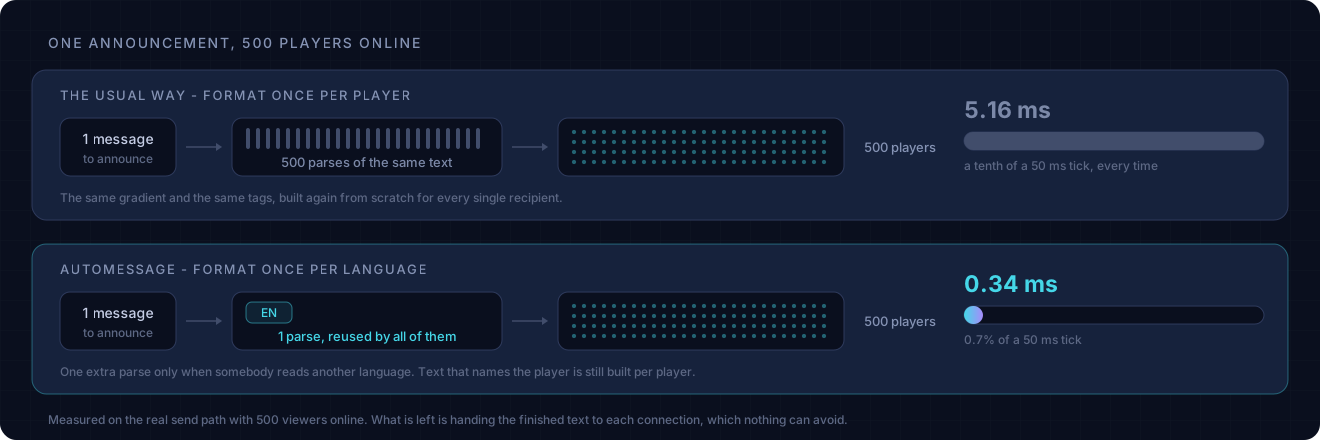
| Formatting per player | AutoMessage | |
|---|---|---|
| Parses per announcement | One per player, so 500 | One per language actually being read |
| Time on the main thread | 5.16 ms | 0.34 ms |
| Share of a 50 ms tick | ~10%, every announcement | ~0.7% |
That is 15× less main-thread time per announcement, measured on the real send path with 500
viewers online - not on a microbenchmark of one function. What remains is handing the finished text
to each connection, which no plugin can avoid.
The saving grows with your player count, and it costs you nothing to configure: there is no cache to
size, no setting to tune, and no behavior to give up.
It never trades correctness for speed. A message that reads differently for each player - one
naming {PLAYER}, or carrying any PlaceholderAPI token - is still built for each of them, because
only the expansion behind that token knows whether two players would see the same thing. Grouping
applies exactly where the text is genuinely identical, and nowhere else.
Three more places the dispatch path refuses to do needless work:
- Placeholders are scanned once per message, not once per announcement. Which tokens a message
contains is decided by the text, so it is worked out when the files are read and remembered until
a reload - rather than re-derived every time the channel fires. - An empty server short-circuits. Nobody online means no selection, no formatting and no work.
- Nothing touches disk while announcing. No database, no player records, no I/O on the hot path.
🌐 One engine. Six runtimes
AutoMessage uses a shared platform-neutral core and a small runtime adapter for each server type.
That means the behavior stays familiar while scheduling, viewers, permissions and lifecycle hooks
remain native to the platform underneath.
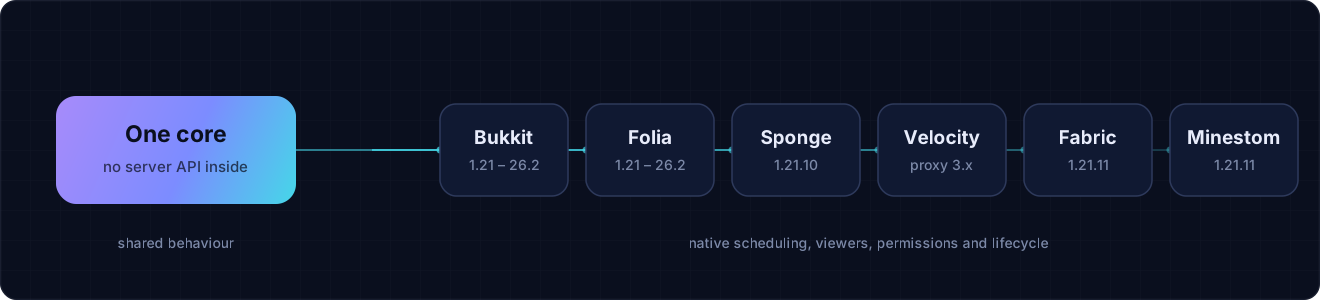
| Artifact | Runtime | Supported line | Java | Platform-specific notes |
|---|---|---|---|---|
| Bukkit | Spigot, Paper, Purpur and other Bukkit-derived servers | Minecraft 1.21–26.2 | 21+ | Full feature set; optional PlaceholderAPI integration |
| Folia | Folia | Minecraft 1.21–26.2 | 21+ | Dedicated regionized scheduling; optional PlaceholderAPI integration |
| Sponge | Sponge API 17 | Minecraft 1.21.10 | 21+ | Full feature set except PlaceholderAPI |
| Velocity | Velocity 3.5.1 proxy | Proxy runtime | 21+ | No world, playtime, first-join or PlaceholderAPI capabilities |
| Fabric | Dedicated Fabric server | Minecraft 1.21.11 | 21+ | Server-side mod; Fabric API required; no PlaceholderAPI |
| Minestom | Embedded Minestom library | Protocol 1.21.11 | 25+ | Classpath library; no world, playtime, first-join or PlaceholderAPI; permission/group rules require your callback |
[!NOTE]
Java 21 is the bytecode floor for the plugin artifacts, not a promise that every Minecraft
server version runs on Java 21. Use the JVM required by your server; Minestom itself requires
Java 25.
Each artifact writes a platform-aware configuration. Options the runtime cannot honor are left out
instead of being generated and silently ignored.
What about Quilt?
There is no separate Quilt artifact. Quilt can read Fabric metadata, but this branch does not claim
a tested Quilt version. Treat the Fabric jar on Quilt as experimental and bring a compatible
Fabric API yourself.
🗂 Configuration model
AutoMessage separates when, who and what. Adding a language never requires copying
scheduling rules, and changing a channel interval never touches the message text.
flowchart LR
    schedule["config.yml<br/>WHEN<br/>channels · periods · selectors"]
    audience["scheduledMessages.yml<br/>WHO<br/>rules · weights · triggers"]
    content["lang/*.yml<br/>WHAT<br/>localized MiniMessage notices"]
    minecraft["Minecraft<br/>PLAYER OUTPUT"]
    discord["discordWebhook.yml<br/>OPTIONAL MIRROR"]

    schedule --> audience --> content --> minecraft
    content -. "chat text" .-> discord

    classDef config fill:#11182d,stroke:#8b7cf6,color:#eef0ff,stroke-width:1px;
    classDef output fill:#0d2028,stroke:#45d7e8,color:#ecfeff,stroke-width:1px;
    class schedule,audience,content config;
    class minecraft,discord output;
| File | Responsibility |
|---|---|
config.yml | Master switch, fallback language, channels, startup delays, periods and selectors |
scheduledMessages.yml | Message names, channel assignment, weights, audience rules and event triggers |
lang/<code>.yml | Localized command replies and the actual MiniMessage announcement payloads |
discordWebhook.yml | Opt-in Discord webhook, display name and avatar |
📥 Get AutoMessage
| What you need | Where to get it |
|---|---|
| Current public Bukkit build | Modrinth · SpigotMC · Hangar |
| Release history and changelogs | GitHub Releases |
| Multiplatform artifacts from this branch | Build all six from source |
[!IMPORTANT]
Release status: this README documents the local multiplatform branch. The current public
listings still represent the earlier Bukkit-focused release line. Until a new GitHub release
publishes all six artifacts, build the multiplatform jars with./gradlew dist.
🚀 Quick start
- Get the artifact built for your runtime. Platform jars are intentionally separate.
- Put it in your platform's
plugins/ormods/directory. For Minestom, add the jar to the
application classpath and use the builder shown below. - Start the server once. AutoMessage generates annotated configuration plus working example
announcements. - Edit
config.yml,scheduledMessages.ymland the files insidelang/. - Run
/automessage reload, then test a message with/automessage view <name>.
[!TIP]
Start with the generated files. They are not empty templates: every available field is explained
next to a working example, and the contents adapt to the platform that created them.
🛠 Build your first announcement
The example below creates an independent event stream, adds one announcement to it, and renders
multiple notice types from a single localized payload.
1. Schedule the stream
# config.yml
enabled: true
fallbackLanguage: en

channels:
  - name: default
    enabled: true
    initialDelay: 1m
    period: 5m
    selector: SHUFFLE

  - name: events
    enabled: true
    initialDelay: 30s
    period: 15m
    selector: SEQUENTIAL
2. Register the announcement
# scheduledMessages.yml
messages:
  - name: event-night
    channel: events
3. Design what players receive
# lang/en.yml
announcements:
  event-night:
    - chat:
        - "<dark_gray>[<gold>EVENT<dark_gray>] <gray>The arena opens in <gold>5 minutes<gray>."
        - "<gray>Click <click:run_command:'/warp arena'><hover:show_text:'<yellow>Teleport'><aqua><u>here</u></aqua></hover></click> to join."
      actionbar: "<yellow>Prepare your loadout - the event starts soon"
      title: "<gradient:#ffd166:#ff6b6b><bold>EVENT NIGHT</bold></gradient>"
      subtitle: "<gray>The arena opens in 05:00"
      times: "500ms 3s 500ms"
      bossbar:
        message: "<light_purple>Event countdown"
        duration: 10s
        color: PURPLE
        overlay: PROGRESS
        progress: 0.75
      sound: "block.note_block.pling MASTER 1.0 1.0"
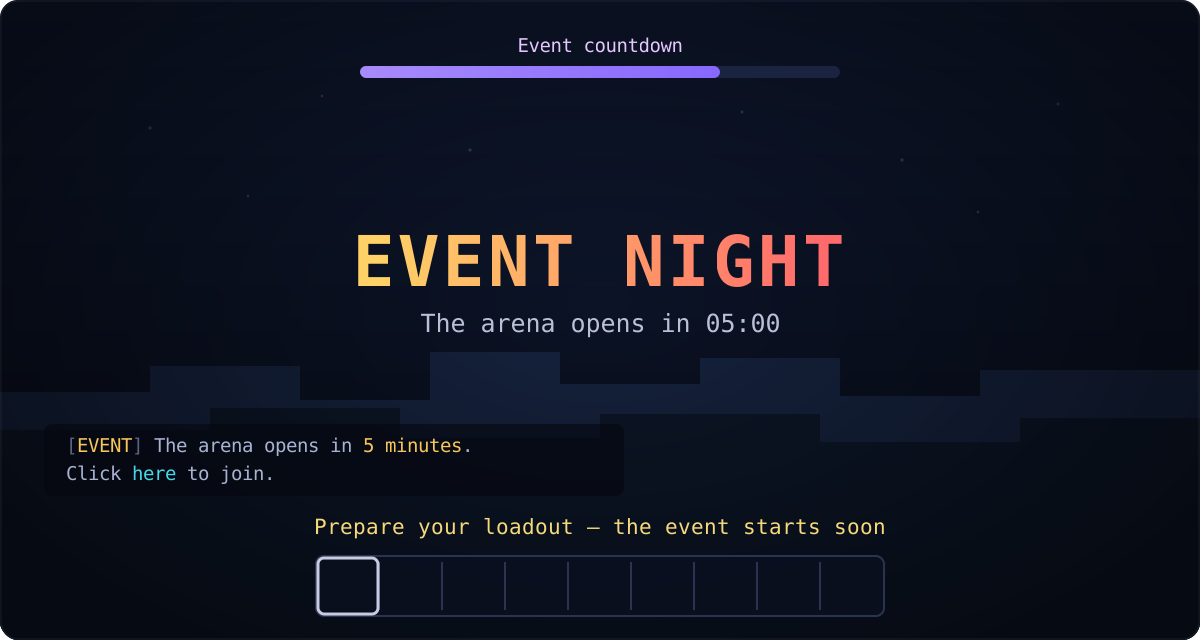
Use only the parts that fit the message. A simple chat announcement can be a single string; a
showcase announcement can combine every surface above.
📖 Reference
Announcement channels and selectors
Every channel has its own schedule and independent selector state:
channels:
  - name: tips
    enabled: true
    initialDelay: 1m
    period: 5m
    selector: SHUFFLE

  - name: promotions
    enabled: true
    initialDelay: 2m
    period: 20m
    selector: WEIGHTED
| Selector | Behavior |
|---|---|
SHUFFLE | Randomizes the order and shows every message once before anything repeats |
SEQUENTIAL | Walks straight through the configured list |
RANDOM | Draws independently; the same message may appear twice in a row |
WEIGHTED | Draws randomly in proportion to each message's weight |
SEQUENTIAL and SHUFFLE keep their position across a normal configuration reload. A weight of
0 parks a message only in a WEIGHTED channel; other selectors do not consult weights.
<det
Similar projects
Plugin →VeinMiner
Mine the whole vein on mining a single ore/block. Make the tedious mining experience to something satisfying and fun! FTB Ultimine alternative
99.3MSueta
Simple Voice Chat
A working voice chat in Minecraft!
76.3MSueta
Chunky
Pre-generates chunks, quickly and efficiently
20.8MSueta
VeinMiner Enchantment
Veinminer Addon - Adds vineminer enchantment to enchanting tables. Only tools with the enchantment can veinmine
18MSueta
JourneyMap
Real-time map used for mapping in-game or your browser as you explore.
14.7MSueta
WorldEdit
A Minecraft Map Editor... that runs in-game! With selections, schematics, copy and paste, brushes, and scripting. Use it in creative, or use it temporarily in survival.
11.6MSueta