
Meet Bitcoin Reloaded!
Bitcoins are now in a new version!
Server economics can often be quite boring, so this plugin offers a unique opportunity to spice things up!
Note:
A little disclaimer, I am not the full developer of this plugin, the previous developer (Donut) disappeared somewhere, and with it the page with the plugin.
I decided to transfer his creation to new versions, currently only 1.20 has been tested!

Features:
- Bitcoin mining
- Intuitive user GUI
- Buying and selling of bitcoins
- Fluctuation of bitcoin value
- Option to use real bitcoin value
- Optional circulation limit
- Black market
- Works with all Vault compatible economies
- Configurable settings, messages and sounds
- PlaceholderAPI support
- PlayerPoints support
Changes of fork:
- removed supporting of premium MVdWPlaceholder plugin
- removed supporting of premium PlayerPoints plugin
Note:
The API is still available, but it cannot be borrowed from the repository, most likely it will appear on the repository in the future
How Bitcoins Work
Bitcoin is not designed to be a standalone economy on your server, but rather it works in conjunction with your existing economy plugin as players can exchange bitcoins for your normal currency. See more about the value of bitcoins below.
Value of Bitcoins
Just like in real-life, the value of bitcoins is volatile and unstable. Every (Minecraft) day at 6:00 am (by default), the value of bitcoins will fluctuate. By holding on to bitcoins, players take the risk of the value decreasing, but the risk could pay off if the value increases. Also, there is now an option to use the real value of bitcoins. Simply enable the setting in the config.
How do I get bitcoins?
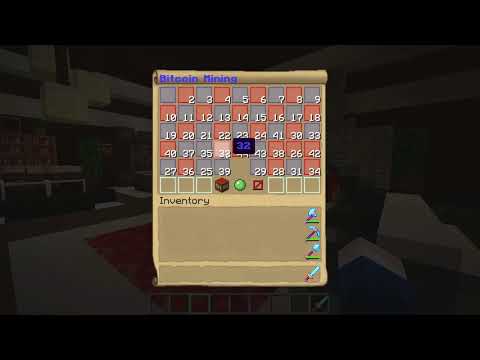
Mining of course! You won't need a pickaxe for bitcoin mining though... Bitcoin mining in Minecraft isn't as difficult as real-life bitcoin mining but it isn't easy either! You must be the first player to solve a 4x4 sliding tile puzzle in order to receive the bitcoin reward. If you feel this is too easy, set the puzzle_difficulty in the config to 'hard'
Black Market
The black market is where players can buy all that juicy contraband with bitcoins. Open it with /bitcoin blackmarket and simply click items to purchase them. The bitcoins from the purchase go into the bank.
To configure it use the command: /bitcoin blackmarket setslot <slot> <price> [stock]. This will set the item in the specified slot to the item you are currently holding with the specified price. For example, if are holding 1 cobblestone and you type /bitcoin blackmarket setslot 1 50, it will set the first slot in the black market to 1 cobblestone that costs 50 bitcoins. If you want to remove an item then simply hold air while using this command and put anything for the price. The stock argument represents how many of the item can be purchased (if you don't put a stock amount, it will be infinite).
Commands/Permissions
Commands
/bitcoin - opens bitcoin menu
/bitcoin value - displays bitcoin value
/bitcoin stats [player] - displays player stats
/bitcoin bank - displays amount of bitcoins in bank
/bitcoin tax - displays purchase tax
/bitcoin circulation: displays circulation info
/bitcoin top [bal/time/solved] - displays top 5 players
/bitcoin mine - opens mining interface
/bitcoin transfer <player> <amount> - transfer bitcoins to player
/bitcoin sell <amount> - sell bitcoins to the bank
/bitcoin buy <amount> - buy bitcoins from the bank
/bitcoin blackmarket - open black market
/bitcoin blackmarket setslot <slot> <price> [stock] - edit black market
/bitcoin give <player> <amount> - give bitcoins to player
/bitcoin remove <player> <amount> - remove bitcoins from player
/bitcoin set <player> <amount> - set balance of player
/bitcoin reset <bal/mined/solved/time>: Reset stats
/bitcoin reload - reload bitcoin plugin
/bitcoin cancel - cancel transfer/purchase/sell
Permissions
bitcoin.*
bitcoin.main
bitcoin.help
bitcoin.value
bitcoin.bank
bitcoin.tax
bitcoin.mine
bitcoin.sell
bitcoin.buy
bitcoin.transfer
bitcoin.give
bitcoin.remove
bitcoin.set
bitcoin.reload
bitcoin.reset
bitcoin.stats
bitcoin.top
bitcoin.gui.transfer
bitcoin.gui.buy
bitcoin.gui.sell
bitcoin.gui.mine
bitcoin.blackmarket
bitcoin.blackmarket.edit
bitcoin.gui.blackmarket
bitcoin.gui.help
Configuration
Config
amount_in_bank: 0
bitcoin_display_rounding: 5
bitcoin_max_value: -1
bitcoin_min_value: 0
bitcoin_value: 1000
broadcast_balance_reset_message: true
broadcast_real_value: true
circulation_limit: -1
days_of_inactivity_until_balance_reset: 30
exchange_currency_symbol: $
fluctuation_frequency: '6:00'
max_bitcoin_value_fluctuation: 100
max_mining_reward: 50
min_bitcoin_value_fluctuation: 0
min_mining_reward: 10
new_mining_puzzle_delay: 0
purchase_tax_percentage: 15
puzzle_difficulty: easy
use_playerpoints: false
use_real_value: false
world: world
amount_in_bank: The amount of bitcoins in the bank. This will change as players sell/buy bitcoins
bitcoin_display_rounding: This is how many decimal places bitcoins will round to in messages. Actual values are exact, this is only used in messages.
bitcoin_min_value: The bitcoin value will not drop below this
bitcoin_max_value: The bitcoin value will not go above this (set to -1 for no limit)
bitcoin_value: This represents the current value of 1 bitcoin. This number will change from what you set it to unless you have the max & min value fluctuation set to 0
broadcast_balance_reset_message: Set this to true if you want a message to be sent when a player's balance is reset to due inactivity (described in the above setting). This message can be configured in the message.yml.
broadcast_real_value: Set this to true if you want the real bitcoin value to be broadcasted at the frequency set in the fluctuation frequency (sorry if this is confusing). Only applies when use_real_value is true.
circulation_limit: This is the maximum number of bitcoins that will exist on your sever. As the amount of bitcoins in circulation approaches the limit, the mining reward will approach 0 but technically never reach it. If you do not want a limit set this to -1.
days_of_inactivity_until_balance_reset: If a player is inactive for the amount of days you set here, then the bank will reclaim their bitcoins and their balance will be set to 0. This setting is especially useful if you set a circulation limit. Set this to -1 if you do not want to use this feature.
exchange_currency_symbol: This is the symbol for your normal currency that bitcoins are exchanged for (this is used in messages such as displaying the value of bitcoins)
fluctuation_frequency: This represents how/when the bitcoin value will fluctuate. It can be set to a time such as '6:00' and every minecraft day at this time the bitcoin value will fluctuate; use military (24 hour) time, do not put am or pm and make sure to put it in single quotes! Another option is to set this value to how often, in ticks, the value should fluctuate. For example if you put 6000, the value would fluctuate every 5 minutes (from when your server starts)
min_bitcoin_value_fluctuation: The minimum amount that the value of bitcoins will change by (increase or decrease)
max_bitcoin_value_fluctuation: The maximum amount that the value of bitcoins will change by (increase or decrease)
max_mining_reward: The maximum number of bitcoins players will be rewarded after solving a puzzle
min_mining_reward: The minimum number of bitcoins players will be rewarded after solving a puzzle
new_mining_puzzle_delay: After the current mining puzzle has been solved this is the delay before the next puzzle is generated (in ticks)
purchase_tax_percentage: This is the tax charged on players buying bitcoins. Ex) If the tax is 15% and the current bitcoin value is $200 and someone buys 5 bitcoins, the tax would be $150, bringing the total cost to $1150
puzzle_difficulty: Set this to 'easy' if you want a less challenging mining puzzle. Set this to 'hard' if you want a significantly larger puzzle.
use_playerpoints: If you would like to use PlayerPoints as your exchange currency, set this to true
use_real_value: Set this to true if you would like the in-game bitcoin value to correspond with the real bitcoin value. If you set this to true then the following config settings will have no effect: bitcoin_min_value, bitcoin_max_value, min_bitcoin_value_fluctuation, max_bitcoin_value_fluctuation, fluctuation_frequency
world: This is the world that is used to determine when a new day occurs
Similar projects
Plugin →Let Me Despawn
Improves performance by tweaking mob despawn rules. Say bye to pesky unintentional persistent mobs.
25MSueta
JourneyMap
Real-time map used for mapping in-game or your browser as you explore.
14.7MSueta
Emotecraft
Create your own emotes in Minecraft.
7.5MSueta
Simple Tpa
A simple tpa plugin which sends requests
5.4MSueta
Common Network
Forge and Fabric Unified Networking Solution
3.9MSueta
Set Home
A lightweight plugin for players to set their homes.
3.8MSueta