
- Tested MC versions
- 1.21, 26.1
Blacksmith Visuals
This plugin adds additional visual and audial details to blacksmiths while they are working, so it's easier to see if they are working or not. It is recommended to put a mace or other hammer-like item in the NPC's off-hand for full effect.
Dependencies
This plugins requires the following:
- Blacksmith 1.2.0+
- Citizens (also a dependency for Blacksmith)
Preview
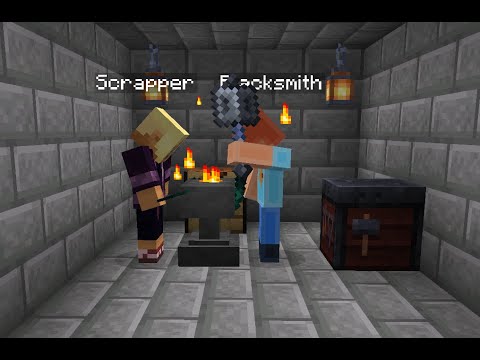
Setting up a new NPC
While most things are automatic, you should set the NPC's idle and working locations for the NPC to automatically move to the crafting station while working. Use "/setNPCPosition idle" to set the position the NPC will go to after it's finished working. Use "/setNPCPosition reforging-workstation" to set the position the NPC will be in while working. As scrappers can salvage lots of different things, they have two additional positions. Use "/setNPCPosition netherite-workstation" to set the position the scrapper will use when working on netherite or armor-trim items (smithing table). Use "/setNPCPosition crafting-workstation" if extended salvage is enabled to set the position the NPC will use when working on extended salvage (crafting table). If book splitting is enabled, you can also
use "/setNPCPosition enchanted-book-workstation" to set the position the scrapper will go to when splitting books.
Remember to disable lookclose or adjust it as described in the FAQ.
FAQ
Citizens lookclose makes NPC rotate weirdly and not face its crafting station
It has been found that with some options, lookclose can still be used. An example of a working lookclose setup is:
"/npc lookclose --linkedbody false --disablewhennavigating true --perplayer true --range 3 --targetnpcs false --headonly true --linkedbody false"
The value of realistic looking "/npc lookclose -r" may also affect behavior. Some other options might work as well, but
a lot of options won't, as it messes with manual NPC rotation. Keep that in mind.
NPCs teleport part of the way while walking to or from a crafting station
This behavior is inevitable. As Citizens pathing is not very accurate (as described in Citizens' FAQ), the NPC must be teleported when it's about to reach the destination to end up in the correct spot.
NPC won't move when delay is less than five seconds
This is a new security feature. Previously, if the work time was set to 0, the NPC would just bug out, as all kinds of
events triggered at once. Five seconds seemed like a good minimum value to ensure the animation would have enough time
to take place.
NPC Position is off by about 90 degrees, or NPC stops right before reaching the workstation
This is usually caused by using an outdated or development Citizens build. Please make sure to use an updated release
build. If you use free Citizens builds, make sure you download builds made the same day the paid build was released, to
avoid unstable development builds.
Commands
| Command                                                    | Options                                                                  | Description                                                                                  |
|------------------------------------------------------------|--------------------------------------------------------------------------|----------------------------------------------------------------------------------------------|
| /reload (/blacksmithvisuals:reload)                        |                                                                          | Reloads the plugin.                                                                          |
| /setNPCPosition <positionType>                             | idle, netherite-workstation, reforging-workstation, crafting-workstation | Sets an idle or working position for an NPC to the current location of the executing player. |
| /playTestSound <sound category> <sound> \[volume] \[pitch] |                                                                          | Plays the specified sound at the selected NPC's location.                                    |
Permissions
| Permission                      | Description                                  |
|---------------------------------|----------------------------------------------|
| blacksmithvisuals.*             | Gives all permissions.                       |
| blacksmithvisuals.reload        | Gives access to the reload command.          |
| blacksmithvisuals.setposition   | Gives access to the /setNPCPosition command. |
| blacksmithvisuals.playtestsound | Gives access to the /playTestSound command.  |
Configuration
Each sound played can be disabled, or have its sound, sound category, pitch, volume and offset specified. The offset can be used to delay a sound to better time it with events happening at the same time as the sound. The working sounds also support a negative offset which causes the working animation to be delayed instead.
The sound category affects which volume slider players must use to decrease the volume of the sound.
The animation of the NPC's arm is triggered according to animationDelay. Then, based on animationChance, it might trigger, or it might not trigger. If you for example want to have it animate on a set delay, you could set animationChance to 100 and animationDelay to 20 to make it swing its arm once a second.
Particles can be set for each crafting station to differ which particle is spawned while working. While
most particles will work, some that have a
specified DataType cannot be used, as extra particle-specific data would be necessary to spawn the particle.
Offhand tool replacement is also available. Each workstation can have its own item that's put into the NPC's hand once
they start working. The idle item is put in the hand once the NPC is finished working. A lot
of materials are available. You can also set
whether the item should look enchanted. Note that no actual enchantments are added, so this behavior shouldn't be
limited based on available enchantments.
Use the reload command after you have altered the configuration. Note that changes won't happen for working sounds and working animations for NPCs in the middle of working when the command is triggered.
See the README for better styled plugin information.
Similar projects
Plugin →Let Me Despawn
Improves performance by tweaking mob despawn rules. Say bye to pesky unintentional persistent mobs.
25MSueta
JourneyMap
Real-time map used for mapping in-game or your browser as you explore.
14.7MSueta
Emotecraft
Create your own emotes in Minecraft.
7.5MSueta
Simple Tpa
A simple tpa plugin which sends requests
5.4MSueta
Common Network
Forge and Fabric Unified Networking Solution
3.9MSueta
Set Home
A lightweight plugin for players to set their homes.
3.8MSueta