
BorderPlus
4.9.6Allows your players to expand the world borders themselves using currency or items.
Description of the BorderPlus Plugin:
BorderPlus is a Minecraft plugin that allows your players to literally move the world borders. This is done through a user-friendly GUI that is fully customizable to meet your needs. Players can pay for expanding the world border using items, blocks, or currency. With the latest update, we’ve introduced a Collective Pot System, enabling players to pool their resources and expand the border together, making the experience even more interactive and engaging.
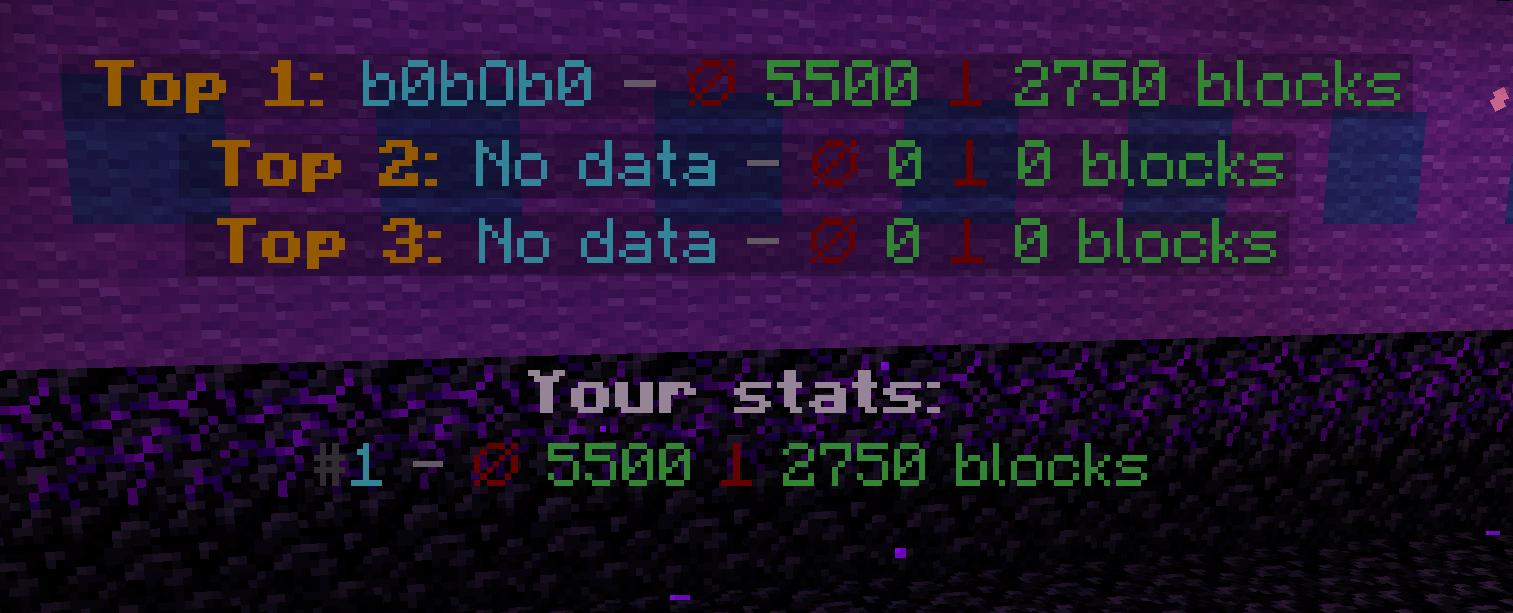
The Collective Pot System gives your server a community-focused twist, where players can contribute items or currency towards a shared goal to extend the world’s border. Once the goal is reached, the border will expand automatically, with a custom notification alerting all online players. The collective system not only tracks contributions but also displays the top contributors on a leaderboard, encouraging friendly competition. To open the pot’s GUI, players simply type /borderplus collective <worldName>.
Each world’s border can be configured with individual limits to prevent expansion beyond a specified maximum radius. This ensures balance and prevents the world from becoming too large to manage. Contributions are tracked through an SQLite database, so no player efforts are lost, even across restarts.
The plugin offers extensive customization options, including per-world GUIs, configurable permissions, support for heads via HeadDatabase and Base64, and integration with economy plugins like Vault and PlayerPoints. Your players will be notified with custom messages and sounds when the border expands, further enhancing the immersive experience.
Java 17+ is required.
Features of the BorderPlus Plugin:
- Each message can be customized.
- Create a separate GUI for each world.
- Each GUI has its own usage permissions.
- Collective Pot System: Players can now contribute together to expand the world border using the
/borderplus collective <worldName>command. - SQLite database system for saving all player expansions.
- Tracks the number of blocks acquired by players.
- Flexible placeholder system for leaderboards.
- Compatible with PlaceholderAPI.
- Notifies all players when someone expands the world border.
- Customizable title when someone expands the world border.
- Supports economy.
- Vault with compatible economies, such as EssentialsX.
- PlayerPoints.
- In one menu for a world, you can add payment options for both currency and items.
- Maximum world border value is specified for each world.
- Support for the HeadDatabase plugin.
- You can use the format
hdb-<head ID>. Example:hdb-4188. - Support for heads in Base64 format.
- Supports hex color codes.
Example:ᱹDA &lDiamond Expansion. - Custom sound settings for each upgrade item. The sound parameter in the GUI.
- Supports the Skulls plugin. To specify a skull, you must use the format
skull-<head ID>. - Automatically expand other worlds relative to the expanding world by listing them in the config.
Commands and Permissions for the BorderPlus Plugin
Player Commands:
-
/borderplus open <World_Name> – Opens the plugin's menu, allowing players to use various functions to expand the world border.
Example:/borderplus open world -
/borderplus collective <World_Name> – Opens the collective contribution menu, enabling players to contribute resources or currency to expand the world border.
Example:/borderplus collective world
Permissions for the BorderPlus Plugin
Player Permissions:
- borderplus.open.<world_name> – Grants players access to the specific world’s menu.
- borderplus.collective.<world_name> – Grants players access to the collective contribution menu for that world.
Admin Permissions:
- borderplus.change – Allows the player to modify the world border using the
/borderplus <amount>command. - borderplus.reload – Grants permission to reload the plugin and its configuration.
Configuration File Example:
config.yml
# ===============================
#       Plugin Settings
# ===============================
#
# You can configure separate GUIs for each world. These GUIs will open automatically
# when a player is in the respective world or by using the command «/borderplus open world_name».
#
# Configuration examples:
#   - Specify the world name and the GUI file that will open for this world.
#   - Comment out or remove lines for unused worlds.
#
settings:
  # Language selection for plugin messages
  # Possible values:
  #   "en" for English
  #   "ru" для Русского
  #   "de" für Deutsch
  #   "fr" pour le français
  #   "es" para español
  #   "it" per l'italiano
  #   "pt" para português
  #   "zh" 表示中文
  language: "en"

  # Show a title to all players when a player expands the world border?
  #    true = show
  #    false = do not show
  show_title: true

  # Enable or disable the use of economy
  economy_enabled: true

  # The economic system to be used
  # Possible values: "playerpoints", "vault", "default"
  # "default" means that the old logic will be used: if both plugins are found, PlayerPoints will be used.
  preferred_economy: "default"

  # The total amount of resources or currency required to reach the goal
  # and trigger the world border expansion.
  # Once the collective goal is reached, the border will expand.
  collective_goal: 1000

  # The number of blocks by which the world border will expand
  # after the goal is achieved.
  # For example, if set to 1000, the world border will expand by 1000 blocks in every direction.
  collective_expansion_amount: 1000

  # The duration (in seconds) it takes for the world border to expand to its new size.
  # For example, if set to 10, the border will take 10 seconds to fully expand after the goal is achieved.
  world_border_expand_duration: 10

  worlds:
    world:
      gui: "gui.yml"
      max_size: 5000
      collective_gui: "collective_gui_world.yml"
      name: "Survival World"
      automatically_expand_worlds:
        # Worlds that expand automatically when this world expands.
        # Key = exact world name on server (check your world/ folder for folder names).
        # Any world works: Nether, End, void, custom, skyblock, etc. Just use its folder name.
        #
        # Value = expansion ratio in format 1.X (means 1:X).
        # The number after the dot is the denominator. Formula: dependent_expansion = source_expansion / X
        #
        # Examples:
        #   1.1 = 1:1  -> multiplier 1.0   -> overworld +1000 = dependent +1000 (same)
        #   1.2 = 1:2  -> multiplier 0.5    -> overworld +1000 = dependent +500  (half)
        #   1.3 = 1:3  -> multiplier 0.333  -> overworld +1000 = dependent +333
        #   1.8 = 1:8  -> multiplier 0.125  -> overworld +1000 = dependent +125 (Minecraft Nether formula)
        #
        # Values outside 1.0-2.0 range are used as raw multiplier (e.g. 0.5 = half, 2.0 = double).
        #
        # Don't want automatic expansion? Remove automatically_expand_worlds block entirely. Old configs without it work fine.
        # Want only Nether to expand? Remove world_the_end line below. Want only End? Remove world_nether.
        world_nether: 1.8   # Nether. 1:8 = overworld +1000 blocks = nether +125 blocks
        world_the_end: 1.1  # End. 1:1 = expands same amount as overworld
      expand_worlds_names:   # display names for automatically_expand_worlds (shown in messages instead of world_nether etc.). Optional.
        world_nether: "Nether"
        world_the_end: "The End"
    #world_nether:
    #  gui: "gui_nether.yml"                     # expansion menu file for Nether
    #  max_size: 625                             # max border diameter (625 = 1/8 of 5000)
    #  collective_gui: "collective_gui_nether.yml"  # collective contribution menu
    #  name: "Nether"                            # display name in messages
    #  depends_on: "world"                       # expands together with world
    #  depends_ratio: 1.8                        # 1.8 = 1:8 Minecraft formula
    #world_the_end:
    #  gui: "gui_end.yml"                        # menu file for End
    #  max_size: 5000                            # max border diameter
    #  collective_gui: "collective_gui_end.yml"  # collective contribution menu
    #  name: "The End"                           # display name
    #  depends_on: "world"                       # expands together with world
    #flat_world:
    #  gui: "gui2.yml"                           # menu for flat world
    #  collective_gui: "collective_gui_flat_world.yml"  # collective menu
    #  max_size: 5000                            # max border diameter
    #  name: "Flat World"                        # display name
    #world3:
    #  gui: "gui3.yml"                           # menu for third world
    #  collective_gui: "collective_gui_world3.yml"
    #  max_size: 5000
    #  name: "Third World"

# ===============================
#    GUI Rotation Settings
# ===============================
#
# Settings for automatic resource rotation in GUI files
#
gui_rotation:
  # Enable automatic resource rotation in GUI
  enabled: true

  # Rotation interval in seconds (for testing)
  # For production, it's recommended to use days: 259200 (3 days)
  interval_seconds: 300

  # Notification settings
  notifications:
    # Show messages about automatic resource rotation
    auto_rotation: true

    # Show messages about manual updates
    #   Message output for command: /borderplus rotategui world_name file_name
    #     example: /borderplus rotategui world collective_gui_world.yml
    manual_rotation: false

    # Show notifications only for collective GUIs
    collective_only: true

    # Show notifications only for regular GUIs
    world_only: false
How the GUI for the world "world" looks:
In the material field, you can use three types of items:
Item names. Example: DIAMOND, which will display a diamond.
Heads from the HeadDatabase plugin. Example: hdb-4188, where 4188 is the ID of the head from the plugin.
Heads in Base64 format. Example:
material: base64-eyJ0ZXh0dXJlcyI6eyJTS0lOIjp7InVybCI6Imh0dHA6Ly90ZXh0dXJlcy5taW5lY3JhZnQubmV0L3RleHR1cmUvZjRhMmFmMjYxMDFmNDRmMTE2YWY5MzM3NzRjMDQ3NGI3NjcxODJlNmNhM2Y4ZmRmMTc2NDFlY2YwMmI2YTE4ZCJ9fX0=
You can find the head you need on the website: https://minecraft-heads.com/
Heads from the Skulls plugin. Example: skull-, where is the ID of the head. Ensure that the Skulls plugin is installed to use this feature.
gui.yml
menus:
border_menu:
title: ' b◂ ˑc8a&lBorder Expansion b▸'
size: 27
items:
increase_diamond_20:
required_material: DIAMOND
cost: 0.0
material: DIAMOND
lore:
- ''
- ' &7Spend &b&l100 diamonds&7 to'
- ' &7increase the world border'
- ' &7by &b&l500 blocks'
- ''
- ' 𩁠⋅  a852click &7- to expand the border'
- ''
required_amount: 100
sound: BLOCK_ANVIL_LAND
weight: 500
economy: false
slot: 10
display_name: 'ᱹDA &lDiamond Expansion'
increase_gold_50:
required_material: GOLD_INGOT
cost: 0.0
material: GOLD_INGOT
lore:
- ''
- ' &7Spend &6&l50 gold ingots&7 to'
- ' &7increase the world border'
- ' &7by &6&l500 blocks'
- ''
- ' 𩁠⋅  a852click &7- to expand the border'
- ''
required_amount: 50
sound: ENTITY_PLAYER_LEVELUP
weight: 500
economy: false
slot: 13
display_name: 'ᱹDA &lGold Expansion'
increase_iron_100:
required_material: IRON_INGOT
cost: 0.0
material: IRON_INGOT
lore:
- ''
- ' &7Spend &f&l100 iron ingots&7 to'
- ' &7increase the world border'
- ' &7by &f&l100 blocks'
- ''
- ' 𩁠⋅  a852click &7- to expand the border'
- ''
required_amount: 100
sound: ENTITY_EXPERIENCE_ORB_PICKUP
weight: 500
economy: false
slot: 16
display_name: '&f&lIron Expansion'
increase_economy_1000:
required_material: EMERALD
cost: 1000.0
material: EMERALD
lore:
- ''
- ' &7Spend &61000 coins&7 to'
- ' &7increase the world border'
- ' &7by &a&l1000 blocks'
- ''
- ' 𩁠⋅  a852click &7- to expand the border'
- ''
required_amount: 1000
sound: BLOCK_GRASS_BREAK
weight: 1000
economy: true
slot: 22
display_name: '&a&lEmerald Border Expansion'
collective_gui_world.yml
menus:
collective_menu:
title: ' b◂ ˑc8a&lPiggy Bank b▸'
size: 27
items:
center_item:
material: GOLD_INGOT
lore:
- ''
- ''
- ' &7Contributed: &a%borderplus_collective_progress_world%&7%'
- ' %progress_bar_world%'
- ''
- ' &9&lLeaders'
- ' &e1st place: &b%borderplus_collective_top_name_1%'
- ' &e2nd place: &b%borderplus_collective_top_name_2%'
- ' &e3rd place: &b%borderplus_collective_top_name_3%'
- ''
- ' &aYour contribution: &7%borderplus_collective_player_contribution%'
- ''
- ' 𩁠⋅  a852Click the buttons below'
- ' 𩁠 below to contribute'
- ''
slot: 13
display_name: '&eWorld Expansion Progress'
contribute_1:
material: IRON_INGOT
lore:
- ''
- ' &7Click to contribute'
- ' &a1 &7resource to the piggy bank.'
- ''
slot: 21
economy: false
display_name: '&aContribute 1 resource'
contribution_amount: 1
contribute_100:
cost: 100.0
material: EMERALD
lore:
- ''
- ' &7Click to contribute'
- ' &a100 coins &7to the piggy bank.'
- ''
slot: 23
economy: true
display_name: '&aContribute 100 coins'
contribution_amount: 100
Message File:
# ===============================
# Plugin Messages #
# ===============================
#
# You can customize it to your liking and make it more informative and appealing.
# ===============================
messages:
border_expanded_one: |
A0DAD&l *✧・゚ &#C4B0FBWorld border expanded A0DAD&l゚・✧*
A0DAD &#AB47BC%player% A0DADexpanded &#B388EB%borderplus_world_name% by A0DAD&#AB47BC%actual_amount% A0DADblocks!!
A0DAD
&#C4B0FB New world borders:
E57C2 Min. coordinates: ╧CD[%minX%, %minZ%]
E57C2 Max. coordinates: ╧CD[%maxX%, %maxZ%]
%expanded_worlds_info%
A0DAD&l ・✧゚======================= ゚✧・
border_expanded_piggybank: |
A0DAD&l *✧・゚ &#C4B0FBWorld border expanded A0DAD&l゚・✧*
A0DAD &#AB47BC%player% A0DADexpanded &#B388EB%borderplus_world_name% by A0DAD&#AB47BC%actual_amount% A0DADblocks!!
A0DAD
&#C4B0FB New world borders:
E57C2 Min. coordinates: ╧CD[%minX%, %minZ%]
E57C2 Max. coordinates: ╧CD[%maxX%, %maxZ%]
%expanded_worlds_info%
A0DAD&l ・✧゚======================= ゚✧・
expanded_worlds_header: "&#C4B0FB Also expanded:"
expanded_worlds_line: "E57C2 &#B388EB%world_name%E57C2: Min ╧CD[%minX%, %minZ%] E57C2- Max ╧CD[%maxX%, %maxZ%]"
insufficient_items: "&cYou don't have enough %material% (%needed% pcs.)!"
insufficient_funds: " &cNo money, but you're holding on. Required: %cost%."
items_removed: "\nᱹDA Removed ᱹDA&l%amount_removed% ᱹDAitems from your inventory.\n "
money_removed: "\nᱹDA Removed ᱹDA&l%amount_removed% ᱹDAcoins from your account.\n "
invalid_number: "&cInvalid number."
gui_item_not_found: "&cItem not found in the menu."
reload_complete: "&aConfiguration reloaded."
title_message: "&eWorld border expansion"
title_next: "&e%player% expanded the world border by %actual_amount% blocks"
usage: "&cNot enough arguments"
usage_open: "&cInvalid command usage! &7Use: &f/borderplus open &e<world name>"
no_permission: " &cNo permission, better luck next time."
loaded_guis: "§aLoaded GUIs for worlds:"
world_gui_info: "§aWorld: §e{world} §a| GUI: §e{gui}"
gui_not_found: "§cGUI for this world not found."
gui_title_size: "Title: %title% | Size: %size%"
max_radius_reached: "§cWorld border has already reached its maximum size. Further expansion is not possible."
no_data: "No data"
not_in_top: "Not in top"
not_found: "Not found"
world_not_found: "World not found"
invalid_position_number: "Invalid position number"
usage_change: |
&#ff6b6b✧ &cUsage:
&#ff6b6b &f/borderplus change &8[&e<world>&8] &e<amount>
&#ff6b6b &7Examples:
&#ff6b6b &f/borderplus change 1000
&#ff6b6b &f/borderplus change world 500
invalid_world: |
&#ff5252✖ &cWorld &cnot found. Please check the name and try again.
border_changed: |
A0DAD
A0DAD&l *✧・゚ &#C4B0FBWorld border &#AB47BC%world% &#C4B0FBchanged by &#AB47BC%amount% &#C4B0FBblocks! A0DAD&l゚・✧*
A0DAD
gui_rotation_changed: |
A0DAD&l *✧・゚ &#C4B0FB🔄 Items Update A0DAD&l゚・✧*
A0DAD &#AB47BC%world% A0DAD- required items changed
A0DAD&l ・✧゚======================= ゚✧・
gui_rotated_manually: |
A0DAD&l *✧・゚ &#C4B0FB⚡ Force Update A0DAD&l゚・✧*
A0DAD &#AB47BC%world% A0DAD- items updated by admin
A0DAD&l ・✧゚======================= ゚✧・
# Log messages
log_gui_rotation_enabled: "GUI rotation enabled: %enabled%"
log_rotation_interval: "Rotation interval: %seconds% seconds"
log_auto_notifications: "Auto notifications: %enabled%"
log_manual_notifications: "Manual notifications: %enabled%"
log_rotation_task_started: "GUI rotation task started (checking every 30 seconds)"
log_gui_rotated: "GUI rotated for world %world% file: %gui% (interval: %seconds%s)"
# Command messages
command_rotategui_usage: "Usage: /borderplus rotategui <worldName> [guiFile]"
command_world_settings_not_found: "§cSettings for world %world% not found"
command_gui_status_header: "§6=== GUI Status for world %world% ==="
command_gui_status_main: "§eMain GUI: §f%gui%"
command_gui_status_collective: "§eCollective GUI: §f%gui%"
command_gui_status_rotations: "§6Active rotations:"
command_gui_status_no_rotations: "§7No active rotations"
command_gui_status_rotation_item: "§7- %key%: %value%"
command_gui_status_next_rotation: "§eTime until next rotation: §f%minutes%m %seconds%s"
command_gui_status_next_rotation_soon: "§eNext rotation: §fsoon"
# ============= End of Messages Settings ================== #
BorderPlus Plugin Placeholders:
Requires PlaceholderAPI to function correctly.
General Placeholders:
-
%borderplus_player_rank%
Returns the player’s current rank on the leaderboard based on the number of blocks expanded. If the player is not in the top rankings, it returns the message "Not in the top." -
%borderplus_player_blocks%
Shows the total number of blocks the player has contributed to expanding the world border. This placeholder reflects the cumulative amount of blocks expanded by a specific player. -
%borderplus_top_block_nick_X%
Returns the name of the player who holds a specific position (X) on the leaderboard by block expansion.- X is the l
Similar projects
Plugin →VeinMiner
Mine the whole vein on mining a single ore/block. Make the tedious mining experience to something satisfying and fun! FTB Ultimine alternative
99.3MSueta
Let Me Despawn
Improves performance by tweaking mob despawn rules. Say bye to pesky unintentional persistent mobs.
25MSueta
VeinMiner Enchantment
Veinminer Addon - Adds vineminer enchantment to enchanting tables. Only tools with the enchantment can veinmine
18MSueta
JourneyMap
Real-time map used for mapping in-game or your browser as you explore.
14.7MSueta
Emotecraft
Create your own emotes in Minecraft.
7.5MSueta
Simple Tpa
A simple tpa plugin which sends requests
5.4MSueta