
THIS PLUGIN IS NO LONGER SUPPORTED BY THE DEVELOPPER SINCE SUMMER 2016.
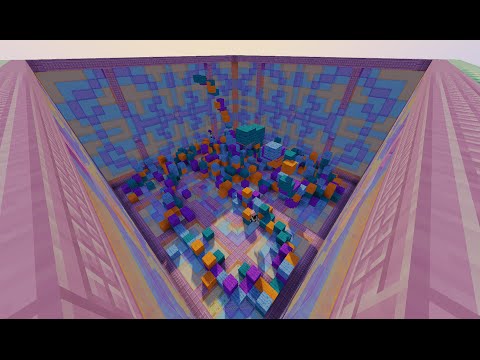
Players are thrown into an arena. The only goal: Survive!
Run for your life as blocks fall on top of your head and try to crush your opponents and survive the longest.
As the blocks accumulate in the arena, it gets harder and harder...
This plugin is an original idea I once did in command blocks on my old server. Now that I know Java and started doing plugins, I decided to recreate it with further functionnalities.
Thanks to Golube who had the original idea on my old server and helped me debugging this plugin.
Don't hesitate to send me suggestions or feedback to help me in my future projects.
Features:
- Compatibility with minecraft 1.7.10 and afterward
- Support singleplayer and multiplayer games with up to 10 players.
- User friendly interfaces and signs
- Many stats regarding the past games of all players
- Editable achievements for players to reach.
- Fun challenges for players to complete
- Compatible with Vault and monetary rewards for game rewards and challenges' rewards
- Arenas easily set and highly editable
- Editable block type and color for the block shower.
- Multiple language support. Comes with English, French and German.
- Language can be chosen individually by players with their preferences.
- Compatible with multi-world and multi-inventory plugins
Images
Images
Videos
Videos
English Tutorial - Thanks to IKFFxRaPzZ for the video!
German tutorial - Thanks to Mamuschkas for the video!

Spanish tutorial - Thanks to Maximiliano for the video!

Set Up and Installation
Compatibility: 1.8.7+ and 1.9
Online Servers
WARNING: If using Paper, blocks will glitch while landing breaking the gameplay. This is a known issue, don't report it to me, I can't do anything about it. Here is the link to the issue on Paper's github : https://github.com/PaperMC/Paper/issues/336
Required Plugins
- WorldEdit
Recommended plugin:
- Vault
- An Economy plugin of some kind e.g. Essentials, etc.
- PermissionsEx to manage groups and permissions
Installation and Configuration:
For upgrading, see release notes.
- Download the plugin (CubeRunner.jar) and other mandatory plugins
- Place into your plugin folder
- Restart your server - this will make the config.yml file
- Open the plugin/CubeRunner folder.
- Open up config.yml and adjust how you like. If you enable the economy rewards, you must have Vault on your server.
- Start your server again
- Permissions should be set by default, unless you use a permissions manager. In which case, set up permissions.
- Set up arenas
- Enjoy
Setting up arenas important notes
- The zone must be a cuboid world edit region. It can't be another shape in the current version
- The start point must be inside of the zone or the arena won't become available
- The lobby must be outside of the zone or the arena won't become available
- The walls of the arena must be straight or else players will be able to hide inside the walls
- You may decorate the interior of the arena (To change the visual shape of the arena, put columns or else) but remember that every block in the zone previously set with world edit that is also a selected block in the /cr setcolor <arena> will be removed before each game.
- If you use worldguard and you have your region said to either build deny, blockbreak deny or blockplace deny it will not work and the blocks will break! So best to not use those region flags.
Commands:
Do /cr help in game to get the complete list
Player Commands
- /cr - Get the plugins's description
- /cr help [category] [page] - Get all CubeRunner's commands
- /cr join - Opens a GUI with the list of all arenas. Click a specific arena to join it
- /cr join <arena> - Automaticly join the lobby and the game
- /cr quit - Quit your current game
- /cr stats - Take a look at all your stats, challenges, and the top 10 players for the different stats
- /cr start - Start the countdown before the game starts
- /cr language - Get the available languages list
- /cr language <language> - Set your language to the selected language
Admin Commands
- /cr new <arena> - Creates a new arena
- /cr delete <arena> - Delete an arena
- /cr setlobby <arena> - Set an arena's lobby
- /cr setstartpoint <arena> - Set the game's starting point for an arena
- /cr setzone <arena> - Must first have a cuboid world edit selection for executing this command. Set an arena's zone where the players can move and blocks can spawn
- /cr setcolor <arena> - Set the pillar's block's type for an arena
- /cr setminplayer <arena> <amount> - Set the minimum amount of players for an arena
- /cr setmaxplayer <arena> <amount> - Set the maximum amount of players for an arena
- /cr reload - reload the config, the language files and the player data
Configuration:
Default config
############################################################
# +------------------------------------------------------+ #
# |                       Notes                          | #
# +------------------------------------------------------+ #
############################################################

# CubeRunner plugin
# Made by PoutineQc
# config.yml - Config File

# If you want to edit the challenges' rewards
# Go in the achievements.yml file in the plugin/CubeRunner folder

############################################################
# +------------------------------------------------------+ #
# |         CubeRunner general configuration             | #
# +------------------------------------------------------+ #
############################################################

# Currently available languages:
# "fr" - Francais
# "en" - English
# "de" - Deutsch
# You may make another YAML file with another language
# Simply put it in the LanguageFiles folder and write it's name here (without the ".yml")
# This will option will be the "CR server language".. The signs will be in this language.
# Warning: If you change this, a simple /dac reload won't do, you'll have to restart the server.
language: 'en'

# Set to true if you have a MySQL database and fill the information below
# Warning: If you change this, a simple /dac reload won't do, you'll have to restart the server.
mysql: false
host: 127.0.0.1
port: 3306
user: ''
password: ''
database: 'minecraft'
tablePrefix: 'cuberunner_'

# If you want the Plugin's "logo" ([cr] if not changed) to be displayed in front of every messages
prefixInFrontOfEveryMessages: true

# True : The game starts automaticly as soon as there are enough players in the lobby
# False : Players have to manually start the game
autostart: true

# The countdown from the moment a players starts the game to the beginning of the block shower. (in seconds)
# Players may still join the game during this countdown
countdownTime: 15

# Set to true if you want player's inventories to be cleared during a game and returned after it.
# Note : If the server crash of the plugin throws an error (which should not happend) during a game,
#   the player will permenantly loose it's inventory
saveAndClearInventory: true

# Set to true if you want players to get back to their original location after the end of the game
teleportAfterEnding: true

# Broadcasts
# True to enable - False to disable
broadcasts:
  startup: true
  achievement: true
  ending:
    singleplayer: true
    multiplayer: true


############################################################
# +------------------------------------------------------+ #
# |           Rewards and end game commands              | #
# +------------------------------------------------------+ #
############################################################

# Economy Rewards
# Requires Vault and an economy plugin
economyRewards: false

# Reward at the end of the game
# The reward will be the amount selected below times the score of the player
# Choose the reward amounts depending on the values of your server's economy
pricePerScore: 0.05

# if true, when completing a challenge gives a money reward
# will be false in all cases if you disable the economy rewards
achievementsRewards: true

# Commands that the console will execute at the end of the game
# (Examples below)
# +-----------------------------------------------------------------------------------------------------+
# | Key Words | Commands with this node are executed :                                                  |
# |-----------------------------------------------------------------------------------------------------|
# | %winner%  | when the last player from a multiplayer game is eliminated where %winner% is the winner |
# | %player%  | whenever a player is eliminated where %player% is the eliminated player                 |
# | (nothing) | at the end of a game                                                                    |
# |-----------------------------------------------------------------------------------------------------|
# | %all%     | Everybody playing and watching                                                          |
# | %arena%   | Name of the arena the game is being played in                                           |
# | %prefix%  | CubeRunner's prefix as in all CubeRunner's messages                                     |
# +-----------------------------------------------------------------------------------------------------+
commands:
#  - minecraft:playsound minecraft:entity.zombie.death hostile %player%
#  - minecraft:give %winner% minecraft:apple 10
#  - send %all% hub
#  - minecraft:tell @a %prefix% The CubeRunner's arena %arena% is now ready for a new game
#  - minecraft:weather clear

############################################################
# +------------------------------------------------------+ #
# |                      Updates                         | #
# +------------------------------------------------------+ #
############################################################

checkForUpdates: true
Achievements config
# File to edit the achievements
# Maximum of 7 achievements per categories
# Minimum of 0 if you want to disable them
# Don't worry about this file if you have set
# the economy rewards to false in the config.

# How to use:
# - amount_to_achieve;reward amount

amountOfGamesPlayed:
  - 10;10.0
  - 50;50.0
  - 150;200.0
  - 500;1000.0
totalScore:
  - 100;5.0
  - 1000;40.0
  - 3600;100.0
  - 15000;750.0
amountPlayerKills:
  - 1;5.0
  - 5;10.0
  - 20;50.0
  - 100;200.0

multiplayerGamesWon:
  - 2;5.0
  - 20;40.0
  - 75;100.0
  - 250;300.0

# Challenge Rewards
rewardSurvive5Minutes: 25.0
rewardFillTheArenasFloor: 50.0
rewardReachHeight10: 100.0
rewardTheRageQuit: 15.0
rewardTheKillerBunny: 15.0
rewardTheAnswerToLife: 15.0
Permissions:
Recommended permissions:
For players:
- cuberunner.player.*
For admins:
- cuberunner.admin.*
Permissions
Scroll down in the code box to see all permissions:
permissions:
  cuberunner.*:
    description: Gives access to all CubeRunner's commands
    children:
      cuberunner.player.*: true
      cuberunner.admin.*: true
  cuberunner.player.*:
    description: Gives access to all commands simply needed to play the game
    children:
      cuberunner.player.list: true
      cuberunner.player.info: true
      cuberunner.player.stats: true
      cuberunner.player.language: true
      cuberunner.player.play.*: true
  cuberunner.player.list:
    description: Allows to see the list of arenas
    default: true
  cuberunner.player.info:
    description: Allows to see arenas' infos
    default: true
  cuberunner.player.stats:
    description: Allows a player to see his stats
    default: true
  cuberunner.player.language:
    description: Allows to change your personal language
    default: true
  cuberunner.player.play.*:
    description: Gives all the access to play a game normally
    children:
      cuberunner.player.play.join: true
      cuberunner.player.play.quit: true
      cuberunner.player.play.start: true
  cuberunner.player.play.join:
    description: Allows to join a game
    default: true
  cuberunner.player.play.quit:
    description: Allows to quit a game
    default: true
  cuberunner.player.play.start:
    description: Allows to start a game
    default: true
  cuberunner.admin.*:
    description: Gives access to all commands needed to setup arenas and other admin stuff.
    children:
      cuberunner.admin.reload: true
      cuberunner.admin.info: true
      cuberunner.admin.edit.*: true
  cuberunner.admin.reload:
    description: Allows to reload the plugin's config
    default: op
  cuberunner.admin.info:
    description: Allows to see advanced arenas' infos
    default: op
  cuberunner.admin.edit.*:
    description: Gives access to all commands needed to setup arenas and other admin stuff.
    children:
      cuberunner.admin.edit.new: true
      cuberunner.admin.edit.delete: true
      cuberunner.admin.edit.zone: true
      cuberunner.admin.edit.lobby: true
      cuberunner.admin.edit.startpoint: true
      cuberunner.admin.edit.sign: true
      cuberunner.admin.edit.color: true
      cuberunner.admin.edit.amountplayer.*: true
  cuberunner.admin.edit.new:
    description: Allows to create a new arena
    default: op
  cuberunner.admin.edit.delete:
    description: Allows to delete an arena
    default: op
  cuberunner.admin.edit.zone:
    description: Allows to select the zone of an arena
    default: op
  cuberunner.admin.edit.lobby:
    description: Allows to edit the lobby position of an arena
    default: op
  cuberunner.admin.edit.startpoint:
    description: Allows to edit the startpoint of an arena
    default: op
  cuberunner.admin.edit.sign:
    description: Allows to setup CubeRunner's signs
    default: op
  cuberunner.admin.edit.color:
    description: Allows to set the block colors for the arena
    default: op
  cuberunner.admin.edit.amountplayer.*:
    description: Gives access to the two commands that edit the min and max amount of players per arena.
    children:
      cuberunner.admin.edit.amountplayer.minplayer: true
      cuberunner.admin.edit.amountplayer.maxplayer: true
  cuberunner.admin.edit.amountplayer.minplayer:
    description: Allows to edit the minimum amount of player for an arena
    default: op
  cuberunner.admin.edit.amountplayer.minplayer:
    description: Allows to edit the maximum amount of player for an arena
default: opSimilar projects
Plugin →Let Me Despawn
Improves performance by tweaking mob despawn rules. Say bye to pesky unintentional persistent mobs.
26.2MSueta
JourneyMap
Real-time map used for mapping in-game or your browser as you explore.
14.7MSueta
Emotecraft
Create your own emotes in Minecraft.
7.9MSueta
Simple Tpa
A simple tpa plugin which sends requests
5.4MSueta
Common Network
Forge and Fabric Unified Networking Solution
4.7MSueta
Set Home
A lightweight plugin for players to set their homes.
3.8MSueta