
The best plugin for building curves
Make curved structures using commands and WorldEdit.
Features
- Place the selected structure freely along a Bezier curve.
- Preview a simplified drawing of the curve.
- Create a curve using continuously connected segments.
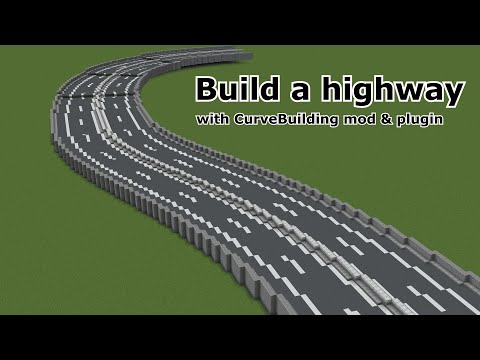
- Ideal for constructing infrastructure, such as roads.
- WorldEdit undo functionality is available.
Installation
This plugin requires WorldEdit or FastAsyncWorldEdit.
Copy curvebuilding-bukkit-*.jar to plugins directory.
If you are using fabric client or server, please download the fabric version.
If you have suggestions for other versions or features, please comment on the Discussions.
Commands
/curvebuilding reload - Reload CurveBuilding
//bcpos set <pos type> - Sets a connection point at your current position
A connection point is a coordinate that a curve must pass through. Specify "pos type" in the format of a single number or a number followed by f or b, such as 1, 1b, 2, 2f, 2b, 3, 3f, 3b, and so on.
Each curve set has two connection points (starting and ending points) and two control points (starting point's control point and ending point's control point). You can specify the starting point's control point by adding "f", and the ending point's control point by adding "b".
When making a curve with continuously connected curves, the connection points between the start and end points throughout have both "f" and "b" control points.
//bcpos clear <pos type> - Delete the specified connection or control point
//bcpos clearall - Delete all connection and control points
//bc [-options] [n] [m] - After making all the connection and control points and selecting the structure to curve using worldEdit, use this command to make the curve
The following settings are available for [-options].
-a: Replace only air blocks with the curve
-x: Read the region in X-direction
-z: Read the region in Z-direction
Regions can be plane or solid. Face the front of the region and check Facing on the Debug screen first.
If Facing is Z (Towards positive Z or Towards negative Z), enter //bc -z when making the curve. If Facing is X (Towards positive X or Towards negative X), enter //bc -x when making the curve. If Facing is negative (Towards negative X or Towards negative Z), the orientation in which the selected structure is placed will be reversed.
Permissions
CurveBuilding.pos - Gives access to bcpos commands
CurveBuilding.bc - Gives access to bc commands
CurveBuilding.admin - Gives access to curvebuilding commands
Config
# Message file path
message-file: "%datafolder%/messages/en-US.yml"
curve:
  # Fineness of the curve
  fineness: 10
  # Maximum length a curve can be built
  max-set-length: 10000
  # Maximum value of pos that can be set with the pos command
  max-pos-value: 100
  # If this value is true, the center will be thicker
  thicken-center: false
  # Default maximum block change limit for CurveBuilding
  # If this value is -1, it means unlimited
  default-max-change-limit: 10000000
particles:
  pos:
    # Particle color
    color:
      pos: 0x00FFFF
      start_pos: 0xFF00FF
      end_pos: 0xFFFF00
      f: 0xFF0077
      b: 0x7700FF
    # Particle density per block
    density: 4
  line:
    # Particle density per block
    density: 4
    # Maximum length to display particles
max-length: 10000Similar projects
Plugin →Let Me Despawn
Improves performance by tweaking mob despawn rules. Say bye to pesky unintentional persistent mobs.
25MSueta
JourneyMap
Real-time map used for mapping in-game or your browser as you explore.
14.7MSueta
Emotecraft
Create your own emotes in Minecraft.
7.5MSueta
Simple Tpa
A simple tpa plugin which sends requests
5.4MSueta
Common Network
Forge and Fabric Unified Networking Solution
3.9MSueta
Set Home
A lightweight plugin for players to set their homes.
3.8MSueta