
CustomScreenMenu
1.5.0A groundbreaking plugin that completely customizes players' screen option menus and features 3D mode
- Tested MC versions
- 1.19, 1.20, 1.21, 26.1, 26.2
CustomScreenMenu Plugin Documentation
A high-performance, fully customizable in-game menu plugin for modern Minecraft servers.
Native Folia support included.
For bug reports or suggestions, join the official Discord.
The open-source version doesn't come with tech support. Buying or donating is just a great way to encourage the author to keep developing and also get support and help for the plugin.
Core Features
- Future-proof: Stable on the latest Minecraft releases, compatible with Folia.
- Command-driven: Open or close any screen with a single command.
- Scenario-ready: Auto-display a personal start menu when a player first joins.
- 3-D item showcase: Hovering, rotatable models of held items.
- Extensible: Seamless integration with ItemsAdder, betterhud, and more.
Commands
| Command | Description |
|---|---|
/cursormenu run <name> | Opens the custom menu with the given name. |
/cursormenu stop | Instantly closes the active menu. |
/cursormenu items <item_name> | Displays a 3-D model of the item in your hand. |
/cursormenu itemsstop | Ends the current 3-D item preview. |
/cursormenu reload | Reloads all configuration files (required after edits). |
Highlights
- 360° camera orbit around the menu or item.
- Join-trigger: Decide whether the menu should open automatically on every login.
- 3-D model settings: custom model-data, rotation toggle, glow toggle.
- Text placement: precise X, Y, Z offsets and tilt angles for any on-screen text.
- Instant teleport: warp the player the moment they enter the menu.
- …and many more configurable options.
PlaceholderAPI:
%cursormenu_current_menu% – the name of the menu currently open
%cursormenu_selected_option% – the name of the currently highlighted option
%cursormenu_display_item_id% – the ID of the item currently shown
%cursormenu_clicked_option% – the key of the text layout component that was just clicked
%cursormenu_menu_world% – the world in which the menu is located
%cursormenu_button_x% – X coordinate of the selected button
%cursormenu_button_y% – Y coordinate of the selected button
%cursormenu_button_z% – Z coordinate of the selected button
%cursormenu_is_attacking_or_breaking% – Determine whether the player is currently attacking and destroying blocks, with true as yes and false as no
Integrations
| Plugin | Added Capabilities |
|---|---|
| ItemsAdder | Floating 3-D models, live enchants & lore display, custom item panels. |
| betterhud | Render menu elements directly onto the player HUD for a seamless look. |
Demo Videos
- Demo 1 – Menu Interaction
- [Demo 2 – Menu example for registration and login
- Demo 3 – Advanced Menu Design
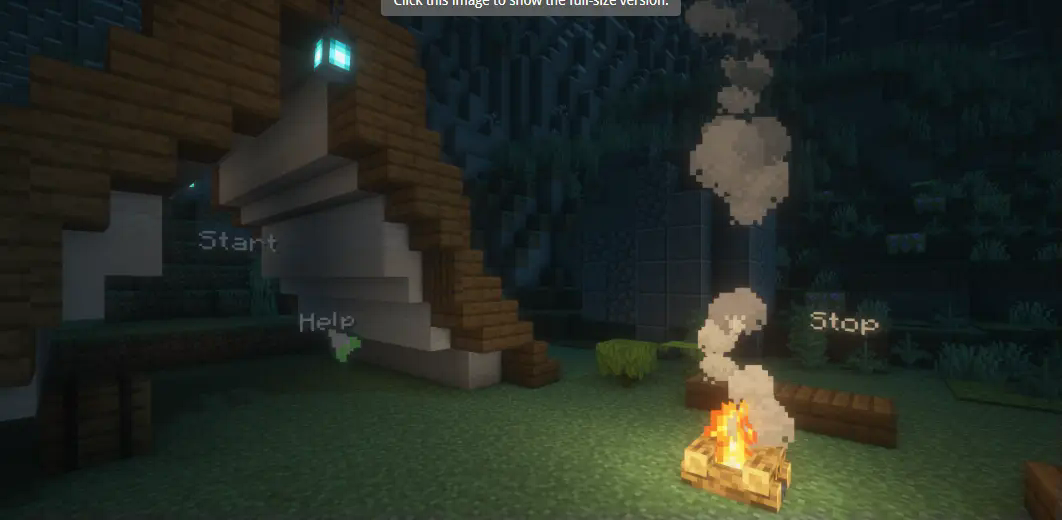 # CustomScreenMenu Plugin Documentation
Similar projects
Plugin →VeinMiner
Mine the whole vein on mining a single ore/block. Make the tedious mining experience to something satisfying and fun! FTB Ultimine alternative
99.3MSueta
Simple Voice Chat
A working voice chat in Minecraft!
76.8MSueta
VeinMiner Enchantment
Veinminer Addon - Adds vineminer enchantment to enchanting tables. Only tools with the enchantment can veinmine
18MSueta
JourneyMap
Real-time map used for mapping in-game or your browser as you explore.
14.7MSueta
WorldEdit
A Minecraft Map Editor... that runs in-game! With selections, schematics, copy and paste, brushes, and scripting. Use it in creative, or use it temporarily in survival.
11.6MSueta
Plasmo Voice
A proximity voice chat mod with audio positioning and lots of features
4.1MSueta