

CustomSigns is a plugin that moves Signs to a new level!
You can format signs however you want! Its up to you and your creativity!
If you like this plugin don't forget to rate it!

- Use colors in signs!
- Use preloaded signs with useful features!
- Create your own signs!
- Send any command or message when click on sign!
- Use variables (now just $player)
- And most important Use Placeholders from PlaceholderAPI !

Currently there is just one command and that is for reloading the plugin
- /customsigns reload

There are few permissions for this plugin:
- customsigns.*
- Permission to allow everything
- customsigns.color
- Permission to allow using color in signs
- customsigns.medic
- Permission to allow creating medic signs
- customsigns.custom
- Permission to allow creating custom signs from config

Here I am gonna show you how you can create your own signs!
Here are some examples:
Example - Message
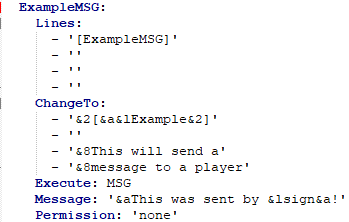
To create Message sign all you have to do in config is this:
- Create new sign and give it a name
- (In our case it is ExampleMSG)
- (You can set anything here)
- Then go and set it a Lines
- (Lines are lines you have to type on sign)
- Then set ChangeTo
- (This will be replaced when lines on your sign are equal to Lines in config (You can use colors))
- Then choose Execute method
- (Since we are making sign with Messages set it to MSG)
- Then set Message that will be send to player
- (Since we are making sign with Messages we only need Message (You can use colors, variables and if you want next line use /n))
- Then set Permission
- (If player has this permission he can use this sign.)
- (If you do not want any permission set it to none)
That is all for Message sign. It's simple :)
Example - Command

To create Command sign all you have to do in config is this:
- Create new sign and give it a name
- (In our case it is ExampleCMD)
- (You can set anything here)
- Then go and set it a Lines
- (Lines are lines you have to type on sign)
- Then set ChangeTo
- (This will be replaced when lines on your sign are equal to Lines in config (You can use colors))
- Then choose Execute method
- (Since we are making sign with Command set it to CMD)
- Then set Command that will be executed
- (Since we are making sign with Command we only need Command (You can use colors and variables here))
- (If you want the command to be executed by console set it without '/')
- (If you want the command to be executed by player set it with '/')
- Then set Permission
- (If player has this permission he can use this sign.)
- (If you do not want any permission set it to none)
That is all for Command sign. Simple right? :)
Example - Message & Command
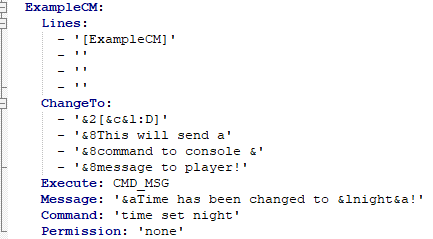
To create sign with Command & Message all you have to do in config is this:
- Create new sign and give it a name
- (In our case it is ExampleCM)
- (You can set anything here)
- Then go and set it a Lines
- (Lines are lines you have to type on sign)
- Then set ChangeTo
- (This will be replaced when lines on your sign are equal to Lines in config (You can use colors here))
- Then choose Execute method
- (Since we are making sign with Command and Message set it to CMD_MSG)
- Then we need to set Message that will be send to player
- (You can use colors, variables and for new line use /n)
- Now we need to set Command that will be executed
- (You can use colors and variables here)
- (If you want the command to be executed by console set it without '/')
- (If you want the command to be executed by player set it with '/')
- Then set Permission
- (If player has this permission he can use this sign.)
- (If you do not want any permission set it to none)
That is all for Command & Message. It's not that hard :)

- Create custom signs with command
- Edit placed signs
- More preloaded signs with functions
Similar projects
Plugin →Let Me Despawn
Improves performance by tweaking mob despawn rules. Say bye to pesky unintentional persistent mobs.
25MSueta
JourneyMap
Real-time map used for mapping in-game or your browser as you explore.
14.7MSueta
Emotecraft
Create your own emotes in Minecraft.
7.5MSueta
Simple Tpa
A simple tpa plugin which sends requests
5.4MSueta
Common Network
Forge and Fabric Unified Networking Solution
3.9MSueta
Set Home
A lightweight plugin for players to set their homes.
3.8MSueta