
Discord-Link
2.0.0The most complete discord linking plugin. Link players's Minecraft account with they Discord Account. A bot hosted in the plugin Fully customizable, you can force the player to link to join the server
- Tested MC versions
- 1.21, 26.1, 26.2, 26.3








DiscordLink v2 (NEW VERSION  )
)
Connect your Minecraft server to Discord with account linking, role management, multi-language support and a full admin panel built with Discord Components V2
✨ What's new in v2
 Language system — the whole plugin and bot are now translatable (French & English included, add your own)
 Admin panel (Components V2) — manage the bot and every linked player directly from Discord, no more console commands
 Linked players browser — paginated list, search, player details, force unlink in one click
 Live bot settings — toggle features, edit roles & channels, reload config from the panel
 Per-player language — each player can choose their own language in-game and on Discord
 In-game GUIs — manage the bot and linked players without leaving Minecraft, with fine-grained permissions (op by default)
Features
🌍 Language System
- Built-in languages:
fr_FRanden_USshipped by default - Language files: every message lives in
plugins/DiscordLink/languages/<locale>.yml - Custom languages: drop a new file (e.g.
es_ES.yml) and it's loaded automatically - Per-player locale: players pick their language with
/lang, or it's auto-detected from their Minecraft client - Discord locale detection: bot replies follow the user's Discord language when available
- Localized slash commands: command descriptions follow each Discord client language
- MiniMessage support: gradients, hover, click events in every in-game message
- Fallback system: missing keys fall back to the default language, no broken messages
🎛️ Admin Panel (Discord Components V2)
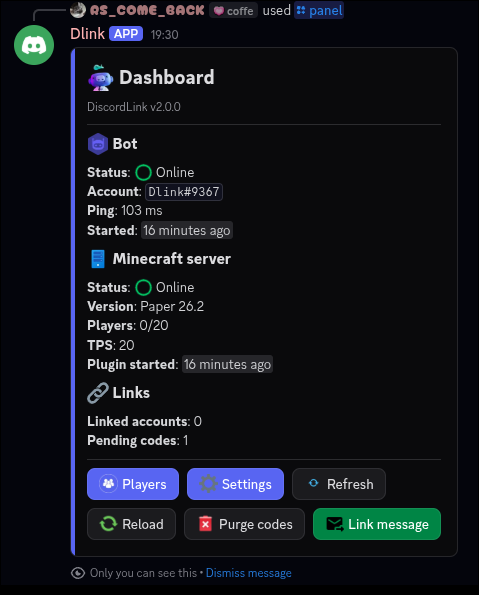
A single /panel command opens an interactive, ephemeral control panel built with Components V2 (containers, sections, separators, buttons, select menus and modals).
Dashboard
- Bot status, uptime, ping, Minecraft server state
- Linked accounts count, online players, pending codes
- Quick actions: reload, clear expired codes, refresh
Linked Players
- Paginated list of all linked accounts (Minecraft name, Discord user, link date, online status)
 Search by Minecraft name, UUID or Discord user (modal)
- Player detail view with skin head thumbnail
- Actions: Force unlink, Resync roles, Add / remove bypass, Change language
- Confirmation step before any destructive action
Bot Settings
- Toggle mandatory linking, role sync, online role, each log type
- Select linked / online roles with role select menus
- Select log channel with a channel select menu
- Select the roles allowed to use the panel
- Edit code length & expiration with a modal
- Change default language
- Changes are saved to
config.ymlinstantly — no restart needed
Security
- Panel access restricted to configurable Discord roles or
Administratorpermission - Every panel action is logged in the log channel (who, what, when)
🧰 In-game GUIs
Everything available in the Discord panel is also available in-game through inventory menus, powered by SmartInvs (shaded, nothing to install).
Open the main menu with /discordlink gui (alias /dl gui).
Main menu
- Bot status (online, ping, guild), linked accounts count, pending codes
- Shortcuts to every sub-menu, reload button, clear expired codes
Linked Players menu
- Paginated list of linked players displayed with their skin head
- Lore: Discord user, link date, language, online status
- Filters: all / online / offline, search via chat input
- Click a head to open the player menu: Force unlink, Resync roles, Toggle bypass, Change language
- Confirmation menu before any destructive action
Bot Settings menu
- Toggle mandatory linking, role sync, online role and each log type
- Change code length & expiration (left / right click, shift for ×10)
- Change default language
- Changes saved to
config.ymlinstantly
Language menu
- Players can pick their language with
/lang(no argument opens the GUI)
Permissions
- Each menu and action has its own permission, all granted to op by default
- Give staff only what they need (e.g. view players but not unlink)
- Menu titles, items, materials and lore are fully translatable in the language files
🔗 Account Linking System
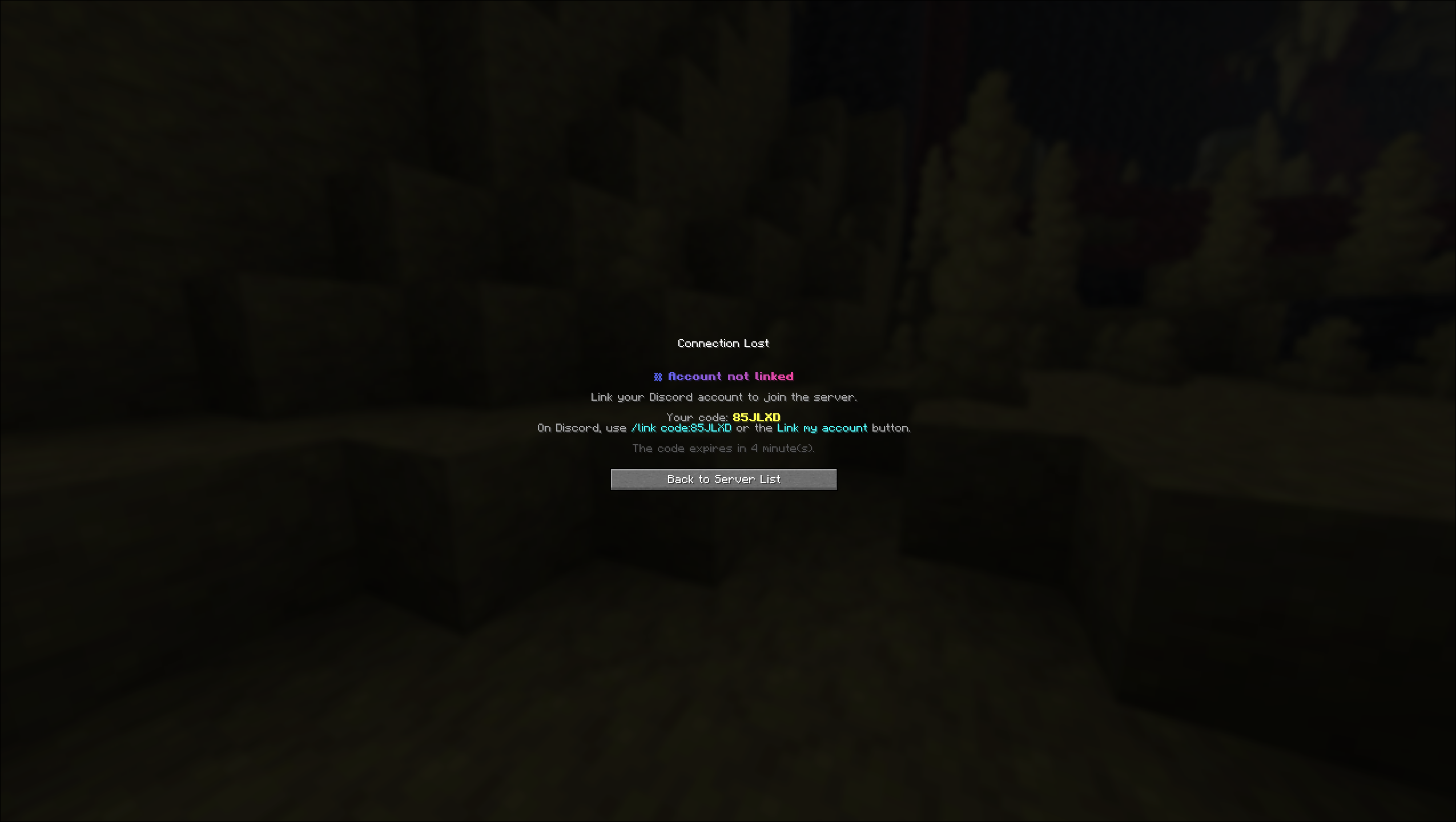
- Automatic code generation: players receive a unique code when trying to connect
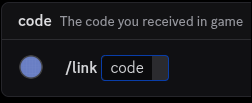
- Discord slash commands: simple
/linkcommand to complete the linking - Secure verification: codes expire after 5 minutes (configurable)
- Mandatory linking: require Discord linking before joining the server
- Bypass system: players, UUIDs or permission can skip linking
🤖 Discord Bot Integration
- Automatic role management: roles assigned on link
- Online status roles: role given to players currently connected
- Nickname sync (optional): members renamed to their Minecraft name
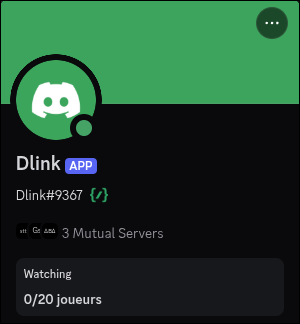
- Activity status:
{online}/{max}players shown as the bot activity - Slash commands & Components V2 interface
- Full customization from config or directly from the panel
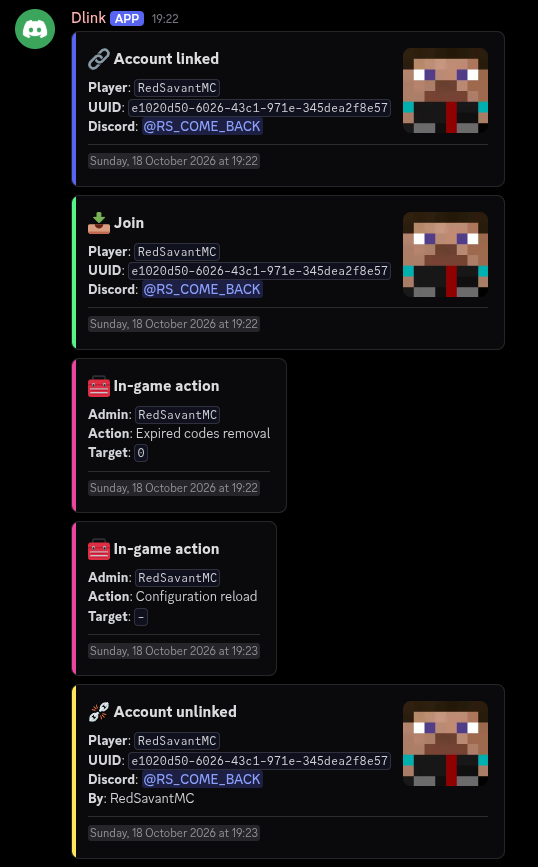
📜 Advanced Logging
- Connection / disconnection logs: IP, UUID, username, timestamp
- Link / unlink events
- Panel actions: every admin action performed from the panel
- GUI actions: every admin action performed from the in-game menus
- Translated logs: logs follow the server default language
- Components V2 containers: colors configurable per event
👥 Player Management
- In-game commands:
/link,/unlink,/linkinfo,/lang - Admin commands:
/forceunlink,/discordlink reload - SQLite storage with automatic migration from v1
- Auto-cleanup of expired codes
Commands & Permissions
Minecraft — Player Commands
| Command | Description | Permission |
|---|---|---|
/link | Generate a linking code | discordlink.link (default) |
/unlink | Unlink your Discord account | discordlink.unlink (default) |
/linkinfo | View your linking information | discordlink.info (default) |
/linkinfo <player> | View another player's information | discordlink.info.others (op) |
/lang [locale] | Change your language (no argument opens the GUI) | discordlink.lang (default) |
Minecraft — Admin Commands
| Command | Description | Permission |
|---|---|---|
/forceunlink <player> | Force unlink a player's account | discordlink.admin |
/discordlink reload | Reload config & language files | discordlink.admin |
/discordlink gui | Open the admin GUI | discordlink.gui |
/discordlink version | Show the plugin version | — |
GUI Permissions (default: op)
| Permission | Description |
|---|---|
discordlink.gui | Open the main admin menu |
discordlink.gui.players | View the linked players list |
discordlink.gui.players.unlink | Force unlink from the GUI |
discordlink.gui.players.resync | Resync a player's Discord roles |
discordlink.gui.players.bypass | Toggle a player's bypass |
discordlink.gui.players.lang | Change a player's language |
discordlink.gui.settings | Open and edit bot settings |
discordlink.gui.reload | Reload from the GUI |
discordlink.gui.* | All GUI permissions |
discordlink.bypass | Bypass mandatory linking (default: false) |
Discord — Slash Commands
| Command | Description | Access |
|---|---|---|
/link code:<code> | Link your Minecraft account | Everyone |
/unlink | Unlink your account | Linked users |
/linkinfo [user] | View linking information | Everyone |
/lang | Choose your bot language | Everyone |
/panel | Open the admin panel | Panel roles / Administrator |
Aliases
/dl→/discordlink
How It Works
For New Players
- Player attempts to connect to the server
- If not linked, they are kicked with a unique code (in their language)
- Player joins your Discord server
- Player uses
/link code:XXXXXX - Account is linked, player can now join
- Configured roles are assigned automatically
For Linked Players
- Player connects normally
- "Online" role is added on Discord
- "Online" role is removed on disconnect
- "Linked" role stays permanently
For Administrators
- Run
/panelon Discord - Browse linked players, search, unlink, resync roles
- Tweak bot settings live from select menus and modals
- Every action is logged automatically
Configuration
config.yml
- Bot token, guild ID, enable/disable features, activity status
- Linked & online role IDs, role sync options
- Log channel and per-event toggles
- Mandatory linking, bypass list & permission
- Code length and expiration
- Panel access roles
- In-game GUI options (rows, sounds, filler)
- Default language & auto-detection
languages/<locale>.yml
meta: language name, flag, GUI icon, Minecraft & Discord locale aliasesminecraft: every in-game, kick and GUI message (MiniMessage)discord: every bot, panel and log message (Discord markdown)console: console messages- Placeholders:
{player},{code},{discord},{minutes}…
Most settings can also be edited live from the Bot Settings section of the panel.
Setup Guide
Prerequisites
- A Discord bot (https://discord.com/developers/applications)
- Bot token, Guild ID, role IDs, log channel ID
Discord Bot Setup
- Create a bot on the Discord Developer Portal
- Enable the Server Members Intent
- Invite the bot with these permissions:
- Manage Roles
- Manage Nicknames (only for nickname sync)
- Send Messages
- Embed Links
- Use Application Commands
- Place the bot role above the linked / online roles
- Copy your bot token
Plugin Installation
- Drop DiscordLink into your
plugins/folder - Start the server to generate
config.ymlandlanguages/ - Stop the server and fill in token, guild ID, roles and channel
- Choose your default language
- Start the server, then finish configuring from
/panel
The bot runs on an embedded Node.js runtime, downloaded automatically into
plugins/DiscordLink/runtime/on first start.
Upgrading from v1
- Replace the jar, start the server
- Your old
config.ymlis converted (a backup is kept asconfig-v1.yml) - Your
links.dbis migrated automatically - Customized messages from the old
config.ymlare moved tolanguages/fr_FR.yml
Getting IDs
- Guild ID: enable Developer Mode → right-click server → Copy Server ID
- Role IDs: right-click a role → Copy Role ID
- Channel ID: right-click a channel → Copy Channel ID
Database
DiscordLink uses SQLite:
- No external database required
- Automatic creation and migration
- Stores UUIDs, usernames, Discord IDs, link timestamps, player language and bypass
- Location:
plugins/DiscordLink/links.db
Building
./gradlew build
Requires Java 21 and pnpm (the bot in bot/ is bundled into the jar). The output is build/libs/DiscordLink-<version>-all.jar.
Requirements
- Minecraft: 1.21 → 26.x (Paper/Purpur)
- Java: 21+
- Dependencies: none (SmartInvs and the bot are included)
Support
Found a bug? Want to add a language?
- Open an issue or a PR on GitHub
- Join our Discord community
- Star the project if you find it useful
Credits
Badges in assets/ come from Devin's Badges by intergrav, under the MIT License — see assets/LICENSE.
Made for the Minecraft community
Connecting players across platforms — and languages
Similar projects
Plugin →Let Me Despawn
Improves performance by tweaking mob despawn rules. Say bye to pesky unintentional persistent mobs.
25MSueta
Chunky
Pre-generates chunks, quickly and efficiently
18.4MSueta
JourneyMap
Real-time map used for mapping in-game or your browser as you explore.
14.7MSueta
Emotecraft
Create your own emotes in Minecraft.
7.5MSueta
Simple Tpa
A simple tpa plugin which sends requests
5.4MSueta
Common Network
Forge and Fabric Unified Networking Solution
3.9MSueta