
-->> RECODED <<--
Explanation:
This plugin only uses a config and ingame commands! So you don't need a mysql.
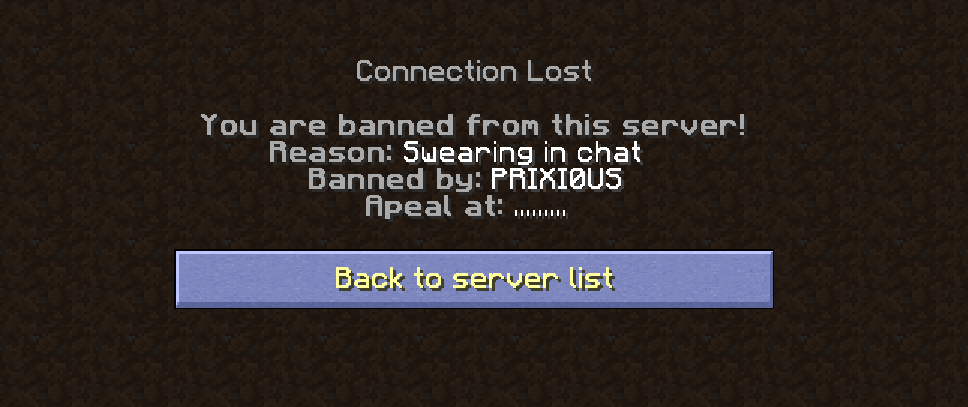
You can change the ban message, the kick message, warn message.
Ingame global ban message can be turned of.
Features:
- Easy to use
- Changeable ban/kick/warn messages (with replaceble variables)
- (Temp)Ban offline/online players
- Disable (Temp)ban/kick/warn broadcasts
- (Temp)Ban/kick/warn from the console
Commands:
/easybans help
/easybans lookup <player>
/easybans unban <player>
/easybans warn <player> <reason>
/easybans kick <player> <reason>
/easybans ban <player> <reason>
/easybans tempban <player> <time> (<reason>)
Re placement variables:
- %reason% = The reason of the ban / kick / warn / mute.
- %staffplayer% = The staff person that did the ban / kick / warn / mute.
- %target% = The banned / kicked / warned / muted player
Permissions:
All used permissions in this plugin
easybans.help (Permission needed to run the help command)
easybans.lookup (Permission needed to look at a record from a player)
easybans.unban (Permission needed to unban someone on the server)
easybans.warn (Permission needed to warn someone on the server)
easybans.kick (Permission needed to kick someone of the server)
easybans.ban (Permission needed to perm ban someone of the server)
easybans.tempban (Permission needed to tempban someone of the server)
easybans.op (If the player has this permission, he can't be banned when he's online)
Configs:
banlist.yml
# EASY-BANS V1.0 Ban Config || Copyright (C) 2021 IdW0309
banmessage.yml
# EASY-BANS V1.0 ban message Config || Copyright (C) 2021 IdW0309
Messages:
ban:
chat: '&c%staffplayer% has banned %target% for %reason%'
chatsender: '&cYou have banned %target% for %reason%'
bannedplayer:
line1: '&7&lYou are banned from this server!'
line2: '&7&lReason:&f %reason%'
line3: '&7&lBanned by:&f %staffplayer%'
line4: '&7&lApeal at:&f .........'
unban:
chat: '&c%staffplayer% unbanned %target%'
chatsender: '&cYou have unbanned %target%'
kick:
chat: '&c%staffplayer% has kicked %target% for %reason%'
chatsender: '&cYou have kicked %target% for %reason%'
kickedplayer:
line1: '&7&lYou are kicked from this server!'
line2: '&7&lReason:&f %reason%'
line3: '&7&lKicked by:&f %staffplayer%'
warn:
chat: '&c%staffplayer% has warned %target% for %reason%'
chatsender: '&cYou have warned %target% for %reason%'
warnedplayer:
topbottom: '&7&m-----------&8[&c&lWARNING&8]&7&m-----------'
line1: '&c&lYou have been warned'
line2: '&c&lReason: &f%reason%'
line3: '&c&lWarned by: &f%staffplayer%'
noreason: '&f&lDid you know&1.&3. &fThe world wastes about 1 billion metric tons
of food each year. &b&l( no reason given )'
config.yml
# EASY-BANS V1.0 Config || Copyright (C) 2021 IdW0309
Easybans:
language: EN
commandprefix: '&2&lEASY&a&lBANS'
announcebans: 'true'
lang.yml
# EASY-BANS V1.0 Language Config || Copyright (C) 2021 IdW0309
Languages:
EN:
NoPermissions: You re not allowed to use this command!
PlayerIsOP: Player has OP and could not be banned...
PlayerNotKnown: Player isn't online!
NotBanned: Player isn't banned!
NoHistory: Player has no ban history!
AlreadyBanned: Player is already banned!
FAQ
How to add a Language?
Go to the Lang.yml file.
Copy
EN:
NoPermissions: You re not allowed to use this command!
PlayerIsOP: Player has OP and could not be banned...
PlayerNotKnown: Player isn't online!
NotBanned: Player isn't banned!
NoHistory: Player has no ban history!
AlreadyBanned: Player is already banned!
And paste it under the EN version.
Change EN to whatever you want, in this situation: DE
Now you have this:
DE:
NoPermissions: You re not allowed to use this command!
PlayerIsOP: Player has OP and could not be banned...
PlayerNotKnown: Player isn't online!
NotBanned: Player isn't banned!
NoHistory: Player has no ban history!
AlreadyBanned: Player is already banned!
Translate it to your languages. ^^
BEWARE, ONLY CHANGE THE WORDS IN BOLD!
Now you go to config.yml and you change the EN behind Language: to your typed in thing. In our situation DE so it will be: Language: DE
Now we restart / reload the server or we type the command /eb reloadconfig ingame.
DONE
If this doesn't work for you, or you have questions, you can pm me on discord: Kurkentrekker#8637
Why does it say null after a command?
You entered an unfamiliar language in the config, so something would have gone wrong when translating a language. Check Lang.yml and Config.yml to make sure you have entered the correct ones (EN or NL for example and no NEE or NLL).
or
You have translated the ban messages wrong, try removing all .yml files and restart your server.
Why does it say null after a command?
Are you stuck? Contact me on discord: Kurkentrekker#8637
If you like the plugin, please leave a review THANKS!
Next Uptdates:
Version 1.2
- Mute command
- Tempmutes
- Extended history command
- GUI for preset bans
Do you know some updates? Add me on Discord! Kurkentrekker#8637


Similar projects
Plugin →Let Me Despawn
Improves performance by tweaking mob despawn rules. Say bye to pesky unintentional persistent mobs.
25MSueta
JourneyMap
Real-time map used for mapping in-game or your browser as you explore.
14.7MSueta
Emotecraft
Create your own emotes in Minecraft.
7.5MSueta
Simple Tpa
A simple tpa plugin which sends requests
5.4MSueta
Common Network
Forge and Fabric Unified Networking Solution
3.9MSueta
Set Home
A lightweight plugin for players to set their homes.
3.8MSueta