
Hello Spigot!
This is a library that allows you to create unique, per-player scoreboards!
Note: This is NOT a standalone plugin.
Why EasyScoreboardLib?
- This resource is actively maintained!
- Most other legacy scoreboard libraries (<1.13) are outdated and don't work properly any more, or aren't free.
- Very easy to use!
Features:
- Non-flickering scoreboards!
- Up to 32 characters per line!
- Multiple lines with the same text!
- Animations on your scoreboard!
- Easy library access, with the possibility to create your own animations!
- Runs asynchronously!
Installation:
- Download EasyScoreboardLib.jar , and put it in your servers plugins folder.
- Import it into your project, and add it to depend in plugin.yml:
depend : [ EasyScoreboardLib ] - You are ready to use it!
Usage:
Step 1: Create your scoreboard:
EasyScoreboard scoreboard = EasyScoreboardLib. createScoreboard ( player, "§cTest Scoreboard" ) ;Step 2: Add lines!
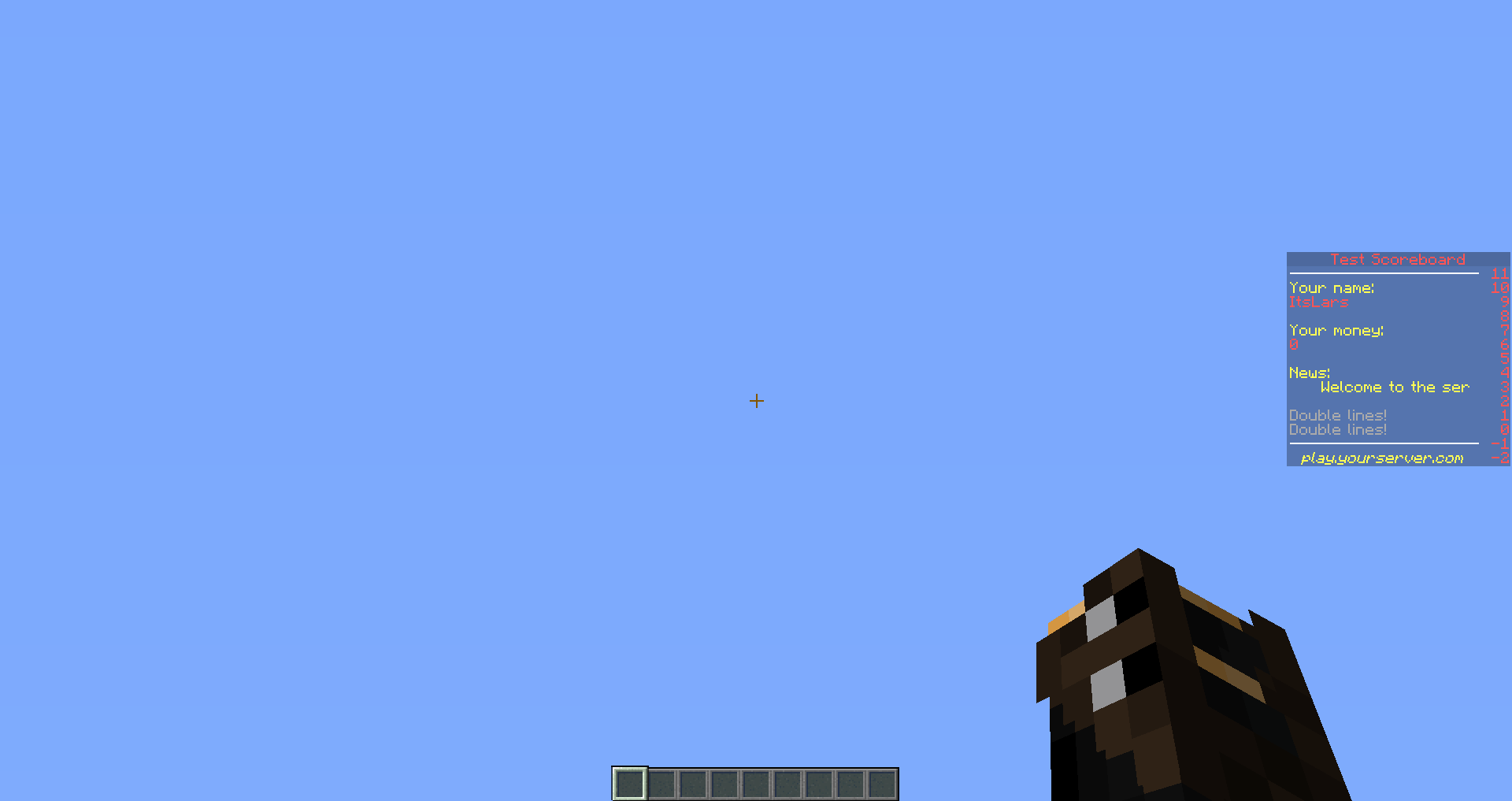
scoreboard.  setLineText   (   11  ,  "§m--------------------"   )   ;
scoreboard.  setLineText   (   10  ,  "§eYour name:"   )   ;
scoreboard.  setLineText   (   9  ,  "§c"   +  player.  getName   (   )   )   ;
scoreboard.  setLineText   (   8  ,  ""   )   ;
scoreboard.  setLineText   (   7  ,  "§eYour money:"   )   ;
scoreboard.  setLineText   (   6  ,  "§c0"   )   ;
scoreboard.  setLineText   (   5  ,  ""   )   ;
scoreboard.  setLineText   (   4  ,  "§eNews:"   )   ;
scoreboard.  setLineText   (   3  ,  new  Scroller  (   2  ,  25  ,  "§eWelcome to the server. We have a lot of cool gamemodes!"   )   )   ;
scoreboard.  setLineText   (   2  ,  ""   )   ;
scoreboard.  setLineText   (   1  ,  "§7Double lines!"   )   ;
scoreboard.  setLineText   (   0  ,  "§7Double lines!"   )   ;
scoreboard.  setLineText   (   -   1  ,  "§m--------------------"   )   ;
scoreboard.  setLineText   (   -   2  ,  "  §e§oplay.yourserver.com"   )   ;
Step 3: Don't forget to enable the scoreboard!
scoreboard.enable(); Result:
For information about how to use or add scoreboard animations, please visit the github page:
https://github.com/MeItsLars/EasyScoreboardLib
If you have any questions, or want support, don't leave a negative review.
Instead, join the support discord: https://discordapp.com/invite/CGkdxsg
Similar projects
Plugin →Let Me Despawn
Improves performance by tweaking mob despawn rules. Say bye to pesky unintentional persistent mobs.
25MSueta
JourneyMap
Real-time map used for mapping in-game or your browser as you explore.
14.7MSueta
Emotecraft
Create your own emotes in Minecraft.
7.5MSueta
Simple Tpa
A simple tpa plugin which sends requests
5.4MSueta
Common Network
Forge and Fabric Unified Networking Solution
3.9MSueta
Set Home
A lightweight plugin for players to set their homes.
3.8MSueta