
ElevatorTP
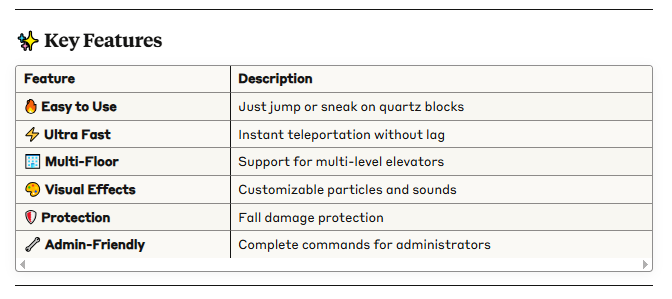
1.0.0🚀 Modern and efficient elevator system for Minecraft 1.21.5 Create functional elevators with quartz blocks. Jump to go up, sneak to go down!
 Modern and efficient elevator system for Minecraft 1.21.5
Create functional elevators with quartz blocks. Jump to go up, sneak to go down!
 Quick Installation
 Requirements
Minecraft: 1.21.5
Server: Paper, Spigot, or forks
Java: 21+
 Installation Steps
Download the .jar file from Modrinth
Place the file in your server's /plugins/ folder
Restart the server
Done! The plugin is active
 How to Use Elevators
 Building Elevators
Required Materials
 Quartz Blocks (QUARTZ_BLOCK)
 Support blocks (any solid block)
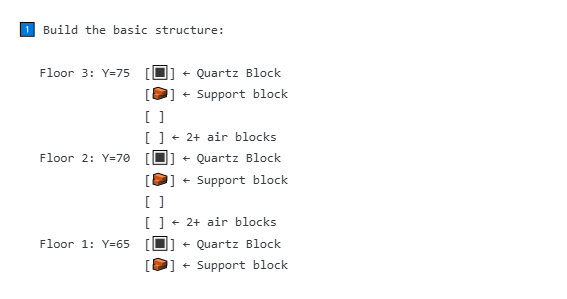
 Step-by-Step Construction
 Important Requirements
 Exact alignment: All quartz blocks must have the same X,Z coordinates
Free space: Minimum 2 air blocks above each floor
Minimum distance: 2+ blocks between floors
Correct material: Only quartz blocks (QUARTZ_BLOCK)
 Using the Elevator
 To Go Up
-
Stand on the quartz block
-
Jump (Spacebar)

-
You'll be teleported to the upper floor!

 To Go Down
 -
Stand on the quartz block
-
Sneak (Shift)

-
You'll be teleported to the lower floor!
-
 Visual Indicators
 Action Bar: Shows elevator status
Particles: Visual effects during teleportation
 Sounds: Teleportation audio
 Usage Examples
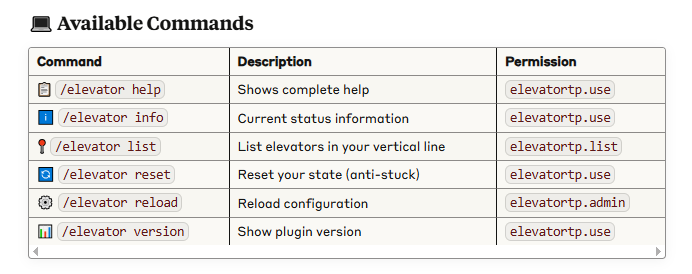
/elevator info ← Check if you're on an elevator
/elevator list ← See all available floors
/elevator reset ← Use if elevator gets stuck
 Permission System
 Player Permissions
yamlelevatortp.use:
description: "Allows using elevators"
default: true # All players by default
elevatortp.list:
description: "Allows listing nearby elevators"
default: true # All players by default
 Administrator Permissions
yamlelevatortp.admin:
description: "Full access to administration commands"
default: op #  OPs only by default
elevatortp.*:
description: "All plugin permissions"
default: op # OPs only by default
 Configuration
 config.yml File
Basic Configuration
yaml# Block used for elevators
elevator-block: QUARTZ_BLOCK
Maximum search distance (in blocks)
max-search-distance: 256
Cooldown between uses (in seconds)
cooldown-seconds: 1
 Visual Effects
yamleffects:
enabled: true # Enable effects
particles: true # Teleportation particles
sound: true # Teleportation sounds
 Advanced Configuration
yamladvanced:
strict-alignment: true # Exact alignment required
min-floor-distance: 2 #  Minimum distance between floors
fall-damage-protection: true #  Fall damage protection
max-elevator-height: 30 #  Maximum floors per elevator
 License and Credits
Developed by: DeLaRosaPlay
Similar projects
Plugin →VeinMiner
Mine the whole vein on mining a single ore/block. Make the tedious mining experience to something satisfying and fun! FTB Ultimine alternative
99.3MSueta
VeinMiner Enchantment
Veinminer Addon - Adds vineminer enchantment to enchanting tables. Only tools with the enchantment can veinmine
18MSueta
Emotecraft
Create your own emotes in Minecraft.
7.5MSueta
Customizable Player Models
Customize your minecraft avatar!
3.2MSueta
ItemSwapper
Inventory update concept for hotswapping items.
2.1MSueta
TAB
An all-in-one solution that works
1.3MSueta