
ExplorerMapCreator
minecraft 1.13 - 1.15 | version 1.0.1
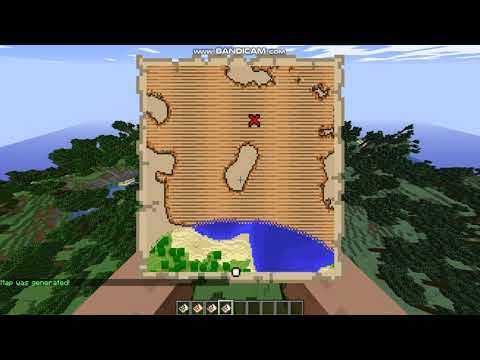
Plugin allows you to generate a custom explorer map. Also you can use the plugin like API for build custom map in your own plugins.
The plugin is dependent on NBTReflectionAPI.
Features:
- Map disign is similar with map generated in game.
- You can change the color of the map (Item Icon).
- You can enable / disable terrain rendering.
- You can enable / disable the display of the player on the map.
- You can enable / disable the remote tracking of the player (If the player runs far, the map stops displaying a circle that helps with orientation. In the explorer's maps, the player is always displayed, but the circle becomes smaller.)
- You can add markers to the map at any point. The number of tags is limited by the maximum number of characters in the chat line.
- The map is generated asynchronously. This is longer, but the server does not freeze during generation.
- Support two languages - English, Russia.
- You can easily configure the output of messages in the chat. To configure, just edit the localization file that you use, or create your own file by analogy with the basic ones. The required file name is <language> _messages.yml, where <language> is any text without spaces. I recommend using meaningful names, or a two-letter language designation (ru_messages.yml, en_messages.yml, de_messages.yml, uk_messages.yml, custom_messages.yml). To activate the message file, edit the config.yml file, replace the line lang: <language>. For example, lang: ru, lang: en, lang: de, lang: uk, lang: custom.
Command:
/emcreate <help|types> - help - help with plugin, types - All of marker types.
/emcreate <x> <z> <locked> <tracking> <unlimited> {r,g,b} [{type:<type>,x:<x>,z:<z>,rot:<degree>}, {..}, ...]
<x> - Center of map on axis OX - integer
<z> - Center of map on axis OZ - integer
<locked> - terrain render - true/false
<tracking> - player marker display - true/false
<unlimited> - unlimited player tracking - true/false
With tracking = false, this parameter does not affect the map, set any value.
{r,g,b} - color in RGB system, r,g,b - integer (0-255) - {255,0,0}
{type:<type>,x:<x>,z:<z>,rot:<degree>} - parameters for the marker. All markers are set without spaces. The markers themselves are separated by spaces.
type - Marker type - string
x - Cooidinate of marker on axis OX - integer.
z - Cooidinate of marker on axis OZ - integer.
If the marker is outside the map, it will not be displayed.
rot - angle of rotation - integer (0-359)
Note: All icons are displayed upside down in minecraft. To make them appear evenly, specify an angle of 180 degrees.
Example: /emcreate 2000 -1500 true true false {200,0,100} {type:red_x,x:2032,z:-1480,rot:180}
Marker types:
- PLAYER - white player marker.
- FRAME - green player marker.
- RED_MARKER - red player marker.
- BLUE_MARKER - blue player marker.
- TARGET_X - white cross.
- TARGET_POINT - red triangle.
- PLAYER_OFF_MAP - Large white point.
- PLAYER_OFF_LIMITS - Small white point.
- MANSION - Mansion icon.
- MONUMENT - Underwater temple icon.
- BANNER_X - Banner icon, where X - name of wool color.
- RED_X - red cross.
Permission:
emcreator.admin - permission for generation the map.
Similar projects
Plugin →Let Me Despawn
Improves performance by tweaking mob despawn rules. Say bye to pesky unintentional persistent mobs.
25MSueta
JourneyMap
Real-time map used for mapping in-game or your browser as you explore.
14.7MSueta
Emotecraft
Create your own emotes in Minecraft.
7.5MSueta
Simple Tpa
A simple tpa plugin which sends requests
5.4MSueta
Common Network
Forge and Fabric Unified Networking Solution
3.9MSueta
Set Home
A lightweight plugin for players to set their homes.
3.8MSueta