
EzBoost
2.2.0The ultimate token-based booster system. Create custom speed, movement, and gameplay buffs for your players.
- Tested MC versions
- 1.9, 1.10, 1.11, 1.12, 1.13, 1.14, 1.15, 1.16, 1.17, 1.18, 1.19, 1.20, 1.21, 26.1
EzBoost is a feature-rich potion boost plugin for Spigot, Paper, Bukkit, and Folia (Minecraft 1.21+). It provides an inventory GUI for boost selection, per-boost cooldowns, Vault economy integration, WorldGuard region overrides, boost token items, PlaceholderAPI support, persistent storage (YAML, SQLite, MySQL, MariaDB, PostgreSQL), and a leaderboard for top boost buyers. Inspired by RedBull.

✨ Key Features
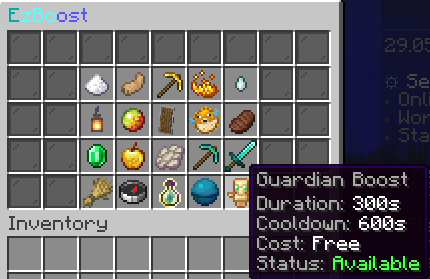
- GUI-first activation: Players can browse boosts with clear status, cooldown, and cost info.
- Admin GUI: Create and manage boosts through an intuitive admin interface.
- Folia support: Fully compatible with Folia servers – task scheduling routes through Folia's region schedulers automatically.
- Boost top leaderboard:
/boosttopdisplays the all-time top boost buyers, backed by persistent storage. - Fully configurable boosts: Define custom potion effects, amplifiers, durations, and permissions per boost.
- Multi-file configuration: Clean separation of settings, GUI, boosts, and more for easy management.
- Interactive GUI: Customizable inventory interface for boost activation.
- Per-boost cooldowns: Prevents abuse and enables balanced gameplay.
- World restrictions: Allow/deny boosts in specific worlds for tight gameplay tuning.
- Region-based overrides (WorldGuard): Apply different boost settings or disable boosts in specific WorldGuard regions using the override system. WorldGuard is detected automatically if present.
- Vault economy support: Optionally charge players for activating boosts.
- Boost token items: Give, trade, or reward boost tokens with
/ezboost give. Players redeem tokens by right-clicking them to activate the boost. - Live reload: Reload all configuration and messages at runtime with
/ezboost reload. - MiniMessage support: Rich formatting for all messages and GUI text.
- Internal message tags: Boost-specific tags (
<boost_display>,<boost_cost>,<boost_duration>, etc.) are available directly inmessages.yml– no PlaceholderAPI required. - PlaceholderAPI expansion: 18+ placeholders covering boost status, active boost, cooldowns, time remaining, XP multiplier, and economy formatting, usable in scoreboards, GUI plugins, and any PAPI-compatible plugin. See the PlaceholderAPI integration guide.
- Command hooks: Run console commands on enable/disable/toggle per boost.
- Player-friendly behavior: Reapply boosts on join, keep on death, and refund on failed activation.

⚡ Commands
| Command | Description | Permission |
|---|---|---|
/boost | Open the boosts GUI or show usage. | ezboost.use |
/boost <boostKey> | Activate a boost directly. | ezboost.use + boost permission |
/boosttop | View the top boost buyers leaderboard. | ezboost.top |
/ezboost create | Open the admin GUI to create boosts. | ezboost.admin |
/ezboost reload | Reload configuration and messages. | ezboost.reload |
/ezboost give <player> <boostKey> [amount] | Give boost token items. Players redeem by right-clicking. | ezboost.give |
For detailed command and permission documentation, see the Commands and Permissions pages.
🛡️ Permissions
ezboost.use– Use boosts (/boost).ezboost.top– View the boost leaderboard (/boosttop).ezboost.admin– Access admin commands.ezboost.reload– Reload configuration.ezboost.give– Give boost tokens.ezboost.cooldown.bypass– Bypass boost cooldowns.ezboost.boost.<key>– Per-boost permissions (example:ezboost.boost.speed).
🚀 Quick Start
- Place
EzBoost.jarin your server’splugins/folder. - Start the server to generate all config files in
plugins/EzBoost/(settings.yml,boosts.yml,gui.yml,messages.yml, etc.). - Use
/ezboost createto open the admin GUI and create boosts. - Configure boosts, cooldowns, costs, and GUI slots in
plugins/EzBoost/boosts.yml,gui.yml, and related config files. - Use
/boostto open the GUI or/boost <boostKey>for instant activation. - Use
/ezboost give <player> <boostKey> [amount]to give boost tokens. Players redeem tokens by right-clicking them. - Grant per-boost permissions (like
ezboost.boost.speed) to control access.
⚙️ Configuration Highlights
- Boost definitions: Add or edit boosts in
boosts.ymlwith effects, duration, cooldown, cost, and permissions. See the Boosts reference for a full reference. - Command hooks: Add
commands.enable,commands.disable, orcommands.toggleper boost to run console commands when boosts turn on/off (supports{player},{displayname}, and{boost}placeholders). - GUI layout: Customize title, size, filler, lore templates, and per-boost slot positions in
gui.yml. - Limits: Clamp amplifier and duration ranges for balance in
limits.yml. - World rules: Use
worlds.allow-list/worlds.deny-listto control where boosts apply inworlds.yml. - Storage backend: Choose YAML (default), SQLite, MySQL, MariaDB, or PostgreSQL in
storage.yml. - Region & World Overrides: Use
boosts.ymlto define per-world or per-region settings. If WorldGuard is installed, region overrides are applied automatically using region IDs. - Behavior toggles: Replace active boosts, reapply on join, keep on death, or refund failed activations in
settings.yml. - Economy: Enable Vault costs with
economy.enabledandeconomy.vaultineconomy.yml.
🌍 WorldGuard Integration & Region Overrides
- EzBoost automatically detects WorldGuard if present and applies region-based overrides for boosts.
- No hard dependency: If WorldGuard is not installed, region overrides are ignored.
- Use region IDs from WorldGuard in your
boosts.ymlto customize boost behavior per region. - See the Overrides documentation for syntax and examples.
✅ Recommended Use Cases
- Rank perks: Grant unique boosts per rank using per-boost permissions.
- Crates & events: Distribute boost tokens as rewards.
- Economy sinks: Add costs to balance late-game progression.
- World/region gating: Enable or disable boosts only in specific worlds or WorldGuard regions.
📚 Documentation & Support
Full documentation is available at ez-plugins.github.io/EzBoost.
| Page | What it covers |
|---|---|
| Commands | All /boost and /ezboost commands |
| Permissions | Permissions reference and defaults |
| Configuration | All config files explained |
| Boosts | boosts.yml schema – effects, duration, costs |
| GUI | gui.yml layout and slot configuration |
| Overrides | World and region override syntax |
| PlaceholderAPI | 18+ available placeholders |
Need help or want to chat? Join our Discord:
https://discord.gg/yWP95XfmBS

Similar projects
Plugin →Let Me Despawn
Improves performance by tweaking mob despawn rules. Say bye to pesky unintentional persistent mobs.
25MSueta
JourneyMap
Real-time map used for mapping in-game or your browser as you explore.
14.7MSueta
Emotecraft
Create your own emotes in Minecraft.
7.5MSueta
Simple Tpa
A simple tpa plugin which sends requests
5.4MSueta
Common Network
Forge and Fabric Unified Networking Solution
3.9MSueta
Set Home
A lightweight plugin for players to set their homes.
3.8MSueta