
ForceBlocks
1.1.12-SNAPSHOTCreate a sphere where no monster or player can enter using the power of Force Blocks!
- Tested MC versions
- 1.19, 1.20, 1.21
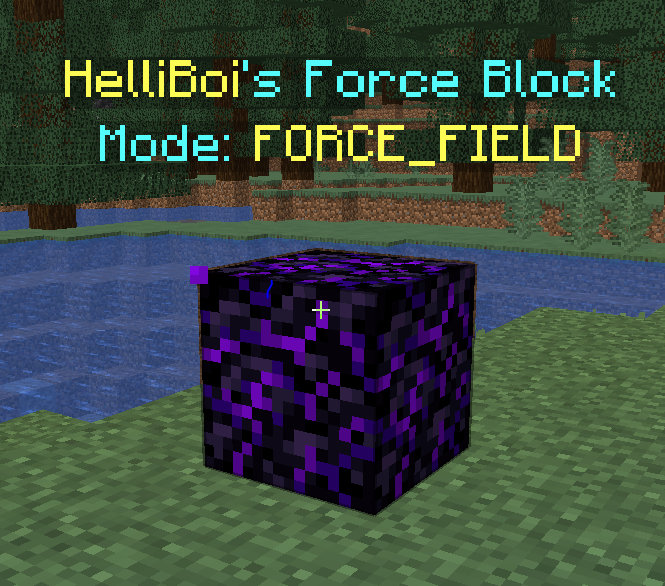
The ForceBlocks plugin allows for an effective barrier around the placed ForceBlock that can either push or pull surrounding monsters and players.
Commands:
In order to get a force block you must hold a block such as obsidian, crying obsidian or netherite and type the command: /applyforceblock
The radius can be anything you like although don't go too high as this may crash the server. I would recommend 10.
In order to allow other players to walk around the land protected by the ForceBlock unaffected, the player who placed it must do the command: /forceblocktrust
An admin command to bypass all Force Blocks is: /bypassforceblock
Some other fun commands in this plugin include:
/projectileaimbot
/reach
/follow
Permissions:
forceblock.apply - /applyforceblock
forceblock.projectileaimbot - /projectileaimbot
forceblock.reach - /reach
forceblock.follow - /follow
forceblock.bypass - /bypassforceblock
Dependencies (IMPORTANT!!)
This plugin requires the following plugins in order to work:
DecentHolograms
PlaceholderAPI
Similar projects
Plugin →VeinMiner
Mine the whole vein on mining a single ore/block. Make the tedious mining experience to something satisfying and fun! FTB Ultimine alternative
99.3MSueta
Simple Voice Chat
A working voice chat in Minecraft!
76.8MSueta
Chunky
Pre-generates chunks, quickly and efficiently
18.4MSueta
VeinMiner Enchantment
Veinminer Addon - Adds vineminer enchantment to enchanting tables. Only tools with the enchantment can veinmine
18MSueta
JourneyMap
Real-time map used for mapping in-game or your browser as you explore.
14.7MSueta
WorldEdit
A Minecraft Map Editor... that runs in-game! With selections, schematics, copy and paste, brushes, and scripting. Use it in creative, or use it temporarily in survival.
11.6MSueta