
Free Multi-economy plugin with multi-server support
1.2.1Free Multi-economy plugin with multi-server support
Economy-Plugin
Economy-Plugin is an advanced economy plugin for Minecraft servers, providing multi-currency support, multi-server synchronization, secure transactions, and high performance. Ideal for servers of any size.
Main Features
Multi-currency
- Create as many currencies as you want.
- Support for different currencies simultaneously with custom icons and formatting.
Multi-server
- Full support for servers connected via BungeeCord / Redis Messaging Service.
- Transactions between players on different servers are synchronized in real time.
Rankings and Balance Top
- Complete ranking system with support for infinite pages in the balance top.
- Advanced strategies like seek pagination allow accessing the 1st or 300 trillionth user with the same speed.
- Real-time updates from the database, without data loss.
 Performance and Security
- All transactions are updated instantly in the database.
- Data security and integrity are prioritized.
- Uses caching to quickly retrieve the balances of players on the same server as the player executing the command, improving performance.
- Redis is used to update the cache and handle pending transactions across servers.
- Designed for high performance even on large servers.
Database Synchronization
- Real-time updates.
- Database always synchronized, ensuring no data loss.
Available Commands
- `/currency` - View your own balance.
- `/currency view <player>` - View another player's balance.
- `/currency pay <player> <amount>` - Pay another player.
- `/currency set <player> <amount>` - Set another player's balance (admin).
- `/currency add <player> <amount>` - Add balance to another player (admin).
- `/currency remove <player> <amount>` - Remove balance from another player (admin).
- `/currency top` - Open the richest players ranking.
> All commands support placeholders, customizable messages, and instant balance updates.
Demo / Video
Watch a full demonstration of Economy-Plugin in action:
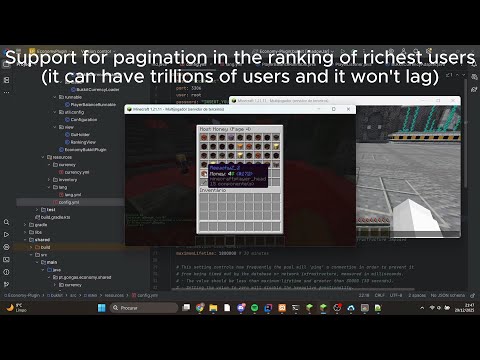
Click the image to watch the video on YouTube.
Installation
1. Download the latest version of Economy-Plugin from one of the following sources:
- https://github.com/goncalodelima/Economy-Plugin/releases
2. Install required dependencies (if any) as specified in the documentation.
3. Place the `.jar` files in your server's `plugins` folder:
- For a Bukkit/Spigot/Paper server, place the main `Economy-Plugin.jar` in `plugins`.
- Velocity server with Redis as messaging service:
- Place the `EconomyPlugin-Velocity.jar` in the `plugins` folder of your Velocity server.
- This jar only works on Velocity.
- Even when using Velocity, it is recommended to use Redis for better security.
- Even if you don’t use Redis as a messaging service, it is required for synchronizing pending transactions with the cache in a multi-server setup. Make sure Redis is installed and running.
- Without Velocity:
- You can use BungeeCord messaging service.
- No extra plugin is required.
- Using Redis as the messaging service is still recommended for optimal security.
4. Database setup:
- All servers must connect to the same MySQL database to ensure proper synchronization.
- MySQL is mandatory (the only officially supported database), but compatible variants like MariaDB can also be used.
5. Configure the plugin:
- After placing the plugin and starting your server once, open the config.yml.
- Set your MySQL credentials and select which messaging service to use: Redis, BungeeCord, or none.
- If "none" is selected, Redis is not required, but cross-server transactions and synchronization will be disabled.
- Restart the server to save and apply these changes.
Support / Sponsorship
If you enjoy using Economy-Plugin and want to support its development, you can sponsor me via GitHub Sponsors:
https://github.com/sponsors/goncalodelima
Your support helps maintain the plugin, fix bugs, and add new features.
Similar projects
Plugin →Let Me Despawn
Improves performance by tweaking mob despawn rules. Say bye to pesky unintentional persistent mobs.
25MSueta
JourneyMap
Real-time map used for mapping in-game or your browser as you explore.
14.7MSueta
Emotecraft
Create your own emotes in Minecraft.
7.5MSueta
Simple Tpa
A simple tpa plugin which sends requests
5.4MSueta
Common Network
Forge and Fabric Unified Networking Solution
3.9MSueta
Set Home
A lightweight plugin for players to set their homes.
3.8MSueta