
Report
I'd like to remind you that if you encounter any bug, REPORT THEM instead of whining and give a 1 star review. Because whining won't tell me where the error is, and won't give your money back.

What is Gems?
Gems is a cool plugin that adds a whole new RPG mechanic to your server: the gems. It's mainly used in survivals but still can be used anywhere else. Your imagination is your limit.
The gems
Gems are items that gives specific stats when they're used on a weapon / armor that can receive them. A gem slot has a color, and can only be filled with a gem of the same one.
There is 4 colors of gem:
- Blue, with defensive bonuses
- Green, with offensive ones
- Prismatic, with miscellaneous and utility effects
- Red, with a mix of everything. Please don't point out that white and red should swap roles. Don't. :c
======================================
Getting a gem
For a long time, the only way to get gems was to drop them from monsters. Drop rates are low, but configurable.
Since update 2.2.0, you can also craft gems! - If you already managed to drop a few before, of course.
To create a gem, you first need to extract the power of a gem into a core, by doing the following:
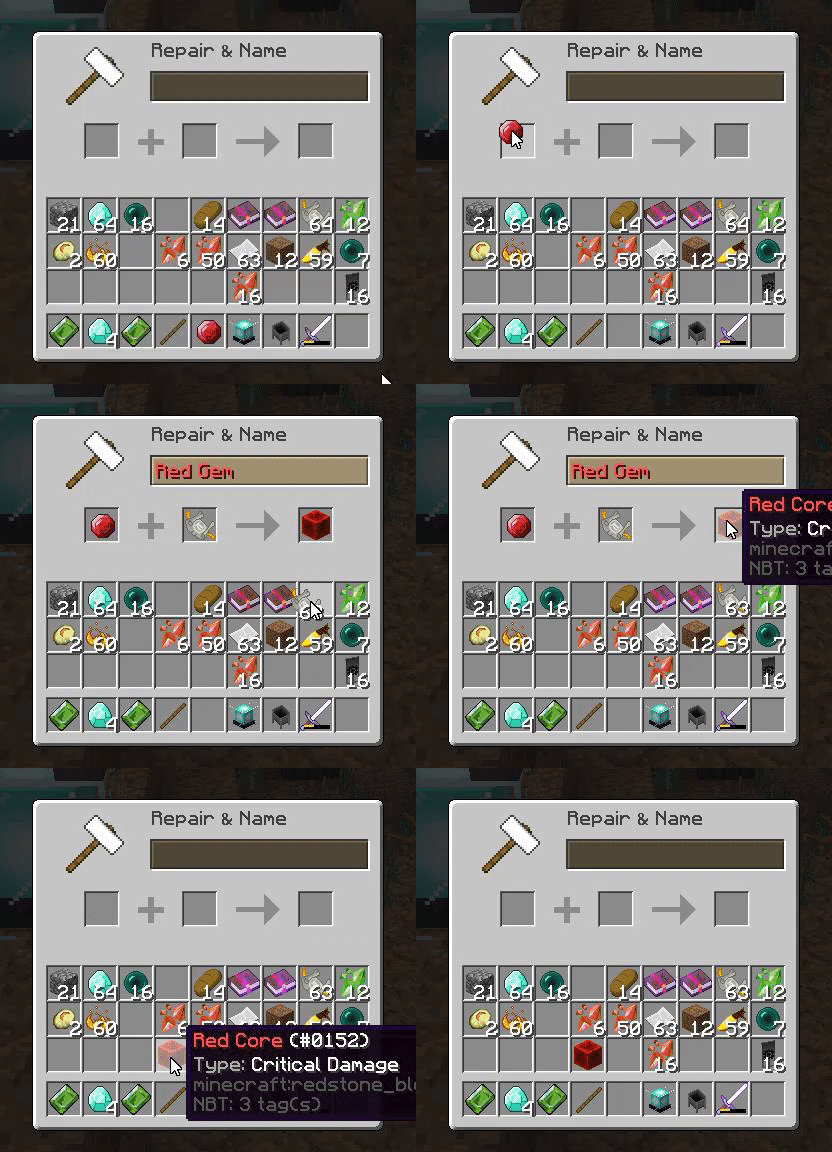
Next, you want to get shards, by doing the following:

Then, you want to place a cauldron on top of a beacon, to be able to open the gem creation menu:

And then, finally, you can create your first gem!

ou can select 9 different tiers of power, each of them being configurable in how strong the gem will be and what the success rate is.
In case of failure, shards will be consumed but the core will stay.
The higher the tier is, the more shards it will require.
Using a gem
To use a gem, you first need an item that has an empty gem slot.
Place the said item in the first slot, and the gem in the second, then take the resulting item. All done!
The gem must be placed in a slot of the same color.
Adding a gem slot
The list of the items that can receive a gem slot is configurable.
To add a gem slot to an item, you first need to put the item in the first anvil slot, then add a piece of orichalcum in the second.
Take the resulting item, and poof! Magic! A new gem slot with a random color!


The orichalcum and the lunar stone
Since 0.3 Update, you can create the orichalcum.
And since 0.6, you can create the lunar stone. Lunar Stones are used the same way as Orichalcum, however they do not add gem slots: they improve the item. An improved weapon deal more damage, and an improved armor gives more armor points.
How to create an Orichalcum or a Lunar Stone?
You'll need to build an altar first, like this one:

Made of:
- 1 Diamond Block
- 4 Gold Blocks
- 1 Golden pressure plate
- 8 End rods
Then, you drop a nether star on the pressure plate and zoof! It's starting the process. Depending of if it's day or night, it will create an orichalcum or a lunar stone.
You can also combine 4 orichalcum dust in the crafting table to get an orichalcum. You can get orichalcum dust by removing gems from an item with the protection scrolls.
The protection scroll
What is the protection scroll? It's an item you can use in the anvil, to open a menu, to finally be able to empty all the gem slots of this item!
Beware, because a basic protection scroll only gives 60% chances of success, and won't protect your item from breaking if it fails!
There is several scrolls type, but only the basic is craftable.
- Protection Scroll: Basic. 60% chances of success | 10% chances of getting an orichalcum dust on success | Does not protect from breaking
- Protection Scroll: GPro. 70% chances of success | 25% chances of getting an orichalcum dust on success | Does protect from breaking
- Protection Scroll: APro. 80% chances of success | 40% chances of getting an orichalcum dust on success | Does protect from breaking
- Protection Scroll: SPro. 90% chances of success | 70% chances of getting an orichalcum dust on success | Does protect from breaking
How to craft the scroll?
You need to put a paper in the middle of the crafting table, and 4 blaze powders on the sides, like this:

This will give you a basic protection scroll.
Other scrolls can not be obtained by default, up to you to add your own ways (Want some MythicMobs to drop them? 100% possible. Vote reward, shop purchase, you name it. If you can't do something, let me know and I should fix it!)
Resourcepack *NEW*
Since 2.0.1, an optional resourcepack is provided to either be set as your server resourcepack, or included to the one you already use. You are free to redistribute this pack and / or modify it.
https://i.gyazo.com/c2276f071160c95412a6d453cd02dfda.mp4
Permissions: Only one permission for now: gems.admin
It gives access to the /gems command, which can be used by the console or a player with the permission.
Commands

Config
Config
"§9Blue Shards"
  green_shards: "§2Green Shards"
  red_shards: "§cRed Shards"
  white_shards: "§fWhite Shards"
  blue_core: "§9Blue Core"
  green_core: "§2Green Core"
  red_core: "§cRed Core"
  white_core: "§fWhite Core"
  generic_scroll: Protection Scroll
  spro_scroll: SPro
  apro_scroll: APro
  gpro_scroll: GPro
  basic_scroll: Basic
  success: Success!
  failure: Failure!
  gem_remove_menu: 'Gem Remover'
  bonus_type: '§7Bonus: §f'
  bonus_amount: '§7Amount: §f'
  attack_speed: Attack Speed
  attack_damage: Attack Damage
  armor: Armor
  speed: Movement Speed
  mcmmo_xpbonus: McMMO XP Bonus
  mcmmo_disarmcancel: McMMO Cancel Disarm
  critical_chance: Critical Strike Chance
  lifesteal: Lifesteal
  critical_damage: Critical Damage
  jobs_rich: Jobs Money Bonus
  absorb_proc: Absorb Proc
  gravity: Gravity
  luck: Luck
  life: Stamina
  smelting: Smelting
  click_to_take: §a--- §2Click to take the item §a---
  click_to_open: §a--- §2Click to open the menu §a---
  creator_core_infos: "Gem Core Slot"
  creator_shard_infos: "Gem Shards required: §6%amount%"
To-do list:
- Add a per-material gem limit maybe?
- More permissions, for even more flexibility!
Any comment, suggestion, idea, feedback or help will be appreciated! ;)
In the item name:
- %orichalcum% : Will make an orichalcum
- %lunar_stone% : Will make a lunar stone
- %random_gem% : Will create a random gem
- %random_gem_blue% : Will create a random blue gem
- %random_gem_green% : Will create a random green gem
- %random_gem_red% : Will create a random infernal gem
- %random_gem_white% : Will create a random prismatic gem
- %random_scroll% : Will create a random protection scroll
- %basic_scroll% : Will create a basic protection scroll
- %gpro_scroll% : Will create a GPro Protection Scroll
- %apro_scroll% : Will create a APro Protection Scroll
- %spro_scroll% : Will create a SPro Protection Scroll
In the item lore:
- %empty_red_slot% : Will be replaced by an empty red gem slot
- %empty_blue_slot% : Will be replaced by an empty blue gem slot
- %empty_green_slot% : Will be replaced by an empty green gem slot
- %empty_white_slot% : Will be replaced by an empty prismatic gem slot
- %empty_random_slot% : Will be replaced by an empty gem slot of a random color.
Servers using this plugin:
Server
play.foxmc.net
Similar projects
Plugin →Let Me Despawn
Improves performance by tweaking mob despawn rules. Say bye to pesky unintentional persistent mobs.
25MSueta
JourneyMap
Real-time map used for mapping in-game or your browser as you explore.
14.7MSueta
Emotecraft
Create your own emotes in Minecraft.
7.5MSueta
Simple Tpa
A simple tpa plugin which sends requests
5.4MSueta
Common Network
Forge and Fabric Unified Networking Solution
3.9MSueta
Set Home
A lightweight plugin for players to set their homes.
3.8MSueta