
Global Gamerules [1.7-1.16+]
v1.0.0A plugin that allows applying global gamerule when a world is loaded.
This is a plugin that allows applying global gamerule when a world is loaded.
Also, the plugin allow you to check per world gamerules.
Features:
- Supports MC 1.7-1.16.
- Allow to set the exempt worlds.
- The global gamerules will be applied when a world is loaded or a command called.
- Allow to check per world gamerules.
- Two configuration methods are available.
- Easy to use.
- For some worlds where the gamerules cannot be saved in some modded server.
- All commands support TAB auto completion.
Getting started:
You can choose to edit config.yml or directly use command to set exempt worlds/ global gamerules.
Tutorial
1.Editing config.yml:
Set the gamerules in group gamerules .
Example:
#Set global gamerules.
gamerules:
  keepInventory: 'true'
  doFireTick: 'false'
2.Using commands (Easiest):
Use /ggr set <gamerule> <value> to set global gamerules
Use /ggr remove <gamerule> to remove a set gamerule
Use /ggr world to manage exempt world.
After setting global gamerules, use / ggr sync to apply to all worlds.
Support TAB auto completion.
Commands & Permissions:
Command - Description - Permission
/ggr reload - Reload config. - globalgamerules.reload
/ggr sync - Apply the global gamerules to all the worlds now. - globalgamerules.sync
/ggr set <gamerule> <value> - Set a global gamerule - globalgamerules.set
/ggr remove <gamerule> - Remove a set global gamerule. - globalgamerules.remove
/ggr check - Check global gamerules value. - globalgamerules.check
/ggr check [gamerule] - Check the specific gamerule value of all the worlds. - globalgamerules.check
/ggr world - Manage exempt worlds. - globalgamerules.world
/ggr world info - Check the exempt world list.
/ggr world add <world> - Add a exempt world.
/ggr world remove <world> - Remove a set exempt world.
Admin permission : globalgamerules.admin (Default : OP)
Player with this permission can access all commands.
Configuration:
config.yml
#Set global gamerules.
gamerules:
  keepInventory: 'true'
  doFireTick: 'false'
#Language file stored in the languages folder of jar file
locale: en_US
#Exempt worlds - will not be applied global gamerules
exempt-worlds:
  - disabled-world
Translations:
The language file stored in the languages folder in the jar file.
Screens hots:
Screenshots
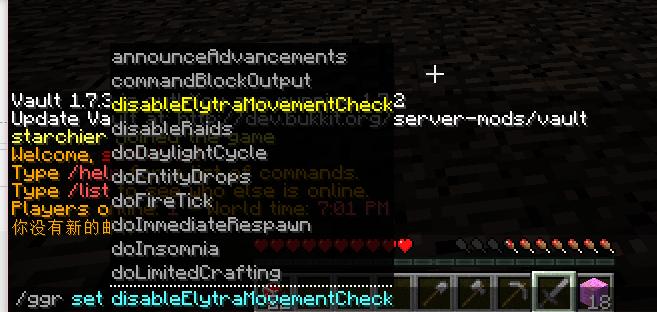
TAB auto completion.
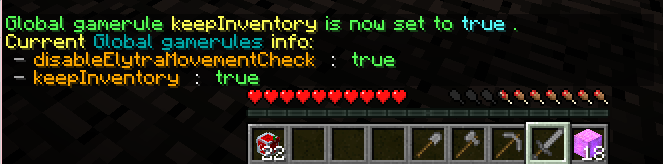
Check global gamerules.

Check per world gamerule.
Support:
Welcome to donate us if you think the plugin helps you!
Similar projects
Plugin →Let Me Despawn
Improves performance by tweaking mob despawn rules. Say bye to pesky unintentional persistent mobs.
25MSueta
JourneyMap
Real-time map used for mapping in-game or your browser as you explore.
14.7MSueta
Emotecraft
Create your own emotes in Minecraft.
7.5MSueta
Simple Tpa
A simple tpa plugin which sends requests
5.4MSueta
Common Network
Forge and Fabric Unified Networking Solution
3.9MSueta
Set Home
A lightweight plugin for players to set their homes.
3.8MSueta