
GraveDiggerX
1.1.2GraveDiggerX is an advanced plugin for Paper servers that automatically creates graves upon a player's death. The plugin secures the player's inventory, experience, and death location, providing clear
 GraveDiggerX
GraveDiggerX is an advanced plugin for Paper servers that automatically creates graves upon a player's death. The plugin secures the player's inventory, experience, and death location, providing clear visual information and easy recovery of lost items.
 Key Features
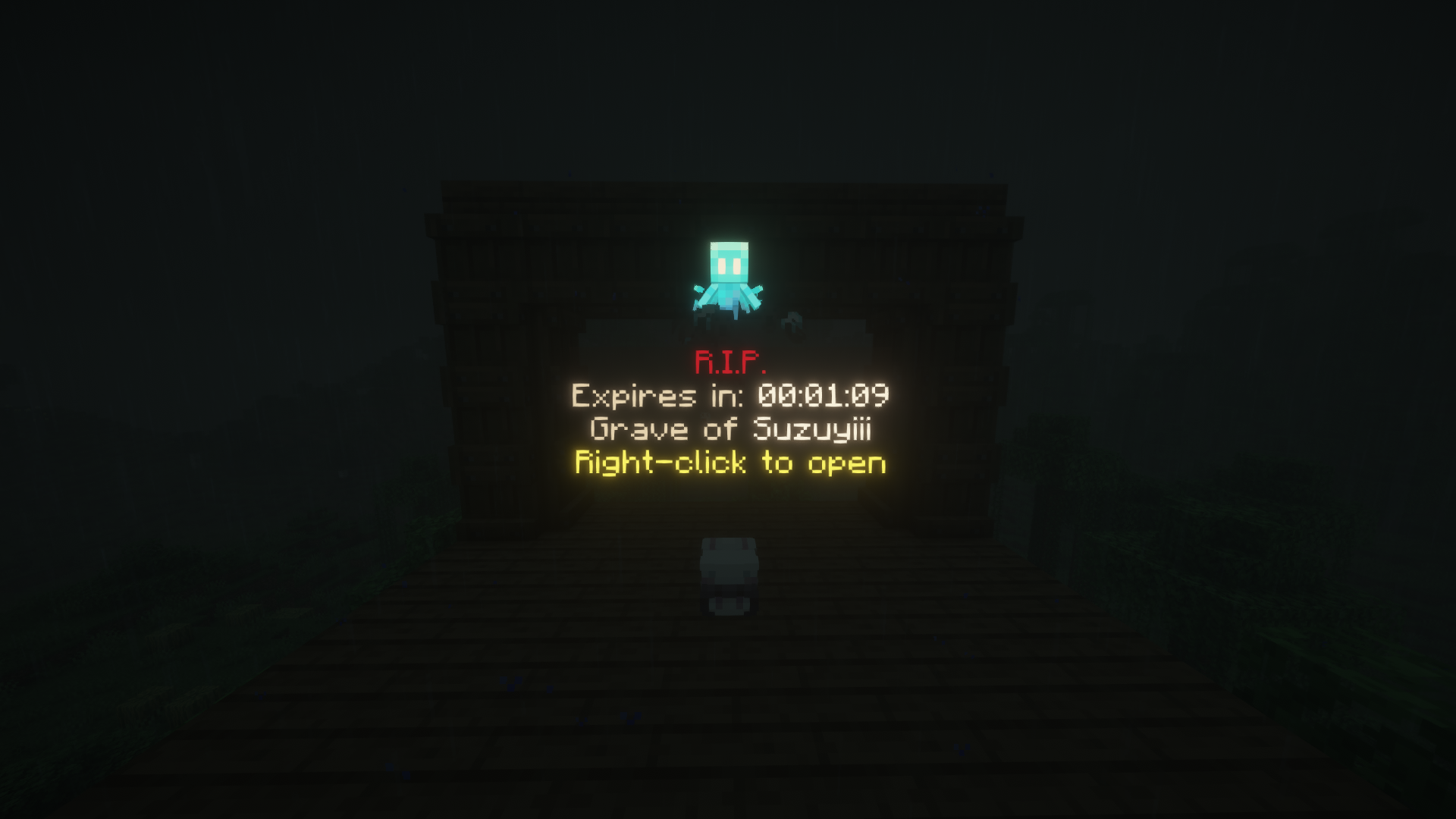
- Auto Graves – After the player’s death, their inventory and experience are transferred to a gravestone in the form of the player’s head, accompanied by an informational hologram.
- Grave Teleportation – Added a dedicated GUI for teleporting to your active graves.
- Interactive inventory recovery – The owner can open the gravestone’s GUI, use teleportation features, or quickly collect its contents by holding the sneak key and clicking on the gravestone.
- Death site protection – Gravestones are immune to destruction by explosions, fluids, pistons, hoppers, or mobs, and thieves are repelled by a special effect until the gravestone expires. Enhanced WorldGuard integration ensures that if a player dies in a protected region where building is disabled (
build: false), graves won't spawn and items drop normally as a fallback. - Guardian spirit – A glowing Allay appears above the gravestone and remains until the loot is collected or the gravestone expires (can be disabled in the configuration).
- Automatic cleanup – Gravestones are removed after a defined period, and the owner receives a countdown in the action bar.
- Persistent storage – Gravestone data is saved in
data.json, ensuring it is not lost after a server restart.
📦Requirements and Installation
- A Paper server version 1.21.8-26.2 is required.
- Vault plugin (required for economy integration and teleportation costs).
- Download the latest version of GraveDiggerX and place the JAR file in the
plugins/directory. - Start the server to generate configuration and language files.
- Adjust the configuration as needed, then restart the server or use the
/gdx reloadcommand.
⚙️ Configuration
The most important options are located in the config.yml file:
| Path | Description |
|---|---|
graves.grave-despawn | Time (in seconds) after which the gravestone is removed. |
graves.max-per-player | Maximum number of active gravestones per player; exceeding this limit prevents new gravestones from being created. |
graves.protected-effect-cooldown | Cooldown time (in milliseconds) for the knockback effect applied to foreign players attempting to loot a fresh gravestone. |
graves.protection.* | Enables/disables protection against explosions, fluids, mobs, pistons, and hopper item extraction. |
teleport.enabled | Enables or disables the grave teleportation feature. |
teleport.cost | Cost required to teleport to a grave (integrated with Vault). |
spirits.enabled | Controls the appearance of the guardian spirit above the gravestone. |
language | Selects the language file (EN/PL). You can customize messages in lang/messages_*.yml. |
update.* | Automatic update checking and downloading (Hangar/GitHub/Modrinth). |
stats.enabled | Enables anonymous usage statistics collection. |
💬Commands and Permissions
The main plugin command is /gravediggerx (shortcut /gdx). The following subcommands are available:
| Command | Description | Permission |
|---|---|---|
/gravediggerx help | Displays a list of available commands and basic information. | gdx.cmd.help |
/gravediggerx reload | Reloads the configuration, messages, and refreshes plugin data without restarting the server. | gdx.cmd.reload |
/gravediggerx list | Shows the owner the coordinates of all their active gravestones. | gdx.cmd.list |
/gravediggerx tp | Opens the graphical interface to view and teleport to active graves. | gdx.cmd.tp |
/gravediggerx admin list <player> | Lists all gravestones of a specific player (for administrators). | gdx.cmd.admin |
Additional Permissions:
| Permission | Description |
|---|---|
gdx.opengrave | Allows opening and collecting items from graves. |
gdx.cmd.tp | Allows viewing the tp GUI. |
gdx.cmd.help | Allows viewing the help command. |
gdx.cmd.reload | Allows reloading the GraveDiggerX configuration. |
gdx.cmd.list | Allows listing active graves. |
gdx.cmd.admin | Allows using administrative commands. |
gdx.owner | Allows using all GraveDiggerX commands. |
gdx.* | Wildcard that provides access to all plugin permissions. |
Tip: Operators (OPs) have full access to all plugin features without needing any additional permissions.
📞 Contact
If you need support or have any questions, join our Discord
or message us directly via DM.
📄 License
This plugin is licensed under the MIT License.
You can find the full license text in the LICENSE
GitHub
Like the plugin? If GraveDiggerX helps you out, a quick heart/like on Modrinth would mean the world to us and help the plugin reach a wider audience! Thank you for your support!
Support and Development
The plugin was designed for survival, hardcore, and RPG servers. Please report suggestions and bugs on the official Discord server or in the project repository so we can continue improving GraveDiggerX.

Similar projects
Plugin →VeinMiner
Mine the whole vein on mining a single ore/block. Make the tedious mining experience to something satisfying and fun! FTB Ultimine alternative
99.3MSueta
Let Me Despawn
Improves performance by tweaking mob despawn rules. Say bye to pesky unintentional persistent mobs.
25MSueta
VeinMiner Enchantment
Veinminer Addon - Adds vineminer enchantment to enchanting tables. Only tools with the enchantment can veinmine
18MSueta
JourneyMap
Real-time map used for mapping in-game or your browser as you explore.
14.7MSueta
Emotecraft
Create your own emotes in Minecraft.
7.5MSueta
Simple Tpa
A simple tpa plugin which sends requests
5.4MSueta