
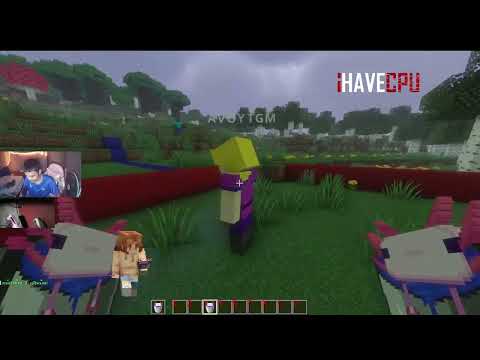
AVO GUI_TPA_HOME is a lightweight and user-friendly teleportation plugin designed for Spigot servers with a sleek GUI system. Whether you're teleporting to friends with /tpa or managing your homes with /home, this plugin makes it simple and intuitive. Plus, it supports Bedrock players via GeyserMC, so everyone can join the fun!

Key Features:
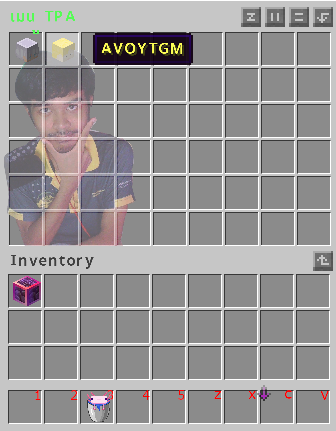
- TPA System with GUI: Send teleport requests with /tpa <player>. If no player name is provided, it opens the TPA menu automatically.
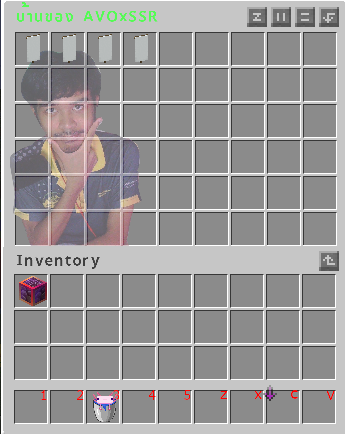
- Home Management: Teleport to a home with /home <name>. If no home name is provided, it opens the home menu automatically. Set and remove homes with /sethome and /removehome. Homes are saved in homes.yml.
- Back Command: Return to your last death or TPA location with /back.
- Admin Tools: Admins with avo.admin.home can teleport to other players' homes using /home player <name>.
- Teleport Delay & Effects: Customizable delays with particle effects and sounds for an immersive experience.
- Bedrock Support: Fully compatible with Bedrock Edition players via GeyserMC.
- Multi-Version Support: Tested across Minecraft versions 1.7 to 1.21.
- Thai Language Support: Includes translations for Thai players (ภาษาไทย).
Installation:
- Download the avotpa_home-GUIv1.jar file from this page.
- Place the JAR file into your server's plugins folder.
- Restart your server or use /reload to load the plugin.
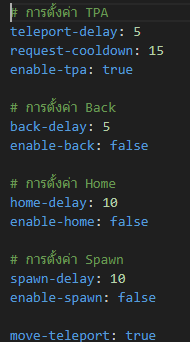
- (Optional) Configure settings in plugins/AvoTPA/config.yml to adjust delays, permissions, etc.
- For Bedrock support, ensure you have GeyserMC installed and configured.
Commands:
- /tpa [player]: Send a TPA request to a specific player. If no name is provided, it opens the TPA menu automatically.
- /tpaccept`: Accept the latest TPA request in your queue.
- พิมพ์ ว่า รับ เฉยๆในแชท ก็จะรับtpa ได้
- /sethome
- /home
- /back: Teleport to your last death or TPA location.
- /sethome <name>: Set a home at your current location.
- /home [name]: Teleport to a specific home. If no name is provided, it opens the home menu automatically.
- /home player <name>: (Admin only) Open another player's home menu.
- /removehome [name]: Remove a home or open the remove menu.
- /avotpaset time
<command> <เวลา><หน่วย> (เช่น 10s, 12m, 3h, 1d)
Set warp cooldown after 1 warp tpa.
Permissions:
- avo.tpa: Use TPA commands.
- avo.back: Use the back command.
- avo.home: Use home-related commands.
- avo.admin.home: Access other players' homes.
- avo.home.sethome.<number>: Set the maximum number of homes (e.g., avo.home.sethome.5 for 5 homes).
confing:
Similar projects
Plugin →Let Me Despawn
Improves performance by tweaking mob despawn rules. Say bye to pesky unintentional persistent mobs.
25MSueta
JourneyMap
Real-time map used for mapping in-game or your browser as you explore.
14.7MSueta
Emotecraft
Create your own emotes in Minecraft.
7.5MSueta
Simple Tpa
A simple tpa plugin which sends requests
5.4MSueta
Common Network
Forge and Fabric Unified Networking Solution
3.9MSueta
Set Home
A lightweight plugin for players to set their homes.
3.8MSueta