
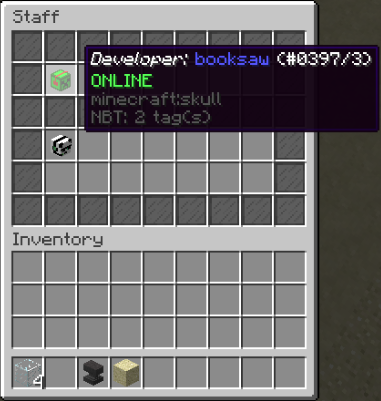
Head Gui is a plugin which allows you to create a GUI full of heads in different ways, useful to display staff, donators or anything else on the server.
Requirements: HeadGui uses Gui-API: https://www.spigotmc.org/resources/gui-api.59839/
which is required for the plugin to work.
Commands
/<gui> - opens a GUI which has been created with that name, for example, /staff will open the staff GUI
/headgui:
If you type in a root for a /headgui command, for example, /headgui player it will give all possible commands for players. It is probably easier to read it in-game as it is more broken apart instead of just a block of text.
- list: lists all the GUIs
- reload: reloads the config (does not work with removing GUIs)
- player: all player commands
- add <gui> <player> <rank> - adds the specified player to the inventory
- remove <gui> <player> - Removes the specified player from the inventory
- list <gui> - lists the players in that GUI
- gui: all commands to edit GUIs
- create <name> - Creates a GUI with <name>
- delete <gui> - Delets <gui>
- displayname <gui> <name> Changes the name which appears at the top of the GUI
- displaystatus <gui> <status>: Changes the status of the GUI, status can be:
- true - Displays if the users are online offline
- false - Does not display if the player os online or offline
- displaymode <gui> <mode>: Changes the display mode, possible modes:
- all - Displays in order of players in config
- separated - puts a glass stained bar between the online and offline players
- online - only displays the online players
- offline - only displays the offline players
Permissions
- 'Headgui.admin' - Required to do /headgui (there is not permissions per command)
- 'headgui.gui.<gui>' - Lets the user do /<gui> (you will be sent the permission node when you create a new GUI
Display mode
There are many different display modes, so you can determine how the GUI looks, different display modes are explained in the commands section (or do /headgui gui displaymode in-game)
Similar projects
Plugin →Let Me Despawn
Improves performance by tweaking mob despawn rules. Say bye to pesky unintentional persistent mobs.
25MSueta
JourneyMap
Real-time map used for mapping in-game or your browser as you explore.
14.7MSueta
Emotecraft
Create your own emotes in Minecraft.
7.5MSueta
Simple Tpa
A simple tpa plugin which sends requests
5.4MSueta
Common Network
Forge and Fabric Unified Networking Solution
3.9MSueta
Set Home
A lightweight plugin for players to set their homes.
3.8MSueta