
H O L O C H A T
A better holochat for skript are now release try it now
better offset
better time-span
better blacklisted region
better blacklisted world
better sound effect
WARN: not even tested on 1.14.x
Problem just pm me here
Rate my work more appreciate it (y) (y) (y) (y) (y) .
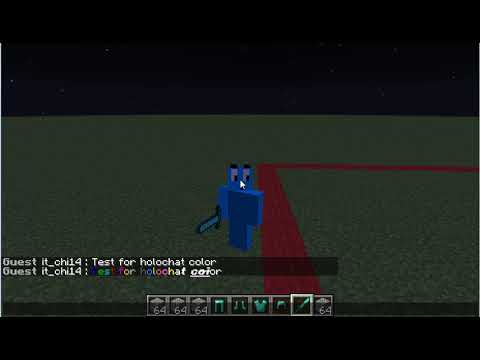
Holochat Video
Required Plugin
You must have a plugin support permission
Skript HERE I must recommend use skript 2.3.6 version that i use no error cuz the latest skript isn't to stable
skript-holo HERE
WorldGuard HERE Optional for holoregion
Tuske HERE
ProtocolLib HERE
Vault HERE
Command
/holochat|hc <help|?> - List of command
/holochat|hc <info|author|creator> - Info for holochat
/holochat|hc <req|requirement> - Requirements of holochat
/holochat|hc togglechat < onlyme | hideall | showall > - Toggle chat option
/holochat|hc togglesound < on | off > - Toggle sound option
/holochat|hc reload - Reload the holochat.sk
Permission
holochatbypass - bypass all command
holochat.use - allow player to use holochat
holochat.reload - allow to reload the holochat skript
holochat.togglechat - allow player to use chat option ( ONLYME , HIDEALL , SHOWALL )
holochat.togglesound - allow player to use sound option ( ON , OFF )
holochat.requirement - allow player to see required plugin for holochat
Options
options:

# Dont forget to reload the skript if you change the options

# Holo Prefix
# you can change this to what you want
    holoprefix: &7[&6&lHolochat&7]

# Holo Offset
# height of holo above the player's head
# 1 = 1 block or 1 meter above player's head
    holooffset: 3.1

# Holo Timespan
# duration of the holo in seconds
# live of holo timespan per seconds
    holotimespan: 3.5

# Message split by characters
# max length count of letters over 246 letters can hold
# Note: message length, characters, spaces is counted
# Note: color code aren't counted to characters
    holosplit: 20

# Holo Sound Option
# if true sound is enable
# if false sound is disable
    holosound: true

# you can find minecraft sound list for 1.9 to 1.12.2 here www.theredengineer.com/1.9-playsound-list.html
# you can find minecraft sound list for 1.13 to latest here https://www.digminecraft.com/lists/sound_list_pc.php
# Note: sound effect is depending on what server version of your server. See the site upthere ^
    holosoundeffect: "block.note_block.harp"

# You can adjust the volume and pitch
    holopitch: 10
    holovolume: 10

# Holo Chat Option
# This is the togglechat option for command /hc togglechat (ONLYME, HIDEALL, SHOWALL)
# If true the holo chat option (ONLYME, HIDEALL, SHOWALL) is enable
# If false the holo chat option (ONLYME, HIDEALL, SHOWALL) is disable
    holochat: true

# Holo Color Format
# if holo color is false holo will be normal plain white text
# Note: if holo color is false even if player has required permission for essentials.chat etc... its only plain white text
# if holo color is true if your message contain style, color or magic format of holo be like that
# Note: if holo color is true depending on player permission for essentials.chat etc...
# essentials.chat.color This allows you to color your chat messages using color codes. &1, &2, &3, &4, &5, &6, &7, &8, &9, &0, &a, &b, &c, &d, &e and &f
# essentials.chat.format This allows you to format your chat messages using format codes. &n, &m, &l, &o and &r
# essentials.chat.magic This allows you to use the matrix/magic color in your chat messages. &k
    holocolor: true

# Holo Chat Style
# can change to any thing you want
# if you want a new line just add semicolon symbol (\nl) it will add newline of holo like example down their
# %{_PREFIX}% = player's prefix
# %{_SUFFIX}% = player's suffix
# %{_CHAT}% = player's message
# %{_NAME}% = player's name
# %{_DISPLAYNAME}% = player's diplayname
# just remove the hashtag holo style example down there
    holostyle: "&eSays:&f %{_DISPLAYNAME}%\nl%{_CHAT}%"
    #holostyle: "&eSays:\nl%{_CHAT}%"
    #holostyle: "%{_CHAT}%"

# Holo Blacklisted Region
# Note: if you put the name region here holochat is not allow inside that region
# Note: Required WorldGuard depending on what server version you running, version of worldguard and skript
# Note: Use correct WorldGuard version for your server
# Note: if you put the name region the holochat is not allow in that region
# if holoregion is true blacklisted region is enable
# if holoregion is false blacklisted region is disable
    holoregion: true
    holoregionblacklisted: "spawn1", "spawn2" or "spawn3"

# Holo Blacklisted World
# Note: if you put the name of world. the holochat is not allow in that world and all regions of that world
# if holoworld is true blacklisted world is on
# if holoworld is false blacklisted world is off
    holoworld: false
    holoworldblacklisted: "world1", "world2" or "world3"

# Holo Blacklisted Gamemode
# Note: if you put the gamemode type. the holochat is not allow in that gamemode
hologamemodeblacklisted: spectatorSimilar projects
Script →Let Me Despawn
Improves performance by tweaking mob despawn rules. Say bye to pesky unintentional persistent mobs.
25MSueta
JourneyMap
Real-time map used for mapping in-game or your browser as you explore.
14.7MSueta
Emotecraft
Create your own emotes in Minecraft.
7.5MSueta
Simple Tpa
A simple tpa plugin which sends requests
5.4MSueta
Common Network
Forge and Fabric Unified Networking Solution
3.9MSueta
Set Home
A lightweight plugin for players to set their homes.
3.8MSueta