
If you like the plugin, please consider donating! :)

Documentation for the HoloGUI pages config can be found on the HoloGUI plugin page!
HoloGUIApi contains the core functionality that drives HoloGUI. This API makes it easy to create immersive and unique player experiences when interacting with your plugin.
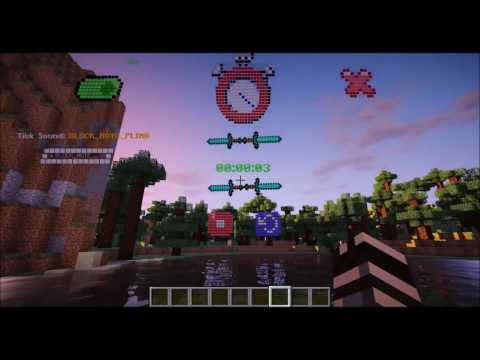
Please reference Stopwatch, the example project for HoloGUIApi.
Checkout HoloGUIApi on Github
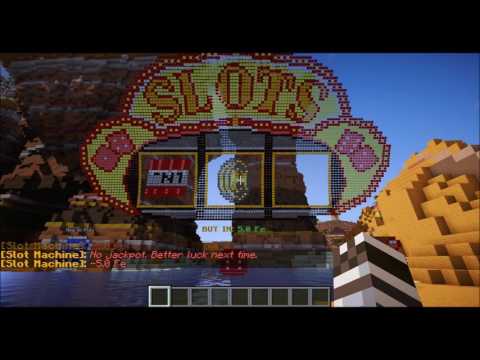
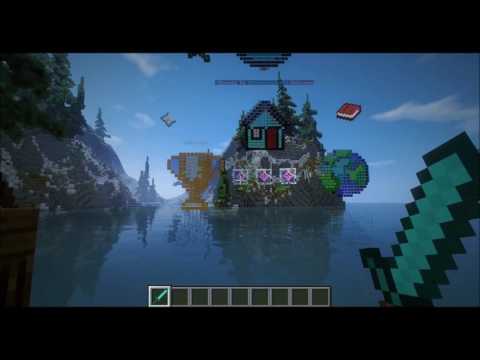
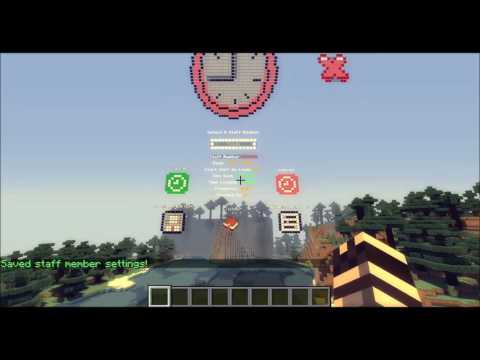
Plugins Powered by HoloGUIApi:
By @VoltaJack
SocialHolo

Requires...
Getting Started With HoloGUIApi...
Before reaching out with questions, please checkout Stopwatch. The full source code is available to download and view. The example plugin is heavily commented and was designed to highlight the most important features of the api.
For Maven users import HoloGUIApi into your project with:
<repository>
  <id>Antarescraft</id>
  <url>https://nexus.minefyre.com/content/groups/public/</url>
</repository>

<dependency>
  <groupId>com.antarescraft.kloudy.hologuiapi</groupId>
  <artifactId>HoloGUIApi</artifactId>
  <version>1.0.6</version>
</dependency>
The HoloGUIApi jar must be in your 'plugins' folder when you try to run your plugin!
Plugin.yml...
Add a dependency for HoloGUIApi in your plugin.yml.
Example plugin.yml from the Stopwatch exmaple project:
name: HoloGUIApiExamplePlugin
main: com.antarescraft.kloudy.hologuiapi.exampleplugin.ExamplePlugin
version: 1.0
author: Kloudy
website: www.antarescraft.com

depend: [HoloGUIApi]

commands:
  stopwatch:
    description: used to define commands for the HoloGUIApiExample plugin
Project Setup:
The Api will look for resources required to run your plugin in a folder called 'resources' at the root level of the .jar file. The /resources directory contains two more directories 'images/' and 'yamls/' where images and yaml gui page config file are stored respectively.
See image for a more clear description of the required .jar filestructure

I would also recommend opening the Stopwatch plugin with a program like WinRar to see how the resource file structure is laid out.
For maven users paste this code into your pom.xml and maven will set up the resource file structure for the .jar:
Maven pom.xml resource file structure config
<resources>
      <resource>
        <directory>resources</directory>
        <includes>
          <include>plugin.yml</include>
          <include>config.yml</include>
        </includes>
      </resource>
      <resource>
          <directory>resources/images</directory>
          <includes>
            <include>*</include>
        </includes>
        <targetPath>${project.build.outputDirectory}\resources\images</targetPath>
      </resource>
      <resource>
          <directory>resources/yamls</directory>
          <includes>
              <include>*</include>
          </includes>
          <targetPath>${project.build.outputDirectory}\resources\yamls</targetPath>
      </resource>
    </resources>
Plugin Main Class...
public class ExamplePlugin extends HoloGUIPlugin //extend your plugin class with HoloGUIPlugin
{
    @Override
    public void onEnable()
    {
        saveDefaultConfig();//save default config.yml
        getHoloGUIApi().hookHoloGUIPlugin(this);//hook the plugin into HoloGUIApi
        loadGUIPages();//load the GUI Pages from cofig

        getCommand("stopwatch").setExecutor(new CommandEvent(this));
    }

    @Override
    public void onDisable()
    {
        //destorys all gui pages displayed through this plugin that players may have been looking at when the plugin got disabled
        getHoloGUIApi().destroyGUIPages(this);
    }
}
Opening a GUI Page and Binding a Page Model...
What is a page model?
A page model is a class that is bound to a gui page that contains data and logic that allows the gui page to be interactive.
A page model class allows you to write java code to program how your gui will function.
Page model classes do things like register click handlers for buttons, do some logic on page load, and hold on to the state of the gui page.
Page Model Example: (Taken from Stopwatch)
Page Model Example:
package com.antarescraft.kloudy.hologuiapi.exampleplugin.datamodels;

import com.antarescraft.kloudy.hologuiapi.HoloGUIPlugin;
import com.antarescraft.kloudy.hologuiapi.guicomponents.*;
import com.antarescraft.kloudy.hologuiapi.handlers.ClickHandler;
import com.antarescraft.kloudy.hologuiapi.handlers.GUIPageLoadHandler;
import com.antarescraft.kloudy.hologuiapi.playerguicomponents.PlayerGUIPage;
import com.antarescraft.kloudy.hologuiapi.playerguicomponents.PlayerGUIPageModel;
import com.antarescraft.kloudy.hologuiapi.plugincore.time.TimeFormat;

import com.antarescraft.kloudy.hologuiapi.scrollvalues.ListScrollValue;
import org.bukkit.Sound;
import org.bukkit.entity.Player;
import org.bukkit.scheduler.BukkitRunnable;

import java.time.Duration;
import java.util.Calendar;

/**
* StopwatchPageModel class
*
* This is the data model class that is bound to the stopwatch.yml gui page that is defined in resources/yamls/stopwatch.yml
* All public methods of this class are available to be called from the stopwatch.yml config file
* Reference resources/yamls/stopwatch.yml to see how the GUIComponents used in this class were configured
*
* Methods can be called from the config file by using syntax: $model.myFunctionName();
* Example of this usage can be found in stopwatch.yml
*
* If the method returns a value, then that value will be replaced in the string in the config file
* This allows you to display dynamic data in your gui pages
*/

public class StopwatchPageModel extends PlayerGUIPageModel // extend your data model class from PlayerGUIPageModel
{
    private PlayerGUIPage playerGUIPage;

    //references to gui components in stopwatch.yml
    private ImageComponent stopwatch;//non-moving stopwatch image
    private ImageComponent stopwatchRunning;//moving stopwatch image. This component was set to 'hidden' so it will not render on the page on pageLoad
    private ButtonComponent startButton;
    private ButtonComponent closeButton;
    private ButtonComponent stopButton;
    private ButtonComponent resetButton;
    final private ToggleSwitchComponent soundToggle;
    final private ValueScrollerComponent tickSoundType;

    private BukkitRunnable stopWatch;
    private Duration time = Duration.ZERO;//the amount of time remaining on the stopwatch

    public StopwatchPageModel(final HoloGUIPlugin plugin, GUIPage guiPage, final Player player)
    {
        super(plugin, guiPage, player);

        //references to GUICoponents can be retrieved from the GUIPage object through the 'getComponent(String guiComponentId)' method
        //pass in the id of the component you want and cast it to the appropriate type
        stopwatch = (ImageComponent)guiPage.getComponent("stopwatch");
        stopwatchRunning = (ImageComponent)guiPage.getComponent("stopwatch-running");
        closeButton = (ButtonComponent)guiPage.getComponent("close-btn");
        startButton = (ButtonComponent)guiPage.getComponent("start-btn");
        stopButton = (ButtonComponent)guiPage.getComponent("stop-btn");
        resetButton = (ButtonComponent)guiPage.getComponent("reset-btn");
        soundToggle = (ToggleSwitchComponent)guiPage.getComponent("sound-toggle");
        tickSoundType = (ValueScrollerComponent)guiPage.getComponent("tick-sound-scroller");

        //You can register a callback function to run when the guiPage is first loaded and displayed to the player
        guiPage.registerPageLoadHandler(new GUIPageLoadHandler()
        {
            @Override
            public void onPageLoad(PlayerGUIPage _playerGUIPage)
            {
                //This code runs on page load

                playerGUIPage = _playerGUIPage;

                player.playSound(player.getLocation(), Sound.ENTITY_EXPERIENCE_ORB_PICKUP, 0.5f, 1);
            }
        });

        //# region register click handlers for the ButtonComponents

        //you can register click handlers for ButtonComponents that will run when a player clicks the button
        closeButton.registerClickHandler(player, new ClickHandler()
        {
            @Override
            public void onClick()
            {
                //when the player clicks the close button

                stop();//stop the stopwatch and close the page

                plugin.getHoloGUIApi().closeGUIPage(player);//close the page
            }
        });

        startButton.registerClickHandler(player, new ClickHandler()
        {
            @Override
            public void onClick()
            {
                //when the player clicks the start button, start the stopwatch countdown

                start();
            }
        });

        stopButton.registerClickHandler(player, new ClickHandler()
        {
            @Override
            public void onClick()
            {
                //when the player clicks the stop button, stop the stopwatch countdown

                stop();
            }
        });

        resetButton.registerClickHandler(player, new ClickHandler()
        {
            @Override
            public void onClick()
            {
                //when the player clicks the reset button, reset the stopwatch to zero

                stop();

                time = Duration.ZERO;
            }
        });

        //# end region
    }

    /**
     * Starts the stopwatch
     */
    private void start()
    {
        //The PlayerGUIPage object contains methods to render / remove components on a player's gui page
        playerGUIPage.removeComponent("start-btn");//remove the start button
        playerGUIPage.renderComponent(stopButton);//render the stop button
        playerGUIPage.removeComponent("stopwatch");//remove the non-moving stopwatch image
        playerGUIPage.renderComponent(stopwatchRunning);//render the moving stopwatch image

        stopWatch = new BukkitRunnable()
        {
            private Calendar prevTime = Calendar.getInstance();

            @Override
            public void run()
            {
                if(soundToggle.getPlayerToggleSwitchState(player))//sound toggle is switched on, play tick sound
                {
                    //Retrieve the current Sound value from the tick type scroller
                    ListScrollValue listValue = (ListScrollValue)tickSoundType.getPlayerScrollValue(player);
                    try
                    {
                        player.playSound(player.getLocation(), Sound.valueOf(listValue.toString()), 0.5f, 1);
                    }
                    catch(Exception e){}
                }

                Calendar now = Calendar.getInstance();
                time = time.plusMillis(now.getTimeInMillis() - prevTime.getTimeInMillis());
                prevTime = now;
            }
        };

        stopWatch.runTaskTimer(plugin, 0, 20);//update the time every second
    }

    /**
     * Stops the stopwatch
     */
    private void stop()
    {
        //The PlayerGUIPage object contains methods to render / remove components on a player's gui page
        playerGUIPage.removeComponent("stop-btn");//remove the stop button
        playerGUIPage.renderComponent(startButton);//render the start button
        playerGUIPage.removeComponent("stopwatch-running");//remove the moving stopwatch image
        playerGUIPage.renderComponent(stopwatch);//render the non-moving stopwatch image

        if(stopWatch != null)
        {
            stopWatch.cancel();
            stopWatch = null;
        }
    }

    /**
     * Returns the amount of time left on the stopwatch
     */
    public String time()
    {
        return TimeFormat.getDurationFormatString(time);
    }
}
Open the GUI Page and Bind the PageModel...
//create a new StopwatchPageModel and pass in the 'stopwatch' gui page
StopwatchPageModel stopwatchModel = new StopwatchPageModel(plugin, plugin.getGUIPage("stopwatch"), player);

plugin.getHoloGUIApi().openGUIPage(plugin, player, stopwatchModel);//opens the gui page and binds the dataModel to the guiPage
Opening a GUI Page Without Binding a Page Model...
You don't have to bind a page model to a gui page in order to display the page to the player.
plugin.getHoloGUIApi().openGUIPage(plugin, player, "my-gui-page"); //opens gui page for the specified player with id 'my-gui-page'Closing a GUI Page...
plugin.getHoloGUIApi().closeGUIPage(player);//close the pageSimilar projects
Plugin →Let Me Despawn
Improves performance by tweaking mob despawn rules. Say bye to pesky unintentional persistent mobs.
25MSueta
JourneyMap
Real-time map used for mapping in-game or your browser as you explore.
14.7MSueta
Emotecraft
Create your own emotes in Minecraft.
7.5MSueta
Simple Tpa
A simple tpa plugin which sends requests
5.4MSueta
Common Network
Forge and Fabric Unified Networking Solution
3.9MSueta
Set Home
A lightweight plugin for players to set their homes.
3.8MSueta