
English:
This plugin allows you to build structures within a few seconds. This could be useful for example in game mode, so also for fun. The plugin is 100% adjustable in the Config.yml. There you can change the items in the GUI as well as the blocks that are placed.
Germany:
Dieses Plugin ermöglicht es ihnen innerhalb von wenigen Sekunden Strukturen zu errichten. Das könnte z. B. in Spielmodus nützlich sein, also auch zum Spaß. Das Plugin ist zu 100 % einstellbar in der Config.yml. Dort kann man die Items in der GUI als auch die Blöcke die platziert werden ändern.
GUI:
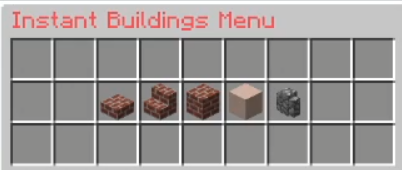
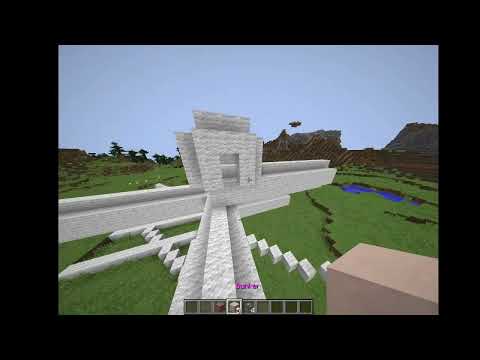
permissions
!!! All Player can use Bridges if they have them
You need "buildings.GUI" to use /Buildings
You need the Permission "buildings.normal" to get the normal_building or you are OP
You need the Permission "buildings.stairs" to get the stairs bridge or you are OP
You need the Permission "buildings.tunnel" to get the tunnel bridge or you are OP
You need the Permission "buildings.bunker" to get the bunker bridge or you are OP
You need the Permission "buildings.wall" to get the safe_wall bridge or you are OP
Config.yml
# !!!
# Please Note that the Block id is only needed when you set the Placed Block to WOOL or STAINED_CLAY !!!!
# Otherwise it will get Ignored !!!!
# !!!
prefix: '&5Instant Buildings &b>> '             // This is The Prefix
GUI_Name: '&cInstant Buildings Menu'            // This is the GUI Name when you type "/buildings"
no_perms: '&4You have no rights to do this!'    // That is the messane you get when you tpe "/buildings" and you are not OP.
normal:                                          // This is the Bridge !! You Can't chnage it !!
  name: '&5Default Bridge'                      // Name of the Bridge
  block: STEP                                   // Block of the Bridge in the GUI
  block_id: 4                                   // Block id in the GUI
  place: WOOL                                   // Placed Block from the Bridge
  place_id: 3                                   // Placed Block id
  length: 15                                    // length of the bridge


stairs:
  name: '&4Stairs Bridge'
  block: BRICK_STAIRS
  block_id: 0
  place: WOOL
  place_id: 5
  length: 15


tunnel:
  name: '&3Tunnel Bridge'
  block: BRICK
  block_id: 0
  place: WOOL
  place_id: 7
  length: 15


bunker:
  name: '&dBunker'
  block: STAINED_CLAY
  block_id: 0
  place: WOOL
  place_id: 8


safe_wall:
  name: '&2Safe Wall'
  block: COBBLE_WALL
  block_id: 0
  place: WOOL
  place_id: 9


destroy-blocks:                // List of Blocks That get Destroyed by the Bridges
- AIR
- LONG_GRASS
- WATER
You can add the plugin to your project and use it as an API
Example Code
package Schulschluss;

import org.bukkit.command.Command;
import org.bukkit.command.CommandExecutor;
import org.bukkit.command.CommandSender;
import org.bukkit.entity.Player;
import org.bukkit.plugin.java.JavaPlugin;

import de.Schulschluss.instantbuildings.API;        // this is NEEDED to import the API

public class Main extends JavaPlugin implements CommandExecutor {

    //  This method is called, when the server starts
    public void onEnable() {
        this.getCommand("build-bridge-bunker").setExecutor(this);    // register this command below
    }

    // This method is called, when somebody uses the command
    @Override
    public boolean onCommand(CommandSender sender, Command command, String label, String[] args) {

        if (sender instanceof Player) {         // check if the sender is a Player and not the console
            Player player = (Player) sender;    // set the player
             API.build_bunker(player);          // create the bunker bridge on the Player Location

         }
        return false;
    }
}
Perfect Example Code if you want to add it to a Game with Teams
package Schulschluss;

import org.bukkit.DyeColor;
import org.bukkit.entity.Player;
import org.bukkit.event.EventHandler;
import org.bukkit.event.Listener;
import org.bukkit.event.block.Action;
import org.bukkit.event.player.PlayerInteractEvent;
import org.bukkit.inventory.ItemStack;
import org.bukkit.inventory.meta.ItemMeta;
import org.bukkit.plugin.java.JavaPlugin;

import de.Schulschluss.instantbuildings.API;        // this is NEEDED to import the API

public class Main extends JavaPlugin implements Listener {

    //  This method is called, when the server starts
    public void onEnable() {

        PluginManager pm = getServer().getPluginManager();
        pm.registerEvents(new Main(), this); // register the "PlayerInteractEvent" event.
    }

// This event get trigger when a player is Interacting with something.
@EventHandler
    public void clickStick(PlayerInteractEvent e) {
        if (e.getAction() == Action.RIGHT_CLICK_AIR || e.getAction() == Action.LEFT_CLICK_AIR || e.getAction() == Action.RIGHT_CLICK_BLOCK || e.getAction() == Action.LEFT_CLICK_BLOCK ) {
            Player p = e.getPlayer();

            // Create the wall for the Team in the gven color.
            ItemStack wall = new ItemStack(Material.STAINED_GLASS_PANE, 1, DyeColor.LIGHT_BLUE.getData());

            // Creates a Example Item that the Player has to click
            ItemStack MagicStick = new ItemStack(Material.STICK, 1);
            ItemMeta MagicStickmeta = MagicStick.getItemMeta();
            MagicStickmeta.setDisplayName("§3MagicStick");
            MagicStick.setItemMeta(MagicStickmeta);

            // Check if the player has the itemstack with the same name as MagicStick in the hand.
            if (p.getItemInHand().getItemMeta().equals(MagicStick.getItemMeta())) {
                API.build_safe_wall(p, wall); // Creates the safe_wall Building withe the Example wall item for the team in the Color.
                API.build_safe_wall(p, wall, 10, 12); // Creates the safe_wall Building withe the Example wall item for the team in the Color and the width of 10 and the hight of 12.
            }
        }
    }
}
Terms And Service
You are not allowed to decompile this plugin.
You are not allowed to sell, give or redistribute this product.
You are not allowed to use, view or modify any of the plugin's codes.
You are not allowed to claim this plugin as your own.
https://www.flaticon.com/de/kostenlose-icons/brucke
Bridge icons created by Smashicons - Flaticon
Similar projects
Plugin →Let Me Despawn
Improves performance by tweaking mob despawn rules. Say bye to pesky unintentional persistent mobs.
25MSueta
JourneyMap
Real-time map used for mapping in-game or your browser as you explore.
14.7MSueta
Emotecraft
Create your own emotes in Minecraft.
7.5MSueta
Simple Tpa
A simple tpa plugin which sends requests
5.4MSueta
Common Network
Forge and Fabric Unified Networking Solution
3.9MSueta
Set Home
A lightweight plugin for players to set their homes.
3.8MSueta