
ItemRewards | Private and Public Item Bombs! [1.8-1.16]
2.7.2Create your own item bombs, people can throw them and get rewards!

What can I do with ItemRewards?
This plugin works as an Item Bomb creator. People can buy and throw these bombs to give the entire server an Item Reward, if the bomb type is set to Global. In the other case, if the bomb type is set to Private, just the user who throw it will get the reward.
These item rewards are fully configurable, you can set the items to win, their probabilities, the amount of prizes to win, the cost, animation and more!
Example: A user buys a Global Item Reward and throws it. A message will appear on the chat and all connected users on the server can click on it to get the reward.


- ✓ Item Rewards GUI Shop
- ✓ Item Rewards Use GUI
- ✓ Create your own Rewards:
- Custom Name and Lore
- Cost (Plugin Vault Required)
- Amount of prizes to win (Max 3 prizes per reward)
- Type (Global or Private)
- Animation
- Permission
- Custom Items
- ✓ Create your own Items:
- Name, Lore.
- Enchantments.
- Potion Effects.
- Leather Armor Color.
- Book Enchantments.
- Written Books.
- Fireworks Attributes.
- Banner, Shields Attributes.
- Skull Textures.
- Item Flags.
- Unbreakable Tag.
- Attributes Modifiers.
- Random Amount
- Command Rewards instead of Items
- ✓ /ir save Commmand to save Items in a very easy way (Without touching the config)
- ✓ /ir open Command to give and open an Item Reward directly to a player.
- ✓ /ir give Command to give a specified reward to a player
- ✓ Plugin enabled in certain worlds
- ✓ Works in 1.8+
- ✓ Messages.yml file for translation
- ✓ Works in Craftbukkit and Spigot

1) Download ItemRewards and Vault from here: https://dev.bukkit.org/projects/vault and place both files in plugins folder.
(If you are using another Economy plugin, tell me and I can try to add compatibility with it)
2) Start your server an wait until ItemRewards folder is created.
3) Open config.yml file and follow these tutorials below:
Config.yml Main Section Tutorial
#Here you can define the inventory items, use IDs instead of item names.
SINCE MINECRAFT 1.13 CHANGED ALL IDS YOU NEED TO USE MATERIAL NAMES FROM THIS PAGE (SAME FOR SOUNDS):
Materials: https://hub.spigotmc.org/javadocs/spigot/org/bukkit/Material.html
Sounds: https://hub.spigotmc.org/javadocs/spigot/org/bukkit/Sound.html
menu-decoration-id: "160:13"
main-menu-id: "262"
item-id: "54"
#Here you can define the sounds that some events will have.
If you are using a 1.8.X server use these Sounds:
https://github.com/Attano/Spigot-1.8/blob/master/org/bukkit/Sound.java
If you are using a 1.9-1.12 server use these Sounds:
http://www.theredengineer.com/1.9-playsound-list.html
global_reward_sound: BLOCK_NOTE_PLING
animation1_sound: BLOCK_NOTE_HAT
#Set this to true if you want to spawn a firework when a user receives an Item Reward.
firework_on_reward: true
#Here you can define in which worlds the plugin will be enabled
enabled-worlds:
- world
- world_nether
- world_the_end
#Enables or disables the Shop feature. If you set this to false, the only inventory the plugin will open is the Use Item Rewards (when using /ir)
buy-item-rewards-enabled: true
Config.yml Creating Items
Items:
        helmet_1:
            id: 306
            name: "&6Guardian &8Helmet"
            amount: 1
            lore:
            - "&8With this item in your possession"
            - "&8you'll be a person to be reckoned with"
            enchants:
            - PROTECTION_ENVIRONMENTAL;7
            - PROTECTION_EXPLOSIONS;7
        diamonds:
            id: 264
            amount: 1-30
As you can see in the example, there are two Items created: helmet_1 and diamonds. These will be the items that you can win on a Item Reward. Of course you can add as many as you want, just remember to save them with different names.

You can use the command: /ir save <name> to save the item you have in your hand, and store their properties automatically on this section of the config. I strongly recommend you using this feature when your item have a lot of properties, like a lot lines of lore, enchantments, attributes, etc..
If you want to do it manually, here is how you can do it:
#ID of the item to craft. Here you can find all IDs: http://www.minecraftinfo.com/idlist.htm
id: 306
#Here you can set a custom name for the item. You can use color codes. You can remove this section if you don't want a custom name for the item.
name: "&6Guardian &8Helmet"
#Here you can set the amount of the item to receive. You can place a line "-" between two numbers to give the player a random amount of items.
amount: 1
or
amount: 1-30
#Here you can set a custom lore for the item. You can use color codes. You can add as many lines as you want. You can remove this section if you don't want a custom lore for the ite,.
lore:
- "&8With this item in your possession"
- "&8you'll be a person to be reckoned with"
#Names of the enchantments that the item will have with the level of the enchant respectively. Here you can find a list with all the enchantments: https://hub.spigotmc.org/javadocs/bukkit/org/bukkit/enchantments/Enchantment.html You can remove this section if you don't want enchantments for the item.
enchants:
- PROTECTION_ENVIRONMENTAL;7
- PROTECTION_EXPLOSIONS;7
#With this you can hide some ItemFlags like the attributes, enchants and more. You can find all the flags names here: https://hub.spigotmc.org/javadocs/bukkit/org/bukkit/inventory/ItemFlag.html
hide-flags:
- HIDE_ATTRIBUTES
#If you add this section, that means that the player will receive commands rewards instead of an item. The item created on this section will only be placed on the reward inventory, but it will not be given to the player. You can add as many commands as you want, and remember that these commands are executed from the console.
command-reward:
- pex user %player% group set VIP
- "broadcast &a&l%player% won a &4&lVIP RANK &a&lon an Item Reward!"
#Here you can decide if the item should be unbreakable. Set this to true or false
unbreakable: true
#Here you can set the owner of a skull. For this option to work you need to set the ID of the item to: 397:3.
skull-owner: Ajneb
#You can also add a head with texture from sites like http://heads.freshcoal.com/ or https://minecraft-heads.com/
skull-texture: eyJ0ZXh0dXJlcyI6eyJTS0lOIjp7InVybCI6Imh0dHA6Ly90ZXh0dXJlcy5taW5lY3JhZnQubmV0L3RleHR1cmUvOTA4Yjc3MmVjYWVlNzA2MjM1ZDFhZGJmMGI5YTI5YjU4YmE5YzBlZDYwZGU2ZjEwZWZiMWE3Zjg2ZDllIn19fQ==
skull-id: ec62ea75-402c-44fb-8f71-bef0015a4634
Config.yml Creating Rewards
Rewards:
        reward1:
            name: "&aCommon &2Item Reward &7[&e%star%&7]"
            lore:
            - "&7The most basic Item Reward"
            - ""
            - "&2Cost: &a$1000"
            - ""
            - "&8[&6Click to Buy&8]"
            cost: 1000
            prizes_to_win: 1
            type: private
            animation_type: 1
            items:
            - diamonds;80
            - chestplate_1;15
In this section, you'll be able to create the item rewards that users will buy. The name and lore works as the same way that in the Items section. You can use the variable %star% to add a star symbol (✮) to the name of the reward.

#Here you need to define the cost of the Item Reward. Remember that this plugin uses Vault for managing economy.
cost: 1000
#Here you can set the amount of prizes the players will win on this reward. The number you put in here, will change animations, so you can set just 1, 2 or 3 prizes per reward.
prizes_to_win: 1
#You can define a permission to buy the reward
permission: itemrewards.buy.reward1
#Here you need to select the type of this reward. If you set "private" that means that only the user who bought the reward will receive it. If you set "global" instead, that means that everyone connected to the server will receive the reward by clicking on a message on chat, as you can see on the picture.
type: global

#Here you need to select the animation type the reward will have when receiving the items. Currently there are 2 animations types so you need to put "1" or "2" on this section. Don't worry, more animations are coming :)
animation_type: 1
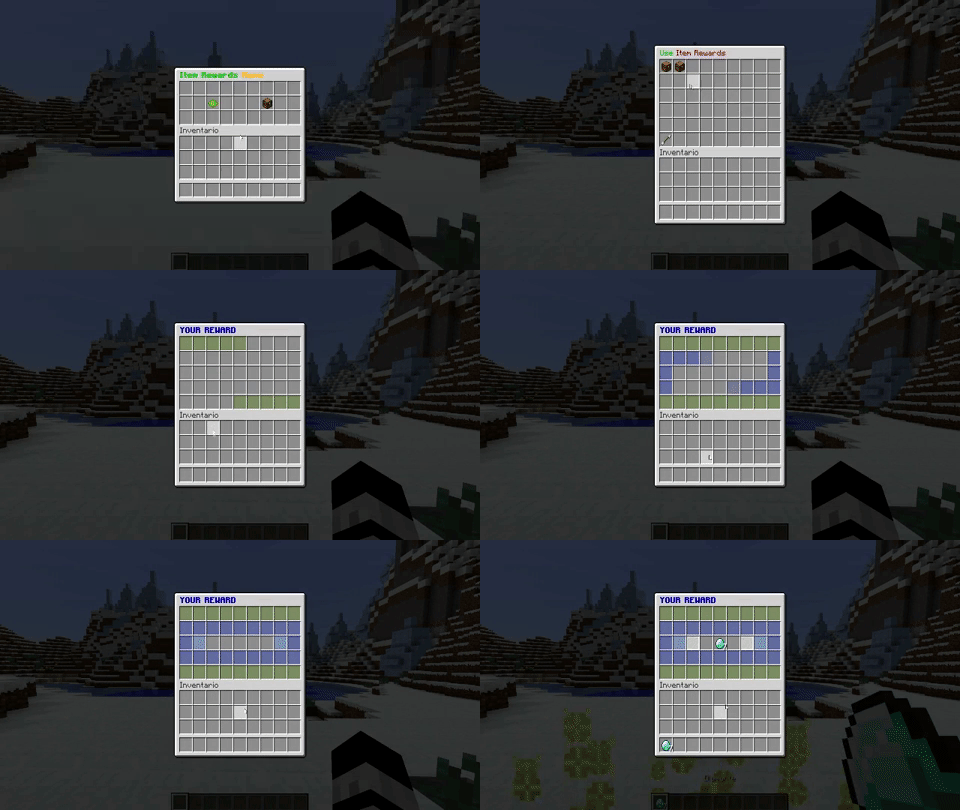
#Finally, you need to set them possible items to win for this reward. Obviously you need to create them first in the Items Section. For this to work you just need to put the name of the created item + ";" + the probability. You can set more than 100 if you want, and that will give the player more probabilities to win that item.
items:
- helmet_1;5
- emeralds;50
- diamonds;70
When you finish editing the config, remember to use the /ir reload command and you are ready to go! Below you can find the config.yml and messages.yml file
Config.yml
#If you need a tutorial you have one on the plugin page:
Config:
    menu-decoration-id: "160:13"
    main-menu-id: "262"
    item-id: "54"
    global_reward_sound: BLOCK_NOTE_PLING
    animation1_sound: BLOCK_NOTE_HAT
    animation2_sound: BLOCK_LAVA_POP
    animation2_sound2: ITEM_SHIELD_BREAK
    animation2_sound3: ENTITY_GENERIC_EXPLODE
    get_reward_sound: ENTITY_FIREWORK_LAUNCH
    firework_on_reward: true
    new-version-reminder: true
    enabled-worlds:
    - world
    - world_nether
    - world_the_end
    Items:
        helmet_1:
            id: 306
            name: "&6Guardian &8Helmet"
            amount: 1
            lore:
            - "&8With this item in your possession"
            - "&8you'll be a person to be reckoned with"
            enchants:
            - PROTECTION_ENVIRONMENTAL;7
            - PROTECTION_EXPLOSIONS;7
        diamonds:
            id: 264
            amount: 1-30
        emeralds:
            id: 388
            amount: 1-5
        wood:
            id: "17:3"
            amount: 32-64
        chestplate_1:
            id: 299
            name: "&cAdventurer &4Chestplate"
            amount: 1
            color: 1096984
        command_1:
            id: '351:14'
            amount: 1
            name: "&4&lVIP RANK"
            command-reward:
            - pex user %player% group set VIP
            - "broadcast &a&l%player% won a &4&lVIP RANK &a&lon an Item Reward!"
    Rewards:
        reward1:
            name: "&aCommon &2Item Reward &7[&e%star%&7]"
            lore:
            - "&7The most basic Item Reward"
            - ""
            - "&2Cost: &a$1000"
            - ""
            - "&8[&6Click to Buy&8]"
            cost: 1000
            permission: itemrewards.buy.reward1
            prizes_to_win: 1
            type: private
            animation_type: 1
            items:
            - diamonds;80
            - chestplate_1;15
        reward2:
            name: "&9Rare &2Item Reward &7[&e%star%%star%&7]"
            lore:
            - "&7A rare Item Reward"
            - ""
            - "&2Cost: &a$5000"
            - ""
            - "&8[&6Click to Buy&8]"
            cost: 5000
            prizes_to_win: 2
            type: global
            animation_type: 2
            items:
            - helmet_1;5
            - emeralds;50
            - diamonds;70
            - chestplate_1;40
- wood;60Similar projects
Plugin →Let Me Despawn
Improves performance by tweaking mob despawn rules. Say bye to pesky unintentional persistent mobs.
26.2MSueta
JourneyMap
Real-time map used for mapping in-game or your browser as you explore.
14.7MSueta
Emotecraft
Create your own emotes in Minecraft.
7.9MSueta
Simple Tpa
A simple tpa plugin which sends requests
5.4MSueta
Common Network
Forge and Fabric Unified Networking Solution
4.7MSueta
Set Home
A lightweight plugin for players to set their homes.
3.8MSueta