
KerisuteGomen Forge mods detection & LiteLoader mods detecti
1.0.0Detect Forge client / mods and LiteLoader client / mods, Forge Wurst, etc. Kick player and logging.

This article has been translated from Japanese to English by Google translation (Original Text: http://forum.minecraftuser.jp/viewtopic.php?f=38&t=36708).
Overview
When the player logs in, it detects whether the player has introduced the modified client and Mod, and if the login permitted client and objects other than Mod registered in the whitelist are included, It automatically kicks that player and records client information on the console.
It is also possible to avoid the kick by giving permission setting of the client type, setting of the player displaying details at the player kick, and giving specific permission.
By the way, Forge introduction client and introduction ForgeMod details, LiteLoader introduction client can be detected with existing plugin, but as long as you look on the net LiteLoaderMod plugin is the world's first plugin .
The following clients and Mod can be detected.
・Forge Client
・Forge Mods
・Forge Wurst
・LiteLoader Client
・LiteLoader Mods
・Non-Forge 5zig Client
・LabyMod Client
・Other items with other original client names set
Currently, the following clients and Mod can not be detected.
・HorseAttirbutes(LiteLoaderMod)
・WorldEditCUI(LiteLoaderMod / It will be responded with the next update)
・Wurst(Hacked Client)
・Other items for which the original client name is not set
various settings
Various settings can be edited from config.
Forge Introduction Allow / Prohibit connection of client

If prohibited, Minecraft Forge, ForgeModLoader, and Mod Coder Pack will be blocked.
Forge:
  CanLogin: true / false
Enable / Disable ForgeMod detection
If disabled, ForgeMod detection will not be performed when the player logs in.
Forge:
  ModCheck: true / false
Enable / Disable ForgeModID Whitelist
If disabled, ForgeMod detection will not reference the ForgeModID whitelist.
Forge:
  EnableModIDWhitelist: true / false
Add connectable ForgeMod
Write ModID after 4 halfwidth spaces, 1 hyphen, 1 halfwidth space.
For each ForgeMod ID, you can install ForgeMod you want to check in advance, you can check from the Mod list displayed by selecting the "Mod" item from the Minecraft title screen.
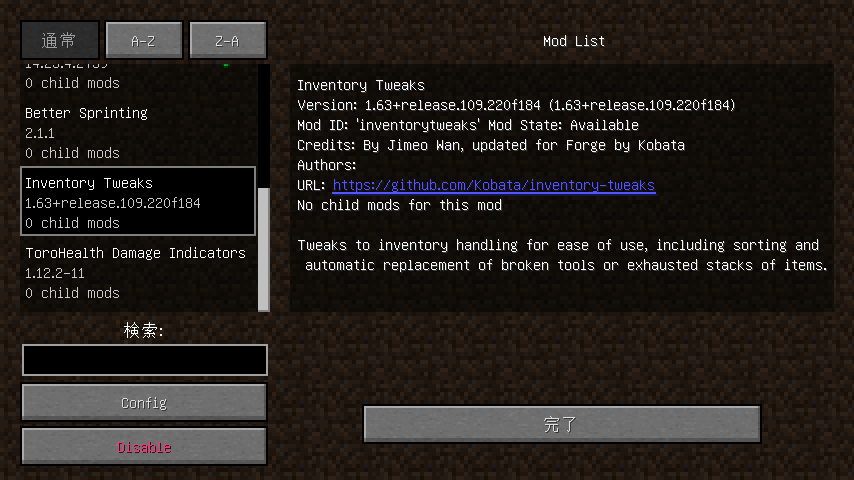
The string sandwiched between single quotes of Mod ID: '' is ModID.
Forge:
  Whitelist:
    - inventorytweaks
    - torohealthmod
LiteLoader Introduction Allow / Prohibit client connection

If prohibited, LiteLoader will be blocked.
LiteLoader:
  CanLogin: true / false
Enable / Disable LiteLoader detection
If disabled, LiteLoader detection will not be performed when the player logs in.
LiteLoader:
  ModCheck: true / false
Enable / Disable LiteLoaderModID Whitelist
If disabled, the LiteLoaderModID whitelist will not be referenced for LiteLoader detection.
LiteLoader:
  EnableModIDWhitelist: true / false
Add connectable LiteLoaderMod
Write ModID after 4 halfwidth spaces, 1 hyphen, 1 halfwidth space.
Please introduce the LiteLoaderMod you want to check in advance for each ID of LiteLoaderMod and confirm from the message displayed on the console and the kick message when logging in to the server.
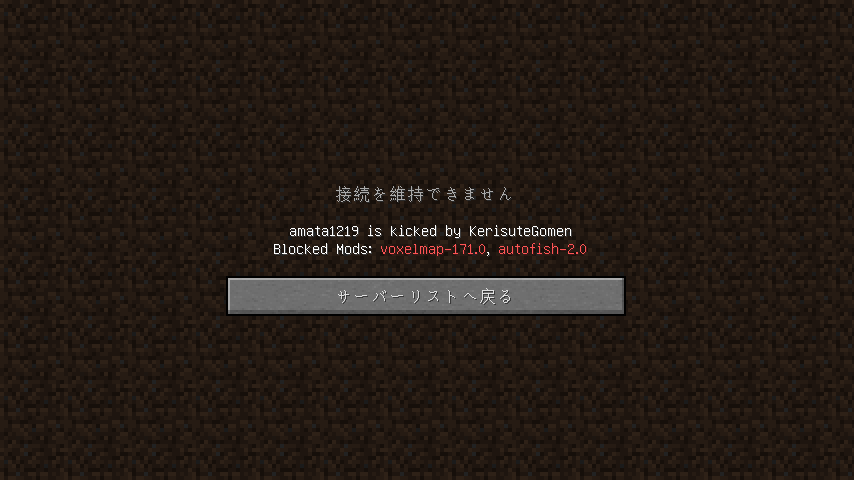
It is displayed in the form of LiteLoader: true (Mods: modid-version, modid-version ...).
Part of LiteLoaderMod does not transmit ID, so we can not confirm their ID.
As soon as the acquisition method is found, we will respond to those Mods in future updates.
LiteLoader:
  Whitelist:
    - voxcelmap
Non-Forge 5zig Mod Allow / Prohibit connection of introduction client

If prohibited, Non-Forge 5 zigMod will be blocked.
NonForge5zig:
  CanLogin: true / false
LabyMod Allow / Prohibit connection of introduction client

If prohibited, LabyMod will be blocked.
Add other connectable clients
Write the client name after two spaces, one hyphen, one space.
RegisterCustomClients:
  - OriginalClient
Allow / Prohibit connection of clients other than the above client
Since cheat clients are handled as vanilla clients across the board, even if they are banned they can not be prohibited.
As soon as the method is found, we respond with future updates.
OtherClient:
  CanLogin: false
Other settings
EnableLogging

Set whether to display client information on the console when the player logs in.
Valid with true, false disabled.
EnableLogging: trueKickMessage

Set the message to be displayed when kicking the player.
Please describe the message with double quotes.
There are two types of placeholders that can be used, and [player] is replaced with the player name kicked, illegal client detected [mods] and illegal Mod list.
Decorative codes using section symbols (§) can also be used.
KickMessage: "[player] is kicked by KerisuteGomen\nBlocked Mods: [mods]"KickMessageReceiver

KickMessageReceiver:
  - test_player1
  - test_player2
config.yml Initial setting
EnableLogging: true
KickMessage: "[player] is kicked by KerisuteGomen\nBlocked Mods: [mods]"
KickMessageReceiver: []
Forge:
  CanLogin: true
  ModCheck: true
  EnableModIDWhitelist: true
  Whitelist: []
LiteLoader:
  CanLogin: true
  ModCheck: true
  EnableModIDWhitelist: true
  Whitelist: []
NonForge5zig:
  CanLogin: true
LabyMod:
  CanLogin: true
RegisterCustomClients: []
OtherClient:
  CanLogin: false
config.yml setting example
EnableLogging: true
KickMessage: "Server > [player]: 許可されていないModが導入されているため接続を拒否しました。\nBlocked Mods: [mods]"
KickMessageReceiver:
  - player_name1
  - player_name2
Forge:
  CanLogin: true
  ModCheck: true
  EnableModIDWhitelist: true
  Whitelist:
    - inventorytweaks
    - torohealthmod
    - 5zig
LiteLoader:
  CanLogin: true
  ModCheck: true
  EnableModIDWhitelist: true
  Whitelist:
    - voxcelmap
NonForge5zig:
  CanLogin: true
LabyMod:
  CanLogin: false
RegisterCustomClients:
  - TestClient
OtherClient:
  CanLogin: false
Commands
/ kerisute # Display version information etc. of this plugin.
/ kerisute commands # Display the command list of this plugin.
/ kerisure reload # Reload config.
/ kerisute [true / false] # Set whether to display details when the player is kicked. The default is false.
/ kerisute fwhitelist [add / remove / clear] [mod-id] # Edit ForgeMod's whitelist. Add by add, delete with remove, clear all with delete. You do not need to specify mod-id to execute clear.
/ kerisute lwhitelist [add / remove / clear] [mod-id] # Edit the white list of LiteLoaderMod. Add by add, delete with remove, clear all with delete. You do not need to specify mod-id to execute clear.
PERMISSION
You can avoid kicks by granting the following permission.
kerisute.samurai.ignoreTerms of service
Secondary distribution and self-made remarks of this plug-in are prohibited.
In addition, we are not responsible for any damage directly or indirectly incurred in connection with this plug-in.
Installation method
Unzip the downloaded file and put the packaged .jar file in the server's plugin folder.
Version information
Spigot 1.12.2
KerisuteGomen 1.0
Minecraft Forge 14.23.4.2739
LiteLoader 1.12.2-SNAPSHOT-release
Non-Forge 5 zig Mod 3.12.5 for Minecraft 1.12.2
LabyMod 3 - 1.12.2
Development environment
Eclipse 4.6 NEON
Java 1.8
Change log
2018/08/28 Spigot 1.12.2 KerisuteGomen Ver.1.0 released!
Other
If you have any problems or concerns, please contact us on this topic or DM on Twitter @ amata 1219.
Twitter: https://twitter.com/amata1219
We also accept requests. If there is something up to amata1219 as well please up.
Last
I am Japanese.
Because it is difficult to read and write long English sentences, I relied on Google translation.
I am sorry for the difficulty in reading.
Thank you very much for reading so far!
Similar projects
Plugin →Let Me Despawn
Improves performance by tweaking mob despawn rules. Say bye to pesky unintentional persistent mobs.
25MSueta
JourneyMap
Real-time map used for mapping in-game or your browser as you explore.
14.7MSueta
Emotecraft
Create your own emotes in Minecraft.
7.5MSueta
Simple Tpa
A simple tpa plugin which sends requests
5.4MSueta
Common Network
Forge and Fabric Unified Networking Solution
3.9MSueta
Set Home
A lightweight plugin for players to set their homes.
3.8MSueta