
King of the Ladder | [1.21.11 - 26.3]
3.2.7Climb, fight, and claim the crown in a competitive ladder minigame!
- Tested MC versions
- 1.21, 26.1, 26.2, 26.3
King of the Ladder
Climb the tower. Claim the crown.
GUI arena setup · Leaderboards · Rewards · MySQL · API
Race to the top of a ladder tower, claim the crown and knock every challenger back down.




King of the Ladder is a competitive Minecraft climbing minigame where players race to the top of a ladder tower, claim the crown, and knock challengers back down.
Players enter an arena built around a ladder and fight their way toward the king plate at the top. Reaching the plate makes a player the king and adds to their score, but holding the position becomes harder as other players climb up and try to take the crown. The goal is to become king as many times as possible while keeping opponents away from the top.

Features
- Classic gameplay: Climb, fight, and claim the crown while other players try to knock you away from the top.
- Automatic arena detection: Players enter and leave games naturally by walking into or out of a configured Game Area.
- Custom king plates: Place the crown trigger anywhere inside the arena and choose from multiple pressure plate materials.
- King cooldowns and knockback: Control repeated crown claims with configurable cooldowns, action bar feedback, and plate knockback.
- Interactive GUI setup: Create and manage arenas through visual in-game menus instead of editing files.
- Visual area selection: Select arena corners with a dedicated tool and preview the complete Game Area with configurable particle outlines.
- Player preparation: Save and restore inventories with configurable inventory clearing, potion effect cleanup, and per-arena join game modes.
- Records and statistics: Track crown claims, kills, deaths, tours played, personal arena scores, and top kings.
- Configurable rewards: Run console or player commands when players join, quit, become king, kill an opponent, or die, with built-in player, arena, king, target, score, and statistics placeholders.
- Scoreboards and boss bars: Keep players informed with fully configurable live game displays.
- Highly configurable: Customize messages, sounds, menus, items, chat, cooldowns, scoreboards, boss bars, and gameplay behavior.
- PlaceholderAPI and leaderboards: Display live player, arena, king, record, and leaderboard data on holograms, scoreboards, or other plugins.
- Flat file and MySQL storage: Start with simple local storage or scale player data across your network with MySQL.
- Developer API: Hook into game shutdown, arena entry and exit, king changes, and statistic updates through a public event API.
Arena Setup Guide
Setting up an arena is intuitive with the in-game GUI editor. Follow these steps:
Click to view the step-by-step guide
Step 1: Create the arena
Initialize a new arena with a unique ID.
/kotl create <arena_id>
Step 2: Open the setup menu
Open the visual editor for the arena.
/kotl edit <arena_id>
Step 3: Set the end location
Set the safe fallback location used when a player is removed from the arena, the server reloads, or an unexpected error occurs.
Step 4: Select the Game Area
Use the Game Area selector to mark the two opposite corners of the complete playable area.
- Left-click: Set the first corner.
- Right-click: Set and save the second corner.
- Outline preview: Toggle the particle visualizer to inspect the selected area.
Step 5: Set the king plate
Choose a pressure plate material, receive the setup tool, and place the plate inside the selected Game Area. This plate becomes the crown trigger.
Step 6: Configure player settings
Choose how players are prepared when they enter the arena.
- Join gamemode: Select Survival, Creative, Adventure, or keep the player's current mode.
- Inventory and effects: Toggle inventory clearing and potion effect removal.
- Game displays: Enable or disable the arena scoreboard and boss bar.
- Arena records: Review or reset the arena's king record when needed.
Step 7: Register and play
Click the Firework item to validate, save, register, and enable the arena.
- Enter: Walk into the enabled Game Area to join automatically.
- Leave: Walk outside the Game Area to leave, restore your saved inventory, and remove the arena displays.
Gameplay Flow
- Enter the arena: Walk into an enabled Game Area and the plugin automatically prepares your player state for the competition.
- Climb the tower: Race up the ladder structure while keeping your position against every other challenger.
- Fight for position: Knock opponents away from the route and stop them from reaching the top before you.
- Reach the king plate: Step on the configured pressure plate to claim the crown and become the arena's current king.
- Earn your score: Every successful crown claim increases your total score, tours played, and personal score for that arena.
- Break the record: Outscore the current record holder to become the arena's top king.
- Challenge again: After the configurable king cooldown expires, climb back to the plate and fight for another crown.
- Leave safely: Walk outside the Game Area when you are finished and the plugin restores your saved inventory and removes the arena displays.

Commands and Permissions
All commands use the /kotl command.
Player commands (everyone)
No permissions are required for statistics. Help access is enabled for everyone by default.
/kotl help: Display the available commands.kotl.command.help/kotl stats [player]: Open the in-game statistics menu for yourself or a cached online or offline player.

Arena management commands
Requires kotl.arena.* for full access.
/kotl create <arena_id>: Create a new arena with the specified unique ID.kotl.arena.create/kotl delete <arena_id> [--confirm] [--cancel]: Delete an arena after confirming the action.kotl.arena.delete/kotl edit <arena_id>: Open the in-game GUI editor for arena setup and management.kotl.arena.edit/kotl list: Display all registered arenas together with their readiness and availability state.kotl.arena.list
Admin commands
Requires kotl.admin for full access.
/kotl reload: Stop active games and reload messages, options, items, events, command settings, game displays, and arena outlines.kotl.admin.reload/kotl stop [arena]: Stop your current arena game or a specified active arena game.kotl.admin.stop/kotl kick <player>: Remove a player from an active arena and send them to its end location.kotl.admin.kick

Debug commands (advanced users)
Requires kotl.debug for full access and debug mode must be enabled. Debug commands are intended for testing and troubleshooting.
/kotl debug component <message>: Parse and preview a MiniMessage component in-game.kotl.debug.component/kotl debug dump: Generate and send an event timing report for troubleshooting performance issues.kotl.debug.dump

Stats and Leaderboards
King of the Ladder rewards every successful climb. Track crown claims, kills, deaths, tours played, personal scores for every arena, and each arena's top king, then put the best players on display with live leaderboards.


Placeholders
To use these placeholders, you must have PlaceholderAPI installed on your server.
Player statistics placeholders
These placeholders display statistics for the player viewing them.
%kotl_name%                           - Returns the player's name
%kotl_uuid%                           - Returns the player's unique ID
%kotl_games_played%                   - Total tours played
%kotl_score%                          - Total number of crown claims
%kotl_kills%                          - Total number of kills
%kotl_deaths%                         - Total number of deaths
%kotl_stat:arena_score:<arena_id>%    - Personal score in a specific arena
Current game and global placeholders
Display the player's current arena information or global activity across the server.
%kotl_is_playing%                    - Whether the player is inside an arena
%kotl_current_arena%                 - Current arena ID
%kotl_current_arena_players%         - Player count in the current arena
%kotl_current_arena_king%            - Current king of the player's arena
%kotl_current_arena_last_king%       - Last king of the player's arena
%kotl_current_arena_top_king%        - Record holder of the player's arena
%kotl_current_arena_top_king_score%  - Record score of the player's arena
%kotl_current_arena_score%           - Player's score in the current arena

%kotl_arenas_total%                  - Total registered arenas
%kotl_arenas_ready%                  - Total ready arenas
%kotl_active_games%                  - Games with active players
%kotl_active_players%                - Players across all active games
Arena status placeholders
Fetch live data from specific arenas. Replace <id> with your arena identifier, for example arena1.
%kotl_arena:<id>:players%             - Current player count
%kotl_arena:<id>:king%                - Current king
%kotl_arena:<id>:last_king%           - Last player to claim the crown
%kotl_arena:<id>:top_king%            - Arena record holder
%kotl_arena:<id>:top_king_score%      - Arena record score

%kotl_arena:<id>:ready%               - Whether the arena setup is complete
%kotl_arena:<id>:enabled%             - Whether the arena is available
%kotl_arena:<id>:gamemode%            - Configured join game mode
%kotl_arena:<id>:scoreboard_enabled%  - Per-arena scoreboard setting
%kotl_arena:<id>:bossbar_enabled%     - Per-arena boss bar setting
Leaderboard placeholders
Display your server's top-performing players on scoreboards or holograms.
%kotl_leaderboard:<statistic>:<position>:<type>%<statistic>: The statistic to rank:score(crown claims),kill,death,tours_playedorarena_score_<arena_id>.<position>: The rank position, such as 1, 2, or 3.<type>:namefor username,valuefor score,uuid, orformatted_value.
Examples:
# Name of the 1st place player by total crown claims
%kotl_leaderboard:score:1:name%

# Crown claim count of the 1st place player
%kotl_leaderboard:score:1:value%

# Name of the 3rd place player by total kills
%kotl_leaderboard:kill:3:name%

# Name of the top player in a specific arena
%kotl_leaderboard:arena_score_arena1:1:name%
bStats Metrics
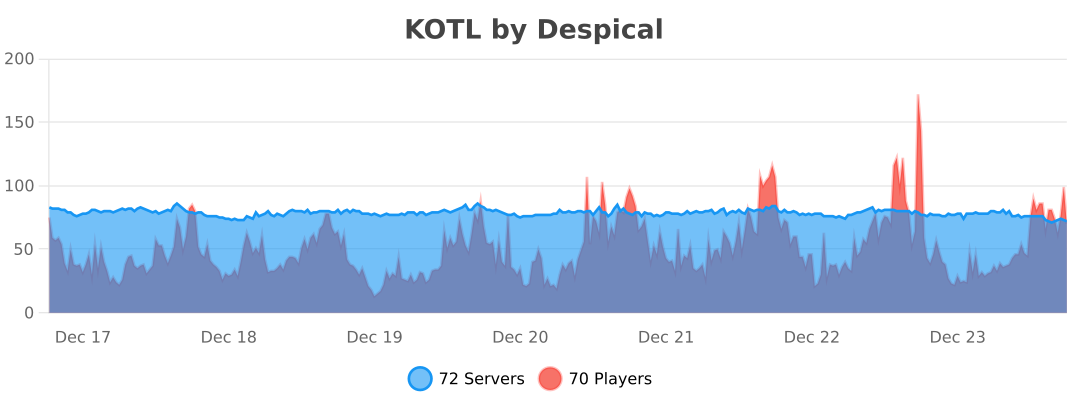
This plugin collects anonymous usage statistics through bStats, such as player count, server version, and Java version. This helps us make better development decisions. No private information is collected.
Enjoying the plugin?
We spend hundreds of hours making King of the Ladder the best competitive climbing experience for your server. If you like the plugin, please consider leaving a 5-star review!
A huge thank you to everyone who has supported the project so far! ❤️
Copyright 2026 © Berke Akçen
Similar projects
Plugin →Let Me Despawn
Improves performance by tweaking mob despawn rules. Say bye to pesky unintentional persistent mobs.
26.2MSueta
JourneyMap
Real-time map used for mapping in-game or your browser as you explore.
14.7MSueta
Emotecraft
Create your own emotes in Minecraft.
7.9MSueta
Simple Tpa
A simple tpa plugin which sends requests
5.4MSueta
Common Network
Forge and Fabric Unified Networking Solution
4.7MSueta
Set Home
A lightweight plugin for players to set their homes.
3.8MSueta