
This game depends on my plugin GameBox!
Combine Gems and gain points. This game is based on Candy Crush.
Have fun :)
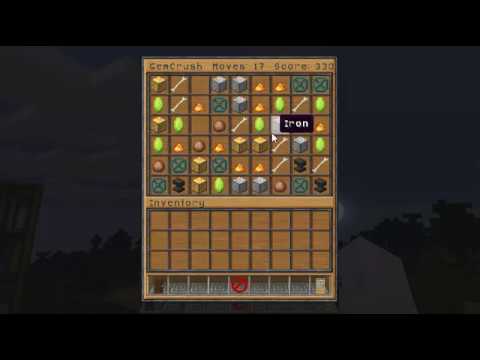
This game depends on my plugin GameBox. It is one of many inventory games for which GameBox provides a neat GUI and lots of customization.
Take a look at the GameBox page for the other games :)
GemCrush is a game about crushing Gems and getting points for it. To destroy gems you have to combine them in rows of three or more. You can switch two gems by clicking them. For the gems to change places they have to be next to each other and they have to complete at least a row of 3 after switching.
The title of the inventory will constantly tell you how many moves you have left and how many points you got so far.
Try to make as many points with each move, as possible. The best is to create special gems.
To create a bomb form a 'T-shape' out of one gem type.
Bomb showcase
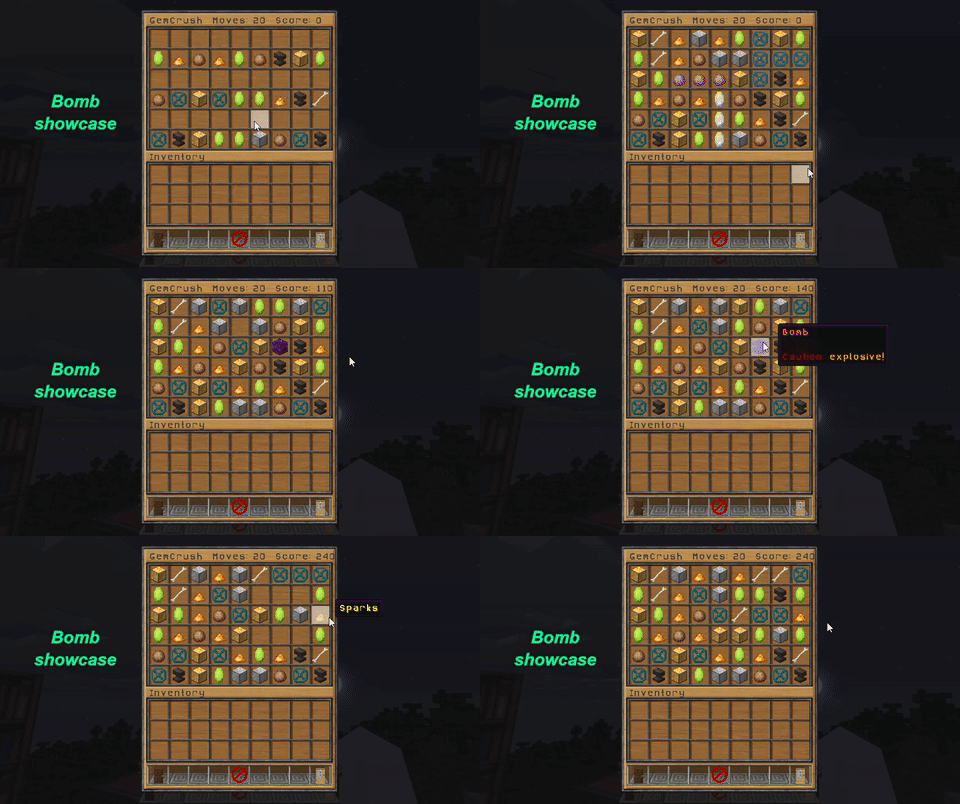
Bombs will explode automatically and destroy all surrounding gems. Giving you max 100 points with default values (20p bomb, 10p per gem; can be changed in the configuration file).
The game aims at providing full configuration in combination with GameBox. The configuration file of GemCrush allows for the creation and customization of different game modes.
For each game mode you can configure:
- The button (item, name and lore)
- The number of different gems in the game
- Whether bombs are enabled or disabled
- Cost
- Rewards depending on the score a player achieved!
- Money rewards if economy is enabled (Vault + economy plugin needed)
- Token rewards which can be exchanged in the Token shop included in GameBox (this basically means you can reward with items and permissions and so on)
- Money rewards if economy is enabled (Vault + economy plugin needed)
Additionally there is a lot of possible configuration about the game in general.
- Define the language file. You can either use one of the default files, write your own file or use the always up-to-date english messages. The language file has to be specified in the configuration file.
- You can customize all the gems and add/remove some if you want to
- Define gems with higher values
- Define gems with higher chances beeing picked for a game
Default configuration file
# ----------------------------------------------------------------------------------------#
#                                                                                         #
#                                    GemCrush config                                      #
#                                                                                         #
# ----------------------------------------------------------------------------------------#

# this plugin depends on GameBox! It will not work without it.


# name of the language file (in the folder 'language')
#   the default.yml file is overwritten on every server restart! This means you will have to use the other files
#     to customize the messages, but since i am adding messages regulary in updates
#   You should use the default file if you just want to have the up to date english default messages
langFile: 'default.yml'


gameBox:
  mainButton:
    # define the Material and data for the button (format: 'material:data')
    materialData: "EMERALD"
    # display name of the button
    displayName: "&3GemCrush"
    # lore of the button
    lore:
    - ""
    - "&1It's raining gems..."
  gameButtons:
    normalGame:
      materialData: "EMERALD"
      displayName: "&1It's raining gems"
      lore:
      - ""
      - "&4Moves: &220"
      - '&4Gems: &28'
      - '&4Bombs: &2true'
      - '&4Cost: &45'
      - ''
      - '&3&lTop list is activated!'
      moves: 20
      # number of different gems in a normal game
      #   This number HAS TO BE equal or smaller then the number of gems defined in the section normalGems below
      #   8 or 7 are good numbers. 7 is easier and the game has to shuffle less but 8 is a bit more challenging
      differentGems: 8
      # enable/disable bombs for this game
      bombs: true
      # slot of the button in the gui
      #   be careful to not use the same twice ;)
      slot: 0
      cost: 5
      saveStats: true
    lessMovesAndLessGemTypes:
      materialData: "nether_star"
      displayName: "&1So much &l&epling"
      lore:
      - ""
      - "&4Moves: &210"
      - '&4Gems: &24'
      - '&4Bombs: &2true'
      - '&4Cost: &410'
      moves: 10
      differentGems: 4
      bombs: true
      slot: 5
      cost: 10
    materialdatatest:
      materialData: "nether_star"
      displayName: "&1The cheaper &l&epling"
      lore:
      - ""
      - "&4Moves: &210"
      - '&4Gems: &24'
      - '&4Bombs: &4false'
      - '&4Cost: &45'
      moves: 10
      differentGems: 4
      bombs: false
      slot: 6
      cost: 5
  topListButtons:
    # use the same key as the game you want to display the top list for
    #   for that button 'saveStats' must be true (see above)
    normalGame:
      materialData: "diamond_block"
      displayName: "&cTop list"
      lore:
      - ""
      - "&3Compare your GemCrush skills with others"
      slot: 9
      # inventory title of the top list (%player% and %game%)
      inventoryTitle: " &1It's raining gems      &rTop List"
      # Lore of the skulls in the inventory. Use %rank% for the rank and %time% for the time in 'mm:ss'
      skullLore:
      - ''
      - '&6Rank:&1 %rank%'
      - '&6Score:&1 %score%'


game:
  # time in ticks (20 ticks = 1 second) between two gem movements
  #   this is time each gem needs to fall down one row
  ticksBetweenMovement: 3
  # time in ticks (20 ticks = 1 second) between switching two gems and destroying the matched ones
  ticksBetweenSwitchAndDestroy: 7
  # customise bombs here
  #   they are spawned if you combine gems to the following kind of forms
  #
  #  x x x      x x x     x
  #     x         x        x x x
  #     x         x           x
  #
  bombs:
    # ticks until the bomb explodes (starts counting AFTER all gems fell down and nothing else can break)
    ticksTillExplosion: 15
    pointsOnBreak: 20
    displayName: '&cBomb'
    lore:
    - '&r'
    - '&4Caution: &6explosive!'
  playSounds: true
  # if you want you can change the sound volume here
  soundVolume: 0.4


# requires vault and an economy plugin
#   to pay out the rewards from section 'onGameEnd' economy.enabled AND onGameEnd.pay have to be true
#   if economy.enabled is true players will pay the cost when starting a game
economy:
  enabled: false


onGameEnd:
  pay: true
  restrictions:
    # players with bypass permission do not have to pay. Here you can set whether they also do not get any rewards.
    playersWithBypassDontGetRewards: true

  scoreIntervals:
    # all keys have to be integers otherwise they will be ignored and a warning will be printed in the console

    # money is only paid if economy is enabled

    # You can add as many intervals as you want to. The order of the intervals doesn't matter
    #   the given reward/messages/commands/broadcasts will always be used if the game is finished with a score between the key and the
    #   next higher key. For the highest key the interval goes to infinity
    # You can add a money-reward with money: x

    # use %player% for the players name and %score% for the score
    0:
      money: 0
    100:
      money: 10
    200:
      money: 20
    300:
      money: 30
    400:
      money: 40
    500:
      money: 50


# use 'Material:data' or 'ID:data'
# Some materials can not be displayed in an inventory, just test everything after changing
# You are advised to use different materials.
# The display names have to be different for the game to work!
# Add as many gems as you want the game will choose random ones for every round
normalGems:
  gem1:
    material: 'Diamond'
    # use & for colors
    displayName: "&dDiamond"
    # optional custom number of points per destroyed gem of this type
    #   the default is 10 and is used if this option is not set
    pointsOnBreak: 10
    # optional probability for this gem to be used
    #   default is 1 and is used if this option is not set
    # This is NOT the probability for the gem to be used to fill an empty slot in the game
    #   this probability is used when the game decides which normal gems to use for the game
    probability: 2
  gem2:
    material: 'EMERALD'
    displayName: '&2Emerald'
    pointsOnBreak: 10
    probability: 1
  gem3:
    material: 'BLAZE_POWDER'
    displayName: '&eSparks'
    pointsOnBreak: 10
    probability: 1
  gem4:
    material: 'clay_ball'
    displayName: '&7Pearl'
  gem5:
    material: 'gold_block'
    displayName: '&6Gold'
  gem6:
    material: 'iron_block'
    displayName: '&fIron'
  gem7:
    material: 'bone'
    displayName: '&5Fossil'
  gem8:
    material: 'apple'
    displayName: '&cApple'
  gem9:
    material: 'anvil'
    displayName: '&8Anvil'
  gem10:
    material: 'structure_void'
    displayName: '&2Wheel'
  gem11:
    material: 'double_plant'
    displayName: '&6Amber'
Old version
If you do not want to use GameBox you can play with the old independent 1.x.x versions (and miss some great features).
Video by DiamondRushXD (outdated)
Video by LtJim007 (outdated)
If you like my inventory games you can also take a look at Minesweeper and Battleship ;) or express your happiness with a small donation 
To Do
- more special gems (fish and so on)
- Campaign with prebuild levels and tasks
- Game with infinite moves but timelimit (new gamemode with GameBox)
Please be friendly in your reviews :p Contact me if you want any features added to the plugin
Similar projects
Plugin →Let Me Despawn
Improves performance by tweaking mob despawn rules. Say bye to pesky unintentional persistent mobs.
26.2MSueta
JourneyMap
Real-time map used for mapping in-game or your browser as you explore.
14.7MSueta
Emotecraft
Create your own emotes in Minecraft.
7.9MSueta
Simple Tpa
A simple tpa plugin which sends requests
5.4MSueta
Common Network
Forge and Fabric Unified Networking Solution
4.7MSueta
Set Home
A lightweight plugin for players to set their homes.
3.8MSueta