
Locked Items
1.8.12Craftable locked chests! Now with Double Locked Chests and Multi-user chests!

Which plugin version you need to use:
For Minecraft 1.8 servers - use LockedItems 1.7.4
For Minecraft 1.9+ servers - use the latest version (at least 1.8.0)
Click "Version History" to download previous versions
This unique plugin adds craftable locked chests!
Simply craft a locked chest and place it, only you can open it!(And people you permit)
This plugin is the only plugin that adds craftable locked chests - a new block! No need for pesky keys or signs!
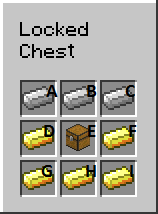
The recipe can be changed in the config.
Note: For PvP servers, PickLockedItems may be more for you.
Plugin tutorial by LtJim007 [English]
Plugin tutorial by Ajneb97 [Spanish/Español]

- Clean, easy and secure!
- Craftable locked chests that can only be opened by the owner of it and users with the lockeditems.lockedchest.openall permission
- Locked chests can only be mined by the owner of it and users with the lockeditems.lockedchest.mineall permission
- Locked chests cannot be destroyed by explosions(unless you change config). If you enabled the option, the chest will drop all it's contents
- You cannot take items out or put items in a locked chest with hoppers
- Give players a locked chest through a command
- See a player's (or your own) locked chests with "/lockeditems see [player]"
- Developer support(see "Implementing in other plugins")
- Double Locked Chests, can be created like a normal double chest, but with locked chests instead.
- Allow other players to open your chest with a simple permit, unpermit command

/lockeditems - base command

/lockeditems help - view help

/lockeditems give [player] [amount] - give a player(or the command sender if none specified) a lockedchest

/lockeditems see [player] - see a player's(or the command sender's if none specified) list of locked chests

/lockeditems permit <player> - Permit the player to open the chest you are looking at

/lockeditems unpermit <player> - Unpermit the player to open the chest you are looking at(only works if they are already permitted)

/lockeditems viewPermitted - View a list of permitted players for the chest you are looking at

/lockeditems checkUpdates - Checks for updates, doesn't auto-update. Can only be run from console
- lockeditems.lockedchest.open - open your own locked chests
- lockeditems.lockedchest.openall - open all locked chests
- lockeditems.lockedchest.craft - craft a locked chest
- lockeditems.lockedchest.mine - mine your own locked chests
- lockeditems.lockedchest.mineall - mine all locked chests
- lockeditems.lockedchest.place - place locked chests
- lockeditems.lockedchest.bypasslimit - bypass chest limit
- lockeditems.lockedchest.give - access to /lockeditems give
- lockeditems.lockedchest.give.others - access to /lockeditems give [player]
- lockeditems.lockedchest.see- access to /lockeditems see
- lockeditems.lockedchest.see.others - access to /lockeditems see [player]
- lockeditems.lockedchest.permit - access to permit, unpermit and viewPermitted commands
- lockeditems.* - all plugin permissions
- lockeditems.lockedchest.* - all locked chest permissions
None of the permissions are true by default! You will have to configure them!

To configure the locked chest recipe, set the shape of the recipe, e.g.
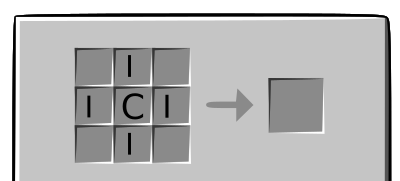
which would be...
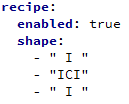
... in the config.
Then, you have to define what the letters mean, e.g. set I to Iron (which has id 265) and set C to Chest (which has id 54).
Which would be...
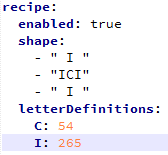
... in the config.
Now, this would be the recipe:
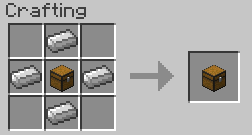
The option "chestLimit" defines the maximum amount of locked chests a player can own. Set to -1 to disable. Players with the permission "lockeditems.lockedchest.bypasslimit" bypass this limit
The option "explodeChests: true/false" defines whether locked chests will be blown up by explosions
The option "checkForUpdates: true/false" defines whether to check for updates when server starts(doesn't auto-update)

Under plugins/LockedItems , there is a file called language.yml
In this file, you can configure the messages of each action and name etc.
It supports colours, e.g. &4Hi or &1Hello
Spanish translation by Ajneb97: https://pastebin.com/9i7R1Jn7
Czech translation by Wupin: https://pastebin.com/0AdhH1EB

- Place the LockedItems.jar in your plugins directory
- Restart server
- Maybe edit config(then restart again)

This plugin saves the locked chests in plugins/LockedItems/chest.yml
Each world name is followed by the locations and owners of each locked chest in that world.
The location is saved as X^Y^Z (e.g. 10^70^40) followed by a colon and the owner's UUID.

You will need to add this plugin to your build path and to your dependencies list in your plugin.yml (Google it if you don't know how).
Then you can use it like this:
Code
import me.Sindybad.lockeditems.*;
LockedChest lc = LockedItemsMain.lc;

//The functions(intelli-sense will show you the javadoc):
lc.save(); //Saves all the locked chests to chests.yml

lc.getChests();//Returns the locked chests HashMap in Location, OwnerUUID. NOTE: editing will not do anything, this just returns a copy

lc.isOwner(UUID playerUUID, Location location);//Checks if a player owns a locked chest

lc.isLockedChest(Location location);//Checks if a block is a locked chest

lc.isLockedChest(ItemStack item);//Checks if an ItemStack is a locked chest

lc.setLockedChest(Location location, UUID ownerUUID);//Sets the given location to a locked chest

lc.removeLockedChest(Location location, boolean dropChest, boolean dropItems);//Removes the locked chest(if there is one) at the location

lc.getItemStack();//Returns the ItemStack of the locked chest
Pick Locked Items is Locked Items, but more geared towards PvP servers. It has many features such as tiered chests, keys, lock picks, traps and more!

This plugin uses MCStats so I can get an idea of who uses the plugin
You can see them here
To opt out, set opt-out in plugins/PluginMetrics/config.yml to true


- New St. Hodenstate : Ip is 37.157.248.114:25565
- Add yours here by telling me in the discuss!
Note: Some parts of LockedItems may not work on offline servers
If you encounter any bugs, post it in the discuss or PM me. Don't post bugs in the reviews section!
If you like the plugin, please leave a review or rating!
Donate to support the development of this plugin

Similar projects
Plugin →Let Me Despawn
Improves performance by tweaking mob despawn rules. Say bye to pesky unintentional persistent mobs.
25MSueta
JourneyMap
Real-time map used for mapping in-game or your browser as you explore.
14.7MSueta
Emotecraft
Create your own emotes in Minecraft.
7.5MSueta
Simple Tpa
A simple tpa plugin which sends requests
5.4MSueta
Common Network
Forge and Fabric Unified Networking Solution
3.9MSueta
Set Home
A lightweight plugin for players to set their homes.
3.8MSueta