
MagicAltar
The place of great power that rewards its visitors for being nearby and for killing other players when altar allows.
----------------------HOW IT WORKS------------------
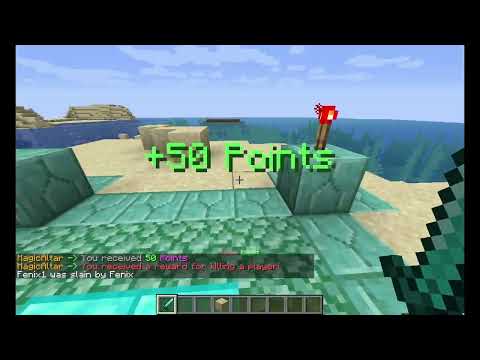
Plugin is fully customizable
Take a look at the example.yml
(Altar 'example' shows all currently added features and variables you can use)
example.yml
#location of an altar
location:
  world: world
  posX: -2
  posY: 100
  posZ: 2
#reward/kill radius
radius: 10
#variables that u can use in commands, titles and messages
donator_nums:
  '1':
    - staff:300
    - god:40
    - premium:35
    - vip:30
    - default:10
#Commands on reward
commands:
  - mgive {player} sp {donator_num-1}
#How often reward should be given
frequency: 30
#Title on reward
title: '&aReceived'
#Subtitle on reward
subtitle: '&a{donator_num-1} &dPoints'
#Message on reward
message: '&6MagicAltar &a-> &7You received &a{donator_num-1} &dPoints'
#Feature that you can use to enable/disable pvp (in future releases i'll add uncountable amount of states support)
pvpChange:
  enabled: true
  #State change frequency
  frequency: 90
  #Active pvp
  'on':
    #Commands on state activation
    commands:
      - rg flag altar_c -w world pvp allow
      - rg flag altar_c -w world invincible deny
      - rg flag altar_c -w world fall-damage allow
    #These are all on state activation
    #Broadcast message who in radius of an altar
    msg: '&6MagicAltar &a-> &cTime to fight!'
    #Broadcast title who in radius of an altar
    title: '&cPvp is on!'
    #Broadcast title who in radius of an altar
    subtitle: '&cMagicAltar example'
    #Play sound who in radius of an altar
    sound: entity_wither_spawn:1.5f:1.5f
    reward-on-kill:
      - givejuicypoints {player} sp {donator_num-1}
      - msg:&6MagicAltar &a-> &cYou received a reward for killing a player!
      - title:&a+{donator_num-1} Points
    #Hologram displayed in that state
    holo:
      - '&eStatus:'
      - '&c&lx &nPvP active&c&l x'
      - '&8========================='
      - '&eNext state:'
      - '%timer%'
      - '&8========================='
  'off':
    commands:
      - rg flag altar_c -w world pvp deny
      - rg flag altar_c -w world invincible allow
      - rg flag altar_c -w world fall-damage deny
    msg: '&6MagicAltar &a-> &ePeace time!'
    title: '&aPvp is off!'
    subtitle: '&cMagicAltar example'
    sound: ENTITY_WITCH_AMBIENT:1.5f:1.5f
    holo:
      - '&eStatus:'
      - '&c&lx &nPvP disabled&c&l x'
      - '&8========================='
      - '&eNext state:'
      - '%timer%'
      - '&8========================='
Permissions:
To execute commands you only need that permission: 'altar.admin'
Donator-nums variables:
It is a list of variables that u can use in commands, titles and messages in configuration.
They work pretty simple.
permission:variable_value
for example:
staff:300
staff- is a required permission. 300 - value that will replace variable's placeholder if player has specified permission
You can actually write anything as a value:
staff:SimpleText
To use that variable u just need to add
{donator_num-here_is_your_var_id}
Particle effects on state change:
By default, that feature is disabled, untill you add configuration section '
effect-on-activation'
pvpChange:
...
...
  'on':
    effect-on-activation:
      #Color of the particles. You can find all available colors here:
      #https://hub.spigotmc.org/javadocs/bukkit/org/bukkit/Color.html
      color: red
      #affects on the total amount of particles
      thickness: 0.35
      iterations: 20
      #increases radius of effect each iteration
      radius_incrementer: 0.1
      starting_radius: 1
      rotation: 0;0;0
----------------------INSTALLATION---------------------
- install .jar file into the /plugins folder, then start/restart server
- Configure altars in folder /altars. If you want just test 'example' altar you can use the command '/altar edit' being in game. (Click on any block with special stick, the plugin gave you)
- Use /altar reload to apply changes you made
ID of an altar is the same as the name of a configuration file. For example: test.yml means that altar configured at this file has ID 'test'
-----------------------INFO------------------------
I'm planning to add:
- Possibility to create unlimited amount of states
- ✅folder 'altars' where you can create for each altar specific configuration file
- Particle effects feature. (First version completed)
If you have any question/suggestion or found an issue:
contact with me via Discord: FenixRa/Phoenix#6242
All commands:
Commands
/altar help - commands list
/altar reload - reload files
/altar create [id] [frequency in seconds] - create simple altar in data.yml
/altar edit [id] - edit the location of an existing altar
/altar remove [id] - remove existing altar
/altar changestate [id] - change pvp state if pvpChange feature enabled
Preview config file:
config.yml
#Sound type of the reward
reward_sound: 'ENTITY_PLAYER_LEVELUP'
#Sound param1 of the reward
sound_param1: 1.0
#Sound param2 of the reward
sound_param2: 1.0
#Height between hologram lines
holoLines_distance: 0.25
#Action_bar msg that shows how much time left before reward
msg_reward_time_left: '&c{time}s &aLeft'
#Action_bar msg that appears when reward received
msg_rewarded: '&aReceived'
If you found an issue, please contact with me before posting a review
Similar projects
Plugin →Let Me Despawn
Improves performance by tweaking mob despawn rules. Say bye to pesky unintentional persistent mobs.
25MSueta
JourneyMap
Real-time map used for mapping in-game or your browser as you explore.
14.7MSueta
Emotecraft
Create your own emotes in Minecraft.
7.5MSueta
Simple Tpa
A simple tpa plugin which sends requests
5.4MSueta
Common Network
Forge and Fabric Unified Networking Solution
3.9MSueta
Set Home
A lightweight plugin for players to set their homes.
3.8MSueta