
 Nether View
 makes it possible to see the nether through nether portals. Before actually travelling to the under world you will already be able to have a brief look at what is expecting you on the other side of the portal:
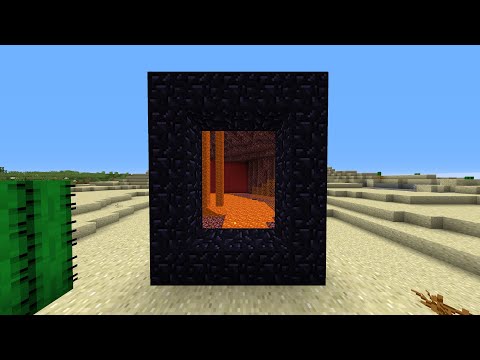
Portals in any (vanilla) size can show their destinations, as long as their linked portal has the same size and both frames are completely built out of obsidian – also the four corners:

New in V3.0
New multiverse-like portals that have the viewing effect!
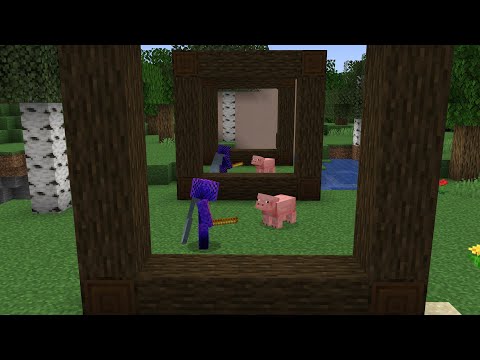
Playing with Optifine can make the portal animations much smoother, so I can only recommend using it!
Disclaimer
Portal animations only work in 1st person view. The 3rd person mode (when pressing F5) is client side and cannot be detected with plugins.
Setup
Drop the jar in your plugins folder and reload your server. If you want NetherView to work only in certain worlds - or your worlds have custom names - open the config file and edit the world list (see below) and then run /netherview reload.
Now every time you create a new portal step into it once so the plugin can load the information about the destination of the portal. When stepping out of the portal again the view will be loaded.
Ran into an issue?
If you run into problems or something that seems to be a bug try to out /netherview debugmessages true.
This will enable debug messages ingame that may help you understand why the plugin is not doing what you expected. They can also be useful for me to identify and fix a bug.
Configuration
#the range around a portal up to which you see a portal animation
portal-display-range: 16
#the distance in blocks up to which the world inside a portal will be visible
portal-projection-distance: 4
#limit for how tall or wide animated portals can become (bigger portals may cause more lag)
max-portal-size: 5
#hides entities from your world behind your portal
hide-entities-behind-portals: true
#makes entities from the other world visible in your portals (only works if above is also set to true)
show-entities-inside-portals: true
#ticks between entity movevent packets sent to the player (default: 3, really smooth movements: 1)
entity-update-ticks: 3

#enables warning messages for players when two portals could not be linked
warning-messages: true
#enables debug messages for the console that give more detailed information about events and errors
debug-messages: false

#settings related to projections of nether portals
nether-portal-viewing:

    #spigot flips the player around when using a nether portal. set this to false if you use another fork of spigot
    flip-portals-by-default: true
    #hide the purple portal layer when looking at a portal view
    hide-portal-blocks: true
    #cancel the portal teleport when two portals are being linked for the first time (for players in survival mode)
    cancel-teleport-when-linking-portals: true
    #cancel the portal teleport when two portals are being linked for the first time (for players in survival mode)
    instant-teleport: true
    #worlds where portal viewing is enabled. enter "*" (with the quotes) if you want to enable it in all worlds
    whitelisted-worlds:
        - world
        - world_nether
    #worlds where portal viewing is disabled. this list has a higher priority than whitelisted-worlds
    blacklisted-worlds:
        - null

custom-portal-viewing:
    #worlds where custom portals can be created and used. enter "*" (with the quotes) if you want to enable it in all worlds
    whitelisted-worlds:
        - "*"
    #worlds where custom portals are disabled. this list has a higher priority than whitelisted-worlds
    blacklisted-worlds:
        - null

#the different blocks that create the border of a portal view for each world type
overworld-border: white_terracotta
nether-border: red_concrete
end-border: black_concrete
"How to hook Nether View in your plugin"
Here is a short example on how to you could get some infos from Nether View with your plugin using the compiled jar as library:
import me.gorgeousone.netherview.NetherViewPlugin;
import me.gorgeousone.netherview.portal.Portal;

NetherViewPlugin netherView = (NetherViewPlugin) Bukkit.getPluginManager().getPlugin("NetherView");

Portal closestPortal = netherView.getPortalHandler().getClosestPortal(player.getLocation(), true);
Set<Portal> overWorldPortals = netherView.getPortalHandler().getPortals(overworld);

boolean canSeePortals = netherView.getViewHandler().hasPortalViewEnabled(player);
boolean isViewingAPortal = netherView.getViewHandler().hasViewSession(player);
Portal viewedPortal = netherView.getViewHandler().getViewSession(player).getViewedPortal();
Commands
- /nv reload – reloads the config data
- /nv listportals <world> – prints a list with all portals from one world into chat
- /nv portalinfo – gives you more detailed information about then closest portal to you
- /nv debugmessages <true/false> – enables or disables debugging messages
- /nv warningmessages <true/false> – enables or disables warning messages when two portals could not be linked
- /nv flipportal – flips the two viewable sides of the nether portal you are looking at
- /toggleportalview – toggles portal viewing on and off for you individually
- /nv wand – gives you a wand for selecting areas for portals
- /nv createportal <portal name> – creates a custom portal from the area selected with a portal wand
- /nv link <from portal> <to portal> – links a custom portal to another custom portal so it will teleport and project to there
- /nv unlink <portal> – removes the link from this portal to another portal
- /nv deleteportal – removes a custom portal
Permissions
- netherview.viewportals – permission to look at other worlds through portals and use the /toggleportalview command
- netherview.linkportals – permission to link portals so they create projections
- netherview.config – permission for config related commands such as the reload command or toggeling messages
- netherview.info – permission for the commands to get information about portals
- netherview.flipportal – permission for the flip command
- netherview.wand – permission to use the wand command to receive portal wand
- netherview.customportals – permission to create custom Portland with a portal wand and use all related commands
Dependencies
ProtocolLib - If you are running 1.16, use the latest dev build
Next Goals
- make entities visible in portals ✓
- adding custom portals that can be viewed ✓
- adding more animations to the entity viewing feature
If you like the plugin make sure to leave a review! :D
(And here is a subtle donation button )
Join my Discord server for support
Similar projects
Plugin →Let Me Despawn
Improves performance by tweaking mob despawn rules. Say bye to pesky unintentional persistent mobs.
26.2MSueta
JourneyMap
Real-time map used for mapping in-game or your browser as you explore.
14.7MSueta
Emotecraft
Create your own emotes in Minecraft.
7.9MSueta
Simple Tpa
A simple tpa plugin which sends requests
5.4MSueta
Common Network
Forge and Fabric Unified Networking Solution
4.7MSueta
Set Home
A lightweight plugin for players to set their homes.
3.8MSueta