
NeverUp2Late - Automatically keeps Server+Plugins up to date
2.9.0Automatic updates of the server for all Java and Bedrock players.
- Tested MC versions
- 1.21

Your server and every plugin on it, always up to date,
without you lifting a finger.
Paper 1.21+ · Java 21+ · Open source (GPL-3.0)
GitHub · Releases · Report a bug
NeverUp2Late watches Paper and your plugins on Hangar, Modrinth, CurseForge, SpigotMC, GitHub and Jenkins.
When something new comes out, it downloads it, checks that it is the real file and that your server can run it,
swaps it in, and restarts at night once nobody is online. If an update does not start, it puts the old version back.
/nu2l https://modrinth.com/plugin/luckpermsThat is the whole setup for a new plugin. Paste a link and NeverUp2Late handles the rest, today and for every future release.
Quickstart
- Download NeverUp2Late with the Download button above and drop it into plugins/.
- Start the server. Operators get a short setup wizard in-game; on a console-only server run /nu2l setup complete.
- Add plugins by link with /nu2l <url>, or open the GUI with /nu2l and link the plugins you already have.
Done. NeverUp2Late checks every three hours and keeps itself up to date as well.
Requirements: Paper 1.21 or newer (or any server implementing the Bukkit API 1.21+) on Java 21.
Built to be trusted
An updater that replaces files on a live server has to be more careful than you would be by hand. Every update passes
through these checks, and any one of them can stop it, leaving the installed version untouched:
- Checksum verified — The download is compared against the SHA hash the platform publishes (Paper, Hangar, Modrinth, CurseForge, GitHub). A corrupted or tampered file never reaches your plugins folder.
- Right plugin, right place — The plugin.yml inside the jar must match the plugin it replaces. NeverUp2Late never overwrites another plugin's jar and never leaves two copies of one plugin behind.
- Will it load? — Before installing, NeverUp2Late checks that the new version supports your Minecraft version, was built for your Java version, and does not need a plugin you have not installed.
- Backup first — The previous jar is kept (5 per plugin by default). No backup, no install.
- Automatic rollback — After the restart, NeverUp2Late checks that every updated plugin actually started. If one did not, the previous version goes back in, and the broken release is not installed again.
- Nobody gets kicked — Plugin updates restart the server only when it is empty and between 03:00 and 06:00, with a one-hour cooldown. Admins online are told what is waiting.
- Stays on your Minecraft version — Paper is only updated within the version you run. A jump to a new Minecraft release is your decision (allowGameVersionUpgrade).
- Works on Windows too — A running jar is locked on Windows, so the update is placed in Bukkit's update/ folder and the server swaps it in on the next start.
Want to see what would happen before anything changes? /nu2l plan reports every update it would install and every one
it would refuse, without downloading or writing a single file.
Supported platforms
- Paper — preconfigured · Server jar; stays on your Minecraft version unless you allow upgrades.
- Geyser — preconfigured · Off by default, switch it on in the wizard or config.yml.
- Hangar — /nu2l <hangar link> · Prefers pinned and reviewed versions.
- Modrinth — /nu2l <modrinth link> · Filters by loader and Minecraft version.
- CurseForge — /nu2l <curseforge link> · Optional API key for higher rate limits.
- SpigotMC — /nu2l <spigotmc link> · Through the Spiget API. Premium resources cannot be downloaded.
- GitHub Releases — /nu2l <github link> · Picks the jar automatically, or asks once if a release has several. Extracts jars from ZIP archives.
- Jenkins — /nu2l <jenkins job link> · Last successful build, artifact by pattern.
- Anything else — custom UpdateFetcher class · Set type to its fully qualified class name.
In-game
Paste a link, pick a file, done
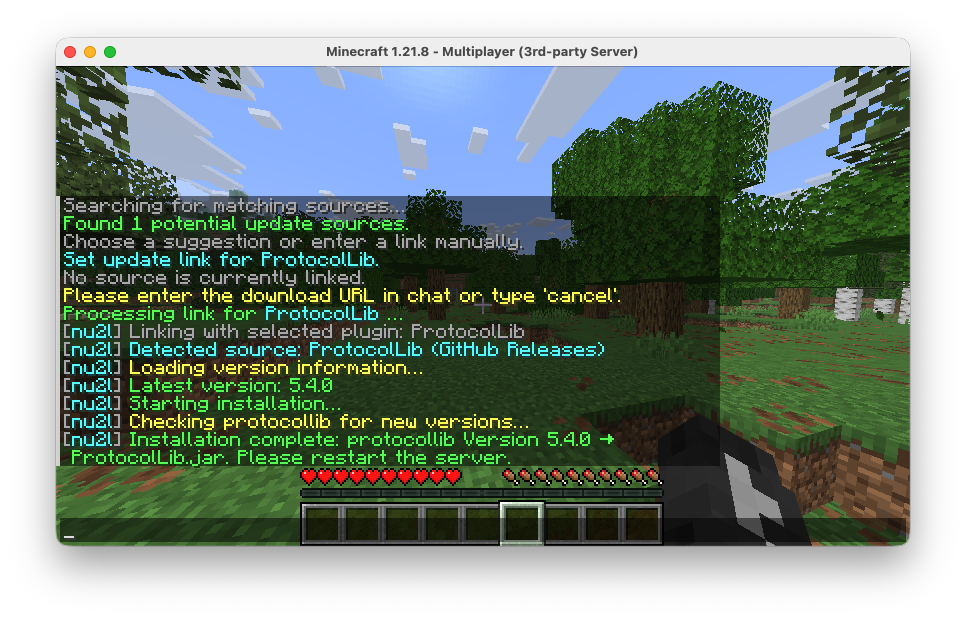
When a release ships several jars or a ZIP, NeverUp2Late lists them in chat. Click the one you want; the choice is
remembered for every future update. While it works, progress and the download bar run in your action bar instead of
filling the chat.
Status at a glance
/nu2l status opens with one line that answers the question - 12 sources · 2 waiting for a restart · 0 failing - and
then lists every source with an icon. Hover for the details, click [Check] to look right now, or [Rollback] when
something failed. /nu2l help works the same way: click a command to run it.
A GUI for everything else
/nu2l opens a chest interface with every plugin on the server. The frame turns green, yellow or red with the state of
the whole server, plugins with an update waiting shimmer, and a right-click checks one right away. Page through any number
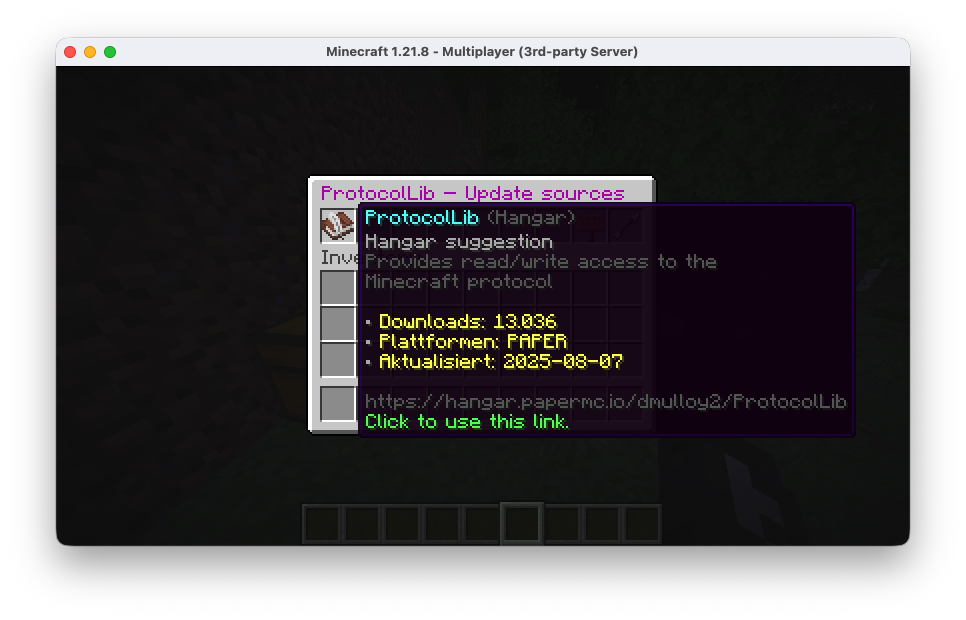
of plugins, filter by updates ready, failing or not linked, or search by name. Link plugins to update sources (with
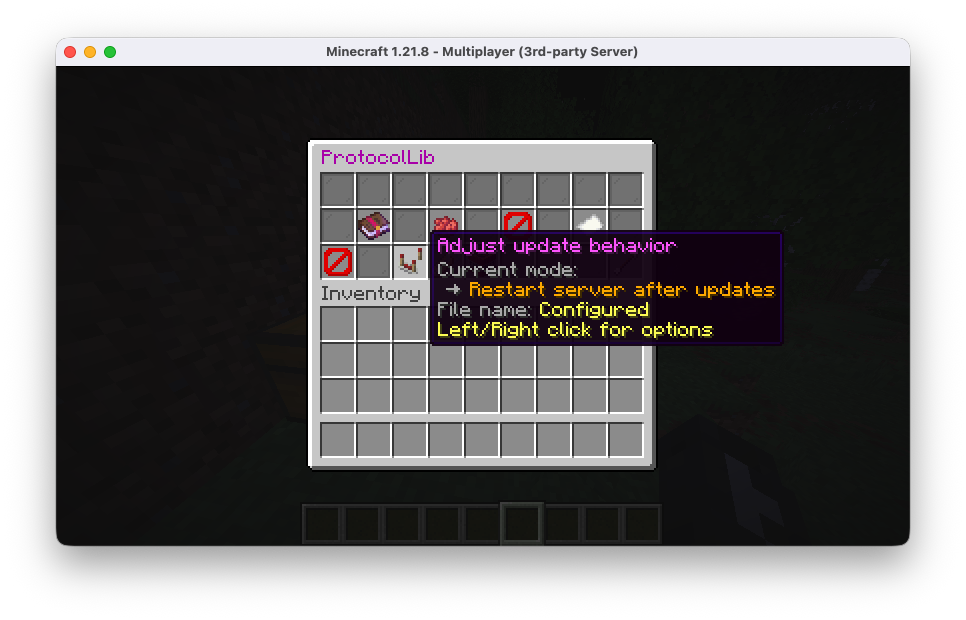
suggestions from Modrinth and Hangar), turn updates on or off, choose between restart and hot-reload, or rename files.
Anything that removes or rolls back asks first on its own confirmation screen.
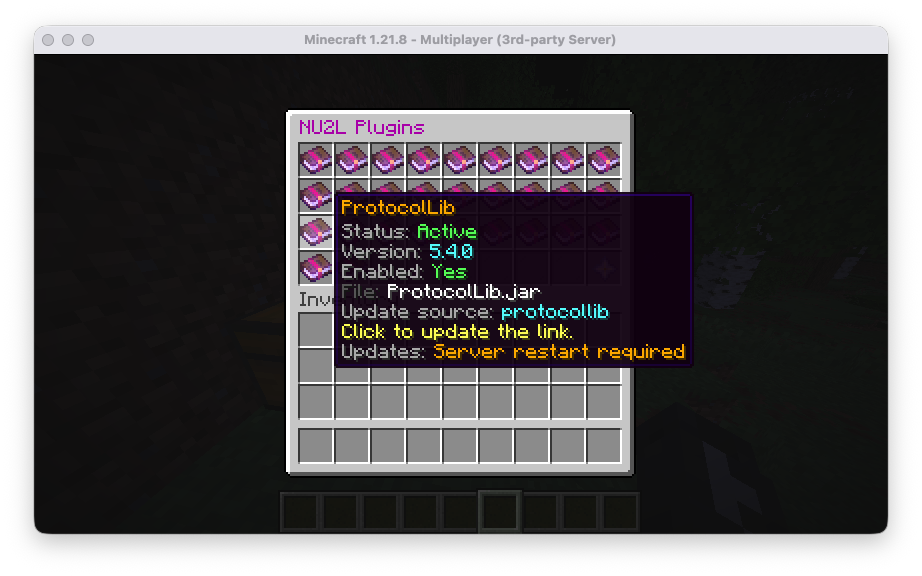
More screenshots
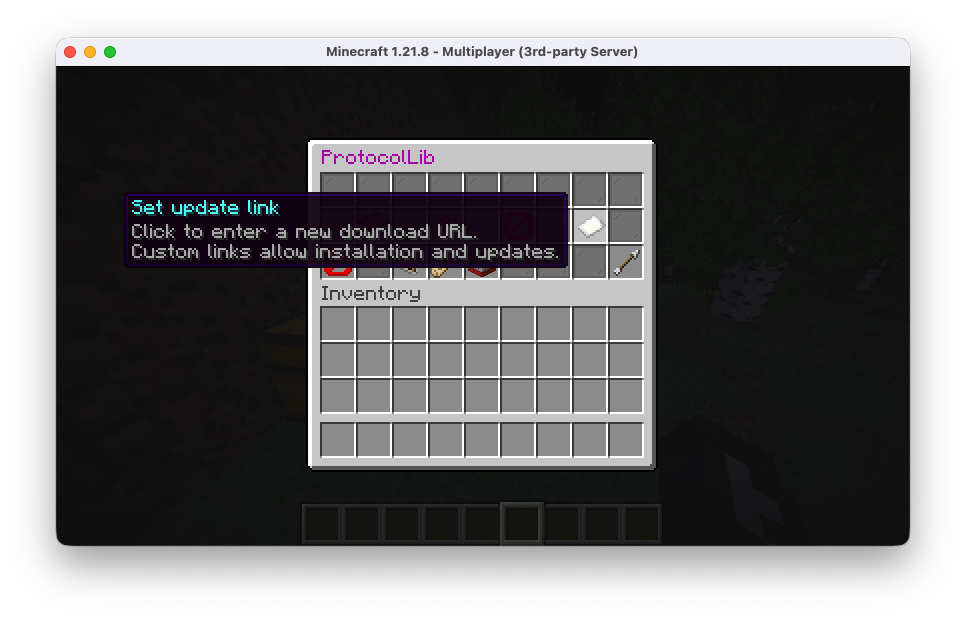
Commands
- /nu2l — Opens the GUI. · neverup2late.gui.open
- /nu2l <url> — Adds the plugin behind a link and installs it. · neverup2late.install
- /nu2l status — Lists every update source with its file, version and auto-update state. · neverup2late.install
- /nu2l plan [source] — Shows what an update run would install or refuse. Changes nothing. · neverup2late.install
- /nu2l check [source] — Looks for updates right now and installs what is newer. · neverup2late.install
- /nu2l rollback <source> — Puts the previous version of a plugin back. · neverup2late.install
- /nu2l remove <name> — Stops managing a plugin. · neverup2late.gui.manage.remove
- /nu2l select <number> — Picks a file when a release offers several (clicking in chat does the same). · neverup2late.install
- /nu2l ignore / cancel — Installs anyway, or aborts, when a plugin does not list your Minecraft version. · neverup2late.install
- /nu2l setup — Opens the setup wizard. · neverup2late.setup
- /nu2l setup complete — Finishes setup with the defaults, also from the console. · neverup2late.setup
- /nu2l setup apply <file> — Loads update sources from a prepared YAML file and finishes setup. · neverup2late.setup
All permissions default to operators.
All permissions
neverup2late.setup                 # Setup wizard
neverup2late.install               # /nu2l <url>, status, plan, check, rollback, select
neverup2late.gui.open              # Open the GUI
neverup2late.gui.manage            # All of the following
neverup2late.gui.manage.lifecycle  # Load, unload, enable plugins
neverup2late.gui.manage.link       # Link plugins with update sources
neverup2late.gui.manage.settings   # Per-plugin update settings
neverup2late.gui.manage.rename     # Rename plugin files
neverup2late.gui.manage.remove     # Remove plugins
The command itself has no permission on purpose: moderators with only neverup2late.gui.open can still open the GUI.
Configuration
Everything lives in plugins/NeverUp2Late/config.yml, and the file explains each setting in place. The ones you are most
likely to touch:
- updateInterval (default 180) — Minutes between update checks.
- startupDelaySeconds (default 60) — Wait after server start before the first check.
- backups.maxCount (default 5) — Backups kept per plugin; 0 keeps all.
- updates.ignoreUnstable (default true) — Prefer stable releases over betas.
- updates.respectManualRollback (default true) — Do not reinstall a version you (or the automatic rollback) rolled back from.
- pluginLifecycle.autoManage (default true) — Enables load/unload in the GUI and hot-reload for plugins set to AUTO_RELOAD.
- quickInstall.ignoreCompatibilityWarnings (default false) — Install even when a plugin does not list your Minecraft version.
- setup.skipWizard (default false) — Skip the wizard on fresh installs and start updating right away.
New settings from later versions are added to your file automatically; values you set are never changed.
Update sources in config.yml
/nu2l <url> writes these for you, but you can also edit them by hand:
updates:
  sources:
    - name: luckperms
      type: modrinth
      target: plugins            # or "server" for the server jar
      filename: "LuckPerms.jar"
      options:
        project: luckperms
installedPlugin: LuckPerms- paper — No fields required; detects the installed Minecraft version. ignoreUnstable / allowUnstable, minimumUnstableBuild (default 50), allowGameVersionUpgrade (default false).
- geyser — Preconfigured; usually needs nothing.
- hangar — owner + slug (or project: owner/slug). Optional: platform, allowedChannels, ignoreUnstable / allowUnstable, requireReviewed, preferPinned, pageSize, maxPages, installedPlugin.
- modrinth — project. Optional: loaders, statuses, versionTypes, gameVersions, preferPrimaryFile, installedPlugin.
- curseforge — modId. Optional: apiKey, release type filters, game versions, installedPlugin.
- spigot — resourceId. Optional: preferredGameVersions, ignoreCompatibilityWarnings, installedPlugin.
- githubRelease — owner, repository. Optional: assetPattern, allowPrerelease, archiveEntryPattern, installedPlugin.
- jenkins — baseUrl, job. Optional: artifact, artifactPattern, preferLastSuccessful, versionSource, versionPattern, installedPlugin.
- custom class — type is the fully qualified class name of your UpdateFetcher; all options are passed to its constructor.
Per-plugin settings (plugin-settings.yml)
Written by the GUI, one entry per plugin:
- autoUpdate – check this plugin on the schedule. Manual checks always work.
- behaviour – REQUIRE_RESTART (default, the safe choice) or AUTO_RELOAD to hot-reload right after the update.
- retainUpstreamFilename – keep the file name the platform uses instead of the configured one.
Files NeverUp2Late keeps
All under plugins/NeverUp2Late/:
- plugins.yml – the installed version per source, so nothing is downloaded twice.
- plugin-settings.yml – per-plugin preferences from the GUI.
- setup-state.yml – how far the setup wizard got.
- restart-state.yml – time of the last automatic restart, for the cooldown.
- pending-verification.yml – updates that still have to prove they start.
- config-upgrade.yml – which config upgrades were applied.
- backups/ – previous versions of replaced jars.
FAQ
Will it restart my server while people are playing?
No. Plugin updates wait until the server is empty and it is between 03:00 and 06:00. Admins who are online get a chat
message with the version and a link to the changelog.
What if an update breaks a plugin?
If the plugin fails to start, NeverUp2Late restores the previous version on its own and does not install that release
again. You can also roll back by hand with /nu2l rollback <source> at any time.
Can I see what it is going to do first?
/nu2l plan lists every update it would install and every one it would refuse, and changes nothing.
I only want some plugins updated automatically.
Turn auto-updates off per plugin in the GUI. Manual /nu2l check <source> still works for those.
How does NeverUp2Late update itself?
From its GitHub releases. Every release first sits as a pre-release for 24 hours, which no installation
downloads, so a broken build can be pulled before it reaches any server.
Troubleshooting
- Set the log level to FINE to see every fetch, decision and lifecycle step.
- If a release has several files and the wrong one is picked, set assetPattern or archiveEntryPattern for that source.
- Prefer to restart by hand? Set pluginLifecycle.autoManage: false and leave every plugin on REQUIRE_RESTART.
Bug reports and pull requests are welcome on GitHub.
NeverUp2Late is released under the GNU General Public License v3.0.
Similar projects
Plugin →Let Me Despawn
Improves performance by tweaking mob despawn rules. Say bye to pesky unintentional persistent mobs.
25MSueta
JourneyMap
Real-time map used for mapping in-game or your browser as you explore.
14.7MSueta
Emotecraft
Create your own emotes in Minecraft.
7.5MSueta
Simple Tpa
A simple tpa plugin which sends requests
5.4MSueta
Common Network
Forge and Fabric Unified Networking Solution
3.9MSueta
Set Home
A lightweight plugin for players to set their homes.
3.8MSueta