
NoUnicode | 1.8 - 1.11 | Unicode blocker & smart Anti-Insul
3.2Prevents bad players to use Unicode to bypass your anti-insult or no swear plugin
What is NoUnicode ?
First, NoUnicode was a plugin that prevents bad players to use Unicode characters to bypass anti-insults plugins.
Some Hacked Clients (like Vatic, Neko etc...) have a hack named Unicode. This hack allows to player to speak with specials unicode characters and to bypass a lot of anti-insults or no swear plugins.
Example of message with Unicode characters:

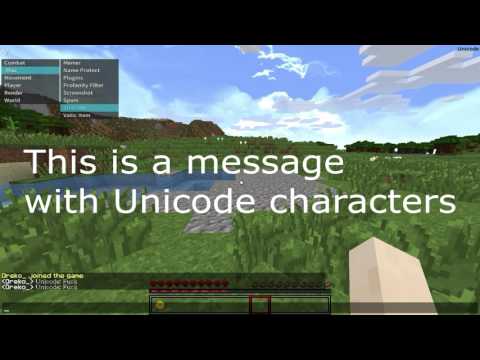
But in a recent update, NoUnicode blocks Unicode and insults too !
(You can disable the Unicode blocker or the insults blocker in the config.yml)
Tip:
Use the unicode and the insults blocker to have the most protected chat ! :)
What is Unicode ?
https://pythonconquerstheuniverse.wordpress.com/2012/02/01/unicode-for-dummies-encoding/
How to install NoUnicode ?
-Click on "Download"
-Put the NoUnicode.jar in your plugin folder of your server
-Start your server or execute /rl
-Make a review ! :D (with 5 stars <3)
Achievements
10 Downloads: ✔
50 Downloads: ✔
100 Downloads: ✖
250 Downloads: ✖
500 Downloads: ✖
750 Downloads: ✖
1000 Downloads: ✖
Question(s):
Q:I speak an another language than English, can I use special characters ?
A: Yes, you can. NoUnicode allows you to use characters like ~, é, è, ë, ê, î, ï, û, ü, ß etc.. If some unicode characters are not authorized by NoUnicode but you still want to use them, you can add them in the ignored_unicode_characters (in the config.yml) :)
Q:I put unicode characters in the config.yml, I reloaded my server but in the config, I see strange letters.. Why ?
A: Because your server do not support UTF-8 encoding, these letters are the CSS code for these characters.
1:If you don't mind to have some strange letters in your config, you can add the CSS Code directly into the config.
To know the CSS Code of a character :
-Go to https://www.utf8icons.com/
-Click on the character you want
-At the left you will see the CSS Code, copy it.

-Paste it on the config.yml
2:Else, if you mind to have some strange letters in your config, you have to add UTF-8 encoding to your server. Follow this tutorial:
-Click on this link and Download NotePad++ https://notepad-plus-plus.org/download/v7.3.3.html
-Download and Install NotePad++
-Go to your server folder
-Right click on the .bat that is used to start your server and click on "Edit with NotePad++"

-Before the "-jar", add "-Dfile.encoding=UTF-8"

-Save the run.bat
-Close NotePad++
-Start your server ;)
Config:
#               NoUnicode
#                By Dreko_
#
#
# Message when a player uses unicode characters
unicode_message: '&cDon''t use Unicode characters !'
unicode_blocker: true
bypass_permission_unicode: nounicode.bypass
ignored_unicode_characters:
- a
- ✖
- ✢
swear_blocker: true
bypass_permission_swear: swear.bypass
ignore_es_and_s_at_end_of_word: true
swear_message: '&cStop to swear !'
insult:
- fuck
- bitch
- suck
- noob
use_command_permission: nounicode.command
If you find a bug, please contact me in pm or on Twitter @DrekoDev
Made by Dreko_, NoComment_ is my old nickname.
Similar projects
Plugin →Let Me Despawn
Improves performance by tweaking mob despawn rules. Say bye to pesky unintentional persistent mobs.
25MSueta
JourneyMap
Real-time map used for mapping in-game or your browser as you explore.
14.7MSueta
Emotecraft
Create your own emotes in Minecraft.
7.5MSueta
Simple Tpa
A simple tpa plugin which sends requests
5.4MSueta
Common Network
Forge and Fabric Unified Networking Solution
3.9MSueta
Set Home
A lightweight plugin for players to set their homes.
3.8MSueta