
nwFurnitureShow | Show off and Sell your Furniture/Model! (W
1.7.6.1Is it really that easy to see the furniture before buying it? Wowww!
nwFurnitureShow | Show off and Sell your Furniture! (Nexo&Itemsadder&CraftEngine&Meg)
Tired of players buying furniture sight unseen? nwFurnitureShow is the perfect plugin to showcase your amazing furniture (powered by ItemsAdder or Nexo) before players commit to a purchase! Let them preview the item in the world with a simple click, and set up a convenient GUI shop for easy browsing and buying.
Contact&Support: https://discord.gg/gwXcr7c6Gq
Official Wiki Updated!
For the most comprehensive and up-to-date information, please refer to the official nwPlugin | NN Wiki:
https://nwmmoupgrade.gitbook.io/nwplugin-or-nn
Review:
If nwFurnitureShow has been beneficial to you, please share your experience by leaving a review. Thank you!
You can use either Nexo or ItemsAdder or CraftEngine or Meg, and if you want to sell furniture as well, you’ll need a plugin that supports Vault.
Required:
- Nexo (for Nexo furniture) --> Download
- ItemsAdder (for ItemsAdder furniture) --> Download
- CraftEngine (for CraftEngine furniture) --> Download
- Vault (for economy support) --> Download
- Model Engine (for Model) --> Download
- HMCColor (for dye menu furniture)
Installation:
- Download the nwFurnitureShow .jar file.
- Place the .jar file in your server's plugins folder.
- Restart or reload your server.
- Configure your furniture in the plugins/nwFurnitureShow/furnitures.yml file.
- Set the preview location using nwfurnitureshow setlocation
- (Optional) Configure the main settings in plugins/nwFurnitureShow/config.yml.
- Use /nwfurnitureshow config reload reload to apply any changes.
How it Works
- Setup: Configure your furniture items with their IDs (Nexo or ItemsAdder namespaces), prices, and lore in the furnitures.yml file.
- Set Preview Location: As an admin, use the /nwfurnitureshow setlocation command while looking at the desired preview spawn point.
- Open the Shop: Players use the /nwfurnitureopen command to open the furniture shop GUI.
- Preview: Players left-click on a furniture item in the GUI to see a temporary preview of it at the set location.
- Purchase: Players right-click on a furniture item in the GUI to purchase it (if pricing is enabled and they have sufficient funds).
Permissions
- nwfurnitureshow.open: Allows players to use the /nwfurnitureopen command. (Default: everyone)
- nwfurnitureshow.admin: Allows players to use administrative commands (/nwfurnitureshow setlocation, /nwfurniture config reload, /nwfurnitureshow config additem, /nwfurnitureshow price). (Default: operators)
Showcase
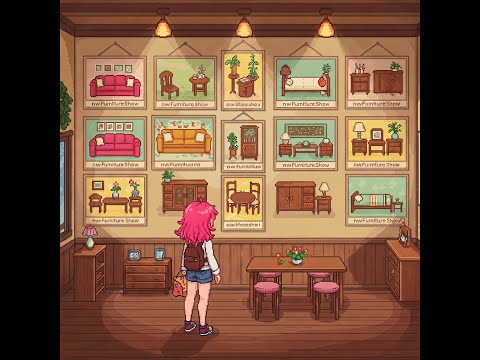
This is the GUI for selecting furniture to preview the ones you're interested in.
Show ModelEngine in nwFurnitureShow Version 1.7+
HMCColor
Wardrobe Update
Search Update
Similar projects
Plugin →Let Me Despawn
Improves performance by tweaking mob despawn rules. Say bye to pesky unintentional persistent mobs.
25MSueta
JourneyMap
Real-time map used for mapping in-game or your browser as you explore.
14.7MSueta
Emotecraft
Create your own emotes in Minecraft.
7.5MSueta
Simple Tpa
A simple tpa plugin which sends requests
5.4MSueta
Common Network
Forge and Fabric Unified Networking Solution
3.9MSueta
Set Home
A lightweight plugin for players to set their homes.
3.8MSueta