
OnlineMonitor - Advanced Player Statistics & Discord Integra
0.5.0Track player activity with Discord notifications, web panel, and detailed analytics
OnlineMonitor
Advanced Player Activity Tracking with Discord Integration & Web Dashboard
Transform your server statistics into a powerful analytics tool!
Description
OnlineMonitor is a powerful plugin for tracking and analyzing player activity on your Minecraft server. Get detailed statistics, beautiful graphs, and Discord notifications in real-time!
Whether you're running a small community server or a large network, OnlineMonitor provides comprehensive insights into your player base with an intuitive web dashboard and seamless Discord integration.
Key Features
Statistics & Analytics:
- Real-time online player tracking
- Detailed player statistics (join count, playtime)
- Historical online data (snapshots every 5 minutes)
- Analytics by hour, day, and day of week
- Top players leaderboard by activity
- Personal statistics for each player
- Peak activity hours analysis
- Record tracking (maximum online players)
Discord Integration:
- Beautiful embed notifications for player join/quit events
- First-time player announcements
- New online record alerts
- Server start/stop notifications
- Discord slash commands for viewing stats
- Customizable notification types
- Automatic command registration
Web Dashboard:
- Interactive web panel with modern design
- Real-time statistics visualization
- Interactive charts powered by Chart.js
- Hourly and daily online graphs
- Auto-refresh every 30 seconds
- RESTful API for third-party integrations
- Fully responsive mobile-friendly interface
- Top players showcase
Database Support:
- SQLite support (default, zero configuration)
- MySQL support (for large servers)
- HikariCP connection pooling for performance
- Automatic old data cleanup
- Efficient data storage and retrieval
Screenshots
Web Dashboard with Charts
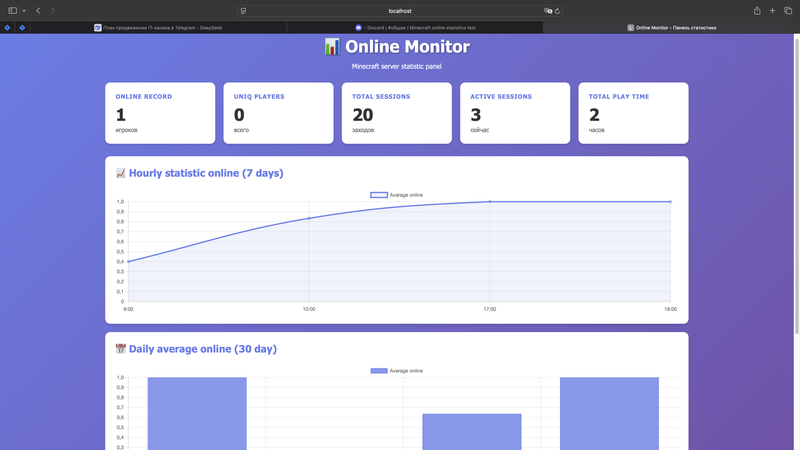

Interactive web dashboard showing hourly and daily statistics
Discord Notifications
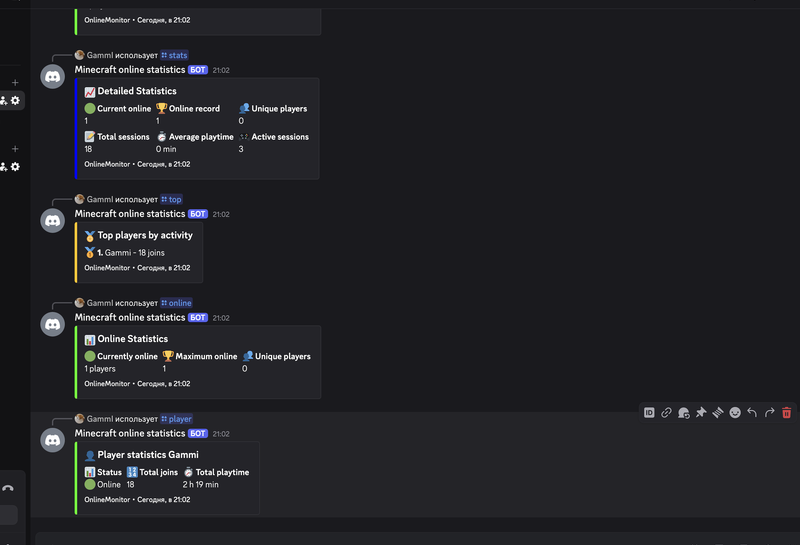

Beautiful Discord embed messages with player activity
In-Game Statistics
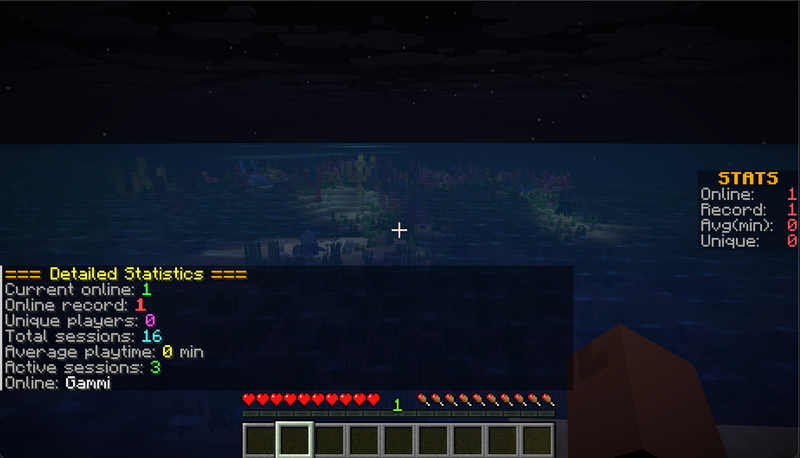

Detailed player statistics available in-game
Commands
In-Game Commands:
/online - Show basic online statistics
/online stats - Show detailed server statistics
/online top - Show top 10 players by join count
/online player <name> - Show statistics for a specific player
/online hourly [days] - Show average online by hour (default: 7 days)
/online daily [days] - Show average online by day (default: 7 days)
/online weekday [weeks] - Show average online by weekday (default: 4 weeks)
/online peak [days] - Show peak activity hours (default: 7 days)
Discord Slash Commands:
/online - Show current online players
/stats - Show detailed server statistics
/top - Show top 10 players by activity
/player <nickname> - Show statistics for a specific player
Permissions
onlinemonitor.* - All plugin permissions
onlinemonitor.basic - Basic /online command (default: true)
onlinemonitor.stats - Access to extended statistics (default: true)
onlinemonitor.admin - Admin permissions (default: op)
REST API
OnlineMonitor provides a comprehensive REST API for third-party integrations:
GET /api/stats - General server statistics
GET /api/online - Current online count and player list
GET /api/players?limit=N - Top N players by activity
GET /api/players?name=PlayerName - Statistics for a specific player
GET /api/snapshots?type=hourly&days=7 - Hourly average values
GET /api/snapshots?type=daily&days=30 - Daily average values
GET /api/snapshots?type=weekday&weeks=4 - Weekday averages
GET /api/snapshots?type=peak&days=7 - Peak activity hours
Example Response (JSON):
{
  "maxOnline": 42,
  "uniquePlayers": 156,
  "totalSessions": 1247,
  "activeSessions": 8,
  "totalPlaytime": 125678900
}
Quick Start Guide
1. Basic Installation:
- Download OnlineMonitor.jar
- Place it in your server's plugins/ folder
- Start the server (config.yml will be created)
- Enjoy basic statistics tracking!
2. Discord Setup (Optional):
- Create a Discord bot at Discord Developer Portal
- Enable MESSAGE CONTENT INTENT in bot settings
- Copy the bot token
- Get your channel ID (enable Developer Mode in Discord)
- Add token and channel ID to config.yml
- Restart the server
3. Web Dashboard Setup (Optional):
- Set web-panel.enabled: true in config.yml
- Configure the port (default: 8080)
- Restart the server
- Access at http://your-server-ip:8080
Detailed Setup Guide: View on GitHub
Configuration
config.yml Example
# Welcome message for joining players
welcome-message: "Welcome to the server, %player%!"

# Logging settings
log-unique-joins: true
log-join-quit: true

# Database (sqlite or mysql)
database:
  type: sqlite
  mysql:
    host: localhost
    port: 3306
    database: minecraft_stats
    username: root
    password: password

# Snapshot interval (in minutes)
snapshot-interval-minutes: 5

# How many days to keep snapshots
snapshot-days-to-keep: 30

# Timezone offset from UTC
timezone-offset: +3

# Discord integration
discord:
  enabled: false
  bot-token: "YOUR_BOT_TOKEN_HERE"
  channel-id: "YOUR_CHANNEL_ID_HERE"
  notifications:
    player-join: true
    player-quit: true
    new-player: true
    new-record: true
    server-start: true
    server-stop: true

# Web dashboard
web-panel:
  enabled: false
  port: 8080
System Requirements
Minimum:
- Minecraft: 1.20.4+ (Paper/Spigot)
- Java: 17 or higher
- 50 MB disk space
- 256 MB RAM
Recommended:
- Paper 1.20.4+
- Java 21
- MySQL database (for large servers)
- 512 MB RAM
Dependencies
All dependencies are included in the JAR file (no external plugins required):
- JDA (Java Discord API) - Discord integration
- HikariCP - Database connection pooling
- SQLite JDBC - SQLite database driver
- Eclipse Jetty - Embedded web server
- Gson - JSON serialization
- Chart.js - Chart visualization
Support & Links
Need Help?
Stay Updated:
- Watch the GitHub repository for updates
- Check the changelog for new features
- Join community discussions
Why Choose OnlineMonitor?
- Easy to Use: Zero configuration required - works out of the box with SQLite
- Lightweight: Optimized for performance with minimal resource usage
- Feature-Rich: Comprehensive statistics, web dashboard, and Discord integration
- Customizable: Extensive configuration options to fit your needs
- Active Development: Regular updates and bug fixes
- Open Source: MIT License - free to use and modify
- Well Documented: Detailed setup guide and API documentation
License
This plugin is distributed under the MIT License. Source code is available on GitHub.
If you enjoy this plugin, please leave a 5-star review!
Your feedback helps me improve and motivates continued development.
Author: Vogulev | License: MIT
Similar projects
Plugin →Let Me Despawn
Improves performance by tweaking mob despawn rules. Say bye to pesky unintentional persistent mobs.
25MSueta
JourneyMap
Real-time map used for mapping in-game or your browser as you explore.
14.7MSueta
Emotecraft
Create your own emotes in Minecraft.
7.5MSueta
Simple Tpa
A simple tpa plugin which sends requests
5.4MSueta
Common Network
Forge and Fabric Unified Networking Solution
3.9MSueta
Set Home
A lightweight plugin for players to set their homes.
3.8MSueta