
Read This:
Place Items On Ground is back and better than ever!
This plugin is NOT compatible with the retired version of this plugin AT ALL.
I have tested it as best I can for bugs and glitches. If you find a bug please let me know :)
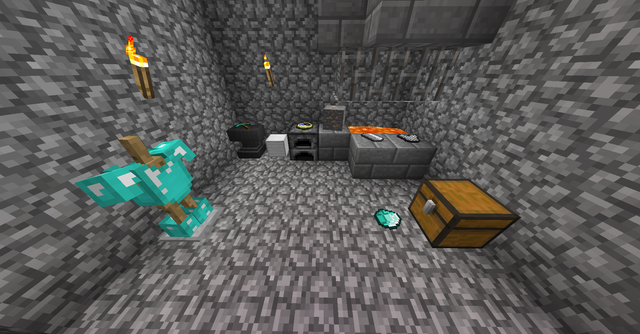
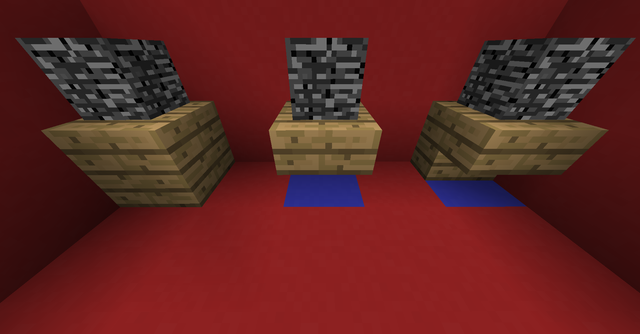
This plugin allows you to place any item you are holding in your hand on the ground.
Performance Notice: This plugin, just like the original, uses invisible armor stands to accomplish what it does, so keep in mind that this plugin will let players create a lot of entities, but they can be capped!
Screenshots:


More Images
Improvements:
This plugin improves upon many features of the original plugin!
+ The ability to place items on all 6 sides of a block
+ Custom chat messages
+ MANY bug fixes
+ More permissions and customization
+ Much more detailed list of what blocks can be placed where
+ A much more robust config file
+ Better command structure
+ Better storage system
+ More flexible and efficient code
+ Clearer error and permissions messages
Mechanics / Controls:
Placing Items:
To access the main features of this plugin do the command, /placeitems toggle. Once this command is issued, sneak and right any block with an item in you hand. When this is done one of the items or the item, depending on if the item is stacked, will be removed from your hand and placed on the ground.
Picking Up Items:
To pick up a placed item there are two ways to do this. One is to break the block underneath the placed item. This will cause the item to pop off and drop on the ground. Another way is to right click the item. For placed blocks this is easy to do, but for placed items you will need to click a little bit in front of where it was placed.
Note: This plugin plays nicely with plugins like WorldGuard and GriefPrevention so you should not have any problems with placing or removing items in claimed areas.
The Placement Cap:
The amount of items a player can place with this plugin can be capped in three ways. One is the default cap, which is applied to everyone. The second way is using the place items commands to set per player caps using the file system. The third way is with permissions. In order to give someone a permissions based cap simply use any permissions plugin to give them the permission "placeitems.cap.#" replace # with the desired cap amount. There is also a permission for unlimited which is "placeitems.cap.u".
Note that if you use permissions for placement caps they will override and take priority over file placement caps!
Other Modified Behaviors:
Pistons cannot push blocks with placed items near them or on top of blocks that are going to be pushed.
Languages:
Here is a step-by-step guide on how to install languages (this works for version 1.0.6 and up):
1. Download the desired language file from below.
2. Put the language file in the plugin data file where the English file is (do not delete the English file).
3. Change the languageFile line, this should be the first line in the config, to the file name of the downloaded language file.
4. Restart the server
Available Languages:
Download: Chinese Thanks To: qsefthuopq
Want to translate my plugin? Send me a translated file and I will list it here!
Commands:
There is only one command: /placeitems
All functionality is done through arguments for this command.
Here is a list of command arguments with descriptions:
/placeitems help - displays a list of commands
/placeitems toggle - toggles the ability for a player to sneak and place items on the ground
/placeitems rightclicktoggle - toggles the ability for a player to pick up placed items by right clicking
/placeitems siderotation <0-7> - set the position that items placed on their side will be rotated at.
/placeitems set <name> <amount> - sets the amount of items a player can set on the ground (use a "u" in place of the amount for unlimited)
/placeitems clear <radius> - removes all placed items within a specified block radius (1 - 250) safely
/placeitems reload - reloads the plugin's config file
/placeitems restorecap <name> - sets the players placement cap back to the default placement cap
/placeitems configname - get the name of the item in your hand that will be accepted by lists in the config file
Dangerous Commands:
/placeitems purge <radius> - this command is designed to fix bugs if a location is not allowing an item to be placed on it
Warning: This command is similar to /placeitems clear <radius> (try using this command first), but if needed, this command will remove ALL ARMOR STANDS (even those not placed by this plugin) in the given radius. It will also purge the location data file of all place items data in the specified radius (1 - 250) blocks!
/placeitems playerdata <arg> <name> (<arg>) (<arg>) - allows direct manipulation of a player's data file
Warning: Direct player data manipulation can lead to unexpected results if not careful!
Permissions (From plugin.yml):
placeitems.help:
        description: Allows usage of /placeitems help to see help list
        default: true
    placeitems.toggle:
        description: Allows usage of /placeitems toggle
        default: true
    placeitems.rightclicktoggle:
        description: Allows usage of /placeitems rightclicktoggle
        default: true
    placeitems.siderotation:
        description: Allows usage of /placeitems siderotation
        default: true
    placeitems.place.top:
        description: Allows user to place items on the top of blocks
        default: true
    placeitems.place.sides:
        description: Allows user to place items on the sides of blocks
        default: true
    placeitems.place.bottom:
        description: Allows user to place items on the bottom of blocks
        default: true
    placeitems.place:
        description: Allows user to place items on all sides of blocks
        default: true
    placeitems.take:
        description: Allows user to pick items up off the ground
        default: true
    placeitems.cap:
        description: Base permission for permission based caps
        default: true
    placeitems.set:
        description: Allows user to set placement cap on other players with /placeitems set
        default: op
    placeitems.clear:
        description: Allows user to clear placed items up to 250 blocks away with /placeitems clear
        default: op
    placeitems.reload:
        description: Allows user to reload the config file using /placeitems reload
        default: op
    placeitems.configname:
        description: Allows user to get the name of the item in their hand to put into config file lists using /placeitems configname
        default: op
    placeitems.purge:
        description: Allows user to purge placed items up to 250 blocks away with /placeitems purge
        default: op
    placeitems.playerdata:
        description: Allows usage of /placeitems playerdata to directly manipulate the player's data file
        default: op
    placeitems.worldblacklistbypass:
        description: Allows user to bypass the world blacklist
        default: op
Sample Config File:
Similar projects
Plugin →Let Me Despawn
Improves performance by tweaking mob despawn rules. Say bye to pesky unintentional persistent mobs.
26.2MSueta
JourneyMap
Real-time map used for mapping in-game or your browser as you explore.
14.7MSueta
Emotecraft
Create your own emotes in Minecraft.
7.9MSueta
Simple Tpa
A simple tpa plugin which sends requests
5.4MSueta
Common Network
Forge and Fabric Unified Networking Solution
4.7MSueta
Set Home
A lightweight plugin for players to set their homes.
3.8MSueta