

This plugin is being provided as is and has not been updated since February 2017 (Version 1.10 of Minecraft). Although it should still work on 1.12, I cannot confirm all the features are working 100%. I will be updating it within a week or two to 1.12.
Please report all bugs and issues on the GitHub repository. Anything reported in the discussion section or reviews will not be fixed.
PlayerShops allows players to create their own virtual shops where they can sell or purchase items from any player, even if they are offline. Players can then search for items to get the best deals, with a simple and interactive search command.
For admins, PlayerShops comes with support for both MySQL and File data storage. Along with a transaction logger to track any information you need.

- Supports MySQL and File data storage (MySQL Recommended)
- Effective and Efficient
- Easily remove old accounts
- Setup custom commands
- Supports online and offline player shops
- Update all shops simultaneously
- Allow players viewing a shop at the same time will see changes made by anyone else
- Admin Mode for editing shops
- Set different shop sizes based on permissions
- Block creative mode
- Stops users in creative mode form accessing player shops
- Transaction Logger
- Control which interactions to log
- Transaction Bills (fully customization)
- Search for Items
- Ordered based on cost
- Supports interactive chat (spigot only)
- Taxes
- Apply when adding items to shop and/or when collecting transaction bill
- Remove taxes from items less than x dollars
- Support PERCENT, FLAT and NONE tax types
- Set special taxes for specific items
- Give player discounts for taxes
- Ultimate customization
- Change every message
- Customize/lore/date/number formats & more
- Signs
- Open player shops or execute searches
- Open sources!
 (To show your love consider give it a star!)
 - Help contribute by forking the repository!
- Post bugs and feature requests
- Requires Vault
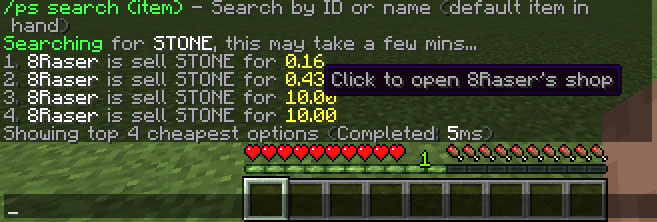
Item Seach
Signs

Transaction Bill


Aliases: pshop, pshops, ps, playershops
(Optional) <Required>
/ps - Help menu
/ps clean (days) - Cleans the database of older acounts
/ps delete - Removes a player from database
/ps edit - Admin edit mode for editing items in a player shop
/ps search - Search player shops for this item
/ps sell - Adds the item in your hand to your shop
/ps shop <player> - Opens a players shop
/ps reload - Reloads everything related to PlayerShops
/ps setconfig <Option> <Value> - Set values in config
/ps convert <mysql/file> - Converts to a database type

playershops.size.1 - Player with a 1-row inventory shop (default)
playershops.size.2 - Player with a 2-row inventory shop
playershops.size.3 - Player with a 3-row inventory shop
playershops.size.4 - Player with a 4-row inventory shop
playershops.size.5 - Player with a 5-row inventory shop
playershops.size.6 - Player with a 6-row inventory shop
playershops.shop - Access to /ps shop
playershops.clean - Access to /ps clean
playershops.search - Access to /ps search
playershops.edit - Access to /ps edit
playershops.delete - Access to /ps delete
playershops.sell - Access to /ps sell
playershops.reload - Access to /ps reload
playershops.convert - Access to /ps convert
playershops.setconfig - Access to /ps setconfig
playershops.sign.create - Ability to create signs
playershops.sign.use - Ability to use signs
playershops.sign.destory - Ability to destory signs.
playershops.update - Sends a message when update is available
playershops.admin - Access to anything with a star

To be announced.

I don't want a message to show when a player ____, how do I remove it?
Set the string in lang.yml to an empty string, ''.
Why is the plugin not loading?
Make sure Vault is installed.
How do I switch from MySQL to File data storage?
Method 1 (File Directory)
- Place the plugin in your plugins folder
- Start your server to generate the config.yml file
- Stop your server
- Go into the config.yml and under Database Type, set it from MYSQL to FILE
- Start your server
- Done!
Method 2 (In-game - This method will remove all comments from the config.yml)
- Type /ps setconfig Database.Type FILE (case sensitive)
- Then reload PlayerShops /ps reload
- Done!
Why won't it connect to MySQL?
Make sure you have entered the proper information in the config.yml file.
Can I convert from MySQL to File storage or vice versa?
- MySQL to File: /ps convert file
- File to MySQL: /ps convert mysql
Is there support for all languages?
A file is generated on your local computer called lang.yml. Here you can change any message you like to support any language you like.

- This list will be updated with know bugs as they become reported.
Support and bugs will be handled through the GitHub repository. Any support or bugs reported in the discussion section will not be fixed.
Please consider donating or purchasing any of my other plugins!
Don't forget to ★ this project on GitHub.
Please keep feature requests and bug reports to the GitHub repository, NOT the reviews.
The review section is solely for reviewing the plugin currently available. Thank you.
Similar projects
Plugin →Let Me Despawn
Improves performance by tweaking mob despawn rules. Say bye to pesky unintentional persistent mobs.
25MSueta
JourneyMap
Real-time map used for mapping in-game or your browser as you explore.
14.7MSueta
Emotecraft
Create your own emotes in Minecraft.
7.5MSueta
Simple Tpa
A simple tpa plugin which sends requests
5.4MSueta
Common Network
Forge and Fabric Unified Networking Solution
3.9MSueta
Set Home
A lightweight plugin for players to set their homes.
3.8MSueta