
Let me introduce you to PreciousStones
PreciouStones is flexible. The "force fields" you see above are the ones that are configured by default, they were created using our massive collection of flags. You can use them as-is, pick just the ones you like, or erase them all and create your own. They are defined in a list called force-field-blocks on the config, and can be changed or completely removed if you like.
In that list you can tie any block type to a set of flags (chose from over 180 flags with varied functionality) to configure your own force fields unique to your server that do exactly what you need them to do. From protection to potion effects to confiscation of items to rollback abilities to teleportation, the possibilities for wacky new types of force fields are endless. PreciousStones is not just about protections.
Here is an example of the how the Entry Bouncer field is defined on the config using flags:
title : Entry Bouncer
block: lapis_block
radius: 5
prevent-entry: true
prevent-unprotectable: true
prevent-flow: true
?prevent-portal-enter: true
?prevent-portal-destination: true
enable-on-src: true
can-change-owner: true
hidable: true
cuboid: true
mask-on-disabled: obsidian
Fields are not limited to one owner, you can allow as many people as you like into your protection (/ps allow), with SimpleClans integration you can even automatically add your entire clans to the allowed list. You can buy/sell your fields or rent them for any type of item/currency or length of time. Set up entry/farewell messages. Get notified when someone enters your field and you're far away, or prevent the use of just about anything you want: chests, doors, traps, fences, teleports, portals, etc. There are flags for just about anything, all created during its 4+ years of heavy development. Just about any request has been created, like the ability to toggle creation of fields (/ps [on|off]), or have it be off by default (settings.off-by-default). Or to have to sneak when you are placing the block to create the field so that often used block types can be used as fields without interfering (settings.sneak-to-place-field). Want to prevent grief in your world and allow only place/break to happen inside fields? Turn on (settings.prevent-place-everywhere) and (settings.prevent-destroy-everywhere) in the config, give your fields the (allow-place, allow-destroy ) flags, and then hand the fields out to your players for them to claim land. You need a feature? Request it, but most likely it already exists.
If you think having all the functionality on flags was flexible, did you know that even the flags themselves are flexible? You can add modifiers before the flag names to change how they behave: flags can be reversed with (~) to have them apply to the allowed vs the non-allowed players and vice-versa (for example the ~launch flag would launch non-allowed players into the air instead of the default of allowed players). They can be made global with (^) to have them apply to all players allowed and non-allowed (for example the ^prevent-entry flag will bounce out all players not just non-allowed ones), or made toggable with (?) disabling them by default but allowing your players to turn them back on manually per-field with the /ps toggle command (great with ?welcome-message and ?farewell-message flags or any other flags that not everyone may want to use all the time).
The fields you create can have limiting functionality (using the limits flag) to control the distribution of the fields you create for your players based on permissions. Use them as a reward for donators, or sell them outright, they are a great way to increase funding for your server. They work alongside other protection plugins. Your players will love them!
Now that you have had an introduction to the flexibility of PreciousStones, one more thing of note: PreciousStones is fast. Really fast. Fields are pulled from the fully indexed DB to memory and their references stored in 6 different hashmaps for linear time O(1) lookups by (world, location, chunks covered, flags, owner, and block type). This means no lag while doing lookups other protection plugins can only dream of being able to do. Now that you have been acquainted, on to the show:
Wiki
Installation
Configuration
Flag Reference
Permissions
Source Code
Developers API
Found a bug or have a feature request?
Donations
Like the plugin? Please consider donating!

Videos
Defining cuboid fields (excuse the lag)
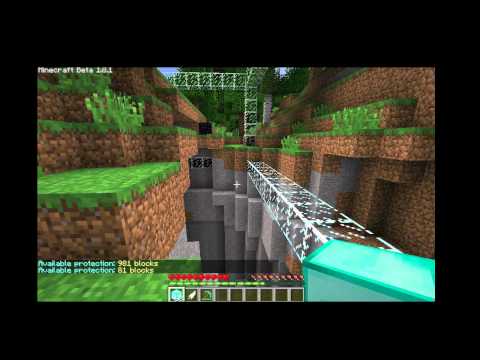
PreciousStones Basics Tutorial
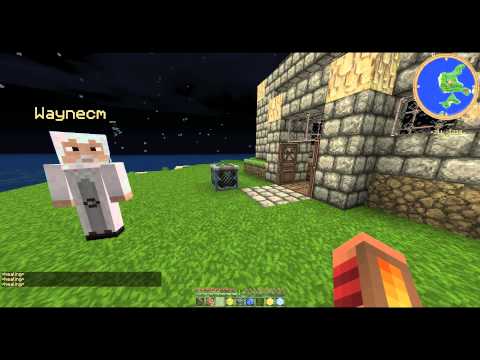
Showcase of the effect of each of the default stones.
Demonstration of various field types (using custom build stones)
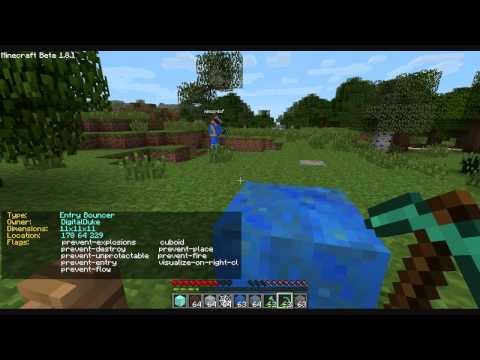
Review of PreciousStones that goes through all the default stones.

PreciousStones has two types of protections unbreakable blocks and field blocks:
Unbreakable blocks
These are protection for the block itself, like OwnBlocks. The blocks on the unbreakable-blocks list in the config will not be breakable by anyone but the owner, they will belong to whomever placed them. They can be used as building material i.e. ungriefable city walls, impenetrable vaults, etc. or protect block types from theft i.e. note blocks, fences, or anything that you want to be grief proof. You can right-click on the block with a tool in hand to view who owns it.
Note: The block types you place on this list cannot be added to the fields list.
Force-Field blocks
Fields are blocks that project a force-field outwards onto their surroundings. They can have various different properties which can be added with field flags. The field's radius extends from the cube itself outwards. ( i.e. For a radius of 3 the resulting force field would measure 7x7x7, you can optionally add a custom height to override the height calculated from the radius to whatever height you choose)
Field Info
Right clicking on any one of your fields with one of the tools configured in the tool-items list in the config.yml will show you specific information for that field. Right clicking on fields that don't belong to you will only tell you who the owner of the field is. You can configure for all fields to display the full info by toggling the public-block-details setting to true. Right clicking on a block in the ground with one of the tool-items will tell you if the block is protected or not.
Field Visualization
You can visualize what one of your fields looks like by standing inside of it and typing /ps visualize, this will surround the field with glass blocks (placed inside of the field). This visualization is sent to the player's client directly and is not visible by any other player on the server. Once the player moves, the visualization will be removed to prevent people from interacting with it. This will help you visually see what is being protected.
Cuboid Fields
Cuboid fields are the next generation of fields. You can make a field into a cuboid field by giving it the cuboid flag. Cuboid fields behave identical to the normal fields at first sight. Like a normal field they can be placed down to create a field around the radius of the block based on the configured size. The difference is that the shape of cuboid fields can be redefined at will.
Redefining a Cuboid / Drawing Mode
Cuboid fields can be placed in drawing mode by [ sneak-left-click] with a tool. During drawing mode you can [ left-click] on blocks around the area to grow the protection cuboid. [ right-click] aiming at any direction will expand the cuboid one block in that direction. [ sneak-right-click] anywhere will undo your last selection if you made a mistake. And to finish and close the cuboid, [ sneak-left-click] again anywhere, or simply click on the field block.
Technically you only required to select two blocks, one from each opposite corner of the cuboid in order to form the cuboid. But we all know that that is almost never how we want to define a cuboid. You have a specific content in mind that you want to protect for example a house with underground area, or a floating platform in mid air, the valley that you can see down below. Traditional methods of cuboid definition require you to dig down into some imagined corner to select the bottom corner block, or pile up blocks to select the top corner block. In cuboid drawing mode, rather than being forced to select opposite corners, you select the actual blocks you want protected from a distance by just left clicking in their direction, and afterwards a cuboid will be created that is the smallest shape that can wrap around all selected blocks.
Cuboid Volume
When you place a field into drawing mode its configured height and radius are converted into volume and given to the player as the available blocks his new field shape can cover. For example field of radius 5 (which is 11x11x11) will be converted into block volume, so 11x11x11 = 1331 blocks. You will then be able to redefine the cuboid using the available volume.
If the cuboid has the custom-volume flag set, then that volume will be used instead overriding the volume calculated from the radius/height. This is good if you want players to be able to place down a small field, with say radius 0, and then be able to redefine it into a much larger field. Good for plots and such that need to be placed next to fields owned by others without causing conflicts.
Cuboid Groups
While in drawing mode you can increase the available volume of a field by placing more of the same type of fields down. Each one you place down will add on its volume to the parent. This way you will be able to create immense fields at any size. When you close the cuboid, all the fields you placed down will turn into a group. Right clicking on any of them will give you the same information and breaking one of the blocks in the group will break them all.
Cuboid Mixing
While in drawing mode you can place down different field types down and their field flags will be imported to the cube being drawn. This way you can mix the effects of several fields into one. What fields can mix with what fields can be configured by putting your fields into "mixing groups" with the mixing-group flag, fields in the same groups will be able to mix with each other. You will want to put fields of similar size and "cost" in the same groups.
Note: Fields without a mixing group will not be mixable
Note: Only the field flags are imported, no extra volume is added to the cuboid.
Fields vs Cuboids
Cuboid fields are saved on a separate database table (pstone_cuboids) than fields (pstone_fields). Due to this changing existing fields that people are already using into cuboids or viceversa is a bad idea.
Grief Revert
Grief revert fields are just what they sound like. They are personal BigBrother fields. They will let you roll back any grief that was done within the field. These fields will record all block breaks by players who are not allowed into the field and all block breaks from explosions in the database. The blocks that are broken and recorded will not drop, they will just disappear. There are two modes to these blocks - you can have them rollback the grief on command when right clicking on them, or you can have them roll back the grief at a predefined interval with the grief-revert-interval' flag. You can define a list of blocks that you don't want to be revertible and will be stealable (drop when broken) by adding them to the grief-revert.black-list in the config.
Proximity Snitch
Any block with the snitch flag will create a field which will keep a record of player's activities within the field. It will keep a record of their entry, any block breaks and placements, and any block usage inside the field. You can see this list by right-clicking on the block or typing /ps snitch. You can clear the list at any time by issuing the command /ps snitch clear.
Similar projects
Plugin →Let Me Despawn
Improves performance by tweaking mob despawn rules. Say bye to pesky unintentional persistent mobs.
26.2MSueta
JourneyMap
Real-time map used for mapping in-game or your browser as you explore.
14.7MSueta
Emotecraft
Create your own emotes in Minecraft.
7.9MSueta
Simple Tpa
A simple tpa plugin which sends requests
5.4MSueta
Common Network
Forge and Fabric Unified Networking Solution
4.7MSueta
Set Home
A lightweight plugin for players to set their homes.
3.8MSueta