
rChat | chat customisation plugin
2.2.0Customise your chat with: chat-format, join-quit messages, broadcast (+ blacklist names)
Features:
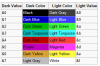
- Chat color using the the rc.color permission.
- You can set the Chat-format in the config.yml.
- You can set the operators name color in the config.yml.
- You can set custom join and quit messages in the config.yml.
- You can set a welcome messages for the new players in the config.yml.
- You can set the broadcast format in the config.yml.
- You can change your name using the rc.nick permssion.
- You can change the name of other players using the rc.nick.others permssion.
- You can send private messages using the /msg command.
- You can clear the chat using the /cc command.
- You can set blacklisted names in the config.yml.
Commands:
Clear the chat: /cc
permsion: rc.cc
Send private message: /msg (player) (message)
permssion: rc.msg
Nick(yourself): /nick (new-name)
permission: rc.nick
Nick(others): /nick (player) (new-name)
permission: rc.nick.others
Broadcast: /bc (message)
permission: rc.bc
More information and newer versions: rtz981.com | rPlugins - rChat
More rPlugins: rtz981.com | rPlugins
Pictures:
chat colors:

custom join & quit messages:

broadcast:

Config.yml file:
#you can use § colors #set the operator's name color
ops-name-color: §4
#set the chat format
#?pn? = player's name
#?pnd? = player's displayname (name, prefix, suffix)
#?msg? = message
chat-format: ?pdn? §r>> ?msg?
#set the join and the quit message
#?pn? = player's name
#?pnd? = player's displayname (name, prefix, suffix)
join-message: §6[§a+§6]?pn?
quit-message: §6[§c-§6]?pn?
#set the welcome message
#it will be applied if the player is new on the server
#?pn? = player's name
#?pnd? = player's displayname (name, prefix, suffix)
welcome-message: §bWelcome §a?pn? §b to the server
#set the broadcast format
#?msg? = message
broadcast-format: §6[§aBroadcast§6] §4?msg?
#set blacklisted names
bn:
#- noch
Similar projects
Plugin →Let Me Despawn
Improves performance by tweaking mob despawn rules. Say bye to pesky unintentional persistent mobs.
25MSueta
JourneyMap
Real-time map used for mapping in-game or your browser as you explore.
14.7MSueta
Emotecraft
Create your own emotes in Minecraft.
7.5MSueta
Simple Tpa
A simple tpa plugin which sends requests
5.4MSueta
Common Network
Forge and Fabric Unified Networking Solution
3.9MSueta
Set Home
A lightweight plugin for players to set their homes.
3.8MSueta