
️RealDropIt | 3D Items [+1.21.1]
1.0.3Enhances dropped items with smooth, customizable '3D' visual displays on the ground.
⣏⡱ ⢀⡀ ⢀⣀ ⡇ ⡏⢱ ⡀⣀⢀⡀ ⣀⡀ ⡇ ⣰⡀
⠇⠱ ⠣⠭ ⠣⠼ ⠣ ⠧⠜ ⠏ ⠣⠜ ⡧⠜ ⠇ ⠘⠤
RealDropIt enhances dropped items by displaying them as clean, customizable item displays on the ground, without changing vanilla mechanics.
The plugin focuses purely on visuals: items behave exactly like vanilla Minecraft items, but are shown using modern display entities for a cleaner, more immersive look.
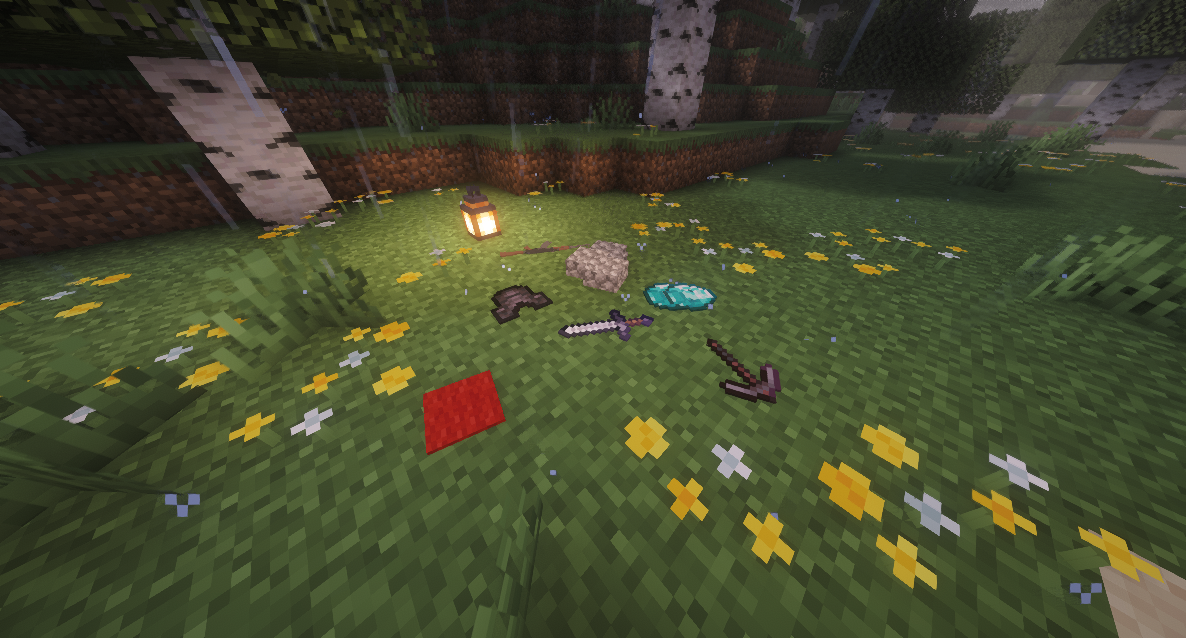
Compatibility
- Paper & Paper forks
- Minecraft 1.21.1+
- ProtocolLib +4.5.0 dependency
Features
- No gameplay or pickup mechanics are modified
- No duplication glitches or server-side item changes
- Fully server-side logic with safe visual displays
- Nametags (very customizable):
Images
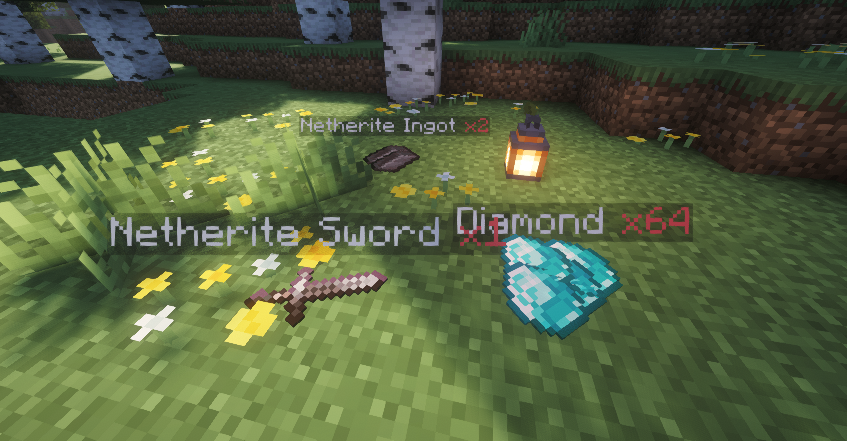
- No Armor-stands
- Per-player toggle support
- Support Custom Model Data
- World and material filtering
- Lightweight and optimized for performance
⚙️How it works
RealDropIt replaces the visual representation of dropped items with display entities while keeping the original item fully intact and functional. Physics, hoppers, mobs, players, and vanilla interactions remain unchanged.
The system is carefully optimized to avoid performance issues and does not interfere with normal gameplay in any way.
⚖️Commands & Permissions
- /realdropit toggle | realdropit.use - realdropit Toggle displays for yourself
- /realdropit reload | realdropit.admin – Reload configuration
- /realdropit debug | realdropit.admin – Show debug information
Config:
# ⣏⡱ ⢀⡀ ⢀⣀ ⡇ ⡏⢱ ⡀⣀ ⢀⡀ ⣀⡀ ⡇ ⣰⡀
# ⠇⠱ ⠣⠭ ⠣⠼ ⠣ ⠧⠜ ⠏  ⠣⠜ ⡧⠜ ⠇ ⠘⠤ ~Hilcraft

enabled: true # Enable or disable the entire plugin
debug: false # Enable or disable debug mode

# Worlds where RealDropIt displays will NOT be created
disabled-worlds:
  - lobby
  - lobby2

display:
  max-per-stack: 5 # Maximum amount of ItemDisplays per item stack
  update-interval-ticks: 1 # How often displays are updated (in ticks), 1 tick = fastest, higher values = better performance
  follow-item: true # Make displays follow the dropped item position
  smooth-movement: true # Smooth movement when displays follow the item, only if "follow-item" is enabled
  max-per-chunks:  # Enable a limit of displays per chunk and maximum displays allowed per chunk
    enabled: false
    amount: 64
  display-animation:
    scale:  # Default scale for normal blocks, flat items (2D-like items) and thin 3D blocks (slabs, carpets, etc.)
      default: 0.4
      flat-items: 0.65
      thin-blocks: 0.45
    rotation:
      enabled: true # Enable rotation animation while item is in the air
      air:
        x: 8.0 # Rotation speed on X axis (degrees per update), rotation speed on Y axis and X axis
        y: 6.0
        z: 5.0

nametag:
  enabled: false # Only works if displays are enabled
  format: "&f%item-name% &cx%amount%" # Text format shown above dropped items | Available placeholders: %item-name% → Item name / %amount% → Item amount / Only support "&" color codes
  y-offset: 0.35 # Vertical height of the nametag relative to the item | Default: 0.35
  billboard: CENTER # Text facing mode: CENTER → Always faces the player (recommended), FIXED → Fixed orientation, does not rotate, HORIZONTAL → Rotates only on the horizontal axis and VERTICAL → Rotates only on the vertical axis
  background:
    enabled: true
    color:
      r: 0 # Red component (0-255)
      g: 0 # Green component (0-255)
      b: 0 # Blue component (0-255)
      a: 80 # Background Opacity (0-255) | 0 = fully transparent;255 = fully opaque;80  = similar to vanilla nametag background
  see-through: true # Allows the nametag to be visible through blocks/walls
  shadow: false  # Adds a shadow effect to the nametag text

filters:
  only-player-drops: false # Only create displays for items dropped by players
  material-blacklist: # Materials that will never have displays and nametags
    - BEDROCK
    - BARRIER
Upcoming Features
- World Guard support.
- Glow Drops & Glow Rarity Drops feature.
- Display distance (at what distance do the displays stop rendering).
- Try to fix visual bugs (like Z-fighting, etc.)
Known Bugs / Limitations
- When many items are dropped in the same spot, multiple displays may visually overlap or flicker slightly. This is a visual limitation of stacked displays.
- In certain situations (tight spaces, uneven terrain, blocks updating), item displays may partially clip into blocks.
- Very large amounts of dropped items in a small area may impact performance.
- First versions may require fine-tuning of configuration values for best results.
- Visual behavior may vary slightly between different Paper forks.
- RealDropIt changes how dropped items are displayed using modern display entities.
Compatibility with other item-drop plugins is not guaranteed (e.g. DivineDrops or Stack Plugins).
- Players joining with older client versions via ViaVersion may experience visual issues or limited functionality, due to the use of display entities.
These issues are purely visual and do not affect item mechanics, pickup behavior, or server-side logic.
Report Bugs or Request Features:
You can contact me on Discord: hil.da
I'm very busy and I apologize if I can't reply within minutes; please expect slow support.
 I would appreciate a positive review if it's what you were expecting :D
Similar projects
Plugin →Let Me Despawn
Improves performance by tweaking mob despawn rules. Say bye to pesky unintentional persistent mobs.
25MSueta
JourneyMap
Real-time map used for mapping in-game or your browser as you explore.
14.7MSueta
Emotecraft
Create your own emotes in Minecraft.
7.5MSueta
Simple Tpa
A simple tpa plugin which sends requests
5.4MSueta
Common Network
Forge and Fabric Unified Networking Solution
3.9MSueta
Set Home
A lightweight plugin for players to set their homes.
3.8MSueta