
RedditCraft | Reddit Forum With Minecraft Integrations [1.8.
1.6.0Use a subreddit with Minecraft integrations as your server forums software.

Use a subreddit with Minecraft integrations as your server forums software.


Dependencies:
RedditAPI - required, Vault - required, PlaceholderAPI (optional)
What?
RedditCraft is a plugin that serves to integrate the presence of a player in-game to an authenticated reddit account on a subreddit of your choice.

Why?
- Subreddits provide rich and dynamic experiences, only enhanced by RedditCraft's Minecraft integrations.
- Your data is in good hands - everyone's heard of reddit, as it's a highly established forums provider.
- Since RedditCraft hooks directly into your server, we can provide an ever growing set of complex Minecraft integrations. Future plans for in-game features include IP banning, notifications, posting, and more.
- Users familiar with reddit will instantly know how to use your forum - no re-learning software for no real reason.
- Subreddits bring most of what popular Minecraft forums providers bring already, and RedditCraft resolves an essential element they were lacking: fluent Minecraft integration.
- Subreddits are highly customisable, and with their recent design upgrades, they're at the forefront of web technology.
- Freshness - make your server stand out with a unique, engaging forums experience!
Features
- Simple Authentication: RedditCraft provides a simple way for players to authenticate their reddit account in-game.
- Advanced Flair Management: RedditCraft can automatically generate custom flairs for players' reddit accounts, and set/remove them without a click.
- Rich Admin Tools: RedditCraft provides a complete set of tools for admins to manage account authentication, flairs on accounts, and more.
- PlaceholderAPI Placeholder Support: RedditCraft provides placeholders for players' reddit account names.
- Automation: RedditCraft tries its best to automate as much as possible for you!
Important Note
Due to the 60 request per minute rate limit for the Reddit API, if your server expects to have more than 30 players authenticating their reddit account per minute, it's not recommended to use this plugin. Going beyond the rate limit will not block commands (this plugin runs commands on separate threads to not block the main thread), but they will become slow.
Dependencies (Requirements)
- RedditAPI - Essential. Required for interfacing with reddit. You will need to download this plugin and configure it such that it loads without errors. NOTE: Ensure you create a *NEW* reddit account for the reddit bot to use (otherwise you will be spammed with verification messages).
- A MySQL database - Essential. In its current state, the plugin only supports MySQL databases, and requires one to store its internal data. Note that in the future other database technologies will be supported.
- Vault - Essential. Required for obtaining players' prefixes and permission data.
- PlaceholderAPI - Optional (recommended). This plugin may be required for accessing the placeholders provided by RedditCraft, notably the placeholder for a player's authenticated reddit account username.
Usage
One must firstly setup a reddit bot for their subreddit, which requires setting up the RedditAPI plugin. The reddit bot must be created in on new reddit account, which will be the verification reddit account for the subreddit.
Do not load RedditCraft without having setup RedditAPI.
Once RedditAPI has been setup with a working bot, one must create a subreddit for their server, with the above reddit bot as a moderator, and the required user flair groups added.
Then, fill the config with the required information.
The plugin does not provide design graphics for your subreddit, i.e the background, banner, etc., so you must configure the design of your subreddit manually.
You must add flair groups to your subreddit and copy their IDs into your config correctly for the plugin to work. See the "Flair Management" section below.
Migration
If you're using the plugin on a server that already has a running forums system, it's recommended you migrate to the subreddit by running both RedditCraft and your old forums simultaneously. You should alert players on the old forums to migrate to the subreddit, by firstly authenticating their reddit account. Make sure you have setup flairs correctly in RedditCraft before beginning the migration procedure. Once sufficiently many users have migrated, you can void the old forums, but make sure to keep stored any important data from it. RedditCraft is not liable for any information loss due to the migration from other forums software.
Configuration (config.yml)
One can find the default config.yml file here.
Authentication
RedditCraft provides a simple way for players to authenticate their reddit account in-game. Once authenticated, their reddit username can be resolved in-game, and things like the prefix in-game can be synced to the subreddit automatically.
Authentication Procedure
Below is the procedure a player follows to authenticate their reddit account in-game:
- Execute the command /rc auth begin to begin authenticating. This may have to be confirmed with /rc auth confirm, for example if they're already authenticated or in the process of authenticating, it will confirm the override.
- The player is sent instructions on the message to send to the server's reddit bot. This includes the subject of the message, the body of the message, and the reddit account to send it to (which is the bot for the subreddit). The body of the message is their Minecraft username.

- The player has within a specified number of minutes to send the specified message to the server bot.

- If the bot receives the message within the specified number of minutes, and the message was completely correct, the player's reddit account authenticates successfully.
Flair Management
The second main feature of RedditCraft is its handling of reddit flairs. Only authenticated users can have a flair, and their flair is automatically applied to their reddit account after authenticating.
Flairs are only automatically updated (computed and applied), after authenticating. You will need to call /rc admin flair update <minecraft uuid> each time their rank in-game changes, to update re-compute and update their flair.
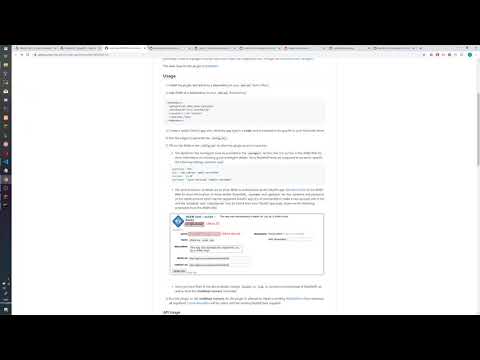
Below shows an example flair of the Minecraft player "omarathon" having authenticated to the reddit account "omar_test". Note the flair is from the prefixsync mode, i.e it syncs their prefix in-game:

Flair Components
Flairs contain the following components:
- <flair>: the user's resolved "flair", which may be resolved in one of three modes: prefixsync, singlegroups or multiplegroups. It serves as a way to show a player's rank in-game as an element of their flair on the subreddit.
- <username>: the Minecraft username of the Minecraft account that has authenticated to this reddit account.
These components may be combined in a specified manner to produce the resulting flair. For example "<flair> | <username>" might show "OWNER | omarathon" if the player omarathon is the OWNER.
Flair States
Flairs may be in one of three states:
- on: both the <flair> and <username> components will be visible in their flair. The user flair group their flairs correspond to are decided by the flair mode (more information below).
- off: only the <username> component will be visible in their flair. The user flair group their flairs correspond to are specified in the config. One additionally must specify the formatting, i.e "[<username>]" will show "[omarathon]" for the Minecraft player "omarathon".
- removed: they will have no flair on the subreddit, i.e neither the <flair> nor the <username> components will be visible in their flair.
After a player has authenticated their reddit account, their flair is automatically set to either the on or off state, specified in the config. Players may change their flair state in the database by /rc flair on/off/remove, and then they may update it (sync on the subreddit) by /rc flair update. If they changed it to the removed state, they don't need to update - it happens automatically. The "update" requirement was chosen so a user can call update without changing the state, just to process the state. Also, admins can call update on users to recompute their on/off flair, without having to check what their status was beforehand.
Flair Modes
As above, the <flair> component of flairs can be resolved via three modes. Flair modes also decide the user flair group for their reddit user to be in (these are specified in the user flairs section of the subreddit modtools, and allow one to specify the colours for the flairs, or even css classes for them). Below each are explained:
- prefixsync: the simplest flair mode. Simply obtains the prefix for the player in-game, via the Vault API.
Users will all belong to the same user flair group, specified in the config as the "custom" user flair group. Therefore, flairs may only be of a single colour. Prefix colours are NOT synced. - singlegroups: a flair mode where Minecraft players may belong to a single specified group, if they have access to the group's permission node. The mappings between the groups and their required permission nodes are to be specified in the config.
Each group has its own corresponding user flair group, therefore each group may be a different colour. The flair mode will pick the group of the highest precedence, and the order of precedence for the groups is also defined in the config.
This flair mode is recommended for servers where players have prefixes with single components, i.e they have single ranks. If so, each rank could have its own group, and user flair groups could be defined for each group, such that it has the colour of the corresponding rank prefix (as an example). - multiplegroups: the most complex flair mode, recommended for servers where players have prefixes composed of multiple ranks. As in the singlegroups mode, one defines groups predicated upon having access to a given permission node. However, these groups may be part of "flair groups", akin to tracks in LuckPerms. The mode will obtain a concatenation of the highest group of the user in all of the flair groups, where the delimiter is specified in the config. The order of precedence for the flair groups, as well as their contained flairs, are defined in the config.
For example, you may have the following flair groups: staff, donors and standard. Then, within the staff flair group the highest flair is OWNER, which requires the group.owner permission. Then the second highest is ADMIN, which requires the group.admin permission, and so on. If a player has the "HELPER" staff flair, "GOD" donator rank and "MEMBER" standard rank, then with the " | " delimiter this flair mode may obtain: "HELPER | GOD | MEMBER".
All flairs obtained from this flair mode belong to the custom user flair group, defined in the config. Therefore, flairs may only be of a single colour.
As a guide, if your server has prefixes and you'd just like user's prefixes to be synced as flairs on the subreddit, then use the prefixsync mode. However, if your server has simple prefixes containing single ranks, you may want to use the singlegroups mode as this allows colouring of individual groups. If you'd like full customisability of flair groups based upon permission nodes, where players may belong to multiple groups and have a concatenation of groups, then use the multiplegroups mode. However, since LuckPerms tracks achieves a similar result, you may still want to use prefixsync instead of this mode if your server uses LuckPerms. But if you'd like flairs to be completely different to prefixes, and the prefixes themselves rely on tracks, then use this mode.
Note that the singlegroups mode is the only mode which provides dynamic flair colouring (it's not possible with the others due to their composed nature).
Placeholders (PAPI)
If you have PlaceholderAPI installed, RedditCraft provides the %redditcraft_authenticatedredditusername% placeholder, which shows the authenticated reddit username associated with a Minecraft player.
If it doesn't exist, or an error occurs while obtaining it, it will show different messages as configurable in the config.
WARNING: Since the plugin doesn't have caching optimisations at present, quickly updating placeholders will cause lots of database queries. If you're using the placeholder, make sure it's set to a reasonable update duration such as every 2 seconds or so. If this placeholder is being obtained for many players, monitor the performance of your server and do not use it if it causes lag.
Commands and Permissions
Important Note
In order to have access to any redditcraft commands, a player must have the redditcraft permission (if they have redditcraft.* but not redditcraft, no commands will work!).
Permission Wildcards
Note that permission wildcards also work, such that if one has the permission node redditcraft.authentication.* then they will have access to all subcommands of redditcraft.authentication.
Selectors
Selectors are menu commands. Each selector has associated with it a "help" or "?" subcommand, which will show the help message. If the selector has permission x then the player must have the permission x.help to view this help message, and it's also shown when calling the command associated with the selector (one does not need to call the "help" or "?" subcommand).
Handlers
Handlers are "executors", i.e endpoints where something will happen.
Recommended Normal Player Permissions
- redditcraft
- redditcraft.help (if you want to show them the help menu when calling /redditcraft or /rc)
- redditcraft.authentication.*
- redditcraft.flair.*
If you wish to not allow players to customise the flairs manually, or restrict options like the /rc flair remove command, then do give individual permission nodes instead! You should not give non-staff players access to any of the redditcraft.admin commands (if you do, be sure you know it won't be exploitable!)
Similar projects
Plugin →Let Me Despawn
Improves performance by tweaking mob despawn rules. Say bye to pesky unintentional persistent mobs.
25MSueta
JourneyMap
Real-time map used for mapping in-game or your browser as you explore.
14.7MSueta
Emotecraft
Create your own emotes in Minecraft.
7.5MSueta
Simple Tpa
A simple tpa plugin which sends requests
5.4MSueta
Common Network
Forge and Fabric Unified Networking Solution
3.9MSueta
Set Home
A lightweight plugin for players to set their homes.
3.8MSueta