
rituals
2.1.34-pluginIntroducing Rituals—a custom datapack/mod that brings mystical totems and ritual magic into your world. Craft totems, display items, and trigger powerful effects through immersive rituals.




Totem Rituals Datapack/Mod
Thank you for 100 downloads
300 Downloads! Thank you! ~Oct.27.2025
\(◎o◎)/ 420 Downloads achieved Nov.6.2025
(●'◡'●) 550 Downloads on Nov.18.2025
672 Downloads a mere ten days later?! (Nov.28.2025)
W E D I D I T! 1,000 Downloads (Dec. 25.2025)
1,371 downloads (Jan. 30.2026)

Get my other mod, compressy for near infinite storage!

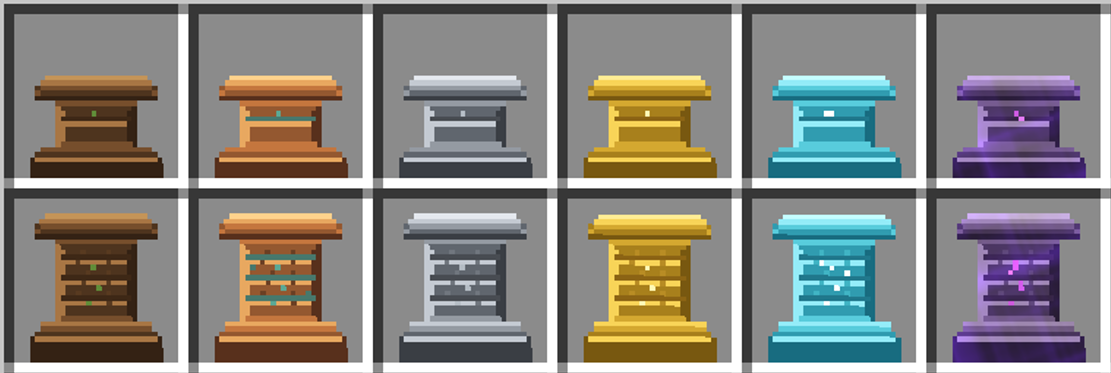
Introducing Rituals—a datapack that brings mystical totems and ritual magic into your world. Craft totems, display items, and trigger powerful effects through immersive rituals. Designed for builders, modpack creators, and lore lovers alike.
 Features
• 8 Unique Rituals - From simple growth magic to complex multi-totem patterns
• 6 Totem Tiers - Wood to Netherite with increasing power and range
• Visual Pattern Guides - Redstone-powered particle markers for easy setup
• Fire Sacrifice System - Immersive activation requiring catalyst offerings
• Interactive Menu System - In-game totem browser and admin tools
• Custom Textures & Animations - Beautiful visual effects and smooth item displays
• Fully Configurable - Customize ranges, frequencies, and behavior
• Debug & Kiwi Modes - Developer tools and easy mode for testing
Built with care for the Minecraft community—open source, tweakable, and ready to enchant your next adventure.
Installation
📦 Step-by-Step Installation Guide (Click to Expand)
This guide assumes you have no prior experience with Minecraft datapacks. A datapack is a special folder that adds new features to your Minecraft world.
1. Download the Datapack
- If you received this as a ZIP file, you're ready to go
- If you have the folder structure, compress it into a ZIP file first
2. Locate Your World Save Folder
- Open Minecraft and note which world you want to add this to
- Close Minecraft (important!)
- Find your Minecraft saves folder:
- Windows: Press
Win + R, type%appdata%\.minecraft\savesand press Enter - Mac: Press
Cmd + Space, type~/Library/Application Support/minecraft/savesand press Enter - Linux: Navigate to
~/.minecraft/saves
- Windows: Press
3. Install the Datapack
- Find the folder with your world's name
- Open the
datapacksfolder inside (create it if it doesn't exist) - Place the datapack ZIP file (or folder) into this
datapacksfolder
4. Enable the Datapack
- Launch Minecraft and open your world
- You should see a message in chat: "[Totem Rituals] Datapack loaded successfully!"
- If you don't see the message, type
/reloadin the chat and press Enter
5. Get Started
- Type
/function rituals:give/allto receive all totem items - You're now ready to perform rituals!
Note: servers with performance modifications that combine drops from more than 1.5 blocks away will not be able to perform rituals that require catalysts dropped on the ground.
Getting Started
Quick Start Guide
This datapack adds a new item category called "Totems" which can be crafted and placed in your world. When you place totems with specific items displayed on them, you can activate powerful rituals. Single-totem mode is enabled by default!
Basic Workflow:
- Craft totems (see Crafting Recipes)
- Right-click on the ground to place a totem
- Right-click a placed totem with an item to display it
- Drop 4 catalyst items around the totem (N/S/E/W)
- Light fire at the totem base - the ritual activates!
Note: Rituals now require a Fire Sacrifice to activate! See Ritual System below.
Available Rituals
🌟 Standard Single-Totem Rituals (6 Available)
These powerful rituals work with just 1 totem displaying the correct item. Perfect for beginners and small-scale magic!
1. Growth Ritual 🌱
- Required Item:
Emerald - Effect: Automatically bonemeals crops and plants in range
- Frequency: Every 15 seconds (Tier 1) → Every 3 seconds (Tier 6)
- Range: 2×2 to 7×7 horizontal area based on tier
- Visual: Green happy villager particles
- Perfect For: Farming automation, tree growth, crop acceleration
2. Strength Ritual 💪
- Required Item:
Diamond - Effect: Grants Strength and Resistance buffs to nearby players
- Duration: 10-30 seconds based on tier
- Frequency: Every 2 seconds to 0.75 seconds based on tier
- Range: Tier-based area effect
- Visual: Critical hit particles
- Perfect For: Combat preparation, mining expeditions, mob farms
3. Prosperity Ritual 💰
- Required Item:
Netherite Block - Effect: Attracts nearby items to the totem and grants Luck effect to players
- Pull Speed: 0.3 to 1.0 blocks/tick based on tier
- Luck Level: 0-2 based on tier (helps with loot drops)
- Range: Tier-based area effect
- Visual: Golden dust particles
- Perfect For: Item collection, loot farming, treasure hunting
4. Protection Ritual ⚔️
- Required Item:
Iron Ingot - Effect: Damages hostile mobs in range periodically
- Damage: 2-8 half-hearts per hit based on tier
- Frequency: Every 9 seconds to 1.5 seconds based on tier
- Range: Tier-based area effect
- Visual: Blue dust particles and magic damage
- Perfect For: Base defense, mob control, area protection
5. Healing Ritual 💖
- Required Item:
Nether Star - Effect: Applies regeneration to nearby players and animals
- Duration: 10-120 seconds based on tier
- Frequency: Every 3 seconds to 1.25 seconds based on tier
- Bonus: Absorption at tier 3+
- Range: Tier-based area effect
- Visual: Pink/purple dust particles
- Perfect For: Health regeneration, animal care, safe zones
6. Sentry Ritual 🏹
- Required Item:
Arrow - Effect: Fires homing magical projectiles at hostile mobs
- Damage: 1.5-12 half-hearts based on tier
- Fire Rate: Every 9 seconds to 1.5 seconds based on tier
- Projectile Speed: 0.4-1.2 blocks/tick based on tier
- Range: 2× the normal tier range
- Visual: Glowing projectile with trail particles
- Perfect For: Automated defense, mob farming, perimeter security
🎯 Advanced Multi-Totem Pattern Rituals (2 Available)
These complex rituals require specific geometric patterns with multiple totems. Each totem must display a specific item, and the pattern must be exact!
7. Auto-Farming Ritual 🚜
- Central Item:
Diamond Hoe - Pattern: Square (4 diagonal corners)
- Layout: 4 totems at corners, 5 blocks diagonal from center
- Required Items:
- NE Corner (+5,+5):
Wheat - SE Corner (+5,-5):
Carrot - SW Corner (-5,-5):
Potato - NW Corner (-5,+5):
Beetroot
- NE Corner (+5,+5):
- Effect: Automatically harvests and replants fully grown crops every 5 seconds
- Supported Crops: Wheat, Carrots, Potatoes, Beetroots, Nether Wart, Pumpkins, Melons, Sweet Berries, Cocoa Beans
- Range: Tier-based from center
- Min Totems: 5 (1 center + 4 corners)
- Perfect For: Large-scale farming, AFK crop production
8. Auto-Breeding Ritual 🐄
- Central Item:
Wheat - Pattern: Star (4 cardinal directions)
- Layout: 4 totems at cardinal directions, 5 blocks from center
- Required Items:
- North (0,5):
Seeds - East (5,0):
Carrot - South (0,-5):
Potato - West (-5,0):
Beetroot Seeds
- North (0,5):
- Effect: Automatically breeds animals in range when breeding conditions are met
- Range: Tier-based from center
- Min Totems: 5 (1 center + 4 cardinals)
- Perfect For: Animal farms, livestock management, passive mob breeding
🎨 Visual Pattern Guides
Power your central totem with redstone (place redstone block/torch/lever next to it) to see:
- Colored particle markers showing where each surrounding totem should be placed
- Different colors for each position indicating the required item
- Enchanting particle effects to indicate the pattern type
- Real-time updates when you change items or totem positions
This makes setup MUCH easier - you don't need to memorize coordinates!
Ritual System
Rituals now require a fire sacrifice to activate, making them more immersive and balanced.
How It Works
- Place your totem and add a ritual item (Diamond, Emerald, etc.)
- Drop 4 catalyst items on the ground around your totem (North, South, East, West)
- Light a fire at the totem's base using flint & steel
- The offerings are consumed and your ritual begins!
Catalyst Costs by Tier
 Wood: 4× Coal
 Copper: 4× Copper Ingot
 Iron: 4× Iron Ingot
 Gold: 4× Gold Ingot
 Diamond: 4× Diamond
 Netherite: 4× Netherite Ingot
Why this system?
- Makes rituals feel more magical and intentional
- Balanced resource cost encourages totem upgrades
- Prevents "set and forget" infinite rituals
- You control when rituals activate
📖 See FIRE_SACRIFICE_GUIDE.md for complete instructions!
⚙️ Prefer Auto-Activation? (Click to Expand)
Server admins can disable fire sacrifice and restore the old automatic activation:
/data modify storage rituals:config require_fire_sacrifice set value false
/function rituals:config/reload
Or enable Kiwi Mode for easy testing:
/function rituals:admin/enable_kiwi_mode
Totem Tiers
⚡ View All Totem Tiers (Click to Expand)
There are six tiers of totems, each with increasing effect power. All totems use tier-based ranges, with higher tiers providing stronger effects and larger areas.
Tier 1 - Wood Totem
- Material: Oak Planks + Sticks
- Range: 2×2 horizontal, 3 up, 3 down
- Effect Power: Basic
- Visual: Oak fence post with item display on top
Tier 2 - Copper Totem
- Material: Copper Ingots
- Range: 3×3 horizontal, 4 up, 4 down
- Effect Power: Improved
- Visual: Copper-colored post
Tier 3 - Iron Totem
- Material: Iron Ingots
- Range: 4×4 horizontal, 5 up, 5 down
- Effect Power: Strong
- Visual: Iron bars with particles
Tier 4 - Gold Totem
- Material: Gold Ingots
- Range: 5×5 horizontal, 6 up, 6 down
- Effect Power: Very Strong
- Visual: Golden post with particles
Tier 5 - Diamond Totem
- Material: Diamonds
- Range: 6×6 horizontal, 7 up, 7 down
- Effect Power: Powerful
- Visual: Diamond post with cyan particles
Tier 6 - Netherite Totem
- Material: Netherite Ingots
- Range: 7×7 horizontal, 8 up, 8 down
- Effect Power: Maximum
- Visual: Netherite post with purple particles
Range Visualization
      [item]  ← Item display on top
        |     ← Totem pole (fence post)
    ███████   ← 5×5×6 effect zone
    ███████     (3 blocks up, 3 down)
    ███████

Visual comparison of effect ranges for all totem tiers
See RANGE_DIAGRAM.md for detailed range specifications.
How to Use Totems
Placing a Totem
- Hold a totem item in your hand
- Look at the ground where you want to place it
- Right-click on the ground
- The totem will appear as a vertical pole
Adding Items to Totems
- Hold the item you want to display
- Right-click the totem
- The item will appear floating above the totem
- Only one item can be displayed per totem
Removing Items from Totems
- Break the totem with the corresponding tool.
- Re-place the totem if desired.
Breaking Totems
- Punch (left-click or attack) the totem
- The totem and any displayed item will drop
- All visual effects will be removed
Interactive Menu System
🎮 In-Game Menu Features (Click to Expand)
The datapack includes a comprehensive interactive menu system accessible via commands:
Main Menu
- Access:
/function rituals:menu/main - Features:
- Totem browser with all available tiers
- Quick access to guidebook
- Admin tools and configuration options
Totem Browser
- Access: Through main menu or
/function rituals:menu/totems - Features:
- Visual preview of all totem tiers
- Crafting recipe display
- Range and effect information
- One-click item giving
Admin Tools
- Debug Mode:
/function rituals:admin/enable_debug_mode- Shows detailed ritual timing and range information
- Displays particle effects for troubleshooting
- Kiwi Mode:
/function rituals:admin/enable_kiwi_mode- Disables fire sacrifice requirement for easy testing
- Perfect for creative mode and experimentation
- Reset All:
/function rituals:admin/reset_all- Clears all active rituals and resets configuration
- List Totems:
/function rituals:admin/list_totems- Shows all placed totems and their current state
Crafting Recipes
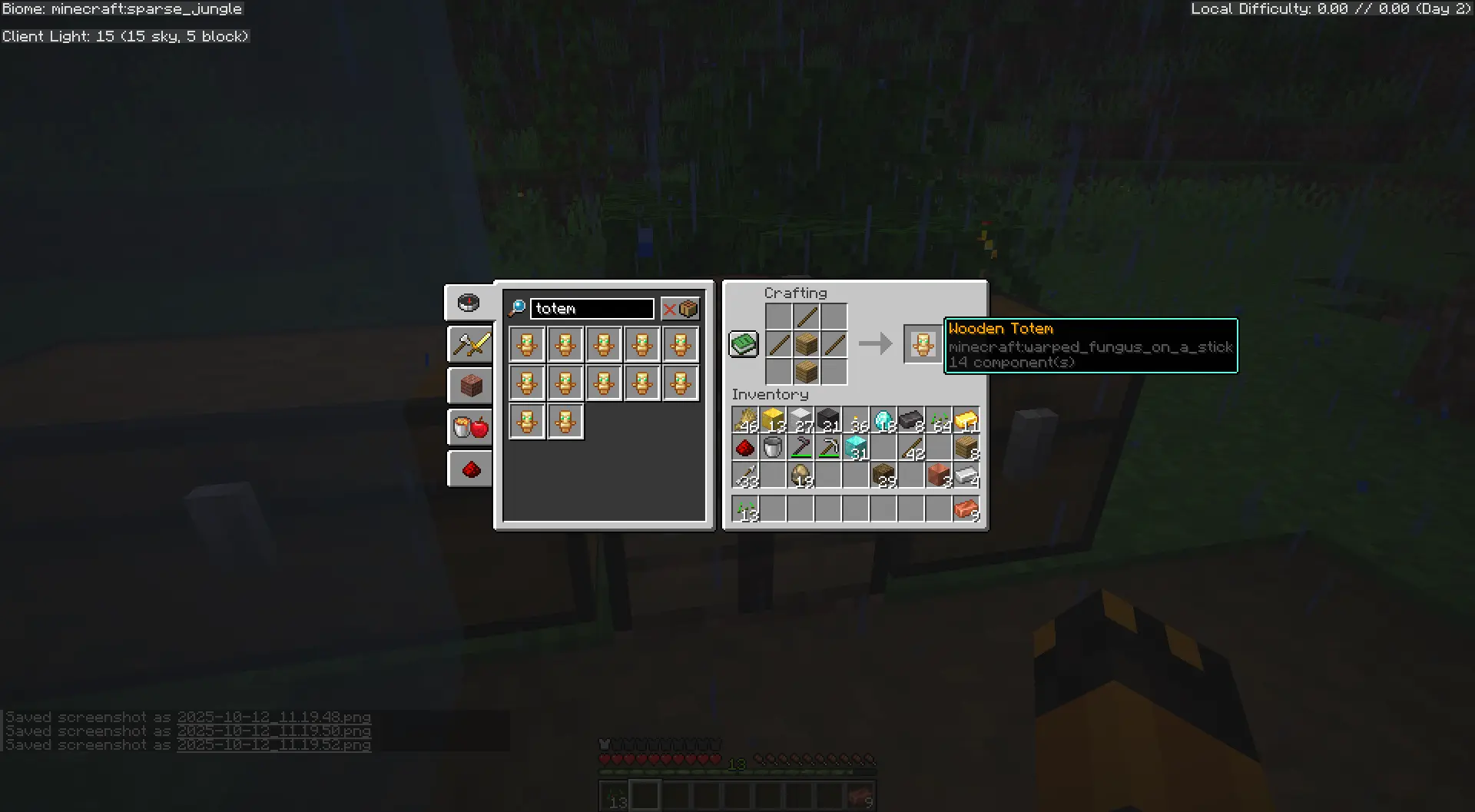
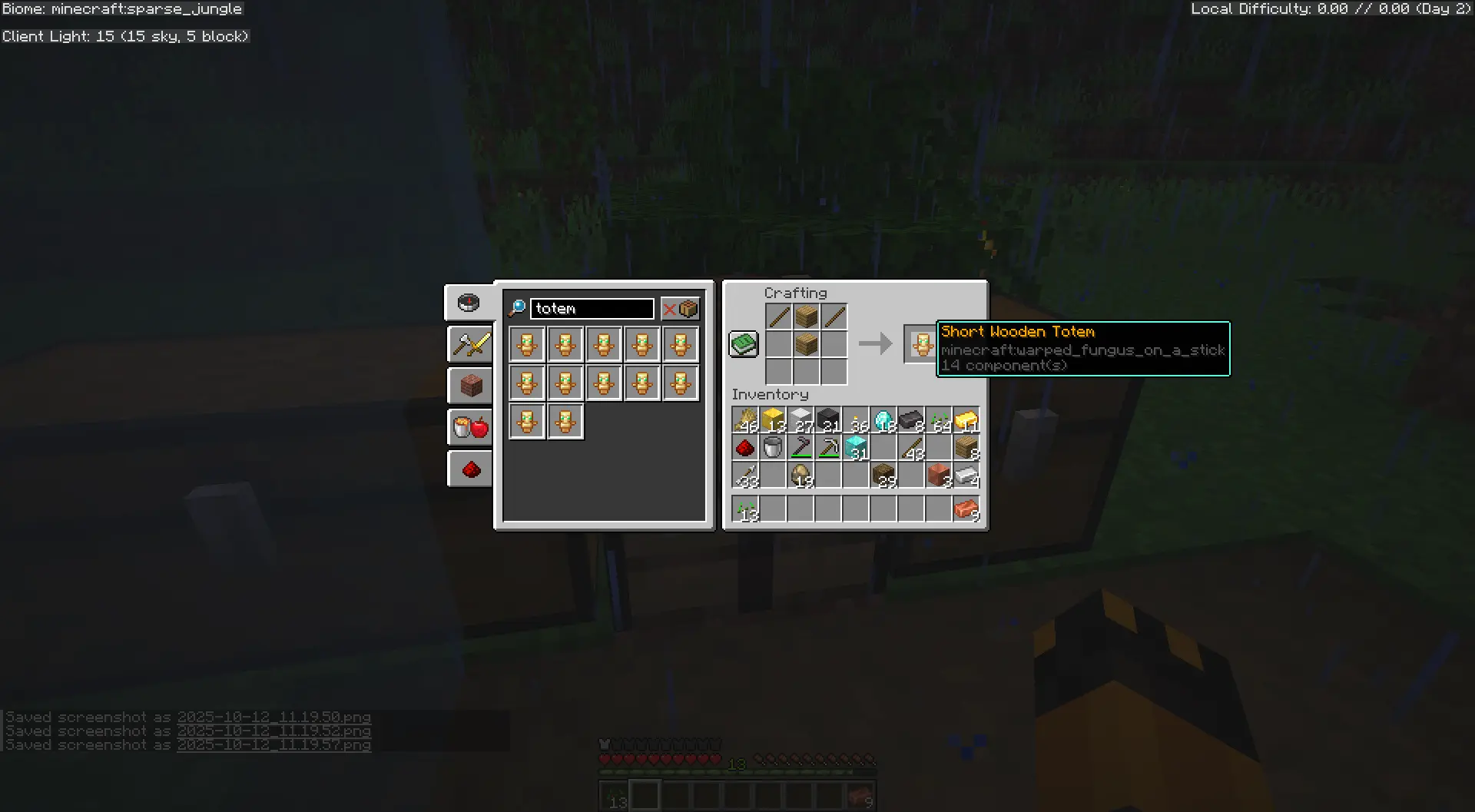
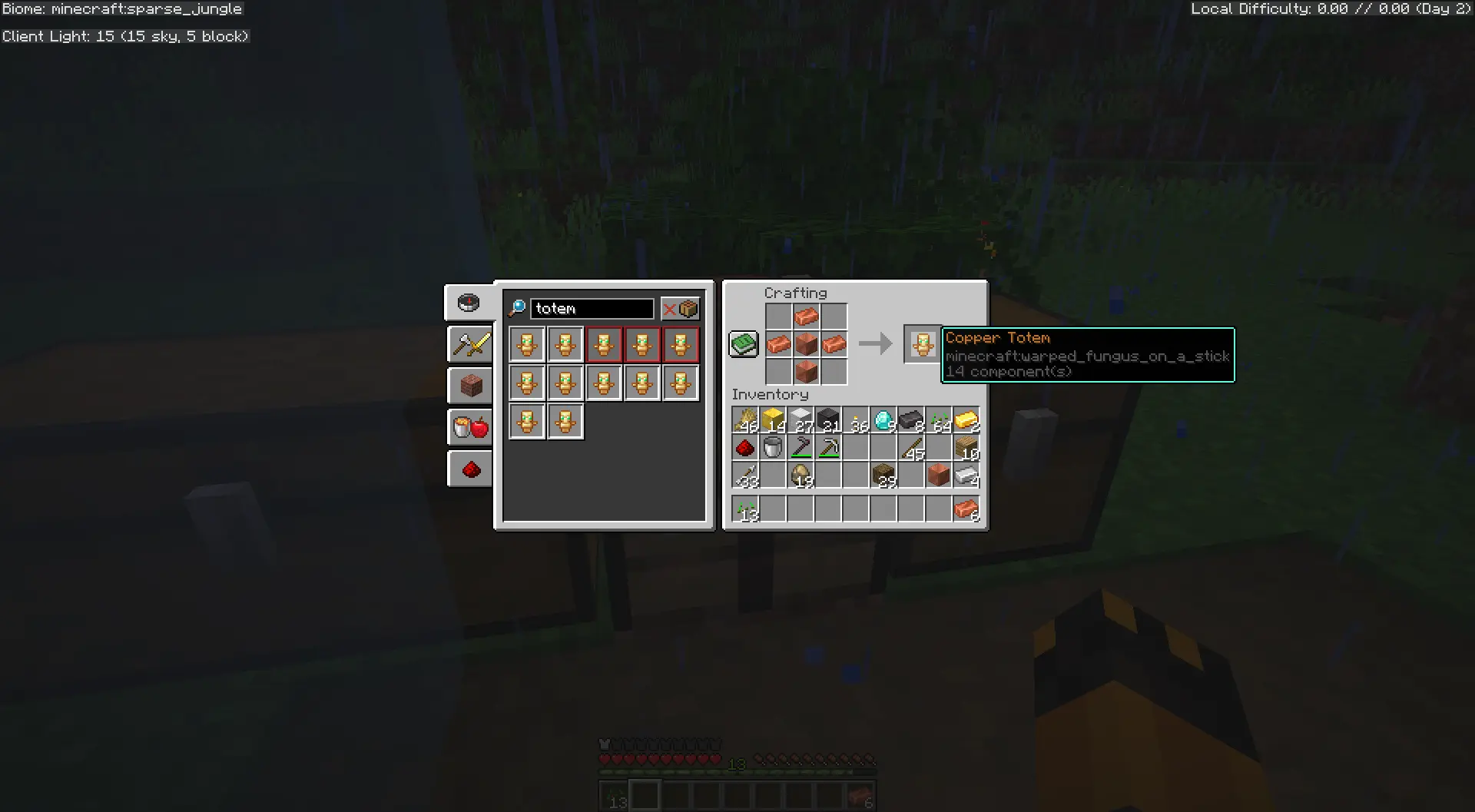
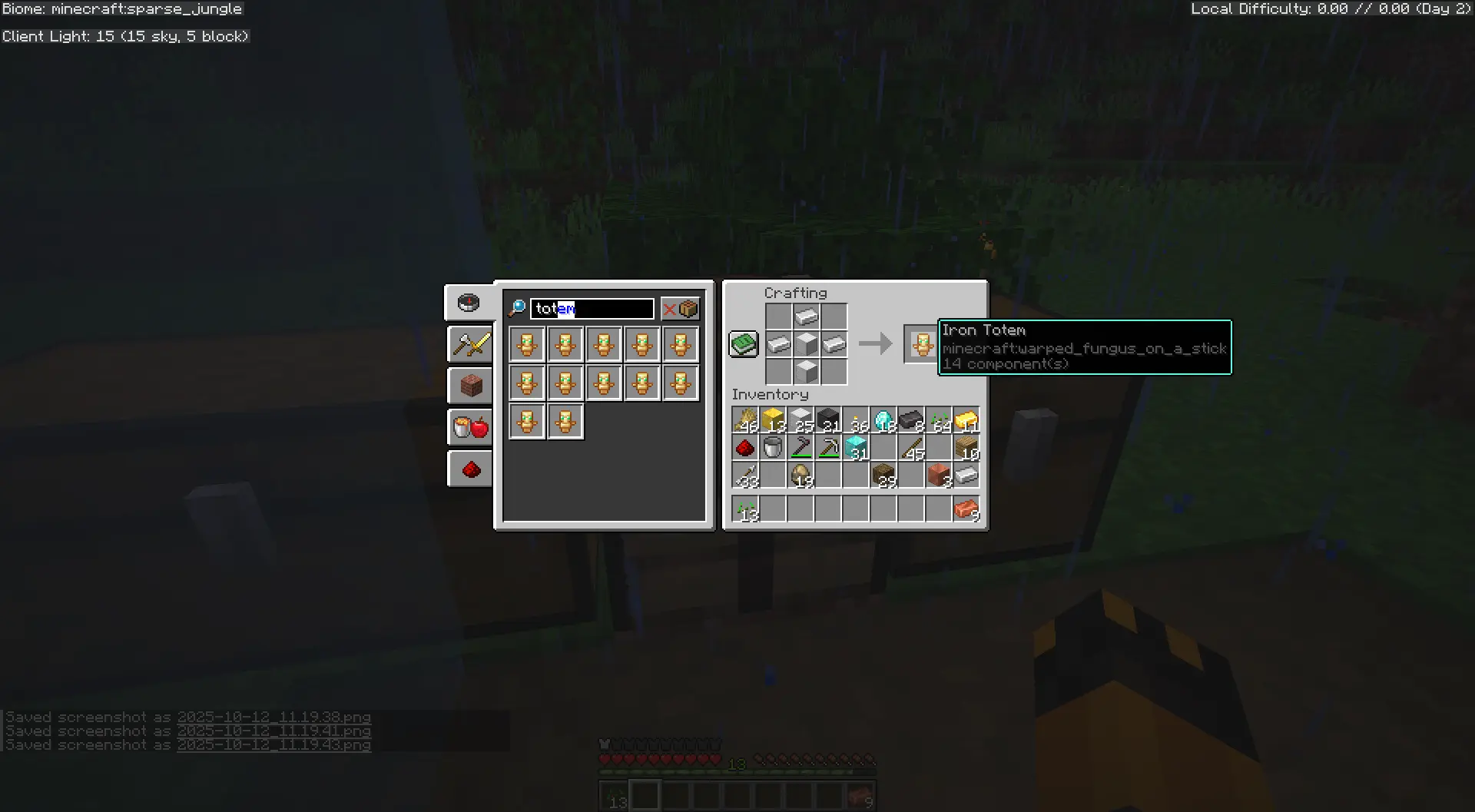
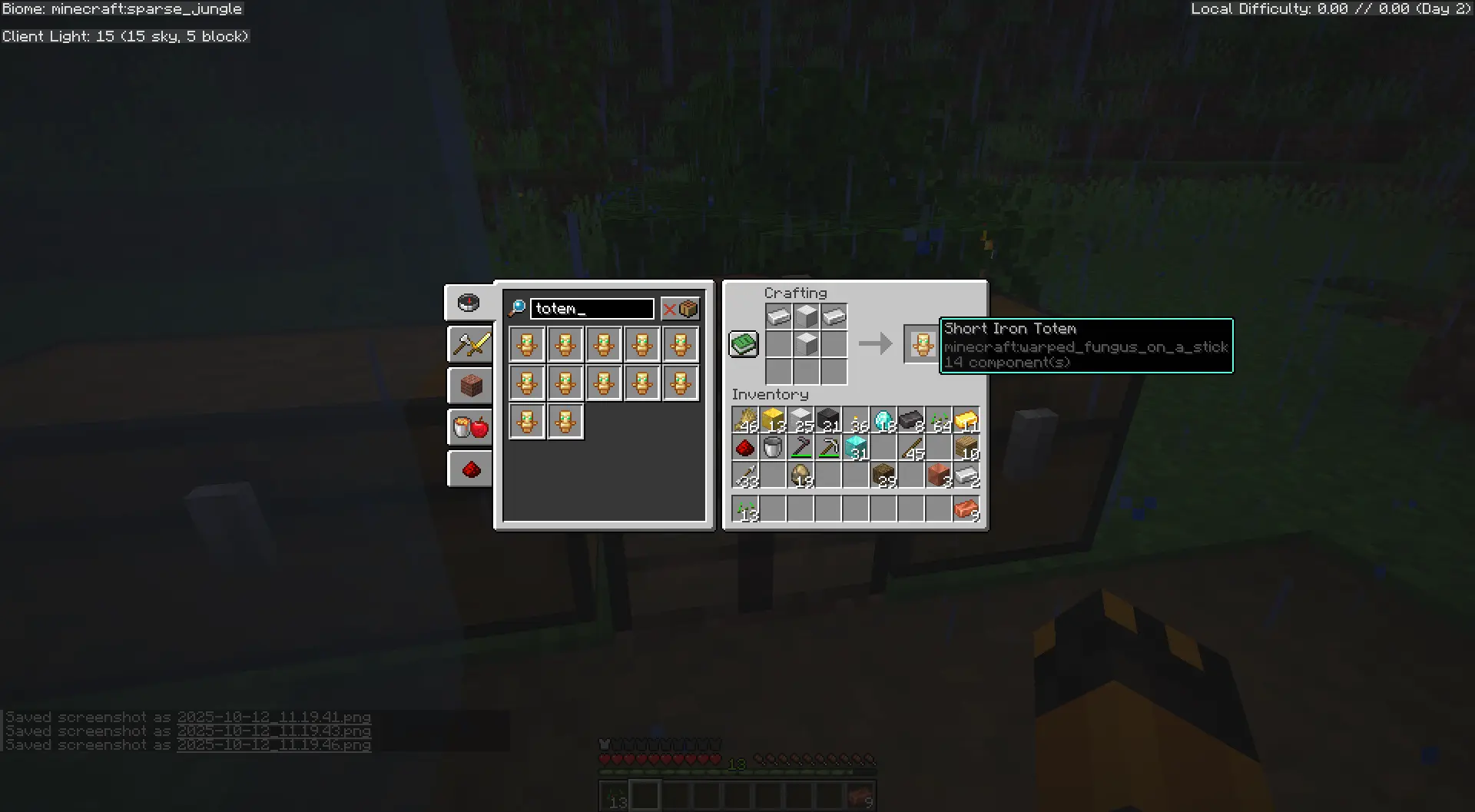
All totems come in two variants: Tall (2 blocks high) and Short (1 block high, walkable). Short variants use the same recipe but without the top ingredient.
🪵 Wood Totem Recipes
Wood Totem (Tall)
Wood Totem (Short)
🟠 Copper Totem Recipes
Copper Totem (Tall)
Copper Totem (Short)
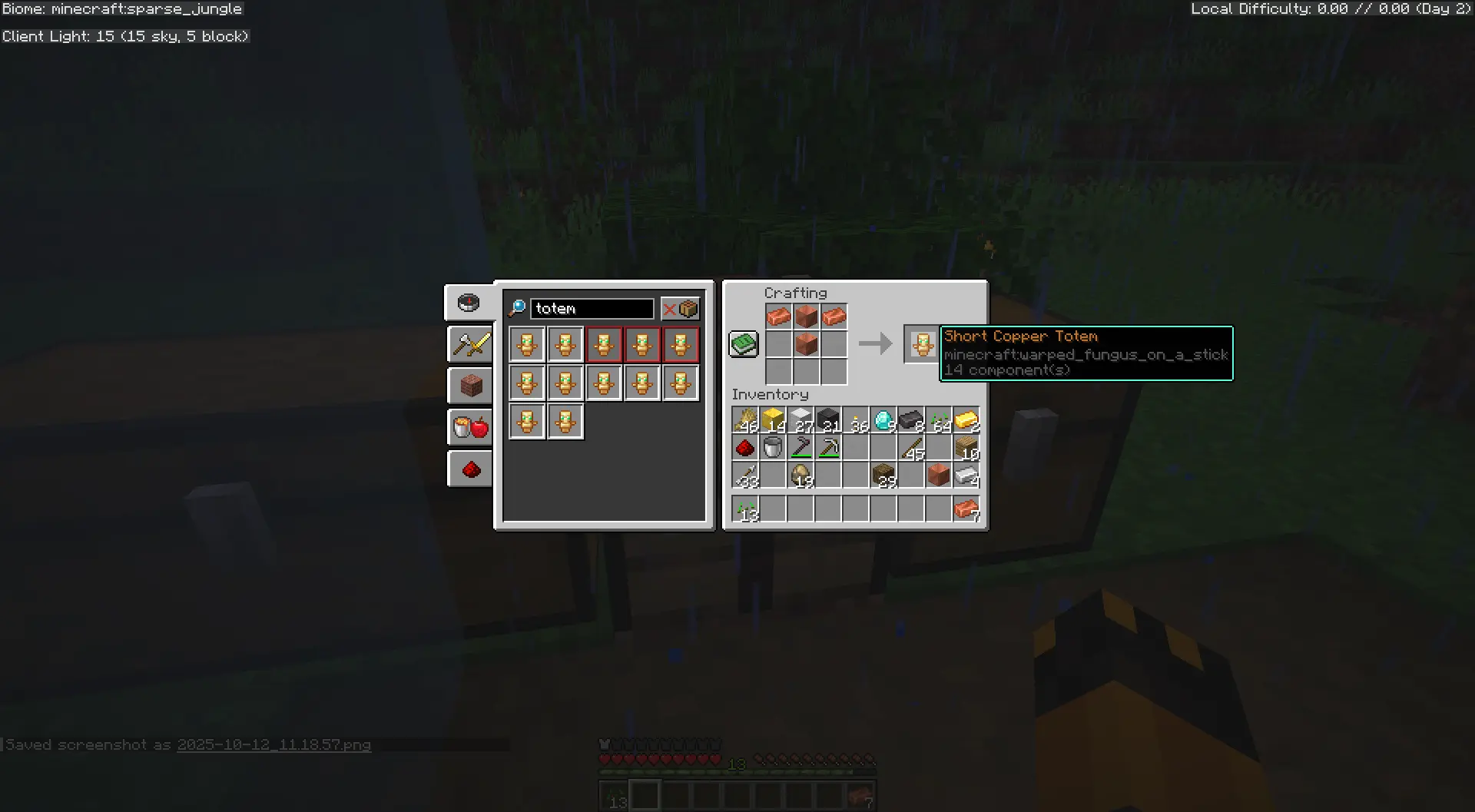
⚙️ Iron Totem Recipes
Iron Totem (Tall)
Iron Totem (Short)
🟡 Gold Totem Recipes
Gold Totem (Tall)
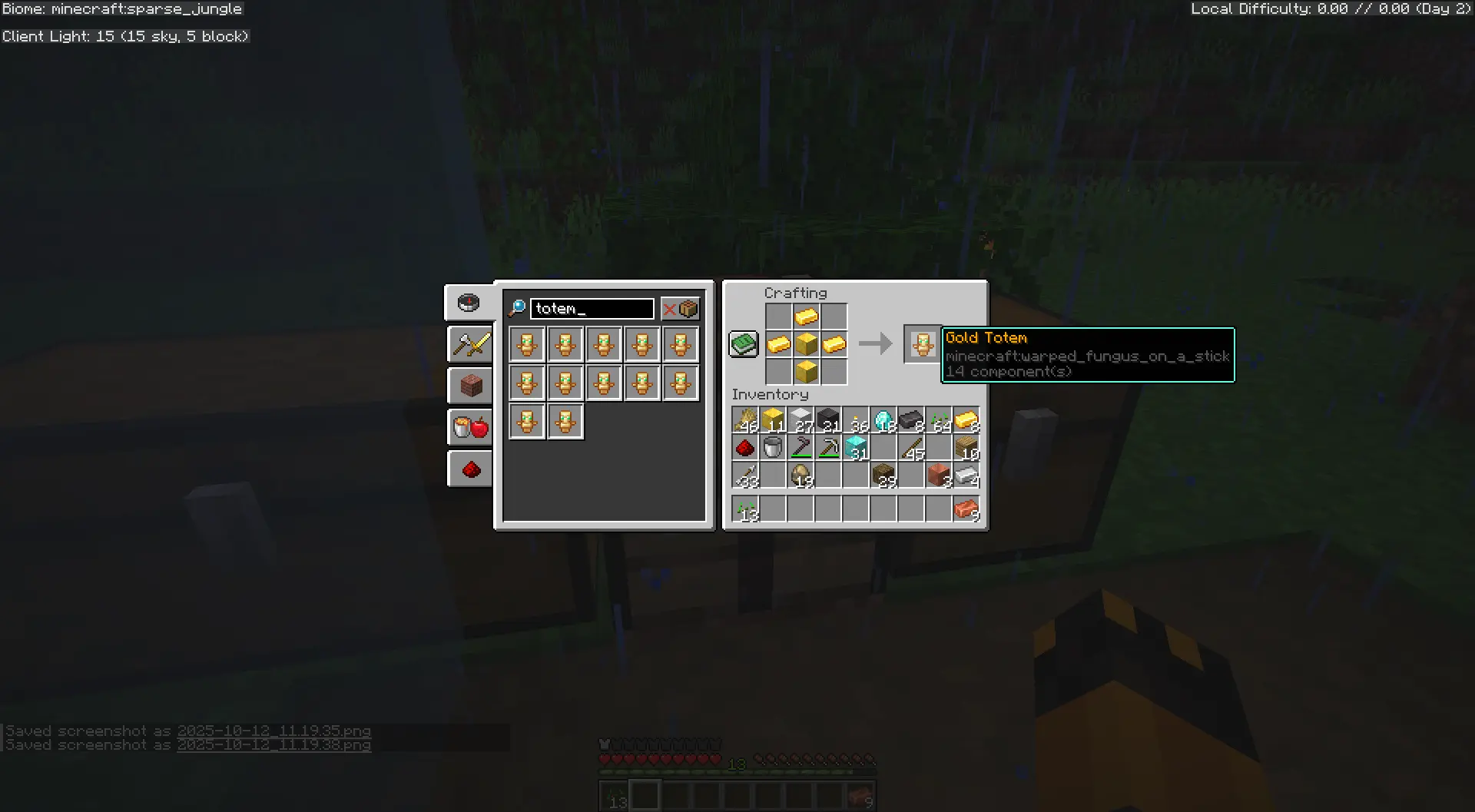
Gold Totem (Short)
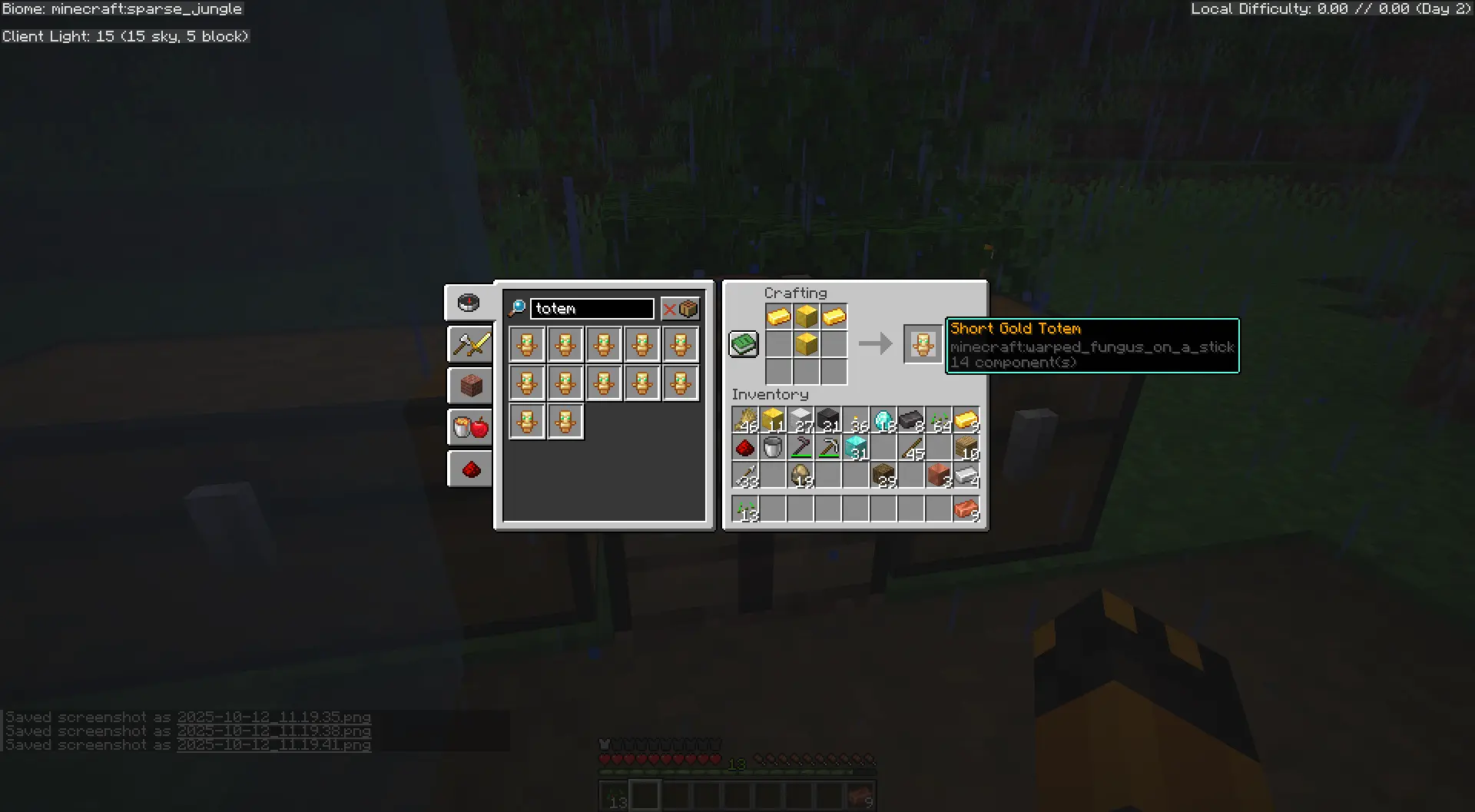
💎 Diamond Totem Recipes
Diamond Totem (Tall)
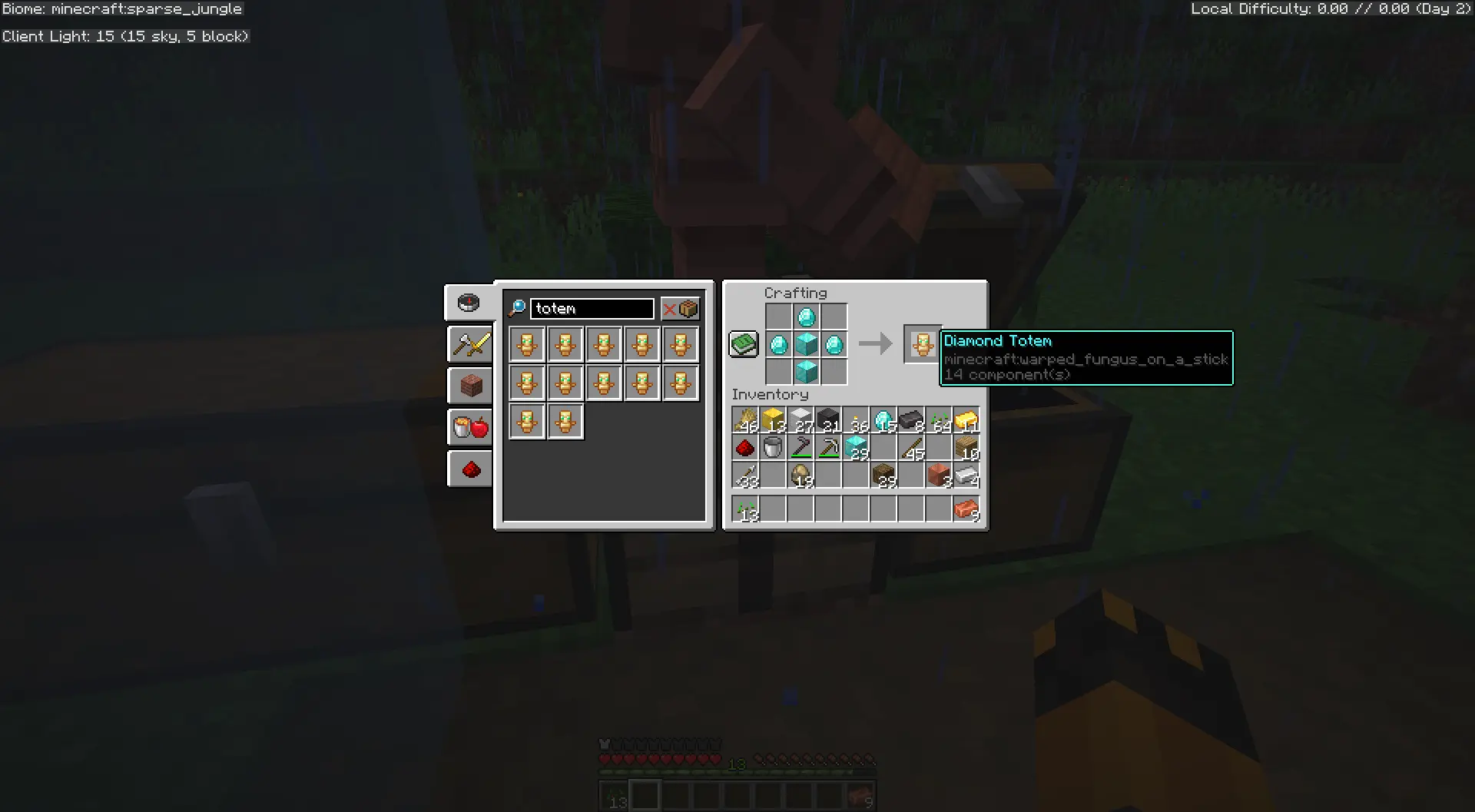
Diamond Totem (Short)

🟣 Netherite Totem Recipes
Netherite Totem (Tall)
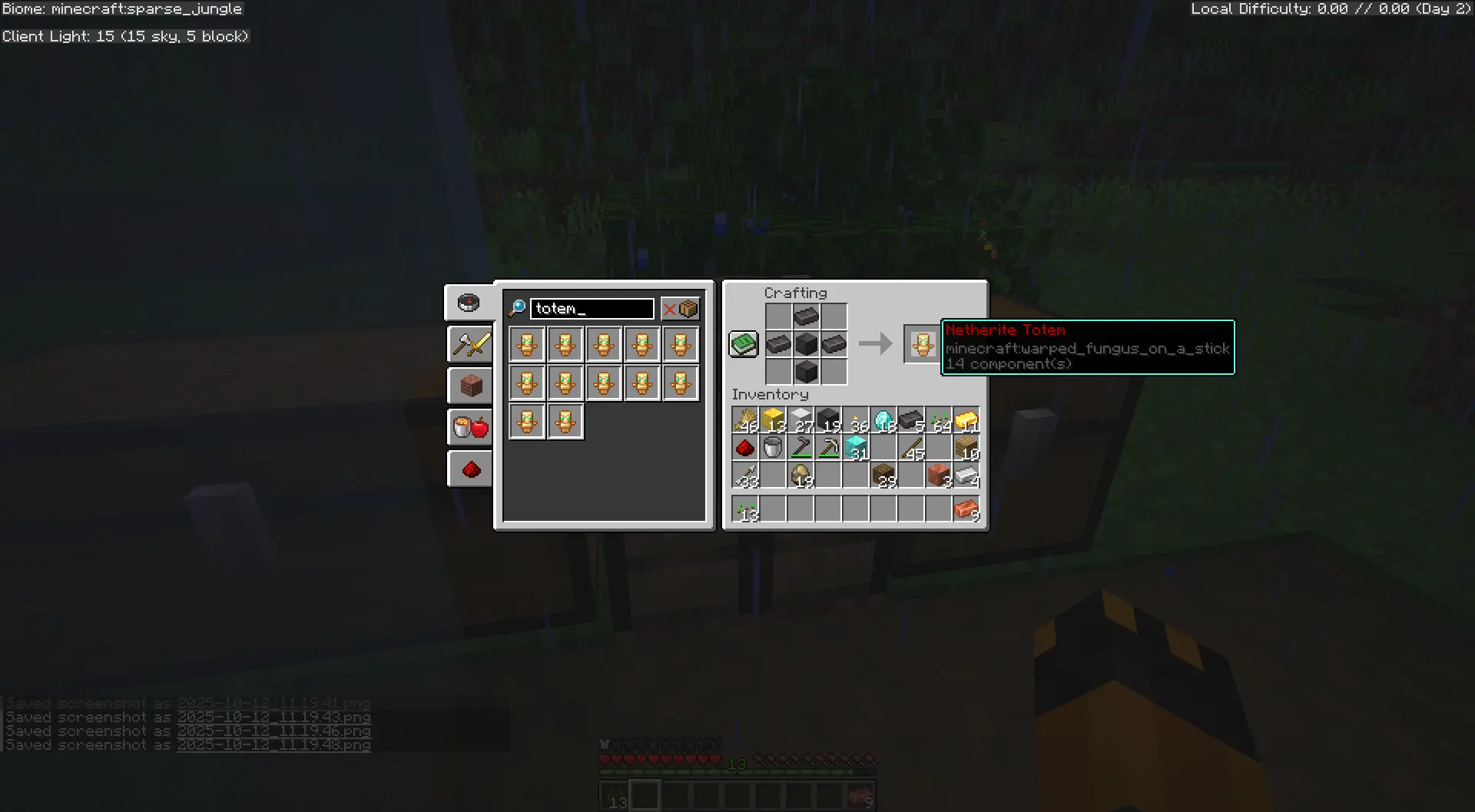
Netherite Totem (Short)
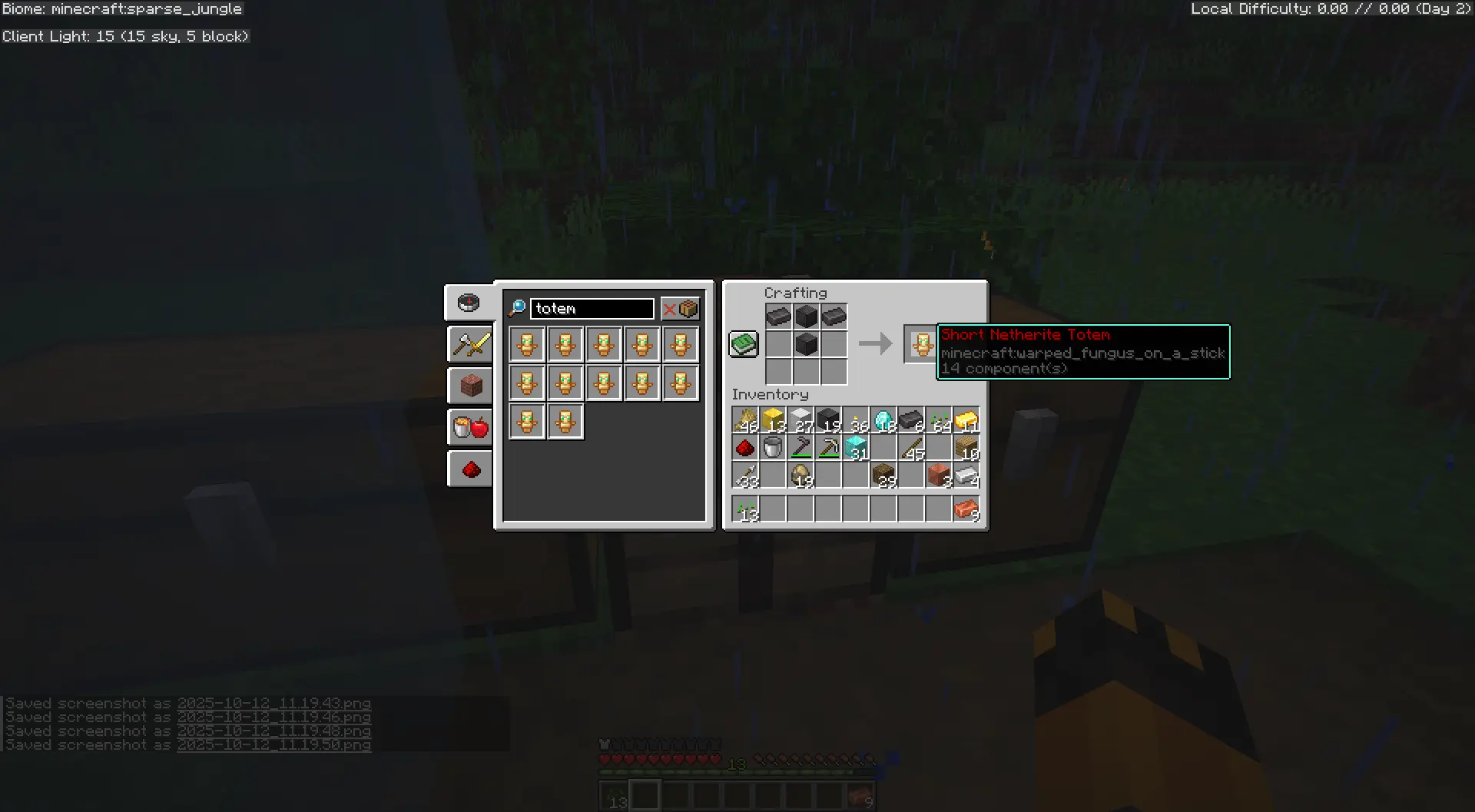
Tip: Higher tier totems provide larger ranges and more powerful effects!
Commands
⌨️ Available Commands (Click to Expand)
Give Commands
These commands give you totem items. They can only be used by players with operator permissions (or in creative mode).
/function rituals:give/all- Gives you one of each totem tier/function rituals:give/totem_basic- Gives you a Wood Totem (tall)/function rituals:give/totem_basic_short- Gives you a Wood Totem (short)/function rituals:give/totem_copper- Gives you a Copper Totem (tall)/function rituals:give/totem_copper_short- Gives you a Copper Totem (short)/function rituals:give/totem_gold- Gives you a Gold Totem (tall)/function rituals:give/totem_gold_short- Gives you a Gold Totem (short)/function rituals:give/totem_advanced- Gives you a Diamond Totem (tall)/function rituals:give/totem_advanced_short- Gives you a Diamond Totem (short)/function rituals:give/totem_master- Gives you a Netherite Totem (tall)/function rituals:give/totem_master_short- Gives you a Netherite Totem (short)/function rituals:give/guidebook- Gives you the Totem Rituals Guidebook
Menu Commands
/function rituals:menu/main- Opens the main interactive menu/function rituals:menu/totems- Opens the totem browser/function rituals:help- Shows the in-game help menu
System Commands
/reload- Reloads all datapacks (use if the datapack isn't working)/function rituals:config/reload- Reloads configuration changes
Admin Commands
/function rituals:admin/enable_debug_mode- Enables debug mode for troubleshooting/function rituals:admin/disable_debug_mode- Disables debug mode/function rituals:admin/enable_kiwi_mode- Enables easy mode (no fire sacrifice)/function rituals:admin/disable_kiwi_mode- Disables easy mode/function rituals:admin/list_totems- Lists all placed totems/function rituals:admin/reset_all- Resets all rituals and configuration
Technical Details
🛠️ For Server Administrators (Click to Expand)
Performance Considerations
- The datapack uses interaction entities for totem placement (Minecraft 1.19.4+)
- Rituals check for activation every 20 ticks (once per second)
- Effects apply at intervals (20-40 ticks) to maintain performance
- Each totem uses 3-4 entities: 1 interaction, 1-2 block displays, 1 item display
- Item displays have smooth animations (rotation + bobbing) with 10-tick interpolation
Compatibility
- Should work with most other datapacks
- Uses custom scoreboard objectives (all prefixed with "rituals.")
- Uses storage namespace "rituals:config" and "rituals:temp"
- Custom tags are all in the "rituals" namespace
💻 For Datapack Developers (Click to Expand)
Architecture
- Main Loop:
rituals:tickruns fromminecraft:tick - Initialization:
rituals:loadruns fromminecraft:load - Entity System: Uses interaction entities for hitbox/data, display entities for visuals
- ID System: Each totem gets a unique ID for linking its entities
Scoreboards
rituals.data- Constants and global datarituals.timer- Tick counters for cooldowns/durationsrituals.distance- Totem range valuesrituals.tier- Totem tier (1-6)rituals.effect- Active ritual effect typerituals.temp- Temporary calculationsrituals.id- Entity linking system
Entity Tags
rituals.totem- Main totem interaction entitiesrituals.short_totem- Short variant totems (1 block tall)rituals.totem_visual- Block display entities for totem visualsrituals.totem_display- Item display entities for held itemsrituals.totem_barrier- Barrier block displays for collisionrituals.has_item- Totems
Similar projects
Plugin →VeinMiner
Mine the whole vein on mining a single ore/block. Make the tedious mining experience to something satisfying and fun! FTB Ultimine alternative
99.3MSueta
Simple Voice Chat
A working voice chat in Minecraft!
76.3MSueta
Chunky
Pre-generates chunks, quickly and efficiently
20.8MSueta
VeinMiner Enchantment
Veinminer Addon - Adds vineminer enchantment to enchanting tables. Only tools with the enchantment can veinmine
18MSueta
JourneyMap
Real-time map used for mapping in-game or your browser as you explore.
14.7MSueta
WorldEdit
A Minecraft Map Editor... that runs in-game! With selections, schematics, copy and paste, brushes, and scripting. Use it in creative, or use it temporarily in survival.
11.6MSueta