
⬆️ SchemUploader ⬆️ Transfers your schematic data across ser
1.9Allows you to upload/download your schematics files from WorldEdit to Discord.
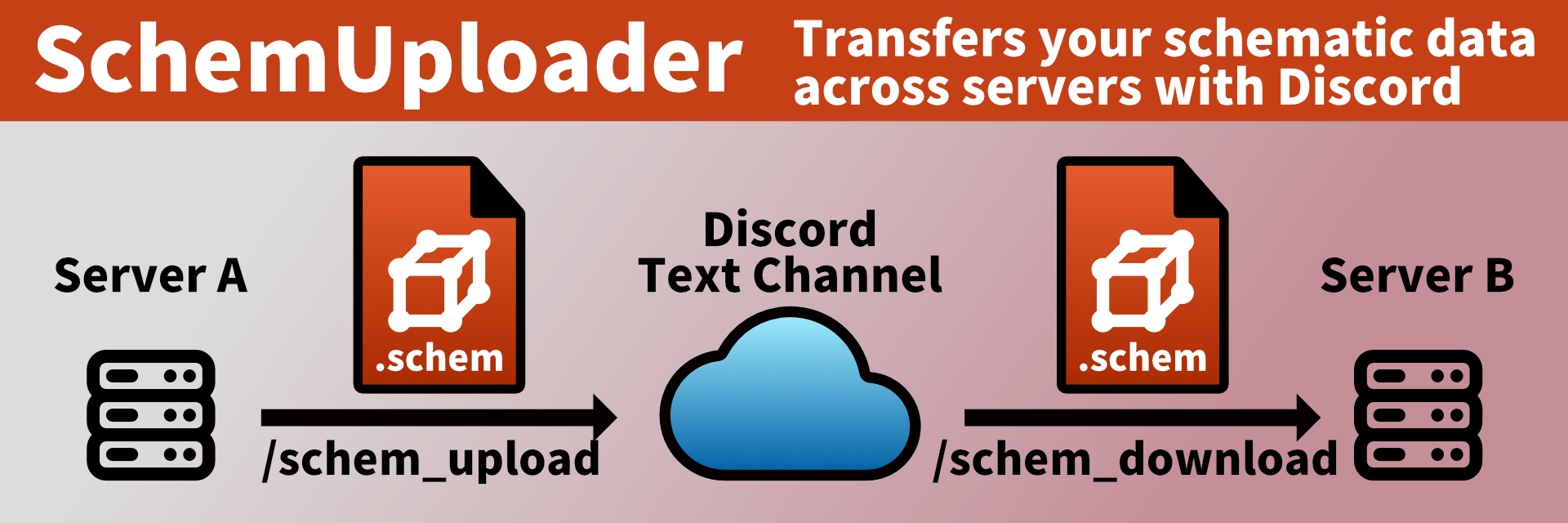
Allows you to upload/download WorldEdit schem files to/from Discord.
You will be able to carry your building between servers or between multiplayer- and single-player.
Usage
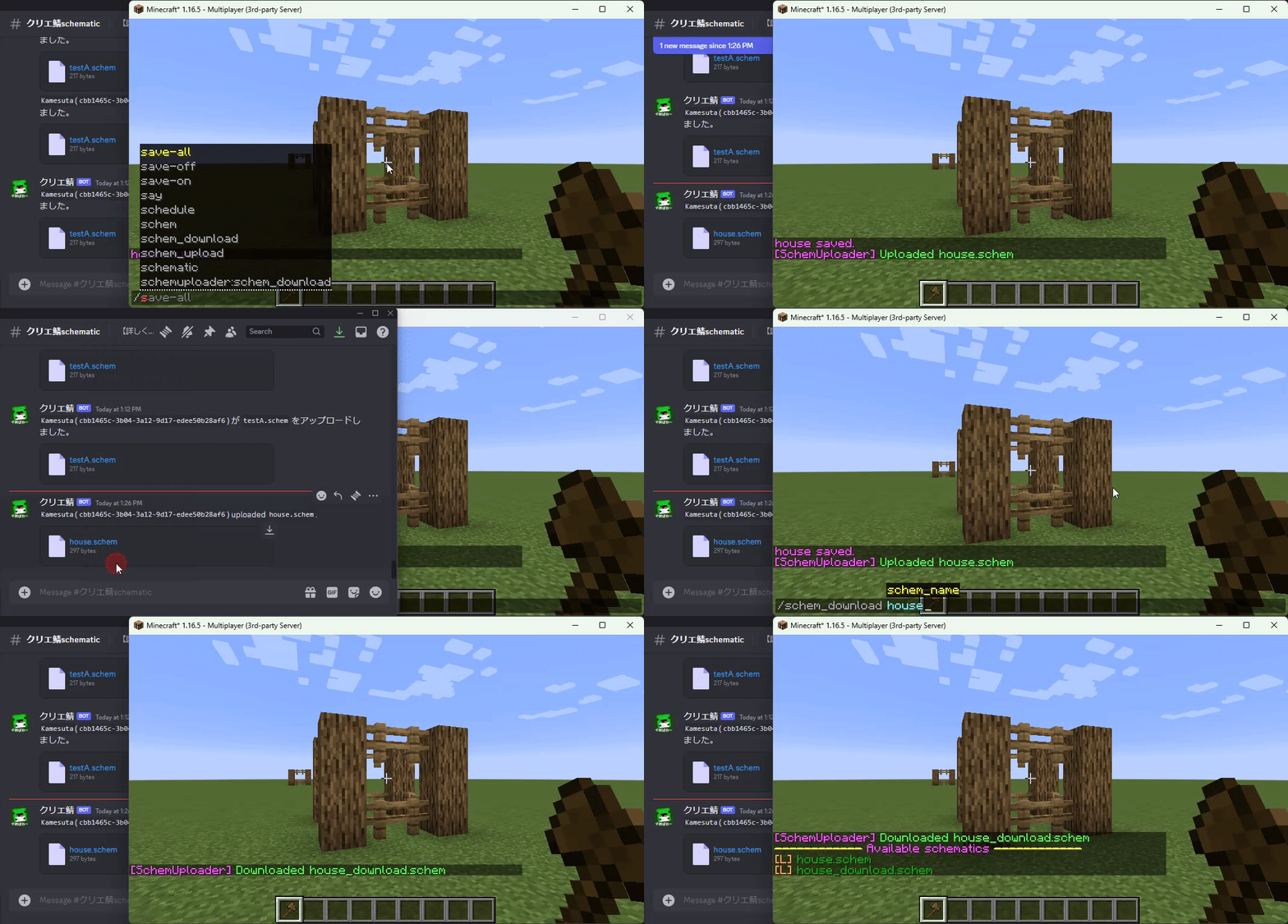
- Upload /schem_upload <schem_name> [message]
- Download /schem_download <schem_name> <schem_file_URL> [-f]
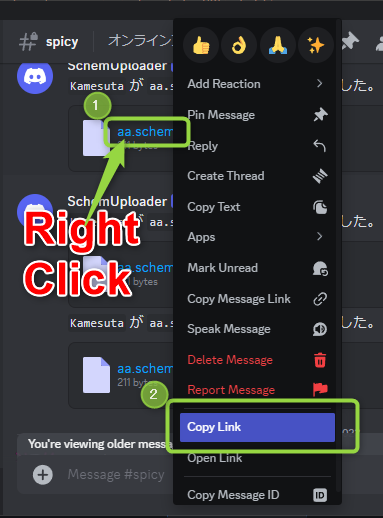
How to get schem file URL
Right-click on the attached file and click "Copy link"
Requirements
- Java 11 or higher
- Required for performing HTTP communication using Java 11 features.
Configuration
This plugin requires configuration in the config.yml file upon installation.
Minimum required settings
- upload.webhook-url: URL of the webhook for uploading. After registering a webhook in the channel settings, you can obtain this URL.
Restricting download URLs
You can restrict downloads to specific Discord channels or sites by enabling this feature.
- download.url-restriction.enabled: Enable the feature
- Set to true.
- download.url-restriction.prefix: Prefix for download URLs
- By specifying https://cdn.discordapp.com/attachments/<channel_ID>/, you can restrict downloads to specific Discord channels.
- download.url-restriction.name: Name of the download location
- This name is used in error messages when downloading from locations other than the specified prefix.
- If set to #schem-storage, the error message will display as "You can only download files from #schem-storage channel".
Full configuration
# Language
language: en
# Upload settings
upload:
  # Enable upload functionality
  enabled: true
  # Discord Webhook URL for uploads
  webhook-url: https://discord.com/api/webhooks/xxxxxxxxxxxxxxxxxx/xxxxxxxxxxxxxxxxxxxxxxxxxxxx-xxxxxxxxxxxxxxxxxxxxxxxxxxxxxxxxxxxxxxx
# Download settings
download:
  # Enable download functionality
  enabled: true
  # Maximum size of downloaded files (in bytes) (-1 for unlimited)
  max-size: 8388608 # 8MB
  # Download source restriction settings
  url-restriction:
   # Enable download source restriction
   enabled: false
   # Prefix for URL restrictions (Note: For Discord attachment URLs, make sure it starts with cdn. and ends with /)
   # Usually, you just need to replace the xxxxxxxxxxxxxxxxxx part with your own channel ID
   prefix: https://cdn.discordapp.com/attachments/xxxxxxxxxxxxxxxxxx/
file:
  # Path to the schematics folder
  folder-path: plugins/WorldEdit/schematics
Permissions
- schemuploader.upload: Permission to use the schem file upload feature
- schemuploader.download: Permission to use the schem file download feature
About Statistics Data
SchemUploader collects anonymous statistical data using bStats.
You can find the statistics data here.
bStats is used to understand the usage of the plugin and help improve it.
To disable the collection of statistical data, please set enabled to false in plugins/bStats/config.yml
Similar projects
Plugin →Let Me Despawn
Improves performance by tweaking mob despawn rules. Say bye to pesky unintentional persistent mobs.
25MSueta
JourneyMap
Real-time map used for mapping in-game or your browser as you explore.
14.7MSueta
Emotecraft
Create your own emotes in Minecraft.
7.5MSueta
Simple Tpa
A simple tpa plugin which sends requests
5.4MSueta
Common Network
Forge and Fabric Unified Networking Solution
3.9MSueta
Set Home
A lightweight plugin for players to set their homes.
3.8MSueta