
Server Tutorial Plus
1.25.3Introduce players to your server with unlimited tutorials! Many customisations! Free!
For versions lower than 1.20
Please use this link to download the resource or use the version page.
New features and bug fixes will only be available on 1.20 or higher versions.


The plugin to introduce new players to your server with unlimited tutorials!

- Create unlimited custom server tutorials.
- Unlimited points per tutorial.
- Unique settings for every tutorial point.
- Give players a reward for completing the tutorial first time. (MySql supported)
- Start a tutorial when a player joins for the first time.
- Start a tutorial when right clicking a block.
- Start a tutorial when right clicking an NPC.
- In game editor (commands)
- Stats for every tutorial.
- Permissions per tutorial possible.
- Block commands while in a tutorial.
- Easy to use.
- Lightweight. No tasks running on the background.
- Supports the PlaceholderAPI
Options per point
- Send a title
- Send a chat message
- Send an action bar message
- Play a sound
- Set a players fly mode
- Lock a player
- Execute a command
- Spawn fireworks
- Add potioneffects
- And more!
Supported placeholders without the PlaceholderAPI: %username%
Point types:
- Timed - Proceed after a set time interval.
- Check point - Proceed after walking into the checkpoint.
- Click block - Proceed after clicking a block (can be a sign).
- Command point - Proceed after the player executes the command /st next. Useful if you want other plugins to perform actions on a certain point.
All these points offer custom settings as well to make them more unique.

[ ! ] NOTE
Only the following 2 videos are using the correct commands!
Please use this page to see what the new commands are
Tutorial / showcase video
Tutorial by Soulstriker
Tutorial by BrandsPickled
Outdated videos (only the commands)
With voice - Not by me
English
Spanish
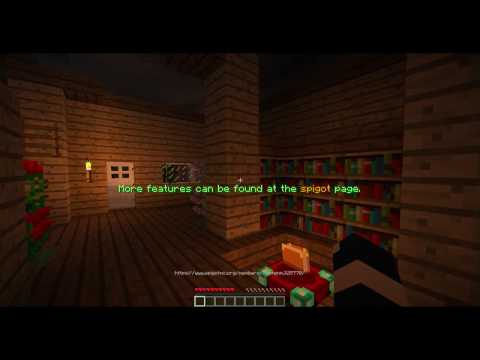
This showcase lacks new features that have been added!

Permissions
//Command permissions
servertutorialplus.command.help
servertutorialplus.command.create
servertutorialplus.command.remove
servertutorialplus.command.addpoint
servertutorialplus.command.removepoint
servertutorialplus.command.play
servertutorialplus.command.player
servertutorialplus.command.quit
servertutorialplus.command.playpoint
servertutorialplus.command.setblock
servertutorialplus.command.edit
servertutorialplus.command.npc
servertutorialplus.command.info
servertutorialplus.command.reload
servertutorialplus.command.save
//Action permissions
servertutorial.action.removeblock
//Permissions for tutorials
servertutorialplus.tutorials.<Server tutorial id here>
servertutorial.tutorial.bypass - Allows to bypass any restrictions (like blocked commands).

Commands
/st help - Shows a help with all the commands (that you have permission for).
/st create <id> - Create a new server tutorial.
/st remove <id> - Remove a server tutorial.
/st addpoint <id> - Add a point to a tutorial.
/st removepoint <id> <point index> - Remove a point from a tutorial.
/st info <optional: id> - Show a list of all the server tutorials or info about a specific one.
/st player <username> - Shows stats of a player in chat.
/st play <id> (playername) - Play a server tutorial. (Playername is optional)
/st quit - Quit your current tutorial
/st playpoint <id> <point> - Play only 1 point of a server tutorial.
/st setblock <id> - Set a interactive block that starts a tutorial when clicked.
/st reload - Reload the plugin from the configs. (without saving first!)
/st save - Save the current data to the configs. (without loading first!)
/st npc <add/remove/bind/text/height> <value>
/st edit <id> <invisible/rewards/permission/
blockcommands/commands/chatblock> - Set settings for a tutorial as whole.
/st editpoint <id> <point> <args> - Edit all the points at once.
/st editpoint <id> <point> <args>
Args
Default args: (Applied to every point)
• time <seconds>
Sets for how long it takes untill the next point.
• fly <true / false>
Set fly mode to true or false.
• lockplayer <true / false>
Prevent the player from moving.
• lockview <true / false>
Lock the players view.
• messages <add / remove / list / clear>
Add and remove chat messages for a point.
• commands <add / remove / list / clear>
Add and remove commands that get executed as soon as the point is played.
[!] NOTE: Commands should be entered without the / !
• actionbar <set / clear>
Set a new action bar that gets played at the point or reset the current one.
• firework (Hold a firework in your hand)
Spawns a firework at the location you stood when adding it when the point is played.
• location
Sets your current location as the new location for the point.
• title <title / subtitle / fadein / fadeout / stay / reset>
Set a title or subtitle to play on a point.
• sound <set / clear> (set args: <sound> <volume> <pitch>)
Set a sound that is played on the point.
You can find a list of all sounds here.
• potion <add / remove / list / clear>
Adds a potion effect to the player.
If the user holds a potion that potion effect will be added.
Otherwise the args are like this: <potioneffect> <time (in S)> <level>
• switch <point index>
Switch the point with the point given.
• infront <point index>
Move a point infront of an other one.
Optional args: (only applied to specific points)
Checkpoint:
• distance <value (blocks)>
The minimal amount of distance between the checkpoint and the player before completing it.
• repeatActionbar <true/false>
If enabled, the actionbar will stay. Usefull for keeping the hint to move to the checkpoint.
• colour <red> <green> <blue>
The colour for the checkpoint.
[TIP]: When using values higher then 255 it will start randomizing!
ClickBlock point:
• colour <red> <green> <blue>
The colour for the checkpoint.
[TIP]: When using values higher then 255 it will start randomizing!
• setblock
Allows you to set the block.
• repeatActionbar <true/false>
If particles should be displayed.
• teleport <true/false>
If the player should be teleported to the point.

Server Tutorial Plus offers a small but useful API for developers.
For more info about the API, expand this spoiler:
API
ServerTutorialApi
public class ServerTutorialApi {
    /**
    * Starts a server tutorial for the defined player.
    * Returns true if the tutorial has been started. False in all other cases
    * @param id     Id of the server tutorial.
    * @param player The player.
    * @return       A boolean that represents if the tutorial has been started.
     */
    public boolean startTutorial(String id, Player player){

    }

    /**
    * Returns if the player is currently in a server tutorial.
    * @param uuid  The players UUID
    * @return      A boolean
     */
    public boolean isInTutorial(UUID uuid){

    }

    /**
    * Get the current servertutorial of a player.
    * @param uuid  The UUID of the player
    * @return      The servertutorial or null if not in one.
     */
    public ServerTutorial getCurrentTutorial(UUID uuid){

    }

    /**
     * Gets the controller object that manges the players tutorial.
     * @param uuid
     * @return The controller object. Null if not in a tutorial.
     */
    public TutorialController getController(UUID uuid){

    }

    /**
     * This method is used to fetch the API with ease.
     * @return An Api Object
     */
    public static ServerTutorialApi getApi(){

    }
}
To get this class simple use this piece of code:
ServerTutorialApi stApi = ServerTutorialApi.getApi();
//TODO: Store this somewhere for easy acces.
Events
The API also provides some events you can listen for.
@EventHandler
public void handlestart(TutorialStartEvent event){

}

@EventHandler
public void handlestop(TutorialEndEvent event){

}

@EventHandler
void handlePlayPoint(TutorialPlayPointEvent event){

}
Javadocs: http://servertutorialplus.martenm.nl/index
(Note: Only contains objects you should be using when using the API)
Placeholder API
ServerTutorialPlus supports the placeholder API.
servertutorialplus_inTutorialBoolean
servertutorialplus_getTutorial
servertutorialplus_getPoint
servertutorialplus_getMaxPoints
☐ New point types
☑ Block certain commands when in a tutorial.
☑ Language files
☑ Support for more custom points. (Priority)
☑ Rework the edit commands.
☑ Bind any mob to play a tutorial (good for citizens etc)
☑ Add placeholder API
☑ NPC's that can be right clicked to play a tutorial
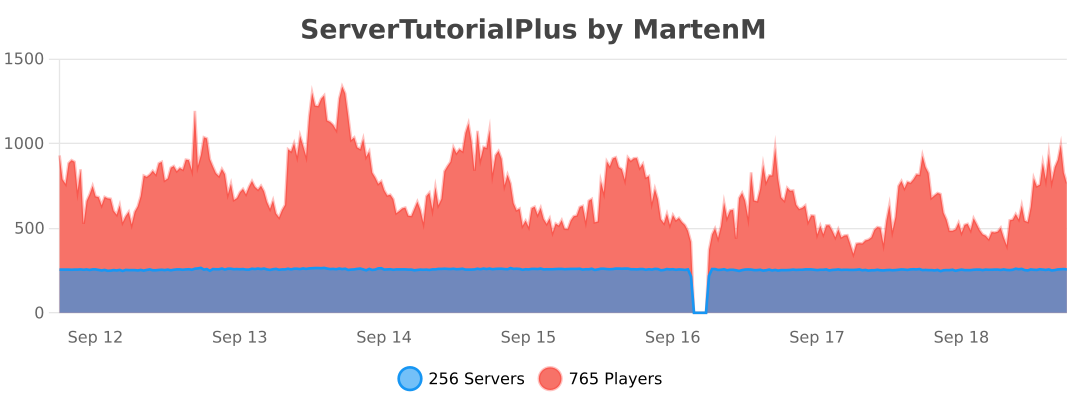
Stats provided by Bstats.org. You can opt out this service at any time.
Checkout another plugin by me

If you enjoy the plugin: Please leave a review or consider donating to help me pay my bills :D
I work on this plugin in my free time. I do not get paid for it anyway, just so everybody can use it, but if you want to support me, and already left a review, then you can donate here:

Donations are hugely appreciated and help me pay for development tools.
Similar projects
Plugin →Let Me Despawn
Improves performance by tweaking mob despawn rules. Say bye to pesky unintentional persistent mobs.
26.2MSueta
JourneyMap
Real-time map used for mapping in-game or your browser as you explore.
14.7MSueta
Emotecraft
Create your own emotes in Minecraft.
7.9MSueta
Simple Tpa
A simple tpa plugin which sends requests
5.4MSueta
Common Network
Forge and Fabric Unified Networking Solution
4.7MSueta
Set Home
A lightweight plugin for players to set their homes.
3.8MSueta